

MOSS-Image Pose Control ComfyUI: Prompted Pose-Transfer Image Generation#
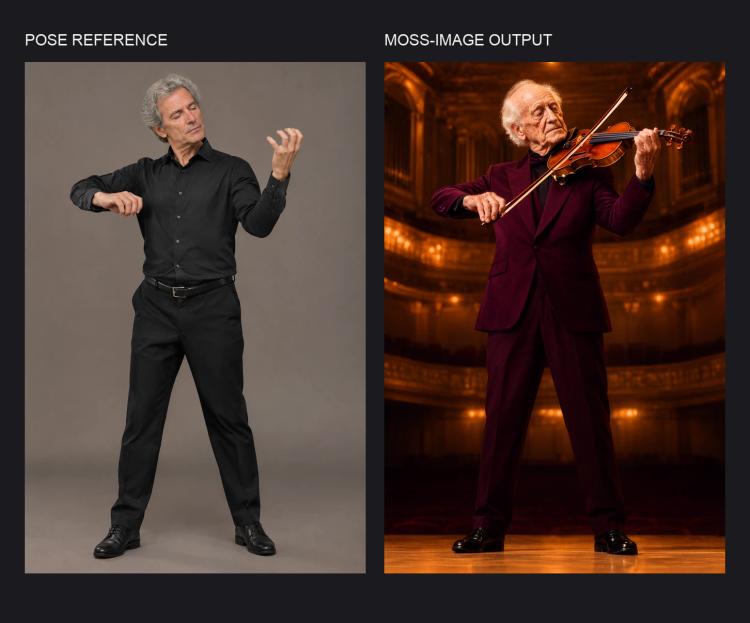
MOSS-Image Pose Control ComfyUI creates new, photorealistic images that follow the full-body pose of an uploaded reference photo while you freely change subject, clothing, and setting via a prompt. It extracts a clean skeleton with DWPose and steers generation using a lightweight pose-control edit LoRA tuned for MOSS-Image SFT, avoiding heavy ControlNet checkpoints.
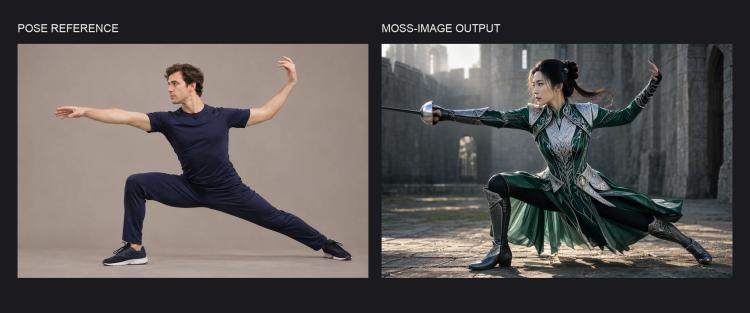
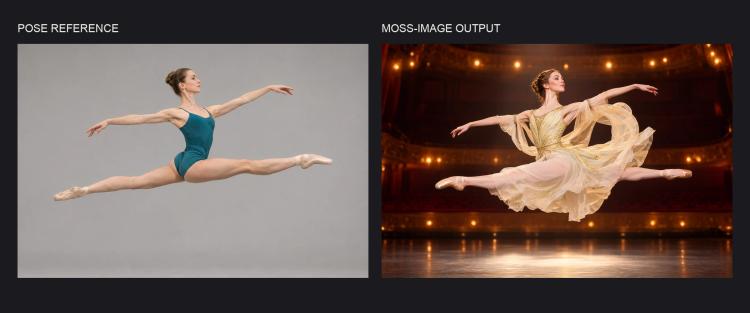
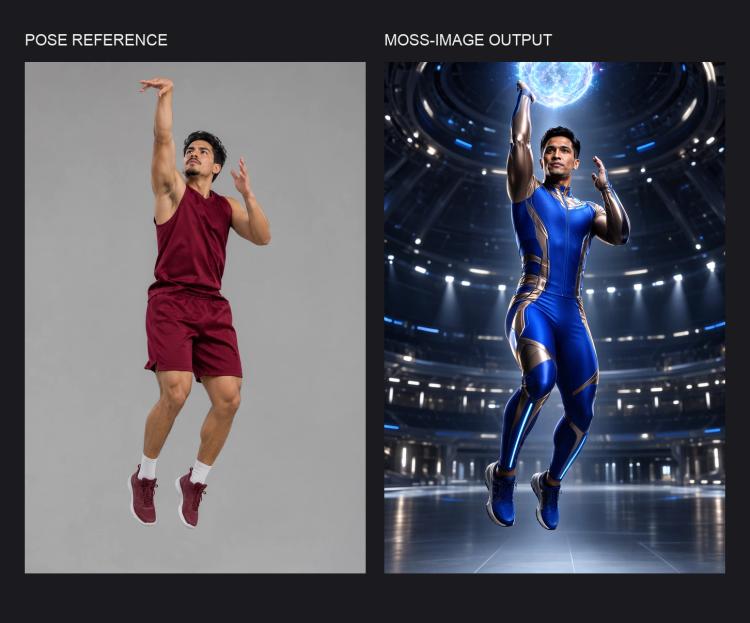
This workflow is ideal for art direction, marketing visuals, and athletic or performance scenes where limb placement must read naturally. In testing it reproduced complex poses such as a fencing lunge, ballet leap, athletic jump, and violin performance with convincing anatomy and clear silhouettes.
Key models in the MOSS-Image Pose Control ComfyUI workflow#
- OpenMOSS-Team MOSS-Image-SFT. The base image generator that interprets your text prompt and produces the final image; it serves as the backbone that the pose-control LoRA modulates. Model card
- MOSS-Image pose-control LoRA by thedeoxen. A compact edit LoRA that injects strong pose-following behavior into MOSS-Image-SFT without requiring a standalone ControlNet. Repository
- DWPose. A high-quality keypoint detector used here to extract body, face, and hand landmarks from the reference image; the ComfyUI preprocessor comes from the ControlNet Auxiliary pack. DWPose repo · ComfyUI node
How to use the MOSS-Image Pose Control ComfyUI workflow#
The graph follows a clear path from your reference image and prompt to a pose-matched result. Stages below map to key groups of nodes you will interact with most.
Reference pose and sizing#
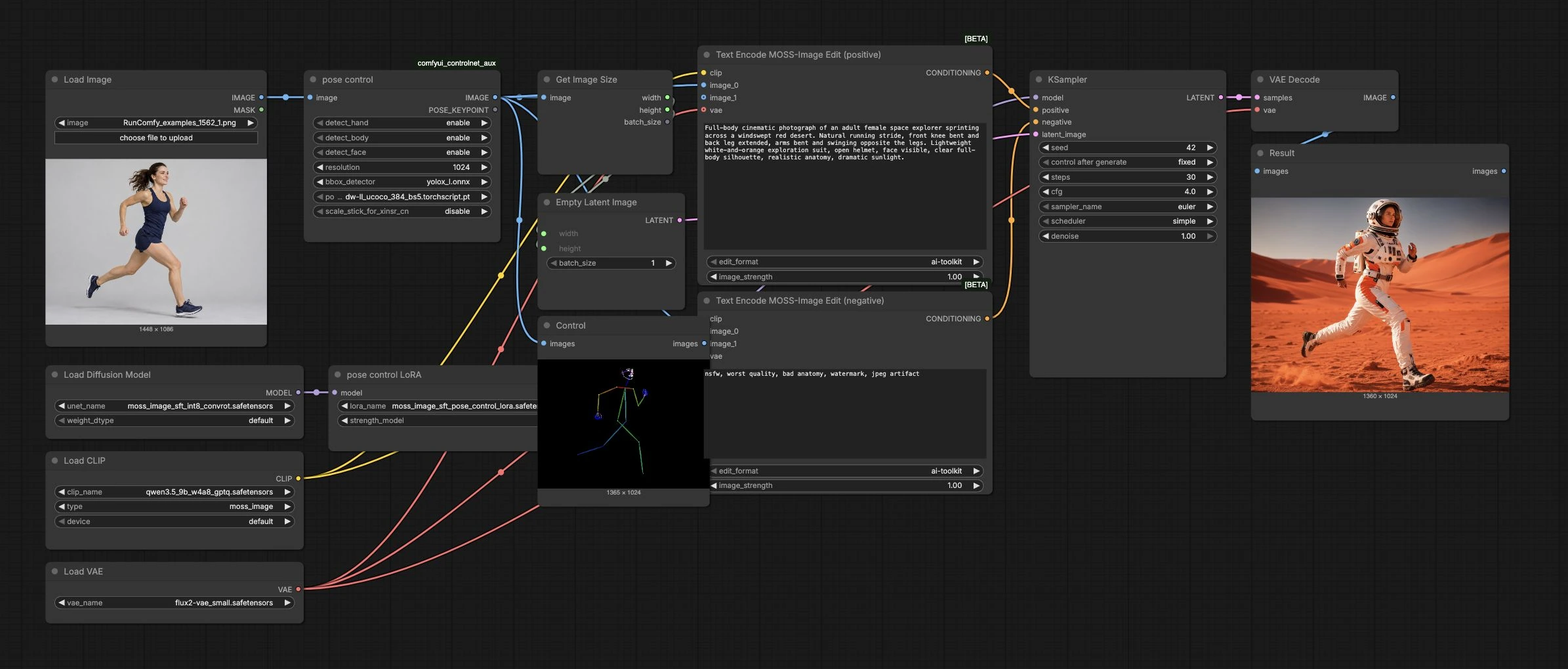
Load your reference photo with LoadImage (#1). The pose control (#2) DWPose preprocessor extracts a clean skeleton over the frame, including optional face and hand keypoints for expressive shots. Use the Control (#13) preview to verify the extracted pose looks correct and fully captures the intended gesture. GetImageSize (#7) passes the reference width and height to the canvas so the generation automatically matches your source framing.
Prompt conditioning with MOSS-Image Edit#
Describe the new subject, clothing, lighting, and environment in Text Encode MOSS-Image Edit (positive) (#8). Typical phrasing like “full-body cinematic photograph,” garment details, and environment cues work well. Use Text Encode MOSS-Image Edit (negative) (#9) to exclude defects and styles you do not want. Both encoders receive the same pose image from pose control so the model bakes the pose constraint directly into the conditioning while still obeying your text.
Base model and pose-control LoRA#
UNETLoader (#3) loads the MOSS-Image-SFT base model. The pose control LoRA (#4) is applied on top to translate the detected skeleton into strong pose adherence during generation. If the result is too rigid or too loose, adjust the LoRA strength: higher values lock the body closer to the reference pose, lower values allow more freedom while still biasing composition.
Sampling and decode#
EmptyLatentImage (#10) initializes the latent canvas at the reference resolution. KSampler (#11) synthesizes the image from your conditioning; the sampler, scheduler, steps, guidance, seed, and denoise collectively trade speed, fidelity, and variability. Set a fixed seed to reproduce a great outcome or change it for fresh variations that keep the same pose and scene intent. VAEDecode (#12) converts the latent to RGB, and the final image appears in Result (#14).
Key nodes in the MOSS-Image Pose Control ComfyUI workflow#
pose control (#2)#
This is the DWPose preprocessor that finds body, face, and hands and renders a pose map used for guidance. Enable face and hands when gestures or expressions matter; turn them off for distant or fast-action shots to simplify control. If parts of the skeleton look clipped, enlarge or recrop the reference so the full figure is inside the frame. Higher preprocessing resolution sharpens limb fidelity but increases compute; balance it against your target output size.
Text Encode MOSS-Image Edit (positive) (#8)#
Encodes your creative brief and the pose image into a conditioning vector that MOSS-Image-SFT follows during sampling. Write concrete, camera-aware prompts that mention shot type, wardrobe, materials, and lighting. The image input anchors body arrangement; the text governs identity, clothing, and environment. If fine textures are drifting, strengthen descriptive nouns and materials; if it feels overconstrained, reduce the image influence.
pose control LoRA (#4)#
Applies the MOSS-Image pose-control LoRA that biases generation to the extracted skeleton. Increase its strength for precise limb placement or decrease it to let the model reinterpret the stance slightly while keeping the overall gesture. Pair LoRA strength changes with minor prompt refinements to preserve your intended silhouette while improving style.
KSampler (#11)#
Drives the diffusion steps that turn conditioning into pixels. Use a reproducible seed when exploring prompt tweaks so pose and composition remain comparable. The tested defaults are 30 steps, CFG 4, Euler/simple sampling, and denoise 1.0. Change the seed for variations while keeping the reference pose and prompt fixed; tune other sampling parameters only after comparing a baseline result.
Optional extras#
- Aim for a full-figure reference with clear limb separation; busy backgrounds or heavy motion blur can hinder DWPose.
- Keep the subject scale similar between reference and desired output; the canvas auto-matches size, but extreme scale shifts reduce accuracy.
- When hands or instruments matter (e.g., violin performance), enable face and hands in
pose controlto capture fingertips and grip. - For athletic scenes like a ballet leap or jump, add action cues in the prompt (dust, motion trails, wind) to sell the pose without changing limb placement.
- Generate consistent variations by changing only the seed; switch garments, time of day, or location in text while the body pose remains locked.
Acknowledgements#
This workflow implements and builds upon the following works and resources. We gratefully acknowledge thedeoxen for MOSS-Image pose-control LoRA, OpenMOSS-Team for the MOSS-Image-SFT base model, and Fannovel16 for the DWPose preprocessor node for their contributions and maintenance. For authoritative details, please refer to the original documentation and repositories linked below.
Resources#
- thedeoxen/MOSS-Image-pose-controlnet
- Hugging Face: thedeoxen/MOSS-Image-pose-controlnet
- OpenMOSS-Team/MOSS-Image-SFT
- Hugging Face: OpenMOSS-Team/MOSS-Image-SFT
- Fannovel16/comfyui_controlnet_aux (DWPose preprocessor node)
Note: Use of the referenced models, datasets, and code is subject to the respective licenses and terms provided by their authors and maintainers.