

MiniMax H3 Character Swap V1.5 with Original Audio#
MiniMax H3 Character Swap V1.5 with Original Audio replaces the on‑screen person in a source video with a reference character while keeping the original soundtrack intact. The canvas combines Akatz Labs’ Character Swap V1.5 LoRA, SAM3 person masking, and H3 Relay history to carry the source performance across multiple generation windows to support identity and timing continuity.
This ComfyUI workflow is designed for editors, previs teams, and creators who want quick, source‑aligned character swaps without losing the performance in the audio. Tested examples include realistic people, an anime character, and a robot. Mouth shapes, hands, and window joins still merit review, so plan on spot‑checking seams and articulation in the final render. MiniMax H3 Character Swap V1.5 with Original Audio runs entirely on the H3 video model family with lightweight controls you can tune per shot.
Key models in Comfyui MiniMax H3 Character Swap V1.5 with Original Audio workflow#
- Comfy‑Org MiniMax H3 Ref2VA U‑Net. Core video diffusion backbone for audio‑conditioned generation in H3. It turns noise into coherent video while honoring reference guidance and the edit mask. Model files
- MiniMax H3 video VAE. Encodes and decodes video latents for H3 so windows render cleanly at the chosen resolution. Model card
- MiniMax H3 audio VAE. Packs and unpacks audio latents used by H3 to align speech rhythm and lips with the source track. Model card
- Qwen3‑VL 32B text encoder for H3. Interprets your prompt and reference conditioning so the replacement character and performance notes are applied consistently. Included in the H3 model bundle. Files
- Akatz Labs Character Swap V1.5 LoRA (
h3_character_swap_v1.5.safetensors). Teaches H3 how to map an input subject to the target character identity while preserving pose and performance. Repository - MiniMax H3 FL2V Turbo 8‑step LoRA. A fast schedule adapter that accelerates H3 sampling with 8 steps for quick, window‑based video generation. Repository
- SAM 3.1 multiplex checkpoint. Detects and tracks the person to replace, producing robust masks for moving subjects. Repository
- H3 Relay toolkit. Provides history‑based window planning, mask recovery/expansion, looping, and window assembly for continuity across the whole clip. GitHub
- Reference workflow source. The character‑swap method and LoRA come from Akatz Labs and are adapted here for H3 Relay. GitHub
How to use Comfyui MiniMax H3 Character Swap V1.5 with Original Audio workflow#
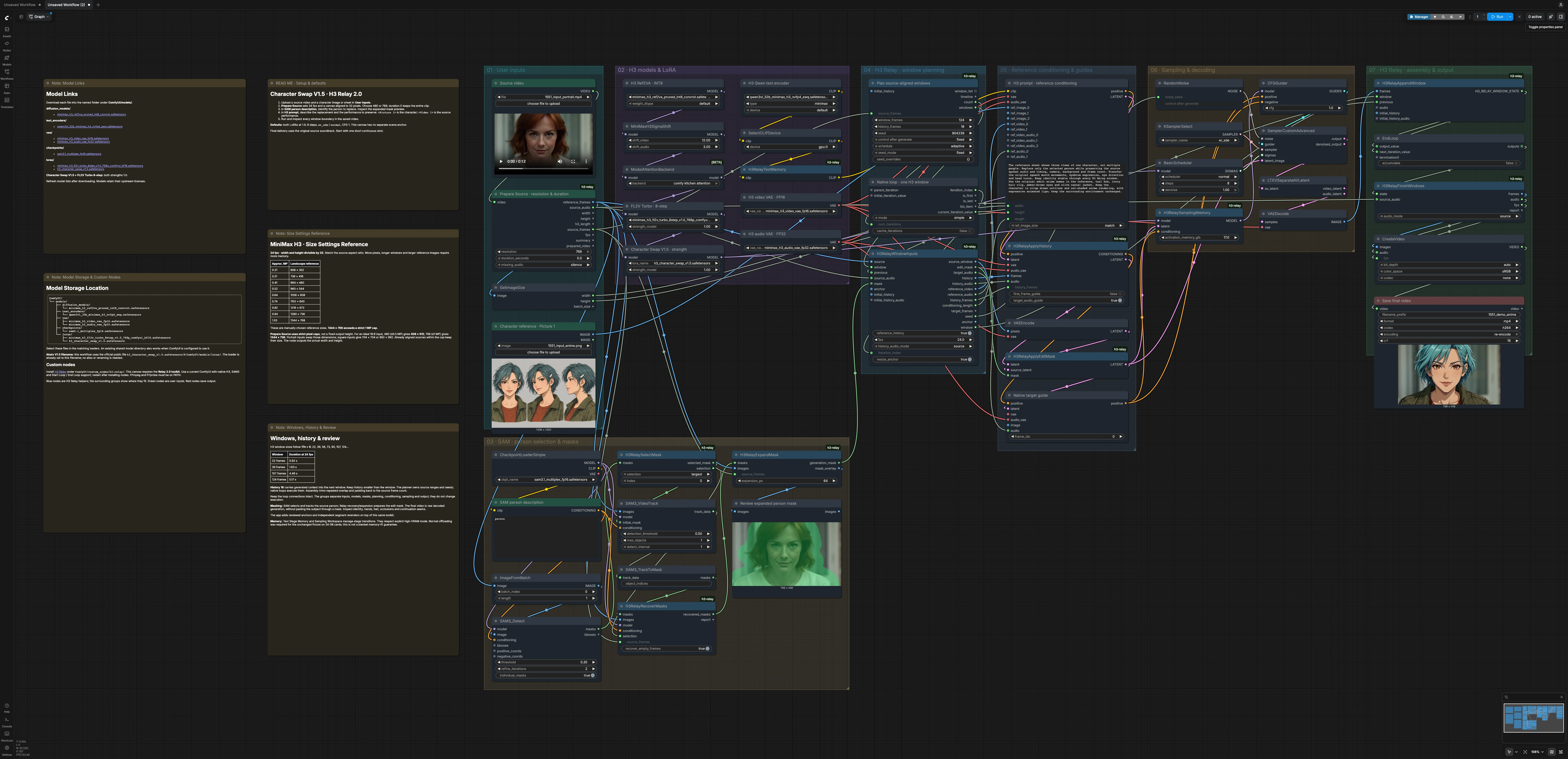
The canvas follows a simple path from inputs to a stitched video: you provide a source clip and a character reference, SAM finds and tracks the person to replace, H3 Relay plans windows with history carryover, H3 generates the edited frames inside the mask, then the workflow assembles everything back with the original audio. Groups in the canvas are organized so you can work top to bottom and review at natural checkpoints.
01 · User inputs#
Upload your clip in Source video, then add a single character image or sheet in Character reference · Picture 1. H3RelayPrepareSource aligns frames to the model’s grid and exposes actual width, height, frame count, and audio. The node emits a clean batch of frames and the original soundtrack that later becomes the guide. Keep the first pass simple by starting with a single, continuous shot.
02 · H3 models and LoRA#
H3 Ref2VA · INT8 loads the MiniMax H3 diffusion backbone. The text encoder, video VAE, and audio VAE wire in automatically. Two LoRAs sit on top of H3: FL2V Turbo · 8-step for fast sampling and Character Swap V1.5 · strength for identity transfer. This pairing lets MiniMax H3 Character Swap V1.5 with Original Audio run quickly while preserving character style.
03 · SAM person selection and masks#
SAM3_Detect finds people in the first frame based on the SAM person description. H3RelaySelectMask picks the subject, then SAM3_VideoTrack tracks that mask across the entire frame batch. H3RelayRecoverMasks fixes gaps and H3RelayExpandMask grows the region to cover hair and hands so identity edits do not leave halos. A preview helps you confirm that the expanded person mask matches the intended subject.
04 · H3 Relay window planning#
H3RelayWindowPlan creates overlap‑aware windows sized for H3 with a smaller slice of history carried forward for continuity. StartLoop and H3RelayWindowInputs feed frames, masks, and the per‑window audio into generation. This is where the source is divided into manageable chunks to carry context between successive windows of a continuous shot. Scene cuts need separate review. MiniMax H3 Character Swap V1.5 with Original Audio uses this plan to keep seeds and ranges deterministic for a reproducible pass.
05 · Reference conditioning and guides#
MiniMaxH3ReferenceToVideo turns your character image and performance prompt into conditioning for H3. H3RelayApplyHistory injects the previous window’s frames and audio as soft guidance for the next one. H3RelayApplyEditMask blends the tracked edit region with the current latent to constrain the edit; it does not guarantee pixel-identical background preservation. MiniMaxH3AddGuide lets you add native target guidance from the window’s audio so lips and expressions follow the original soundtrack.
06 · Sampling and decoding#
H3RelaySamplingMemory, CFGGuider, KSamplerSelect, and SamplerCustomAdvanced run the generation loop window by window using the LoRA‑adapted H3 model. LTXVSeparateAVLatent and VAEDecode decode visuals back to frames ready for assembly. These pieces handle the heavy lifting and keep memory predictable. Most users can leave them as is for a first pass.
07 · H3 Relay assembly and output#
H3RelayAppendWindow accumulates windows in order, trimming overlap as needed. H3RelayFinishWindows outputs frames and re‑attaches the original audio so timing and speech stay true to the source. CreateVideo and Save final video write the result to disk. Review window joins, mouth shapes, hands, and occlusions, then iterate if needed. MiniMax H3 Character Swap V1.5 with Original Audio is optimized for quick review cycles on short shots.
Key nodes in Comfyui MiniMax H3 Character Swap V1.5 with Original Audio workflow#
H3RelayWindowPlanCreates the generation schedule and overlap history. The tested examples use 124-frame windows and 18-frame history at 24 fps. Each 12.25-second clip spans three windows. Inspect both joins for local appearance or motion changes; this is not a guarantee of seamless continuation.MiniMaxH3ReferenceToVideoBuilds the main conditioning from your character image and prompt at the actual width, height, and per‑window length. Use one identity‑true image or sheet and say clearly that multiple views depict the same character. Keep performance instructions concise and tied to the source audio and gestures. If identity drifts, strengthen the identity description and simplify style modifiers.H3RelayApplyEditMaskUses the tracked mask and encoded source frames to constrain generation. Review mask coverage around hair and moving limbs. The tested graph does not composite the generated body back onto untouched source pixels, so surrounding details can still change.MiniMaxH3AddGuideUses the current window’s source audio as native guidance. This supports speech-related motion, but preserving the soundtrack does not guarantee exact lip synchronization. The exposed node in this graph has no adjustable guidance-strength control.LoraLoaderModelOnly · Character Swap V1.5Loads the officialh3_character_swap_v1.5.safetensorsadapter at the tested strength of 1.0. Changes to strength can alter the result, but there is no verified rule that reducing it improves mouth motion or increasing it locks costume details.SamplerCustomAdvancedplusCFGGuiderRuns the tested Turbo recipe: 8 steps, CFG 1,er_sde, andnormalscheduling. Start with these defaults; changes to steps or guidance need a fresh comparison and are not guaranteed quality improvements.SAM3_DetectandSAM3_VideoTrackDrive person detection and tracking for the edit region. Use a clearSAM person descriptionto bias toward your subject when several people are visible. If tracking slips at occlusions, nudge detection sensitivity or re‑select the subject before tracking again. The goal is a single stable mask that follows the intended performer.H3RelayFinishWindowsAssembles the final frames and keeps audio mode onsourceso the original soundtrack passes through. Keepsourceselected when original-audio retention is required. This node is the last quality gate before encoding.
Optional extras#
- Choose shots with stable lighting and minimal fast whip pans for your first passes.
- Use a single, identity‑true reference image with neutral expression and visible hairline.
- Keep width and height divisible by 32 and match the source aspect ratio for efficient memory use.
- For a jumpy seam, test another valid window plan and rerun the dependent window sequence, because later windows use earlier history.
- Always review lips, hands, hair edges, and window joins at 100 percent before delivery.
MiniMax H3 Character Swap V1.5 with Original Audio combines source-aligned timing, reference-guided character generation, and window-history controls so you can iterate quickly from test to final. For deeper context on the method and assets, see the Akatz Labs references above.
Acknowledgements#
This workflow implements and builds upon the following works and resources. We gratefully acknowledge Akatz Labs for the H3 Character Swap Tool workflow, Akatz AI for the MiniMax H3 Character Swap LoRA (v1.5) and H3 Relay, and Comfy-Org for the MiniMax H3 base models for their contributions and maintenance. For authoritative details, please refer to the original documentation and repositories linked below.
Resources#
- Akatz Labs workflow source
- Character Swap V1.5 LoRA
- Hugging Face: akatz-ai/MiniMax-H3-Character-Swap-LoRA
- H3 Relay
- GitHub: akatz-ai/h3-relay
- MiniMax H3 base models
- Hugging Face: Comfy-Org/MiniMax-H3
Note: Use of the referenced models, datasets, and code is subject to the respective licenses and terms provided by their authors and maintainers.