WAN 2.2 Smooth Workflow v5.0: an all‑in‑one ComfyUI pipeline for smooth 5‑second videos#
WAN 2.2 Smooth Workflow v5.0 is a single canvas that covers text‑to‑video, image‑to‑video, First‑to‑Last‑Frame animation, and audio‑to‑video. It is built around the SmoothMix WAN 2.2 model family with optional Lightx2v LoRAs, WanVideoWrapper operators for WAN 2.x, and RIFE frame interpolation, so you can generate short cinematic clips with consistent motion and fast iteration.
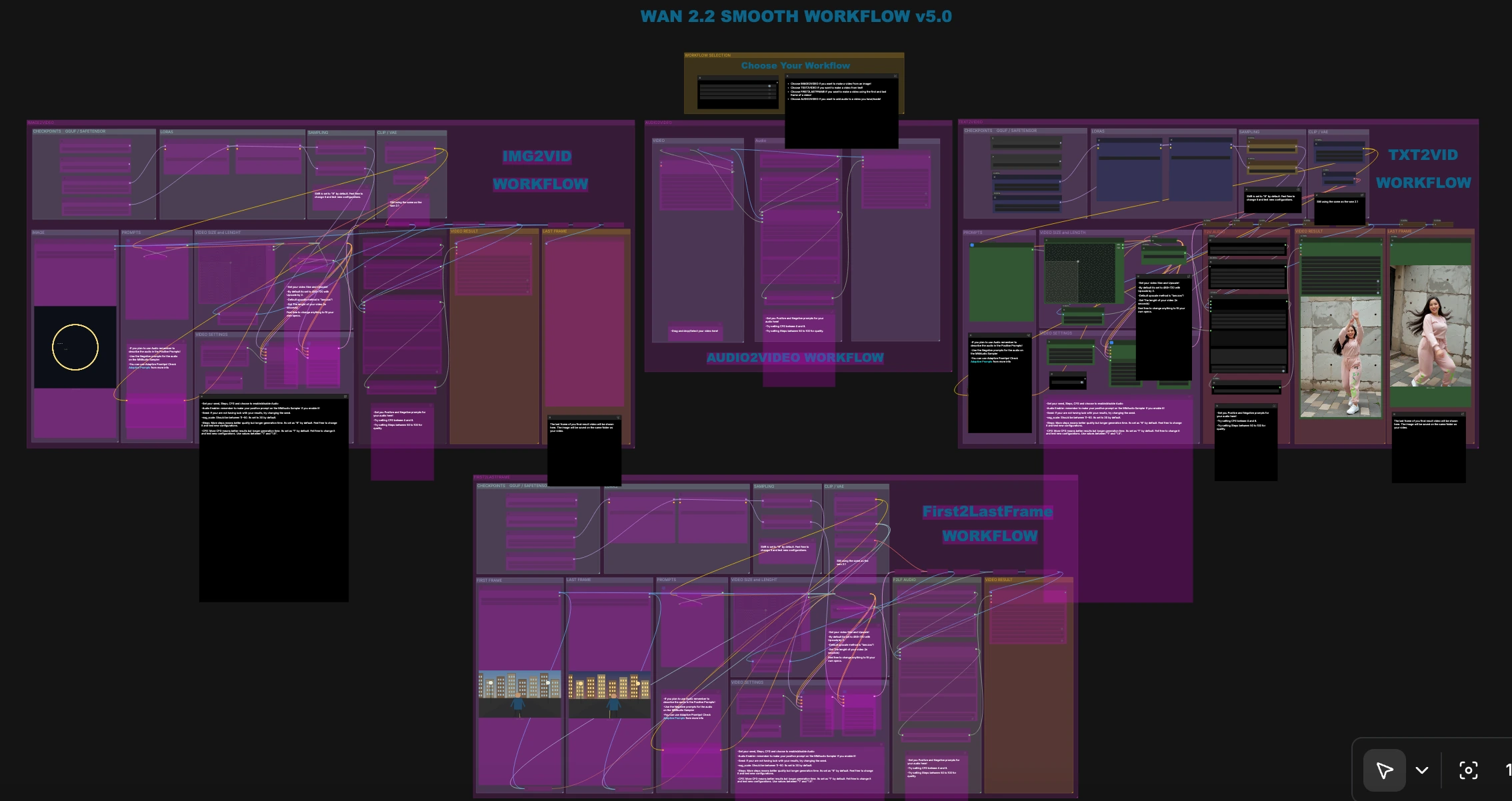
Use this WAN 2.2 Smooth Workflow v5.0 when you want one organized graph that lets you switch among T2V, I2V, F2LF, and A2V without re‑wiring nodes. The canvas includes mode toggles, duration and size controls, last‑frame previews, and an optional audio branch that can follow the visual rhythm of your clip.
Key models in Comfyui WAN 2.2 Smooth Workflow v5.0#
- SmoothMix WAN 2.2 Text‑to‑Video and Image‑to‑Video checkpoints (High and Low)
- Role: main diffusion backbones for motion synthesis and refinement across T2V and I2V paths. High favors quality and detail; Low favors speed and VRAM headroom.
- Lightx2v WAN 2.2 Distill LoRAs
- Role: optional LoRAs distilled for WAN 2.2 that enhance motion smoothness or stylization while keeping prompts responsive. Load as needed to steer look and dynamics. lightx2v/Wan2.2-Distill-Loras
- WAN 2.x VAE
- Role: the VAE used throughout the canvas to encode and decode video latents so image quality and color response remain consistent across branches.
- WAN 2.x text encoder (uMT5 XXL family)
- Role: the specialized text encoder used by WAN 2.x; the workflow loads the matching tokenizer/model so prompts properly condition motion and appearance.
- CLIP Vision encoder (ViT‑H family)
- Role: extracts robust start and end frame embeddings for the First‑to‑Last‑Frame animation path, improving temporal coherence during interpolation.
- Audio generation branch
- Role: optional frame-aware audio synthesis that conditions on visual timing and text prompts to create soundtrack elements aligned with the visual cut.
- RIFE video interpolation
- Role: increases temporal smoothness and apparent frame rate by inserting high‑quality in‑between frames, ideal for short cinematic loops. Used via the ComfyUI VFI integration. GACLove/ComfyUI-VFI
How to use Comfyui WAN 2.2 Smooth Workflow v5.0#
The canvas is organized into four production modes that you can enable from the on‑canvas switches. Across modes you will see consistent groups for Checkpoints, CLIP/VAE, Prompts, Video Size and Length, Sampling, and Video Result. Each mode can optionally enable audio generation via the Audio Enabler toggle.
Text to Video (T2V)#
Enter your description in the Positive prompt and refine with a Negative prompt. The prompt text is encoded in CLIPTextEncode (#90) and combined with the WAN 2.x VAE. WanImageToVideo (#50) acts as the T2V entry point even without a start image, producing an initial latent sequence that passes to the samplers and then to decoding. RIFE interpolation RIFEInterpolation (#160) smooths the sequence before VHS_VideoCombine (#77) exports your MP4. Use the Audio Enabler to generate a soundtrack from your frames and audio prompt.
Image to Video (I2V)#
Drop a single image in the IMAGE group, then set your video dimensions and duration. The image is resized and sent into WanImageToVideo (#172) together with your text prompts, which produces a motion‑aware latent. Paired samplers refine the latent, then the result is decoded, upscaled, and interpolated for a smooth output. Enable the I2V Audio group if you want generated sound that matches the animated content.
First to Last Frame animation (F2LF)#
Provide a start frame and an end frame. The graph encodes both with CLIP Vision and passes them into WanFirstLastFrameToVideo (#343), which plans a path between the first and last images while respecting your text prompts. The High and Low SmoothMix samplers then sculpt the in‑between frames before decoding and interpolation. The result is exported by VHS_VideoCombine (#332), and an optional audio branch can synthesize a soundtrack aligned to the visual transition.
Audio to Video (A2V)#
Load an existing clip in VHS_LoadVideo (#145). The workflow can optionally interpolate it for extra smoothness, then the audio branch creates sound based on the visuals and your audio prompt. VHS_VideoCombine (#148) muxes the track and exports a new file. Use the on‑canvas last‑frame preview to quickly check visual consistency before export.
Exports and last‑frame previews#
Each mode ends with a Video Result group that writes an MP4 through VideoHelperSuite’s VHS_VideoCombine nodes. A dedicated Last Frame pane saves and previews the final frame so you can judge lighting, color, and subject quality at a glance before running full generations. Video I/O and preview functionality is provided by VideoHelperSuite. pythongosssss/ComfyUI-VideoHelperSuite
Key nodes in Comfyui WAN 2.2 Smooth Workflow v5.0#
WanImageToVideo (#50)
- This is the WAN 2.x video entry point for both T2V and I2V inside WanVideoWrapper. It merges your prompts with the VAE (and an optional start image) to build an initial motion latent. Size and length controls upstream must respect model‑friendly constraints, and this node feeds the paired samplers that follow. WanVideoWrapper implementation details and updates are maintained here: kijai/ComfyUI-WanVideoWrapper.
WanFirstLastFrameToVideo (#343)
- Drives the First‑to‑Last‑Frame path by ingesting CLIP Vision embeddings for both boundary frames together with your text prompts. It creates a guided trajectory that preserves subject identity and scene layout while morphing toward the target. Keep start and end frames aligned in subject scale and composition for the most natural transitions.
KSamplerWithNAG (Advanced) (#234)
- Applies Noise Assisted Guidance to improve prompt adherence and reduce temporal drift in short clips. Adjust its guidance only when you see over‑constraint or under‑constraint; it works in tandem with the standard sampler and your negative prompt. See the method and tuning guidance in the project docs: scottmudge/ComfyUI-NAG.
RIFEInterpolation (#160)
- Inserts high‑quality in‑betweens to improve motion smoothness before encoding to video. Use it when your base sequence looks good frame‑to‑frame but feels a little choppy at playback. The node integrates the RIFE implementation provided by the ComfyUI VFI extension. GACLove/ComfyUI-VFI
VHS_VideoCombine (#77)
- Handles final encoding, muxing optional audio, and saving metadata. Keep its format and pixel format consistent across projects for predictable playback. VideoHelperSuite also powers the quick last‑frame preview utilities used elsewhere on the canvas. pythongosssss/ComfyUI-VideoHelperSuite
Optional extras#
- Use High vs Low SmoothMix checkpoints to balance quality and speed. High is ideal for hero shots and the last iteration, Low helps you iterate faster on prompts and timing.
- Keep video width and height in model‑friendly multiples to minimize artifacts and speed up sampling.
- If a T2V clip looks static, refresh the seed or reinforce motion verbs in the prompt before increasing sampling depth.
- For F2LF, choose boundary frames with similar camera angles and exposure. Large jumps in composition are harder to resolve smoothly.
- The canvas includes an Adaptive Prompts helper for richer phrasing when you want quick variations without manual prompt rewrites. Alectriciti/comfyui-adaptiveprompts
This WAN 2.2 Smooth Workflow v5.0 was designed to minimize mode switching friction while keeping results smooth and cinematic. Start with the mode that matches your input, set size and duration, write a clear prompt pair, and let the samplers plus RIFE do the rest.
Acknowledgements#
This workflow implements and builds upon the following works and resources. We gratefully acknowledge the Civitai creators for the Smooth Workflow Wan 2.2 AIO workflow and the Smooth Mix Wan 2.2 14B I2V/T2V models, kijai for ComfyUI-WanVideoWrapper, and lightx2v (ModelTC) for Wan2.2-Distill-Loras for their contributions and maintenance. For authoritative details, please refer to the original documentation and repositories linked below.
Resources#
- Civitai/Smooth Workflow Wan 2.2 AIO (Workflow v5.0)
- Docs / Release Notes: Workflow source
- Civitai/Smooth Mix Wan 2.2 14B (I2V/T2V)
- Docs / Release Notes: SmoothMix WAN 2.2 I2V/T2V models
- kijai/ComfyUI-WanVideoWrapper
- GitHub: kijai/ComfyUI-WanVideoWrapper
- lightx2v/Wan2.2-Distill-Loras
- GitHub: ModelTC/LightX2V
- Hugging Face: lightx2v/Wan2.2-Distill-Loras
Note: Use of the referenced models, datasets, and code is subject to the respective licenses and terms provided by their authors and maintainers.