

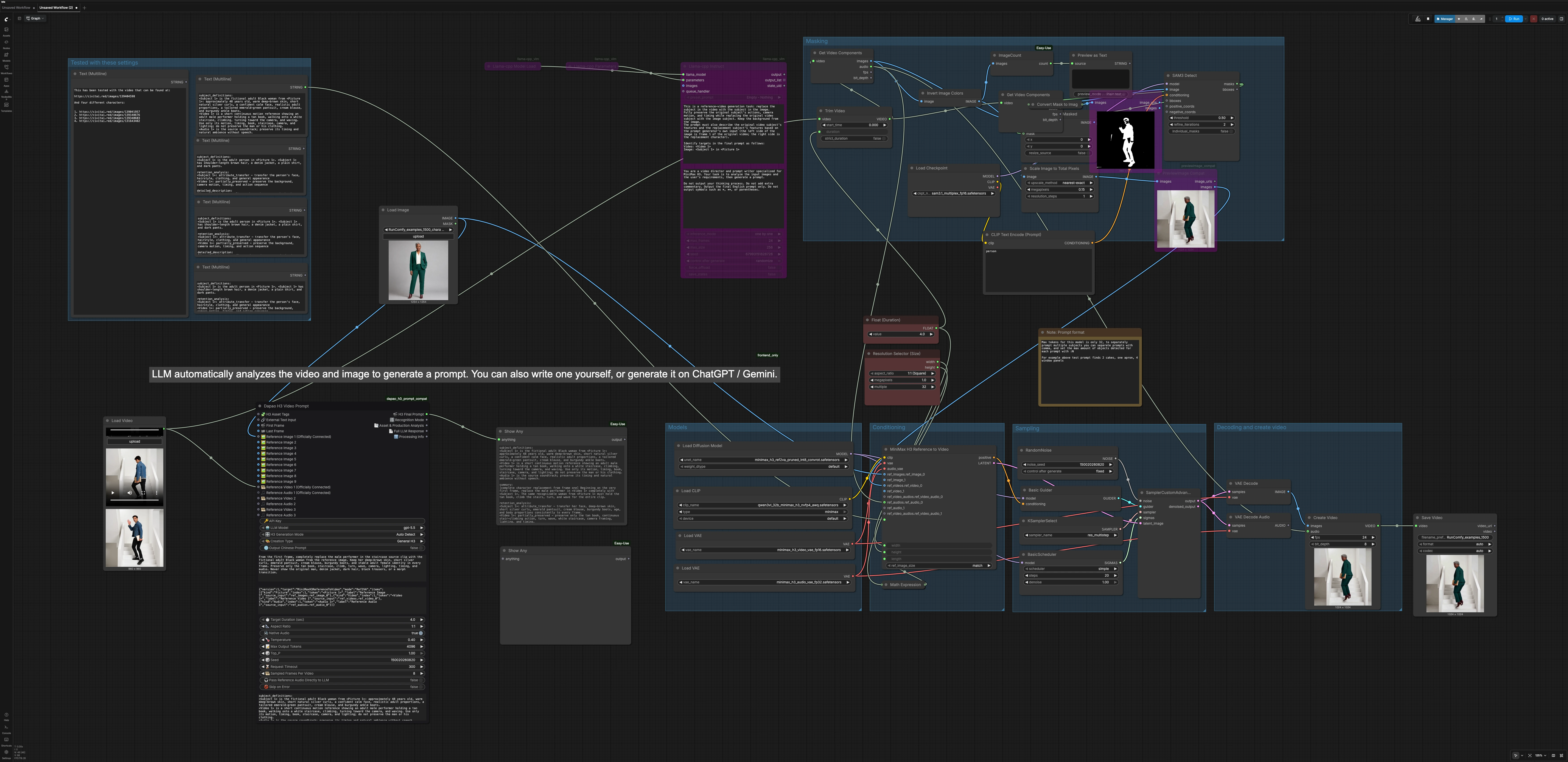
MiniMax H3 Character Replacement ComfyUI#
MiniMax H3 Character Replacement ComfyUI is a reference‑guided video editing workflow for swapping a person or character in a source clip while keeping the original motion, camera timing, and scene layout intact. It pairs SAM3 subject detection and masking with MiniMax H3 Ref2VA so the replacement identity stays consistent across frames without manual inpainting.
Built for creators who need reliable character swaps, identity replacements, outfit variations, or reference‑driven edits inside ComfyUI, this workflow accepts a source video, one or more reference images, and optional reference audio. The result is a motion‑preserving replacement that feels native to the shot, powered by MiniMax H3 Character Replacement ComfyUI logic end to end.
Key models in Comfyui MiniMax H3 Character Replacement ComfyUI workflow#
- MiniMax H3 Ref2VA diffusion backbone. Provides reference‑to‑audio‑video generation that transfers identity and appearance while respecting motion and timing. See the official model card for capabilities and prompt guidance here and the Comfy‑ready weights and VAEs packaged for workflows here.
- MiniMax H3 Video VAE and Audio VAE. Encode and decode video and audio latents for efficient sampling and faithful reconstruction. Included with the Comfy‑Org MiniMax H3 bundle above.
- Qwen3‑VL 32B text encoder. Serves as the multimodal text encoder used by MiniMax H3 to interpret prompts and references for coherent identity transfer.
- SAM 3.1 Multiplex. A high‑quality segmentation model used to detect and mask the on‑screen subject so the workflow can isolate motion cues and prepare a cleaner reference for character replacement. Checkpoint hosted by Comfy‑Org here.
How to use Comfyui MiniMax H3 Character Replacement ComfyUI workflow#
The workflow moves from masking and reference preparation to H3 conditioning, sampling, and final rendering. Groups run in sequence to produce a motion‑preserving swap that replaces only the performer.
Masking#
This group loads your source clip, optionally trims it, and prepares per‑frame masks. LoadVideo (#459) feeds Video Slice (#483) so you can set start time and duration. Frames and audio are unpacked with GetVideoComponents (#460, #505). SAM3_Detect (#503) uses a short category text from CLIPTextEncode (#502), such as “person”, to find the subject and output masks. The mask is previewed via MaskToImage (#491), then ImageCompositeMasked (#454) and ImageScaleToTotalPixels (#456) prepare a lightweight motion reference that highlights the performer for MiniMax H3.
Models#
This group loads the core MiniMax H3 assets used at inference. UNETLoader (#463) initializes the H3 Ref2VA diffusion weights, CLIPLoader (#465) sets up the Qwen3‑VL text encoder, and VAELoader (#470, #474) bring in the video and audio VAEs. Together they define the model context that the sampler will use for identity transfer and decoding.
Conditioning#
This group turns your references and prompt into the H3 conditioning and a starting latent. MiniMaxH3ReferenceToVideo (#464) accepts a replacement identity image, the prepared motion reference from the Masking group, and optional reference audio from the source. Width and height come from ResolutionSelector (#501); length in frames is auto‑computed by ComfyMathExpression (#481) from a human‑friendly duration set with Float (Duration) (#480), snapping to a model‑friendly frame count. A structured prompt is generated by DapaoH3VideoPromptNode (#517) and passed through easy showAnything (#515), or you can write your own according to the official MiniMax H3 reference‑video guide here.
Sampling#
This group performs denoising with your selected sampler and schedule. RandomNoise (#467) seeds the process for reproducibility. BasicScheduler (#473) and KSamplerSelect (#468) define the step schedule and algorithm, while BasicGuider (#466) fuses the model with the positive conditioning from the H3 node. SamplerCustomAdvanced (#469) runs the iterative refinement to produce the final video latents.
Decoding and create video#
This group turns latents into a playable result. VAEDecode (#472) reconstructs frames, which are combined with your clip’s audio in CreateVideo (#476) to preserve timing and ambience. SaveVideo (#482) writes an output file with the chosen format and codec so your MiniMax H3 Character Replacement ComfyUI render is ready to review or publish.
Tested with these settings#
This helper area contains prompt notes and example metadata used during authoring. It is not required for operation but can inspire your own prompt structure and timing choices.
Key nodes in Comfyui MiniMax H3 Character Replacement ComfyUI workflow#
MiniMaxH3ReferenceToVideo (#464)#
Central to identity transfer. It accepts a replacement image, a motion‑preserving video reference, and optional reference audio, then emits both the positive conditioning and an initial latent. Useful parameters to consider are prompt, width, height, and length. If you supply multiple references, keep them visually consistent to avoid identity drift.
SAM3_Detect (#503)#
Finds and segments the on‑screen subject that will be replaced. A short category prompt via CLIPTextEncode (#502) guides detection. Adjust the mask quality options only when the default selection misses the subject or includes background; cleaner masks typically yield more stable swaps.
ImageCompositeMasked (#454)#
Builds a performer‑focused reference from the sliced frames and SAM3 mask. Use x, y, and resize_source only if you need to align overlays or adapt frame scaling before sending images to the H3 reference input. The goal is a motion cue that isolates the actor while leaving scene geometry untouched.
ResolutionSelector (#501)#
Controls the target render size in a few clicks. Choose an aspect and megapixel budget that fit your hardware or turnaround needs. Start modest, confirm identity stability, then increase resolution for your final pass.
SamplerCustomAdvanced (#469)#
Executes denoising using the scheduler, sampler, guider, noise, and starting latent. For faster look‑dev, try a lighter schedule or a sampler tuned for speed, then switch to your preferred quality settings once identity and timing look right.
Optional extras#
- Reference selection
- Use 1 to 3 sharp, well‑lit images that clearly show the target face and outfit. Avoid mixed identities or extreme poses.
- Keep the reference subject’s age, hairstyle, and clothing consistent to minimize drift during long motions.
- Masking tips
- If SAM3 includes background, refine your category text or re‑run with a different threshold. Clean masks reduce haloing and keep scene lighting stable.
- Prompting
- Describe only identity and wardrobe in the replacement while telling H3 to preserve the original motion and scene. The official guide has concise examples here.
- Templates
- If you want a minimal starting point, compare your graph with the official ComfyUI MiniMax H3 R2V template here.
- Rights and safety
- Only use likenesses, performances, and audio you have the right to transform. MiniMax H3 Character Replacement ComfyUI is powerful, so apply it responsibly.
Acknowledgements#
This workflow implements and builds upon the following works and resources. We gratefully acknowledge MiniMaxAI for the MiniMax-H3 model and the reference-video prompt guide, Comfy-Org for the official ComfyUI MiniMax H3 R2V template, and RunningHub.ai for the workflow source and reference for their contributions and maintenance. For authoritative details, please refer to the original documentation and repositories linked below.
Resources#
- RunningHub.ai/Workflow source and reference
- Docs / Release Notes: Workflow source and reference
- MiniMaxAI/MiniMax H3 official model
- GitHub: MiniMax-AI/MiniMax-H3
- Hugging Face: MiniMaxAI/MiniMax-H3
- MiniMaxAI/MiniMax H3 reference-video prompt guide
- GitHub: MiniMax-AI/MiniMax-H3
- Hugging Face: MiniMaxAI/MiniMax-H3
- Docs / Release Notes: MiniMax H3 reference-video prompt guide
- Comfy-Org/Official ComfyUI MiniMax H3 R2V template
- GitHub: Comfy-Org/workflow_templates (video_minimax_h3_r2v.json)
- Hugging Face: Comfy-Org/MiniMax-H3
Note: Use of the referenced models, datasets, and code is subject to the respective licenses and terms provided by their authors and maintainers.