

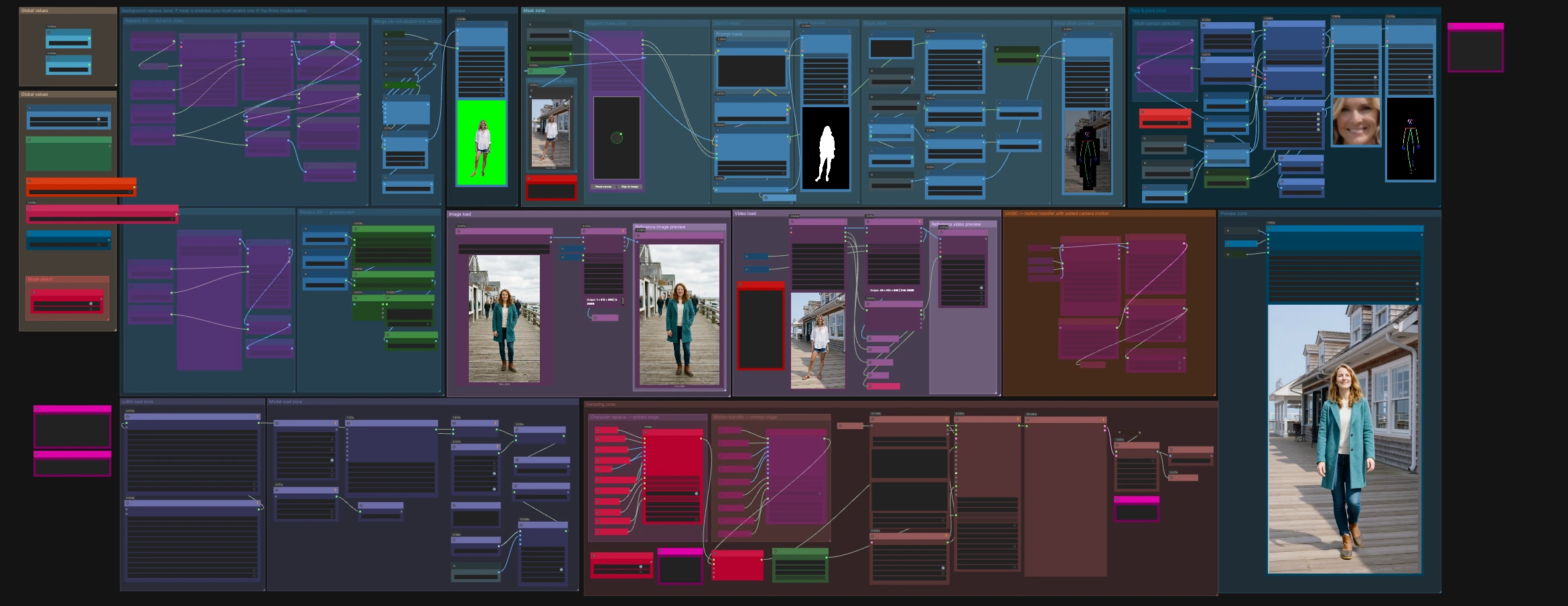
Character & Pose & Background Replacement V3 — Wan2.2 Animate video character swap, pose transfer, and background control#
This ComfyUI workflow turns a source motion clip and a single reference image into a new video where the character identity, pose, and background are all under your control. Character & Pose & Background Replacement V3 keeps source motion structure stable while swapping the subject, transferring body and face behavior, and optionally replacing or blending the scene.
Designed for creators who need a fast, guided pipeline, it pairs Wan2.2 Animate with SAM 3.1 segmentation and SDPose for robust person masking and pose guidance. Use it for character replacement, pose-transfer animation, or full-scene refresh in one canvas with practical toggles and previews.
Key models in ComfyUI Character & Pose & Background Replacement V3 workflow#
- Wan2.2 Animate 14B. The generative video backbone that renders the final frames from image, pose, and text guidance. It supports image conditioning and LoRA adapters for style or relighting control. Model card
- SAM 3.1. A high‑quality segmentation model used to extract or refine the person mask from frames or reference images, driving clean composites and inpaints. Checkpoints
- SDPose. A whole‑body keypoint extraction and drawing toolkit used to create precise pose maps and face crops that steer motion and expression transfer. It also provides RT‑DETR detection weights used in this graph. Repository
- ViTPose-L WholeBody ONNX. A strong multi‑person keypoint estimator used by the preprocess nodes for dense body, hands, and face landmarks. Checkpoint
How to use ComfyUI Character & Pose & Background Replacement V3 workflow#
The workflow has three pillars: guidance building, background control, and rendering. Guidance comes from your identity still plus pose and face signals extracted from the motion clip. Background control offers three interchangeable modes. Rendering uses Wan2.2 Animate with optional LoRAs, then exports a ready‑to‑share video.
Image load#
Load your identity or target character image in the Image load group. It is resized for the model and previewed for quick checks. This image sets appearance for Character & Pose & Background Replacement V3, while motion is taken from the source clip. If the image has a clean subject, results will track identity more reliably.
Video load#
Import the motion source in the Video load group using VHS_LoadVideo (#63). The node exposes frame rate and total frames for downstream scheduling and determines how many frames the renderer will produce. Audio is passed through to the final export if provided. Use the file widgets to trim or sub‑sample when you want shorter previews.
Face and pose zone#
The Face & pose zone builds two key guidance streams. It detects persons and faces, then extracts whole‑body keypoints with SDPoseKeypointExtractor (#690) and draws them into a clean control image via SDPoseDrawKeypoints (#688). A helper detector like RTDETR_detect (#771) and the preprocess loader supply robust boxes for body and face. For multi‑person shots, toggle the “Multi-person detection” control and the “Detection source” switch to choose whether to detect poses on the source or the background‑replaced branch.
SAM 3.1 mask and refinement#
The Sam3.1 mask group creates the subject mask with SAM3_Detect (#753). You can guide it with text via CLIPTextEncode (#754) and nudge selection with clicks using PointsEditor (#758). Two refiners then make the matte production‑ready: GrowMaskWithBlur (#502) softly expands and feathers edges, and BlockifyMask (#401) evens block boundaries to avoid jagged contours. A live overlay preview (DrawMaskOnImage (#391)) helps you confirm the cutout before rendering.
Background replace zone#
You can:
- Keep the original scene.
- Replace with a static photo using
LoadImage(#785). - Replace with a dynamic video using
VHS_LoadVideo(#790).
A simple toggle selects the behavior, and the branch you choose is resized to match the motion frames, then composited with the person mask. If you need a flat color stage look, the greenscreen sub‑group provides a solid background that stays stable across frames.
Uni3C motion options#
For shots that need added camera drift or motion smoothing, the Uni3C group loads a control model and turns the resized source clip into motion embeddings with WanVideoUni3C_ControlnetLoader (#538) and WanVideoUni3C_embeds (#546). A strength control and start or end scheduling let you fade the effect in or out across the sequence.
Character replace - embed stage#
WanVideoAnimateEmbeds (#62) fuses everything for the character‑replacement path: VAE, CLIP‑Vision image features, your identity image, SDPose pose maps, optional face crops, the person mask, and an optional background guide. Width, height, and frame count are inherited from the video so motion alignment stays exact. Use this mode when you want the new subject moving exactly like the original actor.
Motion transfer - embed stage#
A second WanVideoAnimateEmbeds (#904) provides a motion‑transfer‑first path that forgoes background and masking when you only need the pose and expression applied to an image subject. Only one embed stage should be active at a time. Choose the mode that matches your goal, then the upstream Any‑Switch routes the selected embeddings forward.
Sampling zone and LoRA control#
WanVideoSamplerSettings (#530) brings together the Wan2.2 model, the chosen image embeddings, optional text embeddings, Uni3C motion embeddings, and your seed. LoRA stacks are chosen with WanVideoLoraSelectMulti (#467) and applied by WanVideoSetLoRAs (#48), which is useful for relighting, style, or stabilization. WanVideoSamplerFromSettings (#531) generates the latent video, and WanVideoDecode (#28) turns it into frames.
Preview and export#
The Preview zone plays back intermediate frames for checks, and VHS_VideoCombine (#312) writes the final clip at your chosen frame rate with optional audio passthrough. A filename prefix macro is already configured so each render is timestamped.
Key nodes in ComfyUI Character & Pose & Background Replacement V3 workflow#
WanVideoAnimateEmbeds (#62, #904) This is the heart of guidance assembly for Wan2.2 Animate docs. It merges appearance, pose, mask, and optional background into a single image‑embed stream sized to your video. Tune only what matters: increase pose_strength to lock closer to source motion or raise face_strength when identity and lip area should track more tightly. Keep num_frames and the video loader’s frame count aligned to avoid truncation.
SAM3_Detect (#753) Generates the person matte using SAM 3.1 checkpoints. Use prompt conditioning or point clicks when clothing blends into the background. If the matte is noisy, reduce the selection scope with bounding boxes from the detection tools before refining.
GrowMaskWithBlur (#502) and BlockifyMask (#401) From KJNodes repo, these prepare masks for clean compositing. Grow and blur will hide edge seams after background replacement, while blockify avoids staircase artifacts on subject outlines. Adjust gently and preview often.
WanVideoLoraSelectMulti (#467) and WanVideoSetLoRAs (#48) These nodes attach LoRA adapters inside Wan2.2 Animate wrapper. Use them for relight, reward, or motion feel tweaks. Keep total strength balanced with your cfg and sampler steps so LoRAs guide rather than overpower.
WanVideoUni3C_ControlnetLoader (#538) and WanVideoUni3C_embeds (#546) Provide optional camera and motion retargeting inside the same sampler docs. Use the strength and start or end scheduling to blend the effect. For very tight tracking shots, set strength lower so subject motion remains primary.
VHS_VideoCombine (#312) From Video Helper Suite repo. It assembles frames into the final video and can mux audio from the source. Match the frame rate here to your loader’s forced rate for 1:1 timing.
Optional extras#
- If you see memory pressure at high resolution or long clips, enable VAE tiling on the encode or decode nodes and lower context size in the sampler settings.
- When subject edges look jagged, slightly increase mask growth, then adjust block size before rendering again.
- If color or exposure drifts after replacement, try a relight LoRA at modest strength rather than raising CFG.
- For busy scenes, detect poses on the source branch first, then switch detection to the replaced branch only after the mask is reliable.
- To stabilize long renders, keep a fixed
seedwhile you iterate on masks and LoRAs, then randomize once the look is locked.
This workflow was built around Wan2.2 Animate and its preprocess companions, with official references for further reading: Wan2.2 Animate, ComfyUI‑WanVideoWrapper, ComfyUI‑WanAnimatePreprocess, SAM 3.1, SDPose, and KJNodes.
Acknowledgements#
This workflow implements and builds upon the following works and resources. We gratefully acknowledge RunningHub for the workflow reference, Wan-AI for the Wan2.2-Animate-14B model, kijai for the ComfyUI WanVideoWrapper and WanAnimatePreprocess nodes, and Comfy-Org for the SAM3.1 and SDPose models for their contributions and maintenance. For authoritative details, please refer to the original documentation and repositories linked below.
Resources#
- RunningHub/Character & Background Replacement Pose Transfer Wan2.2 Animate SAM3.1 SDPose Ultimate Workflow v3
- Docs / Release Notes: Workflow post
- Wan-AI/Wan2.2-Animate-14B
- GitHub: Wan-Video/Wan2.2
- Hugging Face: Wan-AI/Wan2.2-Animate-14B
- arXiv: 2503.20314
- kijai/ComfyUI-WanVideoWrapper
- GitHub: kijai/ComfyUI-WanVideoWrapper
- kijai/ComfyUI-WanAnimatePreprocess
- Comfy-Org/sam3.1
- GitHub: facebookresearch/sam3
- Hugging Face: Comfy-Org/sam3.1
- Comfy-Org/SDPose
- Hugging Face: Comfy-Org/SDPose
Note: Use of the referenced models, datasets, and code is subject to the respective licenses and terms provided by their authors and maintainers.