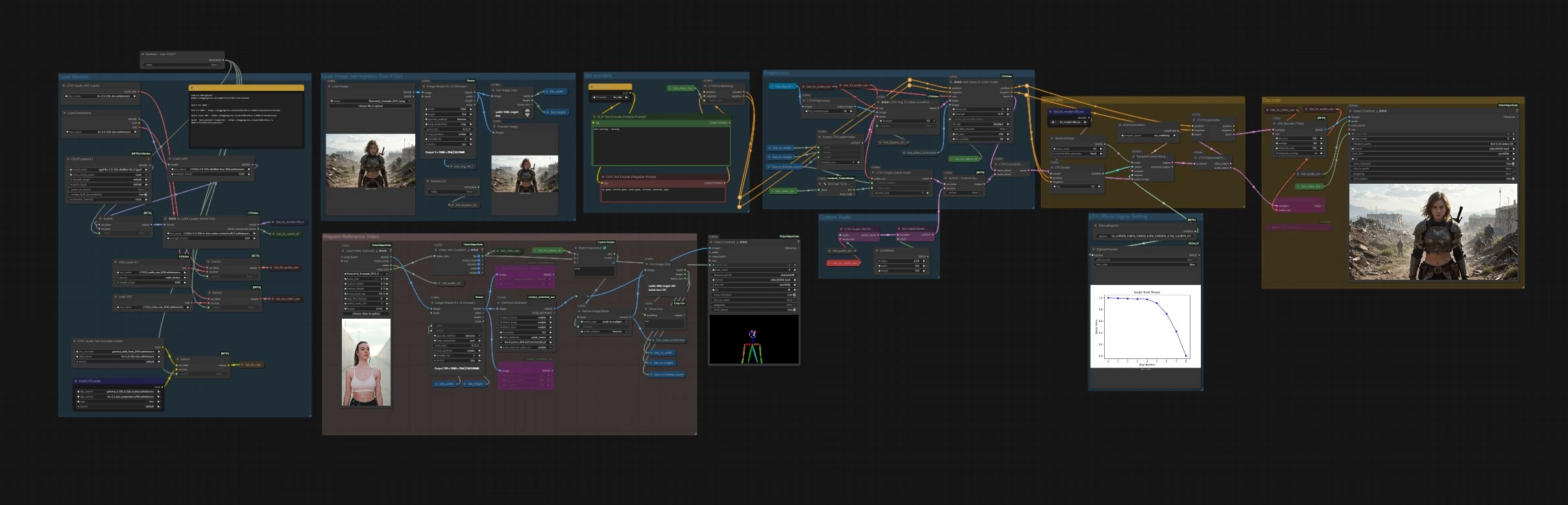
LTX 2.3 IC-LoRA: Motion Track video generation in ComfyUI#
This workflow brings the LTX 2.3 IC-LoRA system to ComfyUI so you can guide motion and scene structure while freely styling with prompts or extra LoRAs. It conditions the LTX-2.3 video generator on reference signals like depth, pose, and edges, enabling motion transfer, camera locking, and predictable composition.
Creators working on video-to-video, motion retargeting, and controlled AI animation will find that LTX 2.3 IC-LoRA separates motion control from visual style. You steer the look with text and style LoRAs, and steer the movement with structured guides, all inside a single ComfyUI graph.
Key models in Comfyui LTX 2.3 IC-LoRA workflow#
- LTX-2.3 by Lightricks. A high-fidelity latent video diffusion transformer that generates temporally consistent sequences and supports conditioning for structure and motion control. Hugging Face: Lightricks/LTX-2.3
- LTX 2.3 IC-LoRA union-control weights. In-context LoRA weights designed to inject structured guidance signals into LTX-2.3 for precise motion and geometry control. Provided with the workflow’s model chain and loaded before generation.
- LTX-2.3 VAEs for video and audio. Latent encoders/decoders paired with LTX-2.3 to compress and reconstruct video and audio features used during sampling. Preconfigured in the graph and switchable when using quantized builds. Examples of split packages are available here: Hugging Face: unsloth/LTX-2.3-GGUF
- Depth Anything V2. Robust monocular depth estimation used to lock camera movement or preserve scene layout during generation. Hugging Face: LiheYoung/Depth-Anything-V2
- DWPose. Lightweight multi-person pose estimator used to retarget or preserve character motion via keypoints. Hugging Face: yzd-v/DWPose
How to use Comfyui LTX 2.3 IC-LoRA workflow#
The graph is organized into clear groups. You prepare prompts and a reference video, choose one or more structural guides, then generate and export.
Set prompts#
Use CLIP Text Encode (Positive Prompt) (#2483) and CLIP Text Encode (Negative Prompt) (#2612) to describe the visual style and to exclude unwanted traits. The text encoders are loaded in the model group and routed into LTXVConditioning (#1241), which also receives the working frame rate so the conditioning matches your clip timing. Keep prompts focused on appearance because LTX 2.3 IC-LoRA will handle motion and structure.
Preprocess#
Load or pass a reference clip into VHS_LoadVideo (#5182). Frames are resized in ImageResizeKJv2 (#5080) and fed into the guide extractors: DepthAnythingV2Preprocessor (#5064) for depth, DWPreprocessor (#4986) for pose, and CannyEdgePreprocessor (#4991) for edges. A downstream resize node ensures the guide maps match the model-friendly multiples, and GetImageSize (#5029) records width, height, and frame count for the rest of the pipeline. The resulting guide image sequence is stored by Set_video_controlnet (#5100) for IC-LoRA to consume.
Load Models#
The base model and LoRAs are assembled in this group. CheckpointLoaderSimple (#3940) loads LTX-2.3; LoraLoaderModelOnly (#4922) applies a distilled LTX LoRA for quality and speed; LTXICLoRALoaderModelOnly (#5011) adds the LTX 2.3 IC-LoRA weights and publishes the required latent downscale factor. VAEs for video and audio are loaded, and Boolean - Use GGUF? (#5158) can switch to a quantized GGUF build via GGUFLoaderKJ (#5150) with compatible text encoders and VAEs when VRAM is tight.
Load Image (set bypass=True if t2v)#
If you want to anchor composition with a still reference or first frame, use LoadImage (#2004). It is resized by ImageResizeKJv2 (#5076) and previewed for quick checks. The boolean bypass_i2v controls whether the image is used at all; set it to True for pure text-to-video with LTX 2.3 IC-LoRA.
Generate#
EmptyLTXVLatentVideo (#3059) creates the latent canvas. If image anchoring is enabled, LTXVImgToVideoConditionOnly (#3159) injects only structural information from your image without baking style. The core step happens in LTXAddVideoICLoRAGuide (#5012), which attaches your chosen guide sequence to the model using the latent downscale factor from the IC-LoRA loader. Audio conditioning also flows into the latent through LTXVEmptyLatentAudio (#3980) or the custom audio path. CFGGuider (#4828), KSamplerSelect (#4831), ManualSigmas (#5025), and SamplerCustomAdvanced (#4829) then perform denoising to synthesize the final latent video while respecting both prompts and LTX 2.3 IC-LoRA controls.
Decode#
LTXVSeparateAVLatent (#4845) splits the generated audio and video latents for decoding. LTXVCropGuides (#5013) aligns and crops if needed, then VAEDecodeTiled (#4851) reconstructs frames efficiently. VHS_VideoCombine (#5070) muxes frames into an MP4, using the reference clip’s audio by default. You can also decode the generated audio latent with LTXVAudioVAEDecode (#4848) if you want to audition it separately.
Prepare Reference Video#
This helper area shows the reference frame pipeline. VHS_VideoInfoLoaded (#5073) extracts fps and duration, which are propagated to the conditioning nodes and to exporters so timing stays in sync. A small combine node provides a quick visual preview of the source sequence for sanity checks.
Custom Audio#
If you would like audio-aware generation, the reference audio is encoded with LTXVAudioVAEEncode (#5146) and a simple mask is applied in SetLatentNoiseMask (#5148). The switch titled Switch - Custom Audio? (#5149) selects between empty or encoded audio latents before concatenation in LTXVConcatAVLatent (#4528). Final export still uses the reference audio by default; if you prefer the decoded audio from the model, route the LTXVAudioVAEDecode output to the exporter’s audio input.
LTX Official Sigma Setting#
The schedule node ManualSigmas (#5025) defines a concise sigma profile tuned for LTX-2.3, and SigmasPreview (#5142) visualizes it so you can reason about noise allocation over time. This lets you trade speed for detail while maintaining the characteristic temporal stability of LTX 2.3 IC-LoRA.
Key nodes in Comfyui LTX 2.3 IC-LoRA workflow#
LTXICLoRALoaderModelOnly(#5011). Loads the LTX 2.3 IC-LoRA weights and outputs the latent downscale factor required by the guide injector. If you add extra style LoRAs, place them before this loader to keep motion guidance dominant.LTXAddVideoICLoRAGuide(#5012). The point where depth, pose, or edge sequences enter the model as in-context guidance. Tune its strength to balance between strict structural adherence and stylistic freedom from your prompt and style LoRAs.LTXVImgToVideoConditionOnly(#3159). Provides optional image-to-video conditioning that transfers only composition and coarse structure from a still image. Use itsbypasstoggle when switching between i2v and pure text-to-video.CFGGuider(#4828). Controls how strongly the model follows your prompts relative to the LTX 2.3 IC-LoRA guide. Increase guidance when style fidelity matters most, decrease it to preserve motion and geometry with minimal drift.SamplerCustomAdvanced(#4829) withManualSigmas(#5025). A compact schedule and multistep sampler pairing that delivers good temporal coherence for LTX-2.3. If you modify the schedule, keep it smoothly decreasing and test short clips before longer renders.
Optional extras#
- Choose the right guide. Use depth to lock camera and layout, pose for character motion, and edges for rigid objects or clean silhouettes. Mixing two guides is possible if they describe different aspects.
- Keep dimensions sampler friendly. The preprocessors already round sizes to model-friendly multiples; keep your source close to the target aspect ratio to minimize padding.
- Style without breaking motion. Add a light style LoRA before the IC-LoRA loader and keep its weight moderate so LTX 2.3 IC-LoRA can maintain geometry and timing.
- Low VRAM mode. Toggle Use GGUF to run the quantized distilled model and matching text encoders/VAEs from the GGUF package if your GPU is constrained. Hugging Face: unsloth/LTX-2.3-GGUF
- Stable timing. The frame rate read from the reference video is injected into conditioning and exporters so motion and audio stay aligned. If you override fps, do it consistently across conditioning and export.
Acknowledgements#
This workflow implements and builds upon the following works and resources. We gratefully acknowledge @Benji’s AI Playground of LTX 2.3 IC-LoRA Source for providing source materials and guidance. For authoritative details, please refer to the original documentation and repositories linked below.
Resources#
- LTX 2.3 IC-LoRA Source
- Docs / Release Notes: YouTube @Benji’s AI Playground
Note: Use of the referenced models, datasets, and code is subject to the respective licenses and terms provided by their authors and maintainers.