Workflow Tutorial#
Wan 2.2 Animate: Swap Characters & Lip-Sync#
Swap any on-camera speaker into your own character while keeping motion, expressions, and mouth shapes aligned to the original audio. This ComfyUI workflow, built around Wan 2.2 Animate: Swap Characters & Lip-Sync, detects body pose and face frames from an input video, retargets them to a single reference image, and renders a coherent, speech‑synchronous result.
The workflow suits editors, creators, and researchers who want reliable character replacement for interviews, reels, VTubing, slides, or dubbed shorts. Provide a source clip and one clean reference image; the pipeline recreates pose and lip articulation on the new character and muxes the original soundtrack into the final export.
Note: The Medium machine supports input videos of about 10 seconds. If you want to generate longer videos, it’s recommended to use a 2XL or larger machine.
Key models in Comfyui Wan 2.2 Animate: Swap Characters & Lip-Sync workflow#
- Wan 2.2 Animate 14B (FP8 scaled): the core video generator that synthesizes the retargeted character across frames using pose, face, and context signals. Model hub
- Wan 2.1 VAE (bf16): encodes/decodes video latents used by Wan during sampling and output. Weights
- UMT5‑XXL Text Encoder (bf16): builds text embeddings for light prompting or shot descriptors. Weights
- CLIP Vision H: extracts robust image features from the reference portrait to preserve identity. Weights
- Lightx2v I2V 14B LoRA: improves image‑to‑video stability and fidelity when driving with reference frames. LoRA
- Wan22 Relight LoRA: helps keep consistent shading and relighting across the shot. LoRA
- YOLOv10m (ONNX): fast person/face detection used before pose estimation. Model
- ViTPose WholeBody Large (ONNX): high‑quality skeletal keypoints for full‑body motion transfer. Model
- Segment Anything 2.1: segmentation for clean foreground masks that guide replacement. Repo
How to use Comfyui Wan 2.2 Animate: Swap Characters & Lip-Sync workflow#
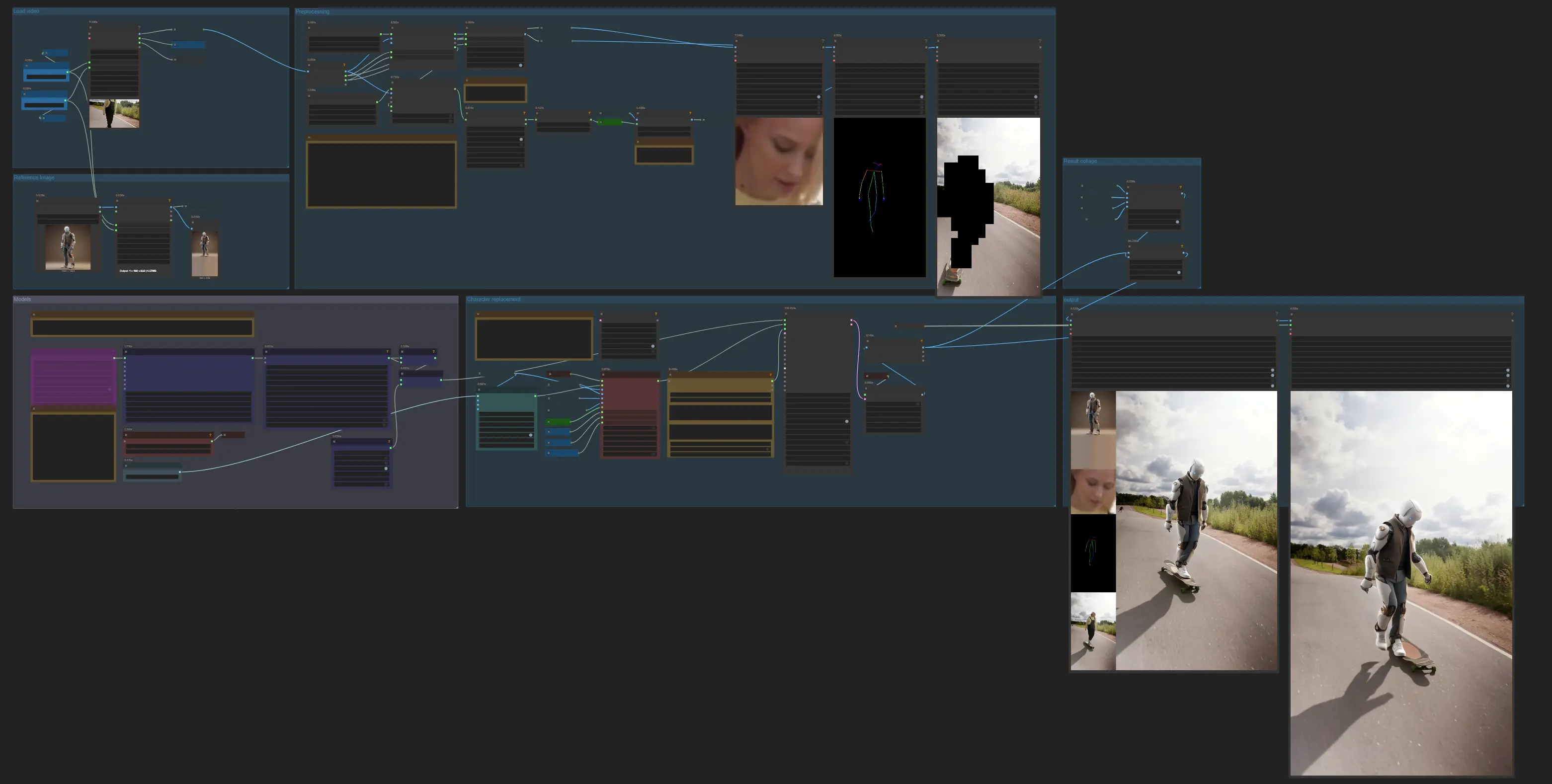
The graph moves through seven groups: load inputs, build a reference, preprocess pose/face and masks, load generation models, run character replacement, preview diagnostics, then export with audio.
Load video#
Import your source clip with VHS_LoadVideo (#63). The node exposes optional width/height for resizing and outputs video frames, audio, and frame count for downstream use. Keep the clip trimmed near the speaking part if you want faster processing. The audio is passed through to the exporter so the final video stays aligned with the original soundtrack.
Reference image#
Provide a single, clean portrait of the target character. The image is resized with ImageResizeKJv2 (#64) to match your working resolution and stored as the canonical reference used by CLIP Vision and the generator. Favor a sharp, forward‑facing image under lighting similar to your source shot to reduce color and shading drift.
Preprocessing#
OnnxDetectionModelLoader (#178) loads YOLO and ViTPose, then PoseAndFaceDetection (#172) analyzes each frame to produce full‑body keypoints and per‑frame face crops. Sam2Segmentation (#104) creates a foreground mask using either detected bounding boxes or keyframe points; if one hint fails, switch to the other for better separation. The mask is refined with GrowMaskWithBlur (#182) and blockified with BlockifyMask (#108) to give the generator a stable, unambiguous subject region. Optional overlays (DrawViTPose (#173) and DrawMaskOnImage (#99)) help you visually verify pose coverage and mask quality before generation.
Models#
WanVideoModelLoader (#22) loads Wan 2.2 Animate 14B, and WanVideoVAELoader (#38) provides the VAE. Identity features from the reference portrait are encoded by CLIPVisionLoader (#71) and WanVideoClipVisionEncode (#70). Style and stability are tuned with WanVideoLoraSelectMulti (#171), while WanVideoSetLoRAs (#48) and WanVideoSetBlockSwap (#50) apply LoRAs and block‑swap settings to the model; these tools come from the Wan wrapper library. See ComfyUI‑WanVideoWrapper for implementation details.
Character replacement#
WanVideoTextEncodeCached (#65) accepts a short descriptive prompt if you want to nudge appearance or shot mood. WanVideoAnimateEmbeds (#62) fuses the reference image, per‑frame pose, face crops, background, and mask into image embeddings that preserve identity while matching motion and mouth shapes. WanVideoSampler (#27) then renders the frames; its scheduler and steps control the sharpness‑motion tradeoff. The decoded frames from WanVideoDecode (#28) are handed to size/count inspectors so you can confirm dimensions before export.
Result collage#
For quick QA, the workflow concatenates the key inputs with ImageConcatMulti (#77, #66) to form a simple comparison strip of the reference, face crops, pose visualization, and a raw frame. Use it to sanity‑check identity cues and mouth shapes right after a test pass.
Output#
VHS_VideoCombine (#30) produces the final video and muxes the original audio for perfect timing. Additional exporters are included so you can save intermediate diagnostics or alt cuts if needed. For best results on longer clips, export a short test first, then iterate on LoRA mixes and masks before committing to a full render.
Key nodes in Comfyui Wan 2.2 Animate: Swap Characters & Lip-Sync workflow#
VHS_LoadVideo (#63) Loads frames and the original audio in one step. Use it to set a working resolution that fits your GPU budget and to confirm the frame count that downstream nodes will consume. From ComfyUI‑VideoHelperSuite.
PoseAndFaceDetection (#172) Runs YOLO and ViTPose to extract person boxes, whole‑body keypoints, and per‑frame face crops. Good keypoints are the backbone of believable motion transfer and are directly reused for lip articulation. From ComfyUI‑WanAnimatePreprocess.
Sam2Segmentation (#104) Builds a foreground mask around the subject using either bounding boxes or keyframe point hints. If hair or hands are missed, switch hint type or expand the blur/grow settings before blockifying. From ComfyUI‑segment‑anything‑2.
WanVideoLoraSelectMulti (#171) Lets you mix LoRAs such as Lightx2v and Wan22 Relight to balance motion stability, lighting consistency, and identity strength. Increase a LoRA’s weight for more influence, but watch for over‑stylization on faces. From ComfyUI‑WanVideoWrapper.
WanVideoAnimateEmbeds (#62) Combines the reference portrait, pose images, face crops, background frames, and mask into a compact representation that conditions Wan 2.2 Animate. Ensure width, height, and num_frames match your intended export to avoid resampling artifacts. From ComfyUI‑WanVideoWrapper.
WanVideoSampler (#27) Generates the final frames. Use higher steps and a steadier scheduler when you need crisper details, or a lighter schedule for fast previews. For very long clips, you can optionally introduce context‑window controls by wiring in WanVideoContextOptions (#110) to maintain temporal consistency across windows.
VHS_VideoCombine (#30) Exports the finished video and muxes the original audio so lip movements remain in sync. The trim‑to‑audio option keeps duration aligned with the soundtrack. From ComfyUI‑VideoHelperSuite.
Optional extras#
- Use a sharp, front‑facing reference with neutral lips for the cleanest identity transfer; avoid heavy makeup or occlusions.
- If segmentation misses hair or accessories, try switching
Sam2Segmentationhints between bounding boxes and keyframe points, then slightly grow the mask before blockifying. - Lightx2v LoRA improves I2V steadiness; Wan22 Relight LoRA helps match inconsistent lighting. Small weight changes can resolve flicker without over‑baking a look.
- Block‑swap can reduce identity drift on long shots; if faces soften over time, enable it in
WanVideoSetBlockSwap(#50) and retest. - Keep working resolution proportional to the source to prevent aspect distortion; upsize only when the reference image is detailed enough to support it.
- For capable runtimes, enabling torch compile and efficient attention in the wrapper nodes can speed up sampling; see ComfyUI‑WanVideoWrapper for guidance.
This Wan 2.2 Animate: Swap Characters & Lip-Sync workflow delivers consistent motion transfer and speech‑synchronous mouth shapes with minimal setup, making high‑quality character swaps fast and repeatable inside ComfyUI.
Acknowledgements#
This workflow implements and builds upon the following works and resources. We gratefully acknowledge @MDMZ for building the whole workflow, Kijai for WAN 2.2 Animate and related ComfyUI nodes, Wan-AI for Wan2.2-Animate assets including YOLOv10m detection, and Comfy-Org for the Wan 2.1 Clip Vision model for their contributions and maintenance. For authoritative details, please refer to the original documentation and repositories linked below.
Resources#
- Workflow Tutorial
- Youtube: ComfyUI-Tutorial from @MDMZ
Note: Use of the referenced models, datasets, and code is subject to the respective licenses and terms provided by their authors and maintainers.