MiniMax H3 Action Scenes: Reference‑guided action video generator with native audio#
MiniMax H3 Action Scenes is a ComfyUI workflow for creating tightly directed, reference‑guided action videos with synchronized native audio. You provide two character images, one scene reference, and a structured prompt. The workflow stages motion with MiniMax H3 Turbo, then refines composition and fight readability with LMS and Combat LoRAs while preserving the original audio. Outputs include a fast first‑pass “base” video and a higher fidelity “refined” video.
This Comfyui MiniMax H3 Action Scenes workflow is designed for previz, stunt and fight design, game and VFX cinematics, and short social clips. Tested examples include castle sword sparring, boxing‑gym mitt work, and a spaceship baton drill. Keep character identity and choreography explicit in the prompt, and review fast hand or weapon contacts for possible artifacts.
Key models in Comfyui MiniMax H3 Action Scenes workflow#
- Comfy‑Org MiniMax H3 core suite. Provides the text encoder plus the video and audio VAEs used to build, separate, and decode the joint audio‑video latent. See models and LoRAs in the official collection. MiniMax‑H3 models
- Minimax‑h3 Singularity (UNet). Serves as the base ref‑to‑video generator that fuses references and prompt into an audio‑video latent for action scenes. Minimax‑h3_Singularity
- MiniMax‑H3 Turbo LoRA. Speeds the first pass so you can iterate on motion beats quickly before refinement. Included in the official MiniMax H3 collection. MiniMax‑H3 LoRAs
- MiniMax‑H3 LMS LoRA. Adds layout, materials, and structural sharpness suited to live‑action style outputs; used during the second pass. LMS LoRA r64
- H3 Combat LoRA. Improves clarity of fight silhouettes, blade contacts, and grounded footwork in action scenarios. Included in the MiniMax H3 collection. MiniMax‑H3 models
- H3 Latent Upscaler LMS. A temporal 3D upscaler that enlarges the video latent between passes while maintaining motion continuity. Comfyui Minimax H3 Latent Upscaler
How to use Comfyui MiniMax H3 Action Scenes workflow#
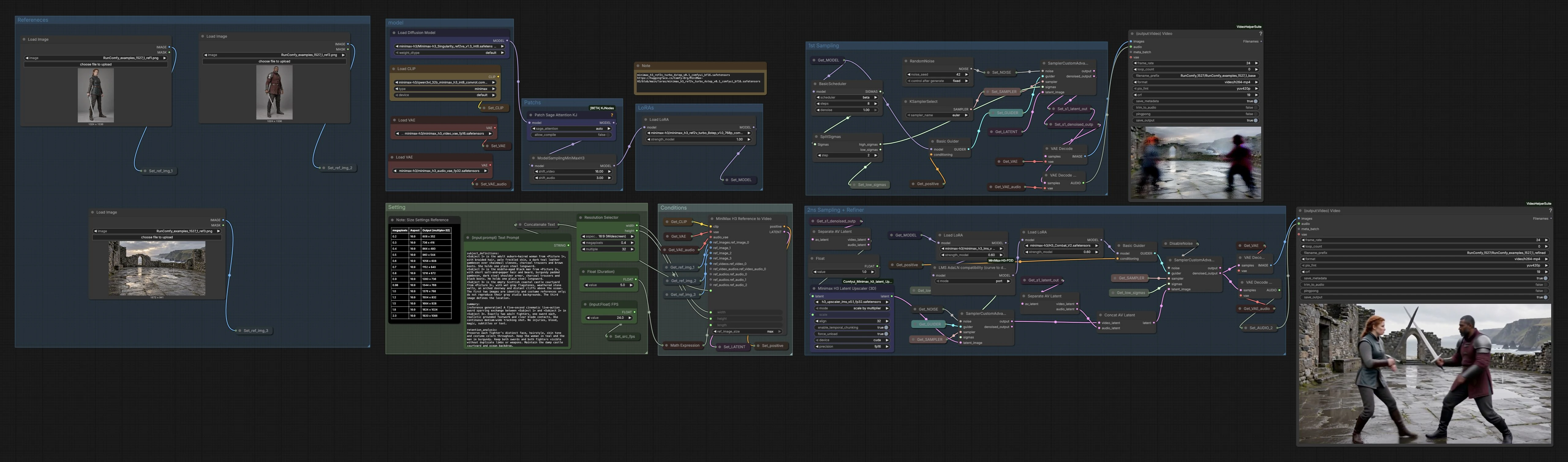
The pipeline runs in two coordinated passes. Pass 1 establishes motion and timing with Turbo for speed. The video latent is then upscaled and refined in Pass 2 with LMS and Combat LoRAs while the native audio is retained. You receive both a quick “base” preview and a polished “refined” export.
Setting#
Use the Setting group to choose aspect ratio, working resolution, clip duration, and frame rate. The duration control converts seconds into a frame count that aligns with the sampler’s chunking, which helps stability. Start lower for quick previews, then scale up once framing and beats look right. Higher resolutions and longer clips increase VRAM and render time.
Refereneces#
Load three references: one image per character and one image that defines the environment. Character images act as identity and costume guides, not backgrounds, so choose clean portraits with readable faces and key wardrobe elements. The scene reference sets lighting, palette, and architecture; pick a view that matches your intended camera height. You can swap references freely to explore different match‑ups and locations.
Conditions#
The MiniMaxH3ReferenceToVideo (#56) node fuses the structured prompt with the references and the MiniMax H3 encoders to produce a joint audio‑video latent and positive conditioning. The prompt works best when split into labeled sections such as subject_definitions, summary, retention_analysis, detailed_description, overall_soundscape, and non_diegetic_music. Be explicit about the number of fighters, weapons, camera move, and the exact count of clean contacts. Avoid extra characters, teleports, superhuman moves, or effects if you want grounded results.
LoRAs#
LoRAs are applied in two stages. Turbo is injected for the first pass to accelerate motion exploration without sacrificing identity retention. The LMS LoRA flows through an AdaLN compatibility fix, then Combat is applied so the refiner emphasizes readable silhouettes and strike‑parry exchanges. You can adjust LoRA strengths to balance realism versus stylization for your genre.
Patchs#
This group configures performance and schedule shaping. PathchSageAttentionKJ (#199) optimizes attention for memory and speed so high‑motion scenes remain responsive. MiniMaxH3SigmaShift (#297) aligns the video and audio sigma schedules, improving lip and foley timing relative to motion. Use these when you see timing drift or small identity instability.
1st Sampling#
The first pass initializes noise, sets a compact schedule, and samples with SamplerCustomAdvanced (#238) guided by your positive conditioning. The output is saved as a base latent and can be decoded into a quick preview video with native audio for fast review. This pass is where you judge blocking, camera travel, and the cadence of hits. If the beat map is off, revise the prompt and references here before refining.
2nd Sampling + Refiner#
Before refinement, the audio and video are separated from the first pass, the video latent is enlarged with MinimaxH3LatentUpscaler3D (#124), and the audio latent is kept intact. The refiner then samples with lower‑noise sigmas using LMS and Combat LoRAs to add material detail, edge fidelity, and fight readability. Finally, images and the preserved audio are decoded and combined into the refined export. Expect crisper edges, cleaner hands and blades, and steadier identity compared to the base pass.
Key nodes in Comfyui MiniMax H3 Action Scenes workflow#
MiniMaxH3ReferenceToVideo (#56)#
Builds a synchronized audio‑video latent from your structured prompt and reference images using the MiniMax H3 text encoder and VAEs. Adjust the prompt, width, height, and length to control content, framing, and duration. For best results, keep the subject definitions and scene constraints unambiguous. Reference: Comfy‑Org MiniMax‑H3.
MinimaxH3LatentUpscaler3D (#124)#
Temporally consistent 3D latent upscaler that enlarges the video latent between passes before refinement. Increase mode.scale modestly to gain detail without destabilizing motion. Useful when you like the pass‑1 timing but want sharper edges and textures. Reference: Comfyui Minimax H3 Latent Upscaler.
MiniMaxH3SigmaShift (#297)#
Shifts the audio and video sigma schedules used by MiniMax H3 so motion, lip cues, and foley stay aligned. Tuning shift_video and shift_audio can reduce timing drift in dialogue or impacts. Leave small offsets unless you notice desync at cut‑in or cut‑out. Reference: MiniMax‑H3 collection.
VHS_VideoCombine (#264)#
Combines decoded frames and audio into the final MP4 with your chosen frame rate and quality settings. Enable metadata saving to retain provenance and workflow details in exports. Use trim_to_audio when your refined video extends beyond the preserved audio. Reference: ComfyUI‑VideoHelperSuite.
PathchSageAttentionKJ (#199)#
Attention optimization that can improve throughput and stability for high‑detail scenes and larger resolutions. Keep it enabled for longer takes or complex environments. If you encounter performance regressions on smaller clips, try its automatic mode. Reference: ComfyUI‑KJNodes.
Optional extras#
- Prompting pattern. Use the provided sectioned format and write out a beat map for the action. Specify the exact number of fighters and weapons, camera move, and the count and timing of readable contacts.
- Reference curation. Choose identity photos with clear faces and wardrobe, and a location image that matches intended perspective and lighting. Avoid busy backgrounds on character references to reduce conflicts.
- Review pass. Watch the base video to validate blocking and timing before you refine. If contacts look mushy, increase clarity in the prompt and reduce frantic hand or blade speed.
- Typical issues and fixes. Fast hand or weapon contacts can cause small distortions; simplify choreography around impacts, shorten the exchange, or increase distance from camera to help the model render the moment cleanly.
- Deliverables. The workflow writes a quick base preview and a refined export so you can compare motion versus final look. Use the refined clip for sharing once identities, environment, and beats meet your goal.
With MiniMax H3 Action Scenes you can turn two character images, a scene reference, and a precise brief into grounded, reference‑faithful action clips with synchronized native audio, ready for editorial, previs, or publishing.
Acknowledgements#
This workflow implements and builds upon the following works and resources. We gratefully acknowledge Innovate Futures @ Benji for the AI Video MiniMax H3 ComfyUI workflow guidance, WarmBloodAban for Minimax-h3_Singularity, and Comfy-Org and RunningHubAI for the MiniMax-H3 base models and LMS LoRA for their contributions and maintenance. For authoritative details, please refer to the original documentation and repositories linked below.
Resources#
- Innovate Futures @ Benji/AI Video MiniMax H3 (workflow source)
- Docs / Release Notes: AI Video Minimax H3 Action Scenes Update — New Sampling Settings in ComfyUI
- WarmBloodAban/Minimax-h3_Singularity
- Hugging Face: WarmBloodAban/Minimax-h3_Singularity
- Comfy-Org/MiniMax-H3
- GitHub: Comfy-Org/workflow_templates
- Hugging Face: Comfy-Org/MiniMax-H3
- RunningHubAI/rh-minimax-h3-lms-v1.0-r64-lora
- Hugging Face: RunningHubAI/rh-minimax-h3-lms-v1.0-r64-lora
Note: Use of the referenced models, datasets, and code is subject to the respective licenses and terms provided by their authors and maintainers.