

Sulphur 3 ComfyUI Workflow: text to video with synchronized stereo audio#
The Sulphur 3 ComfyUI Workflow generates video and stereo audio from a single structured text prompt. It uses the MiniMax H3–based Sulphur 3 W4A8 checkpoint with H3 Corrector enabled, then decodes both streams and saves them together. The RunComfy examples exported MP4 clips at 24 fps with 32 kHz stereo audio.
The runway examples show sculptural fabrics in motion across different lighting setups and camera angles. Use a structured caption to describe the subject, the order of actions, camera movement, and sounds such as footsteps or fabric rustle.
Sulphur 3 W4A8 checkpoint and model components#
- Sulphur 3 W4A8 checkpoint (
s3_w4a8.safetensors) generates the paired video and audio latents from the prompt. Sulphur 3 model card - H3 Corrector (
s3_corrector.safetensors) supplies a learned correction to the video sampling path. SulphurAI lists it as an optional component, and this canvas enables it by default. Corrector nodes and example workflow - MiniMax H3 video and audio VAEs decode the two latent streams into video frames and an audio waveform.
- Qwen3-VL W4A8 INT8-down text encoder turns the structured caption into conditioning for the model. Exact encoder used in the verified runs
Generate video and audio from text#
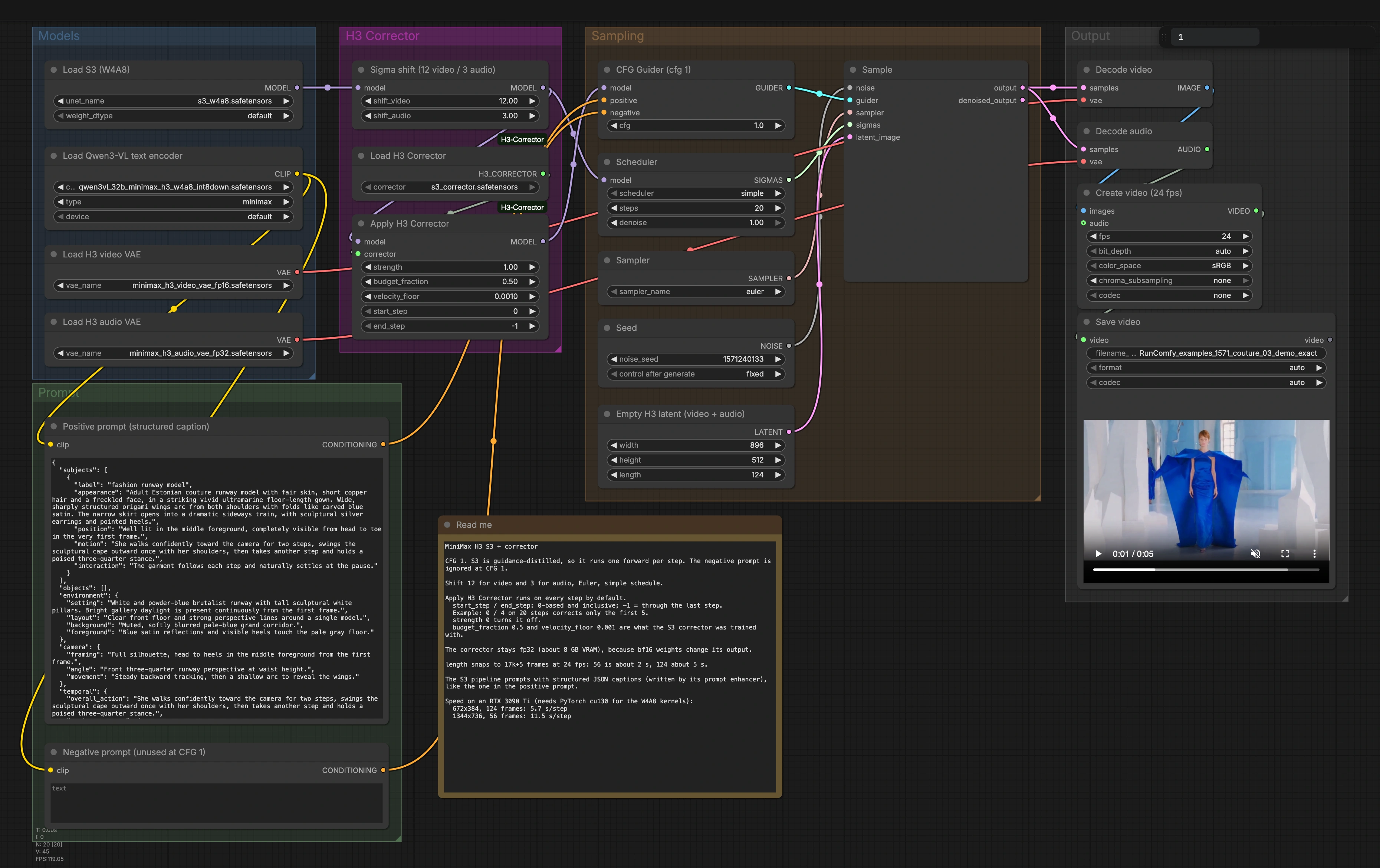
This Sulphur 3 ComfyUI Workflow is organized into five groups that run in a single forward path from prompt to saved video. Models and prompt produce conditioning, the corrector refines the model per step, the sampler generates joint video and audio latents, and the output group decodes and saves.
- Models
Load S3 (W4A8)(#1) loads the quantized Sulphur 3 checkpoint.Sigma shift (12 video / 3 audio)(#2) sets separate shifts for the two streams. Its output feeds bothScheduler(#9) and the Corrector path.
- H3 Corrector
Load H3 Corrector(#17) loads the weights.Apply H3 Corrector(#18) applies a bounded adjustment to the guided video velocity. The default step range covers the full sampling run.
- Prompt
Load Qwen3-VL text encoder(#3) loads the caption encoder. InPositive prompt (structured caption)(#6), describe your scene using fields such assubjects,environment,camera,temporal, andaudio_context. The saved canvas uses CFG 1, where the negative prompt (#7) is unused.
- Sampling
Empty H3 latent (video + audio)(#8) sets resolution and clip length for both modalities. TheScheduler(#9),Sampler(#10), andSeed(#11) define the sampling path and reproducibility.Sample(#12) brings everything together by applying the guider, schedule, sampler, and model to synthesize joint latents for video and stereo audio.
- Output
Decode video(#13) andDecode audio(#14) turn the latents into frames and sound.Create video (24 fps)(#15) combines them and passes the result toSave video(#16), which writes the file.
Key node settings#
Load S3 (W4A8) (#1)#
Selects the W4A8 checkpoint used for the verified RunComfy examples. Runtime memory depends on the resolution, frame count, text encoder, and Corrector configuration.
Sigma shift (12 video / 3 audio) (#2)#
The example uses a video sigma shift of 12 and an audio sigma shift of 3. Start with these settings when reproducing the example.
Apply H3 Corrector (#18)#
The controls include strength, start_step, end_step, budget_fraction, and velocity_floor. Set strength to 0 to disable the correction. The step bounds are inclusive, and end_step = -1 runs through the last step.
Positive prompt (structured caption) (#6)#
Use temporal to describe the order of on-screen actions and audio_context to specify sounds for those actions. For a runway shot, describe a turn and a sweep of the skirt, then request a fabric swish during the turn.
ComfyUI's Dynamic Prompts feature can treat JSON braces as prompt syntax and strip them when you click Run. To reproduce a structured caption exactly, submit the ComfyUI API prompt with the original JSON caption as the text string for node #6. This preserves its braces. ComfyUI frontend Dynamic Prompts implementation
CFG Guider (cfg 1) (#19)#
Runs at a guidance scale of 1 by default. Keep that value when reproducing the guidance-distilled example.
Empty H3 latent (video + audio) (#8)#
Defines the resolution and frame count used by the joint video and audio latent. At the canvas default of 24 fps, a 124-frame result runs for about 5.17 seconds.
Scheduler (#9)#
The saved setup uses the simple schedule with 20 steps and the Euler sampler.
Create video (24 fps) (#15)#
Combines the decoded frames and audio at 24 fps with the canvas color space set to sRGB. The verified example files contain H.264 video and AAC stereo audio.
Prompt and seed tips#
- Start from the provided example prompt, render a short clip, then iterate by editing
subjects,camera, andaudio_contextbefore scaling resolution or duration. - Keep the
Seed(#11) fixed when comparing prompt or Corrector settings. Change the seed to explore variations on the same caption. - Describe material movement and the camera separately. For example, specify a cape opening on a quarter turn and a camera tracking backward to keep the full silhouette in frame.
Acknowledgements#
This workflow implements and builds upon the following works and resources. We gratefully acknowledge SulphurAI for Sulphur 3 model and W4A8 checkpoint, SulphurAI for H3 Corrector nodes and example workflow, and JoaoZaokk for Qwen3-VL W4A8 INT8-down encoder for their contributions and maintenance. For authoritative details, please refer to the original documentation and repositories linked below.
Resources#
- SulphurAI/Sulphur 3 model and W4A8 checkpoint
- Hugging Face: SulphurAI/Sulphur-3
- SulphurAI/H3 Corrector nodes and example workflow
- Hugging Face: S3_ComfyUI.zip
- JoaoZaokk/Qwen3-VL W4A8 INT8-down encoder
- Hugging Face: qwen3vl_32b_minimax_h3_w4a8_int8down.safetensors
Note: Use of the referenced models, datasets, and code is subject to the respective licenses and terms provided by their authors and maintainers.