

LTX 2.3 ID-LoRA talking‑video workflow for ComfyUI#
This workflow turns a single face image, a short voice clip, and a prompt into a fully synchronized talking video. Built on LTX‑2.3, it fuses audio and visuals in one diffusion process and adds an In‑Context LoRA identity adapter so the person in your reference image stays consistent across all frames. LTX 2.3 ID-LoRA is ideal for avatars, virtual hosts, and any scenario where lip‑sync, likeness, and prompt control must align in one pass.
You provide three things: a reference image, a sentence or two of audio, and a text prompt describing look and performance. The LTX 2.3 ID-LoRA path handles identity while a lightweight audio preprocessor enhances voice clarity for stronger mouth cues. The result is a coherent, identity‑preserving video with synchronized speech that does not require per‑subject training.
Key models in Comfyui LTX 2.3 ID-LoRA workflow#
- Lightricks LTX‑2.3 22B base checkpoint. The joint audio‑video foundation model that generates synchronized frames and sound from text, image, and audio conditioning. It is the core generator used by this ComfyUI pipeline. Model card
- LTX‑2.3 distilled LoRA 384. Official LoRA adapter that applies distilled guidance to the base model to stabilize and speed sampling without sacrificing quality. It is plugged in as the second‑stage model in this workflow. See the checkpoints table on the LTX‑2.3 page. Model card
- LTX‑2.3 spatial upscaler x2. Latent‑space upscaler used inside the sampler subgraph to lift spatial detail before decoding, improving face and edge fidelity in the final video. Model card
- Gemma 3 12B Instruct text encoder for LTX‑2.3. Provides the text conditioning that drives style, scene, and performance. This workflow uses the Gemma 3 encoder packaged for LTX‑2 in ComfyUI. Comfy‑Org text encoders
- LTX‑2.3 VAEs for video and audio. Purpose‑built VAEs decode visual and acoustic latents produced by the model into images and a waveform. Compatible bf16 builds are referenced in the graph. Example sources: Video VAE · Audio VAE
- Mel‑Band RoFormer for vocal separation. Optional preprocessor that extracts clean vocals from the reference audio so the model can track syllables and mouth shapes more reliably. Paper · ComfyUI node
- LTX 2.3 ID‑LoRA (IC‑LoRA). An in‑context identity LoRA trained for talking‑video use that biases the generator toward the face in your reference image while respecting prompt and voice cues. Lightricks documents LoRA and IC‑LoRA usage with LTX‑2.3 on the model page. Model card
How to use Comfyui LTX 2.3 ID-LoRA workflow#
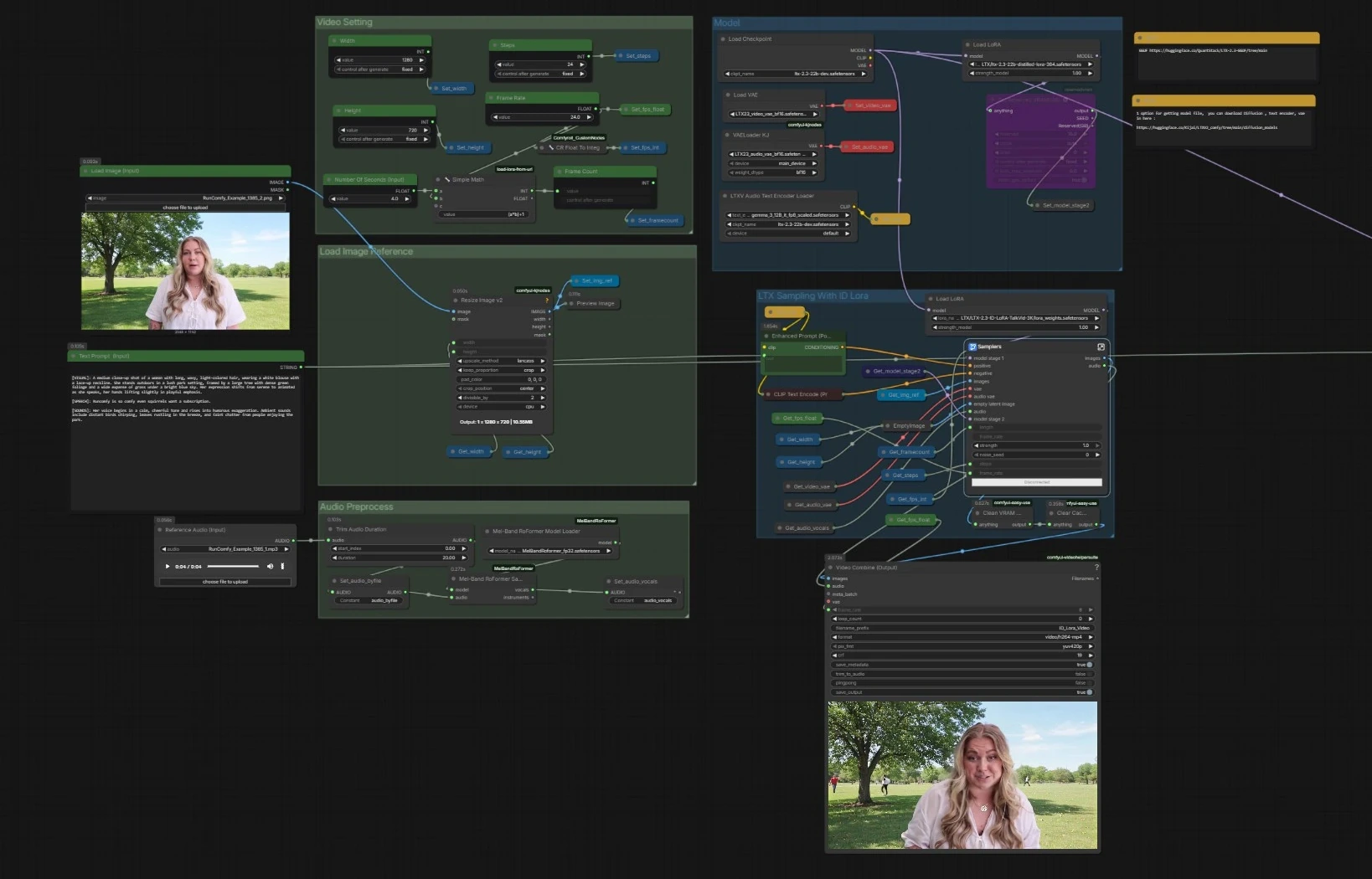
Overall flow. The pipeline loads the LTX‑2.3 base with text encoders and VAEs, prepares your image and audio, then runs a two‑stage LTX sampler that combines text, the face reference, and a vocal track to generate synchronized frames and speech. A parallel sampler without ID‑LoRA is included for quick comparisons. Final frames and audio are muxed into an MP4.
- Model
- The graph loads the base checkpoint with
CheckpointLoaderSimple(#5493), the Gemma‑based text encoders viaLTXAVTextEncoderLoader(#5494), and the dedicated VAEs for videoVAELoader(#5651) and audioVAELoaderKJ(#5649). It then applies two adapters: the official distilled LoRA to form a stage‑2 model and the LTX 2.3 ID-LoRA for identity conditioning throughLoraLoaderModelOnly(#5573). - This stage ensures the generator understands your prompt, has the right decoding stacks, and is primed with both efficiency guidance and identity bias.
- You generally do not modify anything here beyond swapping checkpoints or LoRAs if you have alternatives.
- The graph loads the base checkpoint with
- Video Setting
- Controls output dimensions, frame rate, steps, and length.
Width(#5284),Height(#5286), andFrame Rate(#5289) feed a small utility that computes total frames from seconds, keeping timing consistent across audio and video. - Settings are stored once and read by all downstream nodes so the two samplers and the muxer stay aligned.
- Adjust these values first when you want a different aspect, smoothness, or duration.
- Controls output dimensions, frame rate, steps, and length.
- Load Image Reference
- Provide a single clear face image through
Load Image (Input)(#5525). The image is resized withImageResizeKJv2(#5280) to match your chosen output. - This preprocessed image becomes the anchor for identity in the LTX 2.3 ID-LoRA stage, guiding likeness and shot composition.
- Use a well‑lit, frontal photo with minimal motion blur for best results.
- Provide a single clear face image through
- Audio Preprocess
- Drop in a short WAV or MP3 using
Reference Audio (Input)(#5652). The clip is trimmed if needed and then passed toMelBandRoFormerSampler(#5473) to isolate vocals. - Clean vocals help the model infer phonemes and timing for accurate lip movements and speaking rhythm.
- If your audio is already voice‑only, you can skip separation and feed it directly.
- Drop in a short WAV or MP3 using
- LTX Sampling With ID Lora
- This is the primary path. The sampler subgraph (
Samplers(#5278)) blends your positive prompt fromEnhanced Prompt (Positive)(#5174), the negative list, the face reference, and the vocal track through LTX‑2.3’s AV latent pipeline. LTXVReferenceAudioaligns motion with speech whileLTXVImgToVideoInplaceinjects the face image into the latent as an anchor. The LTX 2.3 ID-LoRA adapter steers the generator toward your subject’s identity.- The stage includes an internal latent upscaler to lift detail before decoding. It outputs frames plus a synchronized audio stream.
- This is the primary path. The sampler subgraph (
- LTX Sampling Without ID Lora
- A mirrored sampler (
Samplers(#5643)) runs the same conditioning but without the ID‑LoRA adapter. Use this for A/B checks or when you want more freedom away from the reference identity. - Everything else remains identical, so differences you notice are due to identity conditioning alone.
- This path can be helpful for quick drafts or creative departures.
- A mirrored sampler (
- Video Combine and Output
- Frames and generated audio are muxed to MP4 with
Video Combine (Output)(#5218). The frame rate comes from your global setting, so motion and lip‑sync match the sampler’s timing. - The secondary
Video Combine(#5645) previews the no‑ID‑LoRA branch if you enabled it, which is useful for comparisons. - The workflow cleans cache between runs to keep VRAM stable on long sessions.
- Frames and generated audio are muxed to MP4 with
Key nodes in Comfyui LTX 2.3 ID-LoRA workflow#
LoraLoaderModelOnly(#5573)- Loads the LTX 2.3 ID-LoRA that preserves facial identity. Reduce its weight if you want more creative variance or increase it to lock down likeness more tightly. Pair it thoughtfully with prompt strength so identity and style do not compete. Reference: LTX‑2.3 LoRA usage on the model page. Model card
LTXVReferenceAudio(#5589)- Converts your reference audio into conditioning for syllable timing, prosody, and mouth shapes. Feed clean speech for best alignment. If you hear pumping or off‑beat articulation, shorten or simplify the clip rather than boosting strength.
LTXVImgToVideoInplace(#5245, also used later)- Injects the face image into the latent video stream as a spatial prior. The image‑strength control balances adherence to the photo versus motion freedom. For strong identity with natural movement, keep image strength moderate and let the ID‑LoRA carry likeness.
LTXVConditioning(#5621)- Packages text conditioning and timing cues for the LTX samplers. Ensure its frame‑rate input matches your output frame rate so motion fields and phoneme timing stay coherent.
VHS_VideoCombine(#5218)- Muxes frames and audio to the final file. If your audio is slightly longer than frames, enable trimming here to prevent a trailing black tail. For platform compatibility, keep the default H.264 settings unless you have a reason to change them. Node reference: ComfyUI‑VideoHelperSuite
MelBandRoFormerSampler(#5473)- Separates vocals from music using a Mel‑band transformer so the generator locks to speech. If sibilants smear or plosives pop, try a different model file from the same family or reduce input loudness. Background reading: arXiv
Optional extras#
- For most stable generations with LTX‑2.3, use width and height divisible by 32 and choose a frame count of 8n + 1 as documented by Lightricks. Model card
- Keep the reference image consistent with your prompt. If you describe outdoor lighting but supply an indoor photo, identity may hold while color and shading fight the prompt.
- Give the audio 2 to 8 seconds with natural pacing. Over‑compressed or reverberant clips reduce lip‑sync fidelity even after vocal separation.
- When faces drift, slightly lower image strength and rely more on the LTX 2.3 ID-LoRA. When faces wander too much, do the opposite.
- For longer takes, generate in segments that share the same seed and global settings, then join clips in video editing if needed.
References and useful repos#
- LTX‑2.3 open weights and notes: Hugging Face model page
- Official ComfyUI nodes for LTX Video: Lightricks/ComfyUI‑LTXVideo
- LTX‑2 codebase and paper: Lightricks/LTX‑Video · arXiv
- Gemma 3 12B IT encoders for LTX in ComfyUI: Comfy‑Org/ltx‑2 text_encoders
- Mel‑Band RoFormer background: arXiv
Acknowledgements#
This workflow implements and builds upon the following works and resources. We gratefully acknowledge the creators of LTX 2.3 ID-LoRA Source for the LTX 2.3 ID-LoRA Source workflow for their contributions and maintenance. For authoritative details, please refer to the original documentation and repositories linked below.
Resources#
- LTX 2.3 ID-LoRA Source
- Docs / Release Notes: YouTube @Benji’s AI Playground
Note: Use of the referenced models, datasets, and code is subject to the respective licenses and terms provided by their authors and maintainers.