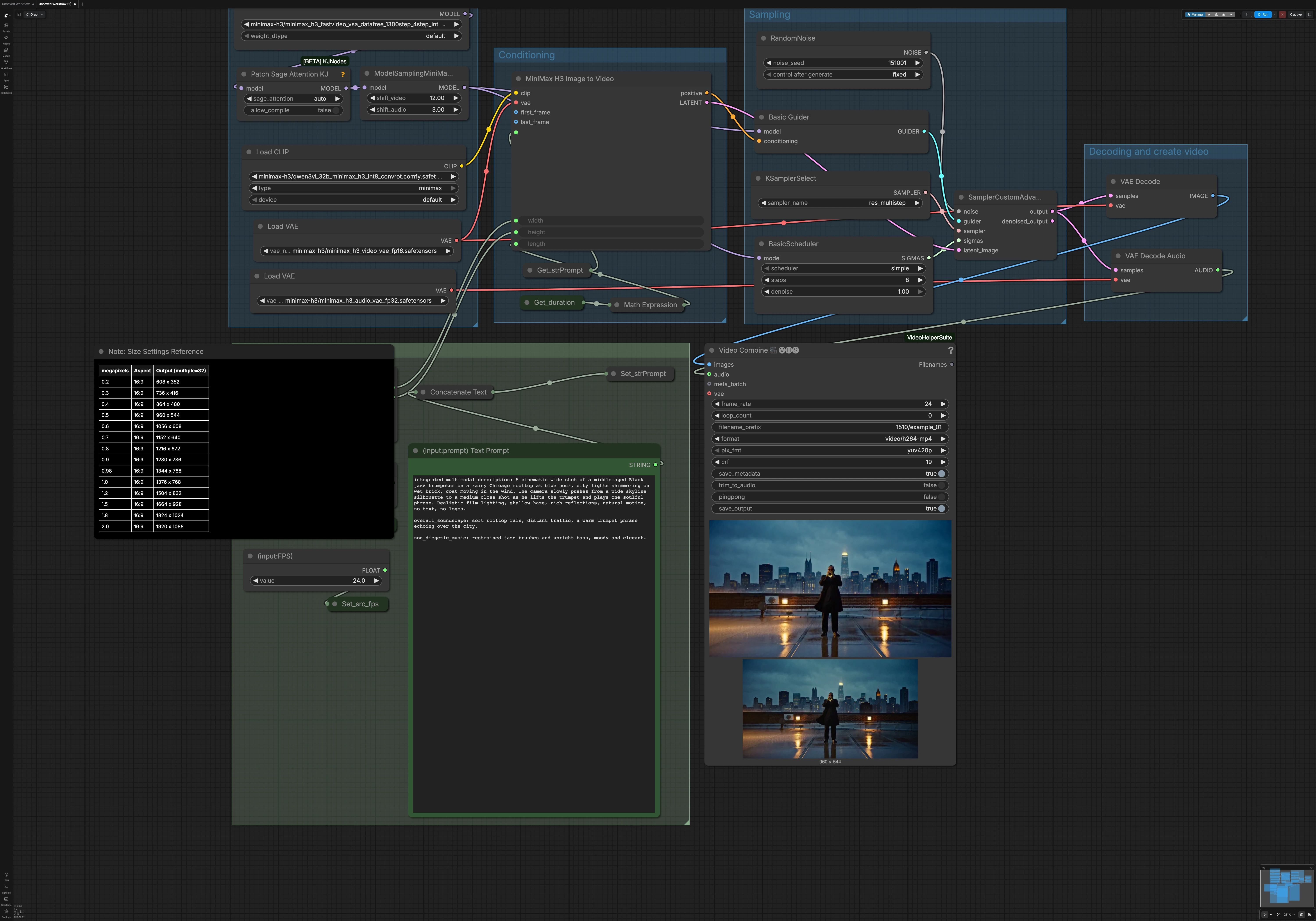
FastH3 4-Step ComfyUI Workflow#
This RunComfy-ready graph delivers rapid MiniMax H3 text-to-video and first-frame image-to-video with synchronized audio. The FastH3 4-Step ComfyUI Workflow follows the FastVideo VSA-DataFree 4-step path while retaining an 8-step scheduler in ComfyUI for practical visual stability. It is well suited for cinematic scenes, character-driven moments, product shots, and atmosphere-rich clips where fast iteration matters.
The workflow auto-muxes frames and audio into an MP4 and supports an optional first-frame I2V branch. Connect a starting image for continuity-sensitive shots, or leave it empty for pure T2V generation. Prompts can be long-form and structured, allowing you to carry visual and sound continuity across clips.
Key models in Comfyui FastH3 4-Step ComfyUI Workflow#
- MiniMax H3 diffusion model (FL2VA). Drives cross-modal video and audio generation with a unified latent design. Model family reference: MiniMaxAI/MiniMax-H3.
- FastVideo FastH3 4-step VSA-DataFree weights. Enables the ultra-short 4-step path used here for speed-first drafting. Weights reference: FastVideo/FastVideo-FastH3-4-step-Preview-v1-VSA-DataFree.
- Qwen3-VL 32B AWQ text encoder for MiniMax H3. Provides high-capacity prompt understanding for style, composition, and audio cues. Distributed with the Comfy-Org MiniMax H3 assets: Comfy-Org/MiniMax-H3.
- MiniMax H3 Video VAE (FP16). Decodes latent video to RGB frames with H3’s native codec. Asset reference: Comfy-Org/MiniMax-H3.
- MiniMax H3 Audio VAE (FP32). Decodes the latent audio track aligned to the generated frames. Asset reference: Comfy-Org/MiniMax-H3.
How to use Comfyui FastH3 4-Step ComfyUI Workflow#
At a high level, user inputs define resolution, duration, and prompt. The graph prepares MiniMax H3 components, builds conditioning for T2V or I2V, then runs a concise sampling pass tuned for the FastH3 4-step path. Finally, it decodes video and audio and combines them into a ready-to-share MP4.
User Input#
Set your target look and timing in the User Input group. Use ResolutionSelector (#115) to choose aspect and pixel budget; resolutions are quantized to multiples of 32 for decoder compatibility. Choose frames-per-second via (input:FPS) PrimitiveFloat (#5986) and clip length in seconds via (input:Duration) Seconds (#221). The expression in ComfyMathExpression (#220) converts duration to a frame count and snaps it to a stride-friendly multiple, giving stable scheduling and consistent clip lengths. Add your long-form prompt in (input:prompt) Text Prompt PrimitiveStringMultiline (#6005); a helper StringConcatenate (#6115) lets you keep reusable style or continuity anchors.
Models#
The Models group loads H3’s core components and optional attention tweaks. UNETLoader (#215) selects the FastVideo VSA-DataFree FL2VA weights that make the 4-step path viable for speed while maintaining coherence under an 8-step scheduler. CLIPLoader (#216) brings in the Qwen3-VL 32B AWQ text encoder for rich language grounding. Two VAELoader nodes handle video and audio branches for faithful decoding at the end. PathchSageAttentionKJ (#223) applies a lightweight attention modification before scheduling that can improve detail retention in very short schedules.
Conditioning#
Conditioning is assembled by MiniMaxH3ImageToVideo (#219), which also acts as the entry point for T2V or first-frame I2V. If you connect an image to first_frame, the node conditions motion from that frame; otherwise it runs pure text-to-video from your prompt. Width, height, and length flow from the User Input group so you can scale quickly without touching downstream nodes. Get_duration (#6067) and Get_strPrompt (#6069) manage shared values cleanly so prompt and timing apply consistently. The output provides positive conditioning and a prepared latent that the sampler will refine.
Sampling#
Sampling is compact and tuned for FastH3. RandomNoise (#217) seeds the trajectory, BasicGuider (#214) builds guidance from your conditioning, and KSamplerSelect (#211) chooses a multi-step sampler optimized for short paths. MiniMaxH3SigmaShift (#6007) adjusts H3’s noise schedule for the FL2VA weights, while BasicScheduler (#212) keeps the saved workflow at 8 steps for a practical balance between speed and fidelity. SamplerCustomAdvanced (#213) then drives the denoising to produce a single latent stream that contains both video and audio content.
Decoding and create video#
Once sampling completes, VAEDecode (#210) turns the latent video into frames and VAEDecodeAudio (#209) reconstructs the synchronized audio. VHS_VideoCombine (#6104) from Video Helper Suite muxes the sequence to MP4 with the project’s frame rate. You can preview the output and the node will write a single file to the output directory, ready for review. Because width, height, and frame count are already validated upstream, this stage is hands-off and fast. If you provided a first frame, motion will flow from it; otherwise the clip will originate entirely from the prompt.
Key nodes in Comfyui FastH3 4-Step ComfyUI Workflow#
MiniMaxH3ImageToVideo (#219)#
Central conditioning hub for both T2V and first-frame I2V. Provide your prompt and timing inputs, and optionally connect first_frame for continuity-sensitive shots. Adjust width and height for scale and aspect while keeping them as multiples of 32. Length comes from the duration-to-frames logic so you rarely need to set it manually.
MiniMaxH3SigmaShift (#6007)#
Applies a sigma shift tailored to MiniMax H3’s FL2VA schedule so the short-path sampler remains stable. Leave it as configured for the FastH3 route; it is primarily a compatibility and quality safeguard. Consider changing only if you swap H3 weights or schedulers.
BasicScheduler (#212)#
Provides an 8-step schedule that pairs well with the 4-step weight path for a practical quality baseline. You can reduce steps for faster drafts or lift them slightly for more stability, noting the trade-off between detail and speed. Step count interacts with sigma shift and sampler choice, so make changes thoughtfully.
SamplerCustomAdvanced (#213) with KSamplerSelect (#211)#
Runs the short denoising trajectory used by FastH3. The selected sampler is tuned for multi-step efficiency and coherence with very few updates. Keep this pairing unless you are experimenting with alternative samplers validated for H3.
ResolutionSelector (#115)#
High-level control for aspect and pixel budget. Use it to scale the look without touching model internals, and prefer resolutions that translate to about 0.7–1.0 megapixels for very fast drafts, then scale up when locking final shots. Outputs are quantized to keep decoders efficient.
VHS_VideoCombine (#6104)#
Combines decoded frames and audio into a single MP4. Quality and size can be balanced via its compression and frame rate controls. It is part of Video Helper Suite, which you can explore here: Kosinkadink/ComfyUI-VideoHelperSuite.
Optional extras#
- First-frame I2V: connect an image to
first_frameonMiniMaxH3ImageToVideo(#219) for continuity from a design board, photo, or previous shot. - Prompting: keep a reusable style bible in
StringConcatenate(#6115) and put only scene-specific directions in the main prompt for consistency across clips. - Timing: adjust seconds only; the graph snaps frame count to a stride-friendly multiple to avoid stutter and keeps audio aligned automatically.
- Speed vs quality: draft at lower megapixels in
ResolutionSelector(#115), then raise resolution and, if needed, step count inBasicScheduler(#212) to finalize. - References: explore weights and assets used by this workflow at MiniMaxAI/MiniMax-H3, FastVideo/FastVideo-FastH3-4-step-Preview-v1-VSA-DataFree, and the Comfy adaptation at barelymining/ComfyUI-MiniMax-H3-FastVideo.
Acknowledgements#
This workflow implements and builds upon the following works and resources. We gratefully acknowledge MiniMaxAI for MiniMax-H3, FastVideo for FastH3 4-step VSA-DataFree weights, and barelymining for ComfyUI-MiniMax-H3-FastVideo for their contributions and maintenance. For authoritative details, please refer to the original documentation and repositories linked below.
Resources#
- AI Future Tech/Workflow source and reference
- Docs / Release Notes: Patreon post
- barelymining/ComfyUI-MiniMax-H3-FastVideo
- Hugging Face: barelymining/ComfyUI-MiniMax-H3-FastVideo
- FastVideo/FastVideo-FastH3-4-step-Preview-v1-VSA-DataFree
- MiniMaxAI/MiniMax-H3
- Hugging Face: MiniMaxAI/MiniMax-H3
- Comfy.org/MiniMax H3 tutorial
- Docs / Release Notes: Comfy.org tutorial
Note: Use of the referenced models, datasets, and code is subject to the respective licenses and terms provided by their authors and maintainers.