

Minimax H3 I2V Dual Clock 8-Step High-Quality Ultra-Fast#
This RunComfy-ready ComfyUI workflow turns a single reference image and a combined motion-and-audio prompt into a short, synchronized video with native stereo sound. Built around MiniMax H3 Ref2VA conditioning and an 8-step Dual Clock sampler, it delivers fast image animation and tightly coupled sound without sacrificing visual coherence.
Use the Minimax H3 I2V Dual Clock 8-Step High-Quality Ultra-Fast workflow for cinematic image animation, character performances, vehicles, product shots, and atmospheric scenes that benefit from synchronized motion and generated audio. The graph integrates SageAttention for memory-efficient inference and the MiniMax-H3 Turbo LoRA for accelerated generation while keeping the user-facing I2V experience simple.
Key models in Comfyui Minimax H3 I2V Dual Clock 8-Step High-Quality Ultra-Fast workflow#
- MiniMax-H3 AV Foundation Model. The core audiovisual transformer that powers reference-image conditioning, motion generation, and native audio synthesis. See the official model card on Hugging Face: MiniMaxAI/MiniMax-H3.
- MiniMax-H3 Turbo LoRA V4 step600. A lightweight adapter that speeds up and stabilizes MiniMax-H3 for 8-step sampling while preserving fidelity. Model card: larryvrh/MiniMax-H3-Turbo-Lora.
- MiniMax-H3 Video VAE and Audio VAE. Paired decoders that convert audiovisual latents into RGB frames and stereo waveforms. They ensure efficient latent transport during sampling and high-quality decoding at the end.
How to use Comfyui Minimax H3 I2V Dual Clock 8-Step High-Quality Ultra-Fast workflow#
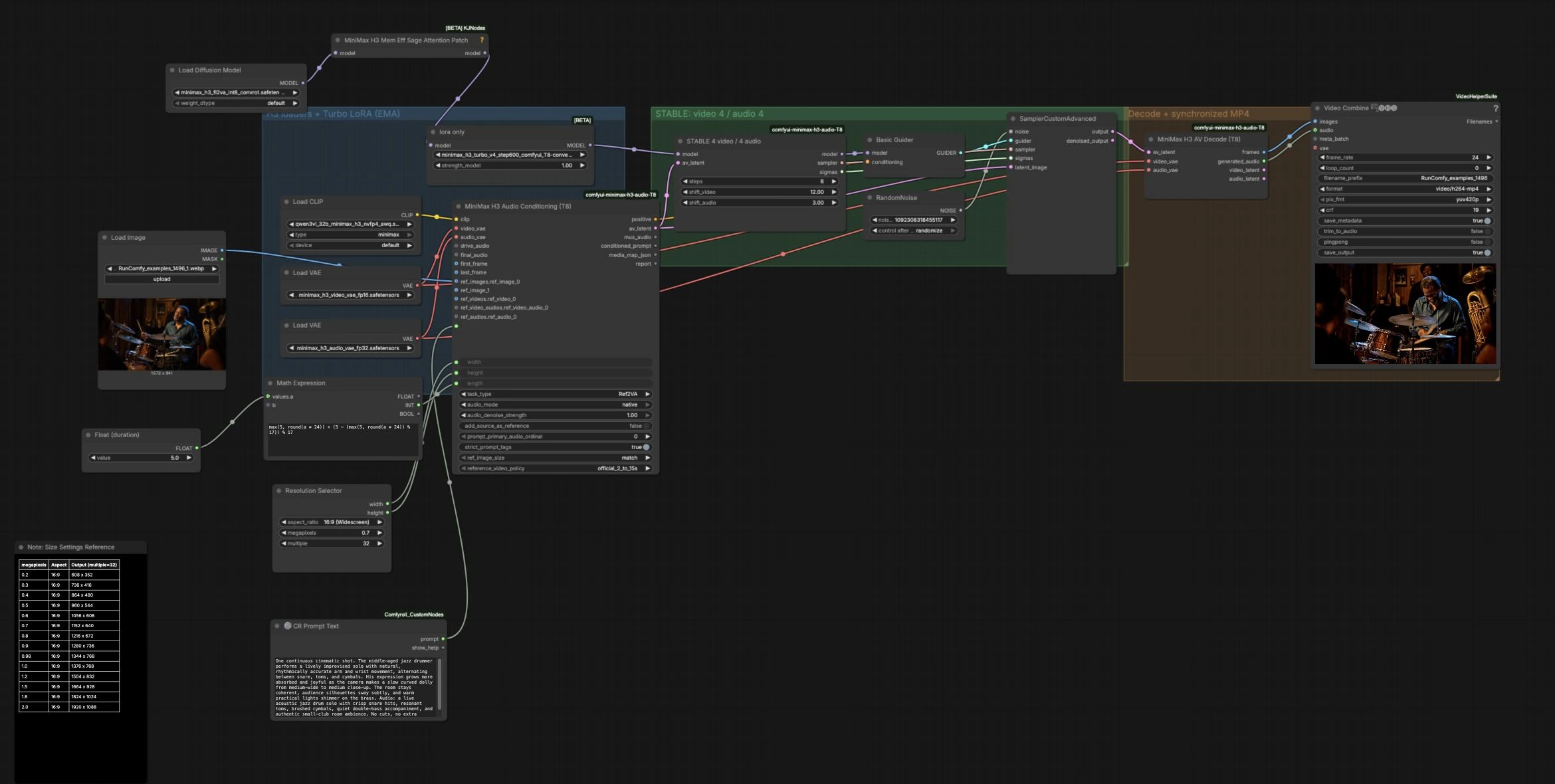
This workflow runs left to right in three grouped stages: model and asset setup, dual-clock sampling, and decode plus MP4 muxing. You provide one reference image and a single prompt that includes both the visual direction and an “Audio:” section describing the desired sound.
H3 loaders + Turbo LoRA (EMA)#
This group prepares the MiniMax-H3 stack and applies the Turbo LoRA for speed. Load your reference image into LoadImage, then write a descriptive motion prompt that ends with an “Audio: …” clause in CR Prompt Text. Choose your output size using ResolutionSelector, which keeps dimensions aligned to multiples of 32 for video stability. Set your target duration in seconds with the Float (duration) control; the graph’s internal math converts it to a frame count aligned to the model’s timing so the sampler runs smoothly. A SageAttention patch is applied to the model to reduce VRAM use and improve throughput without changing the final look.
STABLE: video 4 / audio 4#
This group performs the heart of generation with an 8‑step MiniMax H3 Dual Clock sampler. The conditioning block uses Ref2VA to fuse your reference image and text prompt into an AV latent, which anchors identity, composition, and high-level sound cues. The Dual Clock sampler advances video and audio with separate yet synchronized clocks so motion and sound feel naturally locked. If you need to correct perceived lead or lag, adjust the video and audio clock shifts to nudge either stream forward or backward until the performance snaps into sync. A basic CFG-style guider balances faithfulness to your prompt with the model’s learned priors for clean, cinematic motion.
Decode + synchronized MP4#
The decoder converts the final AV latent into a frame sequence and a stereo audio track using the dedicated MiniMax-H3 VAEs. The VHS_VideoCombine stage packages frames and audio into a single H.264 MP4 at your chosen frame rate, saving a ready-to-share video. If you bring your own audio later, you can trim to audio length or export image-only for external editing. The result is a compact, synchronized clip that preserves the look of your reference image while adding life-like movement and sound.
Key nodes in Comfyui Minimax H3 I2V Dual Clock 8-Step High-Quality Ultra-Fast workflow#
MiniMaxH3AudioConditioningT8 (#6)#
This node implements Ref2VA conditioning, taking your prompt, reference image, target width, height, and length to create an audiovisual latent and positive conditioning. Use it to set the creative intent: describe motion, camera behavior, and scene continuity, then add an “Audio:” segment that specifies instruments, timbre, ambience, and dynamics. Keep width and height consistent with your reference image’s aspect for the most coherent layouts. The length control maps your duration to frames aligned with the sampler’s internal timing, which helps maintain smooth motion and stable audio. Provided by the ComfyUI MiniMax H3 Turbo project: Larryvrh/ComfyUI-MiniMax-H3-Turbo.
MiniMaxH3DualClockSamplerT8 (#7)#
An 8-step sampler designed specifically for MiniMax-H3 AV generation with separate video and audio clocks. It produces fast, high-quality results by coordinating both timelines while respecting your Ref2VA constraints. If visuals feel slightly early or late relative to the beat or action, adjust the video and audio clock shifts in small increments to re-center sync. Keep the number of steps at eight for the intended High-Quality Ultra-Fast balance. Implemented in the same plugin: Larryvrh/ComfyUI-MiniMax-H3-Turbo.
LoraLoaderBypassModelOnly (#2)#
Injects the MiniMax-H3 Turbo LoRA into the base model to accelerate convergence and improve stability at low steps. If you notice over-sharpening or identity drift on certain images, slightly reduce the LoRA strength to regain neutrality. For punchier detail or stronger temporal locking, increase the strength in moderation. LoRA reference: larryvrh/MiniMax-H3-Turbo-Lora.
MiniMaxH3MemoryEfficientSageAttentionPatch (#17)#
Applies a memory-efficient attention implementation to the MiniMax-H3 model for better throughput on typical GPUs. Use it as-is to reduce VRAM pressure on larger resolutions and longer durations. The patch is part of the KJNodes suite for ComfyUI: kijai/ComfyUI-KJNodes.
MiniMaxH3AVDecodeT8 (#11)#
Decodes the audiovisual latent into RGB frames and stereo audio using the paired MiniMax-H3 VAEs. This is where final fidelity is realized, so keep resolution choices realistic for your GPU to avoid decode bottlenecks. The node outputs frames and an audio signal that are time-aligned with the sampler’s clocks, ready for muxing. Provided by the MiniMax H3 Turbo plugin: Larryvrh/ComfyUI-MiniMax-H3-Turbo.
VHS_VideoCombine (#12)#
Combines decoded frames and stereo audio into a single MP4 using Video Helper Suite. Set your preferred frame rate and enable trimming if you later substitute custom audio. This node finalizes delivery so you can preview and export quickly. Project reference: Kosinkadink/ComfyUI-VideoHelperSuite.
Optional extras#
- Prompting works best when you split visual direction and sound design. Write the scene first, then add “Audio:” with instruments, style, room type, and intensity.
- Start with moderate sizes that match your image aspect. Upsize once you like the motion and timing.
- If sync feels off, nudge the video or audio clock shift instead of changing duration. Tiny adjustments can lock performance to the beat.
- For character shots, choose images with clear subject separation and consistent lighting to preserve identity through motion.
- Reseed to explore micro-variations in phrasing and timing while keeping the same setup.
Acknowledgements#
This workflow implements and builds upon the following works and resources. We gratefully acknowledge RunningHub for the Source workflow template, MiniMaxAI for MiniMax-H3 model weights, and Larryvrh for MiniMax-H3 Turbo LoRA and the ComfyUI MiniMax H3 Turbo project for their contributions and maintenance. For authoritative details, please refer to the original documentation and repositories linked below.
Resources#
- RunningHub/Source workflow template
- Docs / Release Notes: Source workflow template
- MiniMaxAI/MiniMax H3 model weights
- Hugging Face: MiniMaxAI/MiniMax-H3
- larryvrh/MiniMax-H3 Turbo LoRA
- Hugging Face: larryvrh/MiniMax-H3-Turbo-Lora
- Larryvrh/ComfyUI MiniMax H3 Turbo project
Note: Use of the referenced models, datasets, and code is subject to the respective licenses and terms provided by their authors and maintainers.