LTX-2 First Last Frame: start-to-end controlled, audio‑synced video generation in ComfyUI#
LTX-2 First Last Frame is a ComfyUI workflow for creators who want precise, cinematic motion between a defined starting frame and ending frame while generating synchronized audio and visuals in one pass. By conditioning on both images (and optionally a guiding middle frame), the pipeline preserves identity, framing and lighting across the shot, then steers motion to land exactly on the last frame. It is designed for narrative beats, title or scene transitions, camera moves, and any moment where temporal continuity and audio alignment matter.
Powered by the LTX-2 real-time model, the workflow keeps iteration fast while offering fine control over prompts, camera behavior via LoRAs, and first/last frame strength. The result is a smooth, coherent sequence whose timing, look, and sound follow your directions from the first frame to the last.
Note: For machine types below 2x Large, please use the "ltx-2-19b-dev-fp8.safetensors" model !
Key models in Comfyui LTX-2 First Last Frame workflow#
- LTX-2 19B (dev). The core video generation model that produces joint audio‑video latents from text and frame controls; supports real‑time iteration and camera‑aware LoRAs. See the official repository and weights: Lightricks/LTX-2 on GitHub and Lightricks/LTX-2 on Hugging Face.
- Gemma 3 12B Instruct text encoder for LTX‑2. Provides robust, instruction‑tuned language understanding for visual and audio prompting in this pipeline; packaged for ComfyUI as a LTX‑compatible text encoder. Weights reference: Comfy‑Org/ltx‑2 split text encoders.
- LTXV Audio VAE (24 kHz vocoder). Encodes and decodes audio latents so the soundtrack is generated alongside the video and stays in sync with on‑screen action. See model family context in Lightricks/LTX-2.
- LTX‑2 Spatial Upscaler x2. A latent upscaler for cleaner high‑resolution results after the base pass, used during the upscale sampling stage. Weights are available under Lightricks/LTX-2.
- LTX‑2 LoRA pack for camera control and detail. Optional LoRAs such as Dolly In/Out/Left/Right, Jib Up/Down, Static, and an Image‑Conditioning Detailer shape camera motion and fine detail. Browse the official collection: Lightricks LTX‑2 LoRAs.
How to use Comfyui LTX-2 First Last Frame workflow#
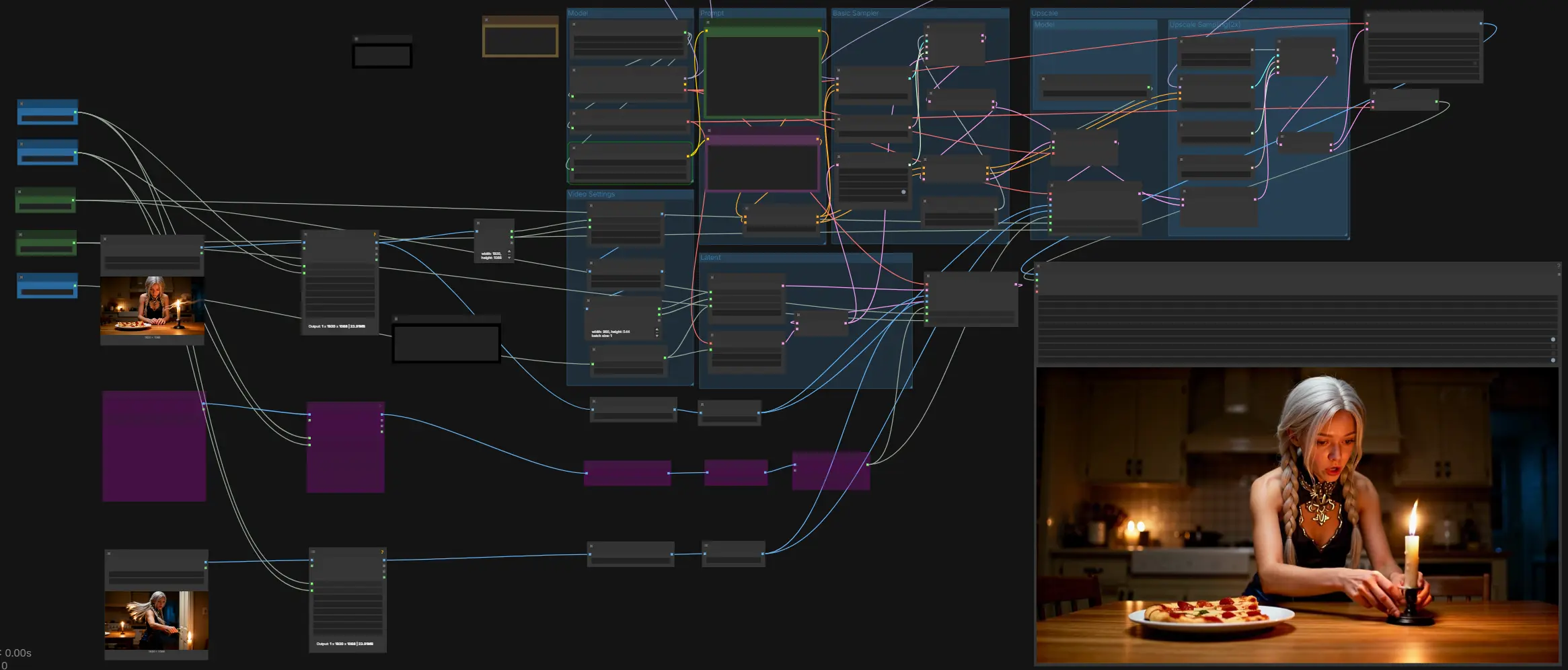
This workflow moves from inputs and prompts to a base audio‑video sample, then performs a guided 2x upscale pass before decoding and muxing to MP4 with audio. It relies on first/last frame controls at both the base and upscale stages, with an optional middle frame to stabilize the trajectory.
Model#
The Model group loads the LTX‑2 checkpoint, the Gemma 3 12B Instruct text encoder, and the LTXV Audio VAE. Use the ckpt_name panel to select between standard and FP8 variants based on your GPU. The text encoder is provided by LTXAVTextEncoderLoader and feeds both positive and negative prompts. The audio VAE enables joint audio‑video generation so dialogue, effects, or ambience described in the prompt emerge with the visuals.
Prompt#
Write the scene in the positive prompt and list undesirable traits in the negative prompt. Describe actions over time, key visual specifics, and sound events in the order they should occur. The LTXVConditioning block applies your prompt together with the chosen frame rate so timing and motion are interpreted consistently. Treat the audio as part of the prompt when you need speech, effects, or ambience.
Video Settings#
Set Width, Height, and total Video Frames, then choose Length for first/last control spacing if needed. The workflow ensures dimensions match model requirements and scales inputs appropriately. If your input images are larger, the graph reads their size to initialize the latent canvas and resizes the provided frames to fit. Choose a frame rate that matches your intended delivery.
Latent#
This group builds an empty video latent and a matching audio latent, then concatenates them so the model samples audio and video together. It is where the first/last frame guidance is first injected on the base pass. Providing a middle frame is optional but useful to stabilize identity or key pose mid‑shot. The result is a single AV latent ready for base sampling.
Basic Sampler#
The base pass uses random noise, a scheduler, and the configured guider to resolve your prompt into a coherent AV latent. The guider receives positive and negative conditioning plus any LoRA‑modified model. After sampling, the latent is split back into video and audio so the video can be upscaled while audio is kept aligned. This stage sets the global motion, pacing, and audio rhythm that the upscale pass will refine.
Upscale#
The upscaler lifts the latent to higher spatial resolution before a second sampling pass. First/last frame control is re‑applied at this higher resolution to lock the opening and closing frames precisely. You can also feed a middle frame here to keep features steady through the upscale. The result is a sharper AV latent that preserves the planned motion.
Model#
This Model group loads the LTX‑2 latent upscaler used by the Upscale group. It prepares the specific x2 spatial model and exposes it to the latent upsampler node. Switch models here if you maintain multiple upscalers. Leave this group untouched if you are satisfied with the default x2 behavior.
Upscale Sampling(2x)#
The second pass performs guided sampling on the upscaled latent using a separate sampler and sigma schedule. A crop‑aware guide aligns conditioning to the new resolution so details stay consistent. The output is split into video and audio again for decoding. This pass primarily sharpens edges, improves small text or textures, and maintains the first/last frame match.
LTX-2-19b-IC-LoRA-Detailer#
This group applies a detail‑oriented LoRA tuned for LTX‑2’s image‑conditioning pathway. Enable it when you want more micro‑detail or tighter textures after conditioning on real images. Keep the strength moderate to avoid overpowering your prompt or frame constraints. If your inputs are already crisp and well lit, you may bypass this LoRA.
Camera-Control-Dolly-In#
Use this LoRA when the camera should push toward the subject over time. It biases the model toward forward motion while respecting first/last targets. Pair it with textual cues describing the move for the strongest effect. Reduce strength if the motion overshoots your intended framing.
Camera-Control-Dolly-Out#
Select this when the shot should pull back from the subject. It helps create negative parallax and widening context as the sequence progresses. Keep the last frame aligned with your exit composition to land the move cleanly. Combine with atmospheric audio prompts for cinematic reveals.
Camera-Control-Dolly-Left#
Applies a lateral move to the left that reads as a dolly or truck. Good for conversational beats or reveals across a set. If objects smear or drift, increase first/last strength slightly or add a middle frame. Balance with small textual hints like “slow move left” to complement the LoRA.
Camera-Control-Dolly-Right#
The mirror of Dolly‑Left, this biases motion to the right side. It works well for following a character or panning to a new subject. Keep LoRA strength modest if you also request a push‑in to avoid conflicting signals. Ensure the last frame’s composition matches your desired endpoint.
Camera-Control-Jib-Up#
Creates a vertical rise, useful for lifting reveals or establishing shots. Combine with shallow prompts about perspective change and horizon shift for clarity. When the move is strong, watch ceilings or sky exposure; tweak negative prompt to avoid blown highlights. If needed, add a middle frame showing mid‑rise framing.
Camera-Control-Jib-Down#
Produces a controlled descent, often used to settle on a detail or character. It can be paired with a quieter audio bed for emphasis. Ensure the last frame contains the target object or face so motion resolves decisively. Adjust LoRA strength if the descent feels too fast.
Camera-Control-Static#
Locks the virtual camera in place when you want action without camera motion. This is useful for dialogue or product shots where only the subject moves. Combine with first/last frame control to keep composition perfectly stable. Add subtle motion via the text prompt rather than a camera LoRA.
Key nodes in Comfyui LTX-2 First Last Frame workflow#
LTXVFirstLastFrameControl_TTP (#227)#
Injects first and last image constraints into the base AV latent. Tune first_strength to control how strictly the first frame is matched and last_strength to determine how hard the sequence lands on the final frame. If the middle of the clip drifts, supply a middle frame via LTXVMiddleFrame_TTP and keep strengths moderate to avoid over‑constraining motion.
LTXVMiddleFrame_TTP (#181)#
Optionally inserts a guiding frame at a chosen position between start and end to stabilize identity or pose. Increase strength when the subject changes too much mid‑shot. Use sparingly; the best results come from a single, well‑chosen middle reference rather than many competing constraints.
LTXVLatentUpsampler (#217)#
Performs the x2 spatial upscale in latent space using the LTX‑2 spatial upscaler. Use this before the 2x sampling pass so the higher‑resolution details are refined by the model rather than stretched. If memory is tight, keep LoRA usage minimal during this stage.
LTXVFirstLastFrameControl_TTP (#223)#
Re‑applies start/end (and optional middle) guidance after the x2 upscale. This ensures the final decoded frames match your first and last references precisely at delivery resolution. If the upscale introduces micro shifts, slightly raise last_strength here rather than at the base stage.
LTXVSpatioTemporalTiledVAEDecode (#230)#
Decodes the high‑resolution video latent to frames using spatio‑temporal tiling. Adjust tile and overlap settings only when you see seams or temporal flicker; larger overlap costs more VRAM but improves consistency. Keep last_frame_fix for edge cases where the final frame shows minor drift.
VHS_VideoCombine (#254)#
Muxes decoded frames and the generated audio to a single MP4. Set output format, pix_fmt, and crf for your delivery target, and choose a frame_rate consistent with conditioning. Enable metadata saving to keep reproducibility records with each render.
Optional extras#
- Use FP8 weights of LTX‑2 if your GPU is limited; switch back to full precision for the highest fidelity when VRAM allows. Weights are in Lightricks/LTX‑2.
- Dimensions work best when width and height are of the form 32n + 1; total frames work best as 8n + 1. The workflow auto‑corrects to the nearest valid values if needed.
- Describe audio cues directly in your positive prompt (dialogue, effects, ambience). The model’s joint AV latent keeps lips, actions, and sounds aligned.
- Start with moderate first/last strengths; raise last strength to nail the final pose, or add a middle frame to stabilize identity.
- Apply only one camera LoRA at a time for clear intent. Browse official options in the Lightricks LTX‑2 LoRA collection.
Acknowledgements#
This workflow implements and builds upon the following works and resources. We gratefully acknowledge @AIKSK for the LTX-2 First Last Frame Workflow Reference for their contributions and maintenance. For authoritative details, please refer to the original documentation and repositories linked below.
Resources#
- RunningHub/LTX-2 First Last Frame Workflow Reference
- Docs / Release Notes: LTX-2 First Last Frame Workflow Reference from AIKSK
Note: Use of the referenced models, datasets, and code is subject to the respective licenses and terms provided by their authors and maintainers.