

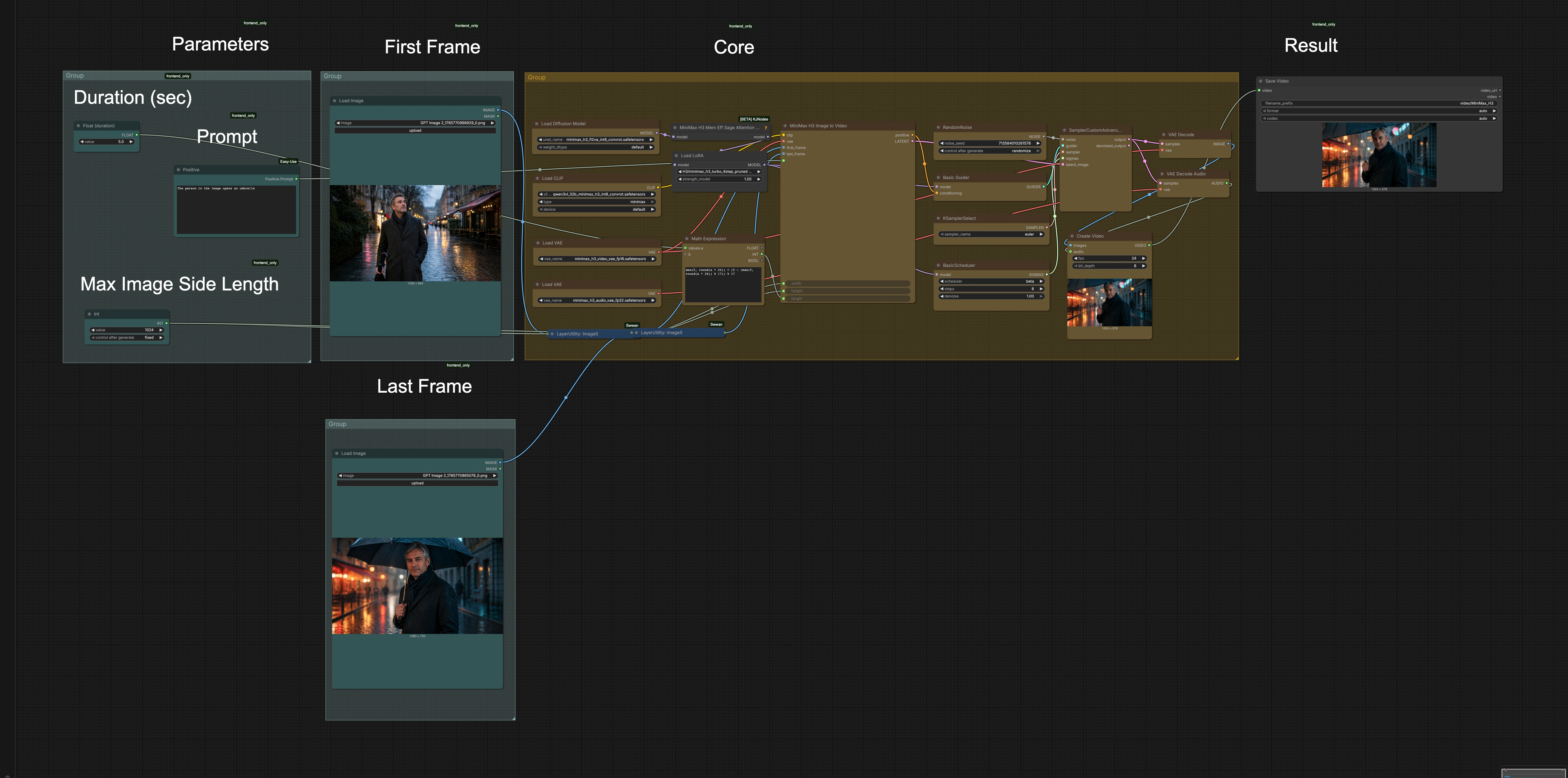
MiniMax H3 First Last Frame to Video Acceleration#
This ComfyUI workflow turns a matched first frame and last frame into a short video with synchronized, native stereo audio. It runs MiniMax H3 with a Turbo Acceleration LoRA so motion lands quickly while preserving the first and last keyframes. The result is a fast FL2VA pipeline that is ideal for drafting character actions, camera moves, and product beats on RunComfy without leaving ComfyUI.
MiniMax H3 First Last Frame to Video Acceleration focuses on speed and temporal coherence. By anchoring the start and end frames, the clip hits the visual targets you set, while the accelerated sampling schedule cuts turnaround time dramatically. Creators get rapid previews they can iterate on, then upscale or refine as needed.
What you get#
- First-last-frame conditioned video generation in ComfyUI
- Accelerated MiniMax H3 sampling via a Turbo LoRA
- Native stereo audio generated alongside the video
- Start and end keyframes visually respected
- One-click export for quick review and sharing
Key models in Comfyui MiniMax H3 First Last Frame to Video Acceleration workflow#
- MiniMax-H3 by Comfy-Org. The core video foundation model used for diffusion-based generation with first/last-frame guidance and synchronized audio output. It produces temporally consistent frames while following your prompt and keyframes. Model card
- MiniMax-H3 Turbo LoRA. A lightweight adapter that accelerates the effective sampling schedule for H3, allowing you to reach motion convergence in far fewer steps while keeping keyframe locks intact. Model card
How to use Comfyui MiniMax H3 First Last Frame to Video Acceleration workflow#
This graph takes your two anchor frames and an optional text prompt, then generates a short, coherent clip with stereo audio. It proceeds in stages: inputs, alignment, motion guidance, accelerated H3 sampling, audio generation, and export.
Inputs: first frame, last frame, and prompt#
Provide visually matched first and last frames that share subject identity, exposure, and aspect ratio. Add a concise text prompt to steer style and content; use a negative prompt for elements you want to avoid. Choose clip duration, frame rate, and resolution appropriate to the motion between frames. A reproducible seed can be set for consistent reruns.
Alignment and normalization#
The workflow normalizes resolution and color so both keyframes sit in the same space. Basic prechecks help reduce flicker from exposure or white balance mismatches. Minor reframing can be applied so composition stays consistent across the clip. This alignment step improves how MiniMax H3 interpolates subject pose and camera changes.
Keyframe-conditioned motion guidance#
Your first and last frames act as hard anchors that the video must start and finish on. The conditioning stack blends prompt features with visual cues from both frames to shape the motion path. This keeps identity, layout, and scene attributes stable while allowing plausible in-between transitions. The guidance strength balances fidelity to anchors with room for natural movement.
Accelerated MiniMax H3 sampling#
MiniMax H3 is loaded with the Turbo LoRA to shorten the effective sampling schedule. The sampler resolves global motion quickly, then refines details while respecting the keyframe locks. If your frames imply larger camera travel or pose change, you can favor stability by dialing back prompt aggressiveness or increasing total steps slightly. For small, well-matched motions, the acceleration gives crisp results in very little time.
Native stereo audio generation#
Audio is generated natively alongside the video so rhythm and semantic cues align with visual content. You can provide a short audio or scene vibe prompt, or let the model infer sound from the visual and text context. The workflow produces a stereo track that matches clip duration automatically. Loudness and onset are shaped to avoid clipping and to sit well under dialogue or music in post.
Assembly and export#
Frames are decoded, ordered, and packed into a review-ready video file with the generated stereo audio muxed in. Filenames capture prompt and seed context so you can trace settings later. Alongside the final clip, the workflow can save stills for quick A/B comparison of anchors versus output. Use these to iterate fast before committing to higher resolutions or longer durations.
Optional extras#
- Pick anchor frames with consistent lighting and color; strong mismatches make any FL2VA model work harder.
- Keep motion moderate between anchors for the cleanest acceleration; extreme pose jumps may require more steps or a gentler prompt.
- If edges of the clip must be exact, prioritize anchor fidelity over aggressive style prompting.
- For product shots, neutral backgrounds and centered composition help preserve geometry through the transition.
- Save seeds for winning drafts so you can upscale or lengthen later with the same look.
Links to referenced assets:
- MiniMax-H3 model weights on Hugging Face: Comfy-Org/MiniMax-H3
- Turbo acceleration LoRA: larryvrh/MiniMax-H3-Turbo-Lora
Acknowledgements#
This workflow implements and builds upon the following works and resources. We gratefully acknowledge MiniMax for the MiniMax H3 model, Comfy.org for the MiniMax H3 tutorial, Comfy-Org for the MiniMax-H3 model weights, and larryvrh for the MiniMax-H3 Turbo LoRA for their contributions and maintenance. For authoritative details, please refer to the original documentation and repositories linked below.
Resources#
- MiniMax/MiniMax H3 official announcement
- Docs / Release Notes: MiniMax H3 official announcement
- Comfy.org/MiniMax H3 tutorial
- Docs / Release Notes: Comfy.org MiniMax H3 tutorial
- Comfy-Org/MiniMax-H3 model weights
- Hugging Face: Comfy-Org/MiniMax-H3
- larryvrh/MiniMax-H3 Turbo LoRA
- Hugging Face: larryvrh/MiniMax-H3-Turbo-Lora
Note: Use of the referenced models, datasets, and code is subject to the respective licenses and terms provided by their authors and maintainers.