

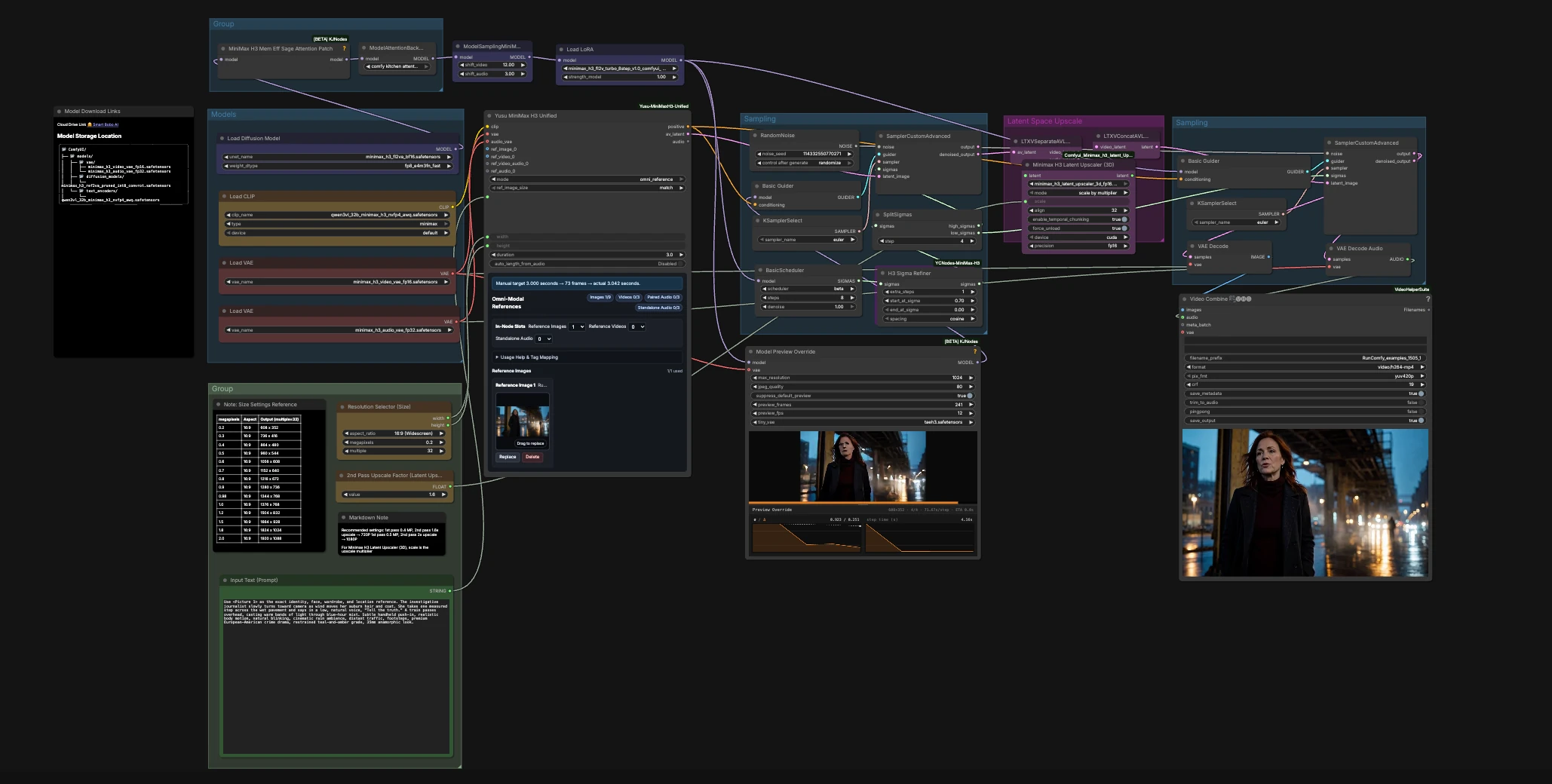
MiniMax H3 8-Step Acceleration: All-in-One multimodal video generation with native audio#
MiniMax H3 8-Step Acceleration is an All-in-One ComfyUI workflow for creating cinematic video with synchronized native audio. Through the unified MiniMaxH3Unified node, it supports image references, video references, videos with accompanying audio, and standalone audio references within one streamlined workflow.
The ready-to-run example uses a single image and a motion-oriented text prompt, but reference-to-video is only one way to use the workflow. Its unified multimodal design supports different combinations of visual and audio guidance without requiring separate workflow graphs for each input type.
The workflow combines the MiniMax H3 FL2VA backbone with the LightX2V Turbo LoRA and a compact 8-step, two-pass sampling schedule. It is designed for cinematic character shots, dialogue scenes, atmospheric micro-stories, and other multimodal video tasks that benefit from faster iteration and synchronized native audio.
Key models in the ComfyUI MiniMax H3 8-Step Acceleration workflow#
- MiniMax-H3 official weights. The audiovisual diffusion backbone that generates video and native audio from prompts and multimodal references. MiniMaxAI/MiniMax-H3
- MiniMax H3 Video VAE and Audio VAE. Paired encoders and decoders used to move between pixel space, audio waveforms, and H3 latents. Included in the Comfy-Org distribution. Comfy-Org/MiniMax-H3
- Qwen3-VL 32B text encoder (AWQ, MiniMax-tuned). Provides language and visual grounding for prompts and references when driving MiniMax H3. Distributed with the Comfy-Org MiniMax H3 package. Comfy-Org/MiniMax-H3
- LightX2V MiniMax H3 Turbo LoRA. A speed-oriented LoRA that tightens trajectories so H3 can converge effectively under an 8-step schedule. lightx2v/Minimax-h3-Turbo
- MiniMax H3 Latent Upscaler 3D. An H3-native latent upscaler used between passes to increase spatial detail without breaking audio alignment.
How to use the ComfyUI MiniMax H3 8-Step Acceleration workflow#
At a high level, the workflow collects prompts and multimodal references through one unified input node, builds a compact 8-step schedule, and runs a fast high-sigma pass to establish motion and scene structure. It can then upscale the video latent in 3D before running a low-sigma refinement pass, decoding the synchronized audio and video, and exporting the result as an MP4.
Inputs and sizing#
Use Resolution Selector (Size) (#115) to choose your target width and height. Enter your scene description in Input Text (Prompt) (#217); you can include quoted dialogue if you want spoken words in the generated clip.
The All-in-One MiniMaxH3Unified node (#212) acts as the workflow’s multimodal reference hub. It supports image references, video references, videos with audio, and standalone audio references, together with prompt, sizing, and duration controls.
The included example is configured with one reference image and a motion prompt for immediate use. You can replace that image or configure another supported reference type inside the same unified node without rebuilding the sampling, upscaling, decoding, or export stages.
You can set duration in MiniMaxH3Unified, or toggle auto_length_from_audio when using an external audio reference to guide timing.
Model setup and acceleration patches#
UNETLoader (#127) brings in the MiniMax H3 FL2VA checkpoint. MiniMaxH3MemoryEfficientSageAttentionPatch (#160) and ModelAttentionBackend (#168) then activate a VRAM-friendly attention backend.
MiniMaxH3SigmaShift (#207) aligns the video and audio denoising horizons for short schedules. LoraLoaderModelOnly (#167) applies the LightX2V Turbo LoRA that enables MiniMax H3 8-Step Acceleration without requiring a separate acceleration graph.
8-step schedule builder#
BasicScheduler (#163) constructs a compact trajectory, which is fine-tuned by ExtendIntermediateSigmas (#220) and H3SigmaRefiner (#209) for H3’s audiovisual dynamics.
SplitSigmas (#197) divides the schedule into a high-sigma block for structure and a low-sigma block for detail. A single RandomNoise (#129) seed feeds both passes to help keep motion and audio coherent.
First-pass sampler: high sigmas#
The high-sigma block flows into SamplerCustomAdvanced (#125), guided by BasicGuider (#126) with the positive conditioning from MiniMaxH3Unified (#212).
This pass establishes composition, motion cadence, and a coarse audio bed inside a unified audiovisual latent. Its denoised output is then prepared for mid-pipeline enhancement.
Latent-space upscale#
LTXVSeparateAVLatent (#199) splits the audiovisual latent so only the video channels are upscaled by MinimaxH3LatentUpscaler3D (#226). The audio latent remains untouched to preserve synchronization.
LTXVConcatAVLatent (#198) then recombines the enhanced video latent with the original audio latent, creating a sharper but still synchronized audiovisual latent for refinement.
Second-pass sampler: low sigmas#
The recombined latent is refined in SamplerCustomAdvanced (#177) using the low-sigma block and BasicGuider (#178).
This pass adds surface detail, cleans facial features, and polishes audio textures while maintaining the motion and timing established during the first pass.
Decode and export#
VAEDecode (#186) converts the video latents into frames, while VAEDecodeAudio (#185) reconstructs the native audio track.
VHS_VideoCombine (#189) muxes the results into an MP4 at the selected frame rate—24 fps by default—producing a ready-to-share audiovisual clip.
Key nodes in the ComfyUI MiniMax H3 8-Step Acceleration workflow#
MiniMaxH3Unified(#212). The central All-in-One multimodal reference hub for MiniMax H3. It brings image, video, video-audio, standalone audio, prompt, sizing, and duration controls into one node, allowing different H3 reference tasks to use the same accelerated generation pipeline.H3SigmaRefiner(#209). Adjusts the schedule to favor the parts of the trajectory where H3 benefits most. If you need crisper details at the same speed, add a little refinement; if you prioritize maximum throughput, keep it lean.SplitSigmas(#197). Splits the compact schedule into a two-pass plan. With an 8-step schedule, the midpoint split balances speed and quality; moving the split allocates more steps to either structure or detail.MiniMaxH3SigmaShift(#207). Offsets sigma ranges for video and audio so they converge cleanly under short schedules. Leave the provided shifts unchanged unless you understand their effect on synchronization and stability.LoraLoaderModelOnly(#167). Applies the LightX2V Turbo LoRA. Lower strength softens the Turbo effect for gentler motion; higher strength can increase snap but may over-accentuate textures.MinimaxH3LatentUpscaler3D(#226). Increases spatial detail between passes while keeping the audio latent intact. Use a modestmode.scalefor 720p-type outputs or a larger multiplier for 1080p when VRAM allows.VHS_VideoCombine(#189). Handles final muxing and export. Adjustframe_rate, set a filename prefix, and optionally use trimming or ping-pong looping for previews.
Optional extras#
- Multimodal references. Use the unified H3 node to work with image references, video references, videos with audio, or standalone audio references without switching to a separate generation graph.
- Fast-start prompts. MiniMax H3 responds well to cinematic verbs and camera language. Short, specific cues such as “slow push-in,” “handheld sway,” or a quoted line of dialogue usually produce stronger motion and cleaner speech.
- Resolution shortcuts. 0.4 MP with a 1.6x latent upscale lands near 720p. A 0.5 MP first pass with 2x upscaling lands near 1080p. If you hit VRAM limits, reduce megapixels before changing the step schedule.
- Stability tips. Keep the same seed for reproducible takes. Change only the seed for quick variations while preserving the rest of the timing and scene direction.
- When to bypass the upscaler. If you prioritize speed or memory, set the latent upscaler’s multiplier to 1 to effectively skip the enhancement stage.
- Good-fit scenarios. This MiniMax H3 8-Step Acceleration workflow works well for medium-close character shots, dialogue with ambient sound, audiovisual scene references, short atmospheric beats, and multimodal video tasks where quick iteration matters.
Acknowledgements#
This workflow implements and builds upon the following works and resources. We gratefully acknowledge RunningHub for the workflow reference, MiniMaxAI for the MiniMax-H3 official model, Comfy-Org for the MiniMax-H3 model weights, and lightx2v for the MiniMax H3 Turbo LoRA.
For authoritative details, licensing information, and model usage terms, refer to the original documentation and repositories linked below.
Resources#
- RunningHub workflow source and reference
- Docs / Release Notes: Workflow source and reference
- MiniMaxAI/MiniMax-H3
- Hugging Face: MiniMaxAI/MiniMax-H3
- Comfy-Org/MiniMax-H3
- Hugging Face: Comfy-Org/MiniMax-H3
- lightx2v/Minimax-h3-Turbo
- Hugging Face: lightx2v/Minimax-h3-Turbo
Note: Use of the referenced models, datasets, and code is subject to the respective licenses and terms provided by their authors and maintainers.