MiniMax H3 ComfyUI Talking and Singing Dual Character 4-step Acceleration#
This RunComfy-ready workflow turns two portrait stills and a short speech or singing track into a single lip-synced video where both characters share the scene. Built on MiniMax H3 reference-to-video with the official Turbo LoRA, it delivers few-step generation while keeping both identities stable and the mouth motion locked to your source audio.
MiniMax H3 ComfyUI Talking and Singing Dual Character 4-step Acceleration is ideal for duets, two-person dialogue beats, trailers, or quick performance previews. You bring two images and one audio file, add a short prompt, pick a size, and the graph renders an mp4 with the original soundtrack intact.
Key models in Comfyui MiniMax H3 ComfyUI Talking and Singing Dual Character 4-step Acceleration workflow#
- MiniMax-H3 reference-to-video backbone from Comfy-Org — the generative model that maps your references and text into an audio-visual latent for video synthesis. Hugging Face: Comfy-Org/MiniMax-H3
- MiniMax-H3 Video VAE FP16 — encodes and decodes video latents so frames can be denoised efficiently and reconstructed with fidelity. Included in the model pack. Hugging Face: Comfy-Org/MiniMax-H3
- MiniMax-H3 Audio VAE FP32 — represents the driving audio in latent space so lip motion and timing are learned from your track. Included in the model pack. Hugging Face: Comfy-Org/MiniMax-H3
- Qwen3-VL 32B text encoder (AWQ/NVFP variants packaged for H3) — interprets your prompt to set scene, style, and shot intent for dual-character composition. Included in the model pack. Hugging Face: Comfy-Org/MiniMax-H3
- MiniMax-H3 Turbo 4-step LoRA — accelerates sampling so you can render with as few as four denoise steps while preserving identity and lip sync. Hugging Face: larryvrh/MiniMax-H3-Turbo-Lora
How to use Comfyui MiniMax H3 ComfyUI Talking and Singing Dual Character 4-step Acceleration#
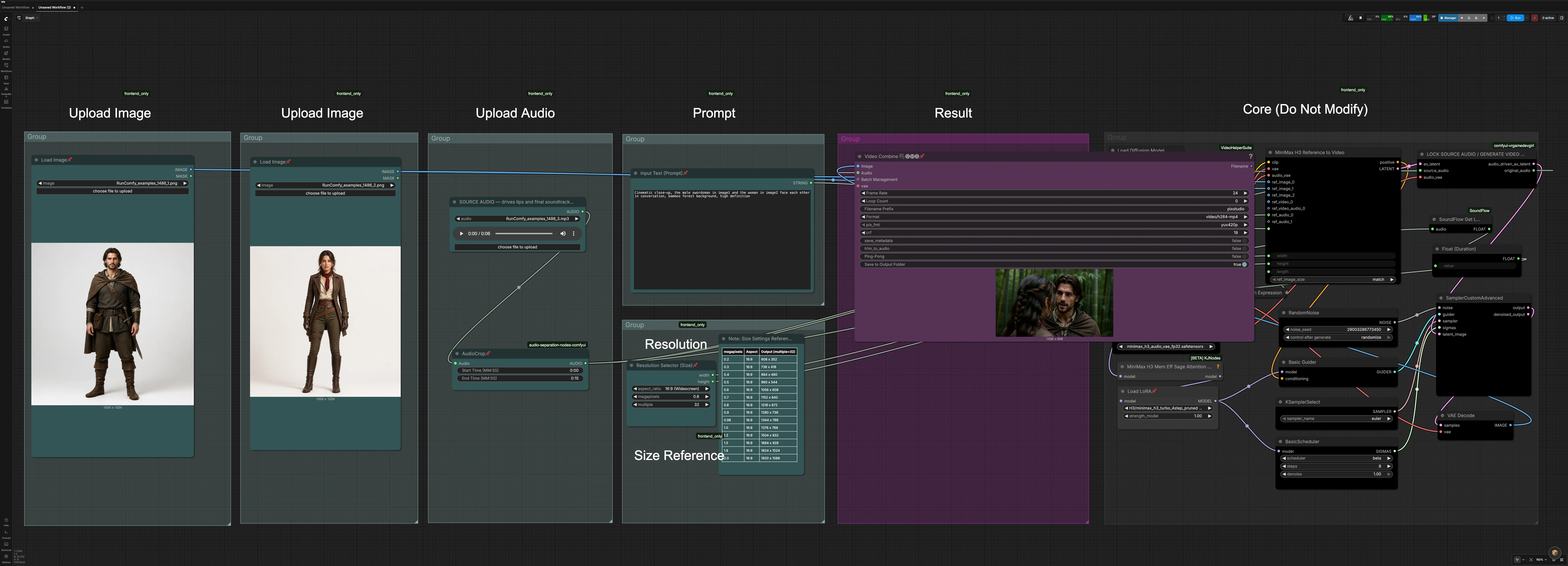
This graph flows left to right: you load two character stills and one audio clip, set prompt and size, then the core H3 path fuses references and audio into an AV latent. A short audio-lock stage preserves your original soundtrack while driving lip motion, and the sampler with Turbo LoRA performs the few-step denoise before final video assembly.
- Upload Image (Character A)
- Drop a clear, front-facing still for character A into
LoadImage(#227). Favor similar head size and lighting to character B for stable co-presence. Background can be simple; identity and pose are the priority. The node feeds the H3 reference stack so the model learns who the first speaker is in the shared scene.
- Drop a clear, front-facing still for character A into
- Upload Image (Character B)
- Provide character B in
LoadImage(#137). Keep framing, orientation, and expression roughly comparable to character A to reduce drift between shots. This second reference lets H3 synthesize a two-shot where both individuals remain consistent while talking or singing to each other.
- Provide character B in
- Upload Audio
- Add your dialogue or vocals in
LoadAudio(#171). UseAudioCrop(#177) to set start and end times so the clip length matches the segment you want. Clean, centered audio improves mouth articulation and reduces timing jitter.
- Add your dialogue or vocals in
- Prompt
- Describe the shot in
Input Text (Prompt)(#138). Short, cinematic phrasing works well, for example describing camera distance, background, and mood for the two characters. The prompt steers layout and style without replacing identity guidance from the stills and the timing from your track.
- Describe the shot in
- Resolution Selector (Size)
- Choose aspect and target size in
Resolution Selector (Size)(#115). The selector outputs width and height already aligned to model-friendly multiples to balance detail and speed. A built-in size note offers ready-to-use 16:9 presets, so you can pick a megapixel tier that fits your GPU budget.
- Choose aspect and target size in
- Result
- The frames decode and are muxed with the original audio in
VHS_VideoCombine(#142) to produce an mp4. If your render runs slightly long or short, use the provided toggle in this step to trim to the audio length. Filenames and format are preconfigured for quick iteration.
- The frames decode and are muxed with the original audio in
- Core (Do Not Modify)
- Inside this protected area,
MiniMaxH3ReferenceToVideo(#136) fuses both reference images, the prompt, and the cropped audio into a joint AV latent and positive conditioning.VRGDG_MiniMaxH3AudioDrive(#172) locks the source audio so lip sync follows your track while the soundtrack is passed through unchanged. The UNet is patched for memory efficiency, andLoraLoaderModelOnly(#234) applies the Turbo 4-step LoRA before the sampler denoises andVAEDecodereconstructs frames. These internals are tuned for stability and speed, so you generally do not need to adjust them.
- Inside this protected area,
Key nodes in Comfyui MiniMax H3 ComfyUI Talking and Singing Dual Character 4-step Acceleration workflow#
MiniMaxH3ReferenceToVideo(#136)- The heart of the graph that ingests both character stills, your prompt, width, height, and an auto-computed clip length. It also accepts the cropped audio as a reference so phoneme timing and viseme shapes align to the soundtrack. If you need tighter control, you can directly adjust
prompt,width,height, or overridelengthfor special timings.
- The heart of the graph that ingests both character stills, your prompt, width, height, and an auto-computed clip length. It also accepts the cropped audio as a reference so phoneme timing and viseme shapes align to the soundtrack. If you need tighter control, you can directly adjust
VRGDG_MiniMaxH3AudioDrive(#172)- Locks lip motion to the provided source audio while ensuring the final video uses that same audio track. Use this when you want exact lyrical or dialogue timing without any generative audio changes. Feed it clean vocals or dialogue for best results.
LoraLoaderModelOnly(#234)- Loads the MiniMax-H3 Turbo 4-step LoRA so the sampler can converge in very few steps. If you prefer slower but potentially more conservative denoising, you can reduce LoRA influence; for maximum speed, keep the default strength. Model reference: MiniMax-H3 Turbo LoRA.
SamplerCustomAdvanced(#125)- Performs the actual denoise using the scheduler and sampler selected upstream. With the Turbo LoRA active, you can render fast with minimal steps; increase steps only if you see motion instability. Seed control comes from
RandomNoise(#129) for reproducible takes.
- Performs the actual denoise using the scheduler and sampler selected upstream. With the Turbo LoRA active, you can render fast with minimal steps; increase steps only if you see motion instability. Seed control comes from
Resolution Selector (Size)(#115)- Outputs model-aligned width and height so you do not need to juggle multiples or aspect math. Use it to jump between preview, mid, and final sizes while keeping composition consistent. Larger sizes increase identity detail but require more VRAM and time.
AudioCrop(#177)- Trims the input audio to the exact segment you want to animate. Use this to cut silence or isolate a verse or dialogue beat. Clean entry and exit points help with mouth open/close timing.
VHS_VideoCombine(#142)- Assembles decoded frames and the pass-through audio into a shareable mp4. Use the built-in options to align duration to the soundtrack and to set filename conventions. This is your final delivery step for MiniMax H3 ComfyUI Talking and Singing Dual Character 4-step Acceleration outputs.
Optional extras#
- Match subject scale and face angle across both images to minimize identity drift.
- Keep prompts concise and visual: camera distance, setting, mood, and lighting cues.
- Use noise seeds when iterating so you can A/B changes reliably across takes.
- If the clip overshoots a hair, enable trimming at the combine step for frame-accurate sync.
- Start at a mid-tier resolution, then scale up once blocking and timing look right.
Acknowledgements#
This workflow implements and builds upon the following works and resources. We gratefully acknowledge MiniMax Research for MiniMax H3, Comfy.org for the ComfyUI MiniMax H3 tutorial, and Comfy-Org and larryvrh for the MiniMax-H3 model weights and MiniMax-H3 Turbo LoRA for their contributions and maintenance. For authoritative details, please refer to the original documentation and repositories linked below.
Resources#
- MiniMax Research/MiniMax H3 official announcement
- Docs / Release Notes: MiniMax H3 official announcement
- Comfy.org/MiniMax H3 tutorial
- GitHub: Comfy-Org/docs
- Docs / Release Notes: Comfy.org MiniMax H3 tutorial
- Comfy-Org/MiniMax-H3 model weights
- GitHub: Comfy-Org/workflow_templates
- Hugging Face: Comfy-Org/MiniMax-H3
- larryvrh/MiniMax-H3 Turbo LoRA
- GitHub: Larryvrh/ComfyUI-MiniMax-H3-Turbo
- Hugging Face: larryvrh/MiniMax-H3-Turbo-Lora
Note: Use of the referenced models, datasets, and code is subject to the respective licenses and terms provided by their authors and maintainers.