

MOSS-Image Canny Control ComfyUI: Prompt‑guided restyle from reference contours#
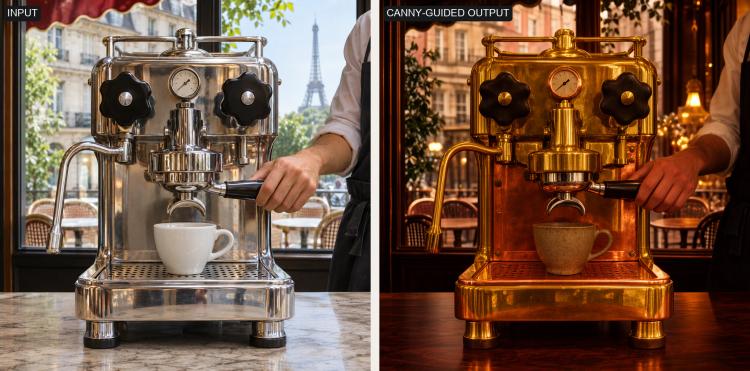
This workflow turns a reference photo’s contours into a new still image guided by a text prompt. It pairs the MOSS-Image-SFT base model with a dedicated Canny Control LoRA so the detected edges steer composition while the prompt dictates materials, colors, and lighting. The result is a fast, reliable way to restyle objects without losing recognizable outlines.
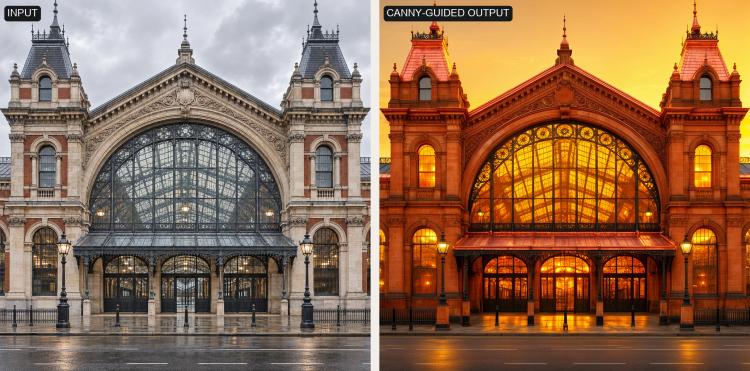
MOSS-Image Canny Control ComfyUI is ideal for product shots, vehicle paint and trim explorations, and architectural facades where silhouette and layout must remain consistent. You supply one image and a clear prompt; the workflow preserves geometry from the edge map while giving you creative control over finish and mood.
Key models in Comfyui MOSS-Image Canny Control ComfyUI workflow#
- OpenMOSS-Team MOSS-Image-SFT. Text-conditioned image model fine-tuned for robust editing and generation; it provides the core denoising and understanding of your prompt while remaining responsive to structure cues. Model card
- MOSS-Image Canny Control LoRA by thedeoxen. Lightweight adapter that injects canny-based control into MOSS-Image-SFT so generated content follows the supplied contour map. Model card
How to use Comfyui MOSS-Image Canny Control ComfyUI#
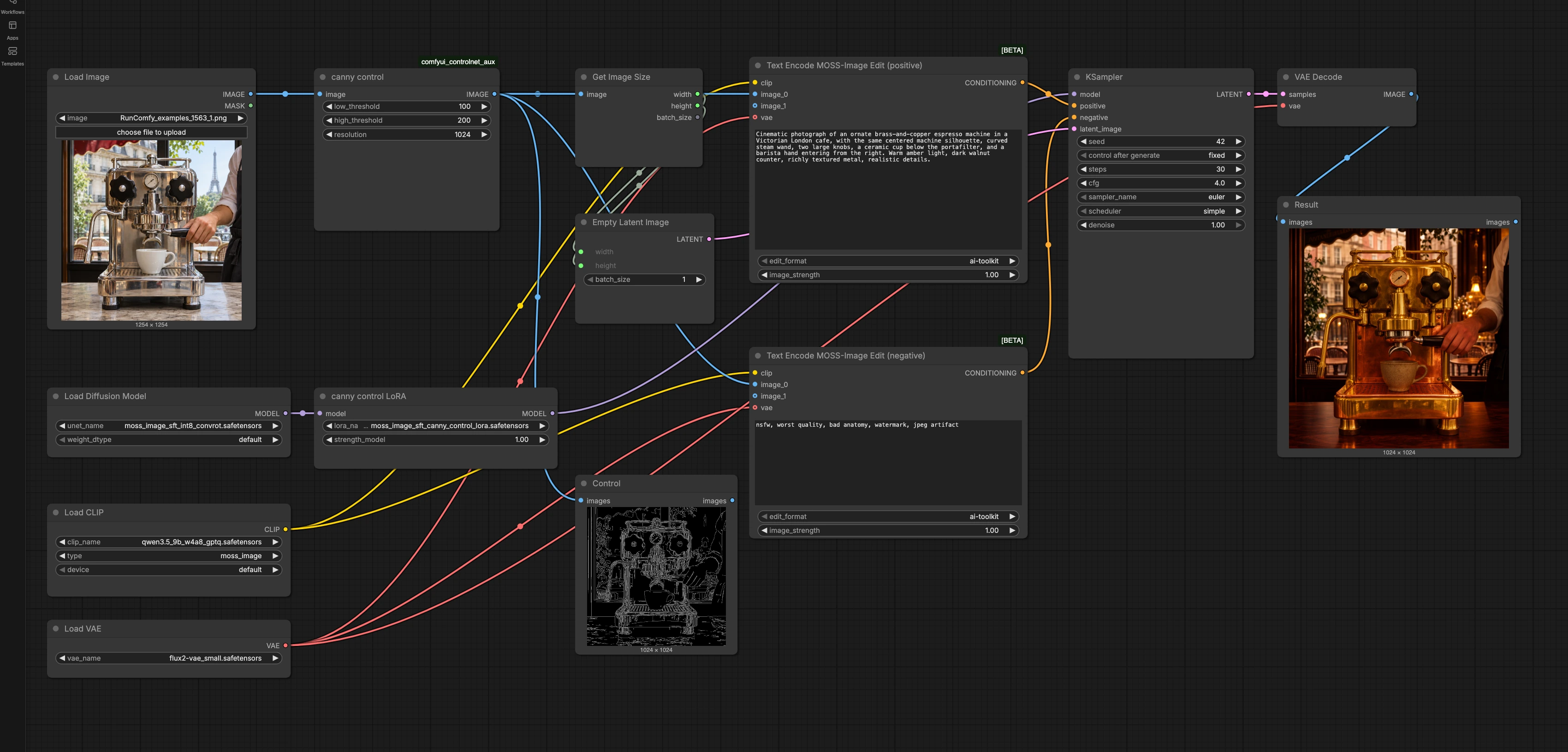
At a high level, the workflow extracts edges from your reference, encodes your positive and negative prompts with MOSS-Image’s edit encoder, samples with the base model plus the Canny Control LoRA, then decodes to a final image. The control image sets structure; the prompt sets appearance.
Load a reference image (LoadImage (#1))#
Import a single, well-exposed photo of the subject at the framing and aspect ratio you want to keep. The workflow treats this as the geometry source for the restyle. Clean sources with clear boundaries and minimal motion blur work best.
Extract Canny contours and preview (canny control (#2) and Control (#13))#
The workflow computes a Canny edge map from your photo using the ControlNet auxiliary preprocessor so only the most salient outlines drive composition. Strong edges of the main subject will be prioritized, while fine noise is suppressed. You can preview the control image to confirm that contours match your intent before generating. This stage uses the Canny operator implementation from the ControlNet Auxiliary suite. See repo: comfyui_controlnet_aux.
Match canvas to the control image (GetImageSize (#7) and EmptyLatentImage (#10))#
Canvas width and height are derived from the control image to keep proportions perfect. This alignment prevents aspect distortion and reduces composition drift. If you need a different aspect ratio, crop the reference before loading it so the control and canvas remain in lockstep.
Write your prompts (Text Encode MOSS-Image Edit (positive) (#8) and Text Encode MOSS-Image Edit (negative) (#9))#
Describe the desired materials, style, color, lighting, and environment in the positive prompt. The edit encoder conditions on both your text and the control image so appearance changes happen while structure remains. Use the negative prompt to suppress artifacts you don’t want, such as unwanted text, low quality, or off-style elements. The image edit conditioning helps maintain silhouette fidelity even when your prompt is highly stylized.
Load the base model and apply the Canny Control LoRA (UNETLoader (#3) and canny control LoRA (#4))#
The UNet from MOSS-Image-SFT provides the generative backbone. The Canny Control LoRA is then applied to the model so edge-based guidance influences the denoising trajectory. Together they fuse structural control from contours with the semantic intent of your prompt, enabling faithful restyles without manual masks.
Sample and decode (KSampler (#11) and VAEDecode (#12))#
Sampling produces the latent image under your positive and negative conditions. You can keep results repeatable with a fixed seed or explore alternatives by changing it. After sampling, the VAE decodes latents to an RGB image for preview and export. If you see over-rigidity to lines, relax control by reducing LoRA influence or increasing creative freedom during sampling; if you see drift, do the opposite.
Review the output (Result (#14))#
Inspect the result preview. If the silhouette is correct but details miss the brief, refine the positive prompt; if structure drifts, strengthen structural control or simplify the prompt. Iterate until materials, mood, and geometry meet your goal.
Key nodes in Comfyui MOSS-Image Canny Control ComfyUI workflow#
canny control (#2)#
Generates the edge map that acts as the structure prior for the whole run. Tuning the low and high thresholds changes which contours survive: higher thresholds emphasize major outlines, lower thresholds admit finer detail. Use the preview to ensure edges capture the object’s silhouette without clutter. Implementation reference: comfyui_controlnet_aux.
canny control LoRA (#4)#
Applies the Canny Control LoRA to the base model so the sampler follows the edge map. Increase LoRA strength when you want strict adherence to outlines, and reduce it for looser, more creative geometry. This balance is key to matching structural fidelity with stylistic freedom. Model card: thedeoxen/MOSS-Image-canny-controlnet.
Text Encode MOSS-Image Edit (positive) (#8)#
Encodes your main prompt, conditioning both on text and the control image for edit-aware generation. Focus on concrete descriptors like surface materials, finish, brand-neutral shape cues, lighting quality, and environment. If the model under-specifies color or texture, add explicit adjectives and camera language. Base model reference: OpenMOSS-Team/MOSS-Image-SFT.
Text Encode MOSS-Image Edit (negative) (#9)#
Encodes your negative terms to steer the sampler away from unwanted features. Use concise blockers for low quality, artifacts, off-topic elements, and NSFW terms when appropriate. Tight negatives help the sampler invest capacity in the look you want instead of repairing common mistakes.
KSampler (#11)#
Runs the denoising process that turns conditioning and latent noise into an image. Key levers are the seed for reproducibility, the sampler algorithm for texture and detail character, the number of steps for refinement, the guidance scale to trade prompt strength against realism, and denoise strength to vary how strictly the result follows the control. When in doubt, lock seed while you adjust one lever at a time to understand its effect. Project reference: ComfyUI.
Optional extras#
- Start with crisp, mid-contrast product photos; avoid motion blur and cluttered backgrounds so Canny extracts clean silhouettes.
- If structure is perfect but the vibe is off, keep the seed and refine only the prompt; if structure drifts, adjust LoRA strength or denoise toward more control.
- Mention composition anchors in the prompt (e.g., “same centered silhouette”) to reinforce layout without fighting the control image.
- Pre-crop the reference to the exact aspect you want; the canvas matches the control image automatically.
- For fine mechanical details, allow slightly richer edges; for broad restyles, favor sparser edges to prevent over-constraining textures.
This MOSS-Image Canny Control ComfyUI workflow gives you precise structural control with flexible styling, making it a dependable tool for fast, iteration-friendly restyles across products, vehicles, and architecture.
Acknowledgements#
This workflow implements and builds upon the following works and resources. We gratefully acknowledge thedeoxen for MOSS-Image-canny-controlnet (Canny Control LoRA and workflow), OpenMOSS-Team for MOSS-Image-SFT (base model), and Fannovel16 for comfyui_controlnet_aux (Canny preprocessor nodes) for their contributions and maintenance. For authoritative details, please refer to the original documentation and repositories linked below.
Resources#
- thedeoxen/MOSS-Image-canny-controlnet
- Hugging Face: thedeoxen/MOSS-Image-canny-controlnet
- OpenMOSS-Team/MOSS-Image-SFT
- Hugging Face: OpenMOSS-Team/MOSS-Image-SFT
- Fannovel16/comfyui_controlnet_aux
Note: Use of the referenced models, datasets, and code is subject to the respective licenses and terms provided by their authors and maintainers.