logo
RunComfy
  • ComfyUI
  • TrainerNew
  • Models
  • API
  • Pricing
discord logo
MODELS
Explore
All Models
LIBRARY
Generations
MODEL APIS
API Docs
API Keys
ACCOUNT
Usage

Wan 2.7 Image Edit: AI Photo Editing with References | RunComfy

wan-ai/wan-2.7/edit

Edit up to four reference images with bilingual prompts using WAN 2.7: negative prompt, size presets, optional prompt expansion, multiple outputs per run, and safety checking—about **$0.03 per image** on RunComfy.

Image 1
Reference images for editing (1–4). Order matters: refer to image 1, image 2, image 3, image 4 in your prompt.
Text prompt describing the desired image edit. Supports Chinese and English.
Content to avoid in the generated image. Max 500 characters.
Output image size preset; mapped to the provider’s internal size format.
Number of images to generate (1–4). Default 1.
Enable DashScope prompt expansion (image edit mode). Default true.
Random seed for reproducibility (0–2147483647).
Idle
The rate is $0.03 per image.

Introduction To Wan 2.7 Image Edit

Wan 2.7 image edit is a prompt-driven, reference-first workflow: you supply one to four images, describe what should change (and what must stay), and the model returns an edited still that preserves structure and identity when instructed.
Ideal for: wardrobe swaps | background replacements | style transfer | product recoloring | rapid iterative retouching without manual masks

Wan 2.7 Image Edit


Overview


Wan 2.7 image editing on RunComfy supports natural-language edits with composition preservation and optional multi-reference guidance. You can attach one to four reference images via image_urls.


Response fields


The response includes images (1–4 variants depending on num_images) plus seed.


Key features


  • Ordered references: List image_urls left-to-right as image 1 through image 4 when you write instructions.
  • Bilingual prompts: Chinese or English.
  • Negative prompt up to 500 characters.
  • image_size presets map to the provider’s internal sizing.
  • enable_prompt_expansion: Lets the service elaborate short prompts (adds latency when on).
  • Safety checker for input/output moderation.

Parameters

ParameterRequiredTypeDefaultRange / OptionsDescription
image_urls*Yesarray of URIssample1–4Reference frames for the edit.
prompt*Yesstring——Desired transformation; mention image indices.
negative_promptNostring""≤500 charsContent to avoid.
image_sizeNostringsquare_hdenum presetsOutput size preset.
num_imagesNointeger11–4Variations per request.
enable_prompt_expansionNobooleantrueon / offAuto expand prompts.
seedNointeger—0–2147483647Repeatability.
enable_safety_checkerNobooleantrueon / offInput/output moderation.

Pricing

BillingRate
Per generated image$0.03

Cost scales with num_images.


How to use


  1. Upload or paste 1–4 public URLs (order = image 1 through 4).
  2. Write the edit as two clauses: what changes, and what must stay untouched.
  3. Choose image_size to match your delivery aspect ratio.
  4. Turn off enable_prompt_expansion when you already have a precise art-direction prompt.
  5. Raise num_images for alternatives; keep seed fixed to compare prompt tweaks.

Prompt tips


  • Explicitly say “keep the face/pose/logo unchanged” when those areas must stay stable.
  • Reference assets as “image 2” or “image 3” when transferring textures or patterns between inputs.
  • If the model over-edits, shorten the prompt and add preservation clauses.

Related Wan 2.7 models


  • Wan 2.7 Image Edit Pro on RunComfy — higher-fidelity edits.
  • Wan 2.7 Text-to-Image on RunComfy — generate new scenes without reference photos.

Related Models

wan-2.7/pro/edit

WAN 2.7 Pro image edit: high-fidelity prompt-driven edits with 1–4 references, prompt expansion, and the same controls as the standard edit endpoint.

Frequently Asked Questions

How many reference images does Wan 2.7 image edit support?

You can attach one to four HTTPS URLs in image_urls. In your prompt, name them as image 1, image 2, image 3, or image 4 so the model knows which reference you mean.

How much does Wan 2.7 image edit cost per image on RunComfy?

RunComfy lists $0.03 per generated image. If num_images is greater than 1, you pay per output image in that job.

What does `enable_prompt_expansion` do on Wan 2.7 image edit?

When it is on (the default), DashScope-style expansion can lengthen short instructions and may add latency. Turn it off when you already have a tight creative brief and want the model to follow it closely.

Do I need a mask to edit images with Wan 2.7 image edit?

No. This is prompt-driven editing: describe the change and, if needed, say what must stay untouched (for example “keep the face unchanged”).

How does Wan 2.7 image edit compare to Wan 2.7 Pro image edit?

Both share the same input schema on RunComfy. Pro targets higher-fidelity results and costs $0.075 per image. Use standard edit first when budget or speed matters, then switch to Pro for finals.

Do reference images have to be public URLs?

Use HTTPS URLs that RunComfy workers can retrieve without extra login, or upload through the supported file flow in the product.

Follow us
  • LinkedIn
  • Facebook
  • Instagram
  • Twitter
Support
  • Discord
  • Email
  • System Status
  • Affiliate
Video Models
  • Wan 2.6 Flash
  • Seedance 1.0 Pro Fast
  • Seedance 1.0
  • Seedance 1.5 Pro
  • Wan 2.6
  • Hailuo 2.3 Fast Standard
  • View All Models →
Image Models
  • Wan 2.6 Image to Image
  • Nano Banana 2 Edit
  • Nano Banana Pro
  • Flux 2 Flash Edit
  • seedream 4.0
  • ImagineArt 1.5
  • View All Models →
Legal
  • Terms of Service
  • Privacy Policy
  • Cookie Policy
RunComfy
Copyright 2026 RunComfy. All Rights Reserved.

RunComfy is the premier ComfyUI platform, offering ComfyUI online environment and services, along with ComfyUI workflows featuring stunning visuals. RunComfy also provides AI Models, enabling artists to harness the latest AI tools to create incredible art.
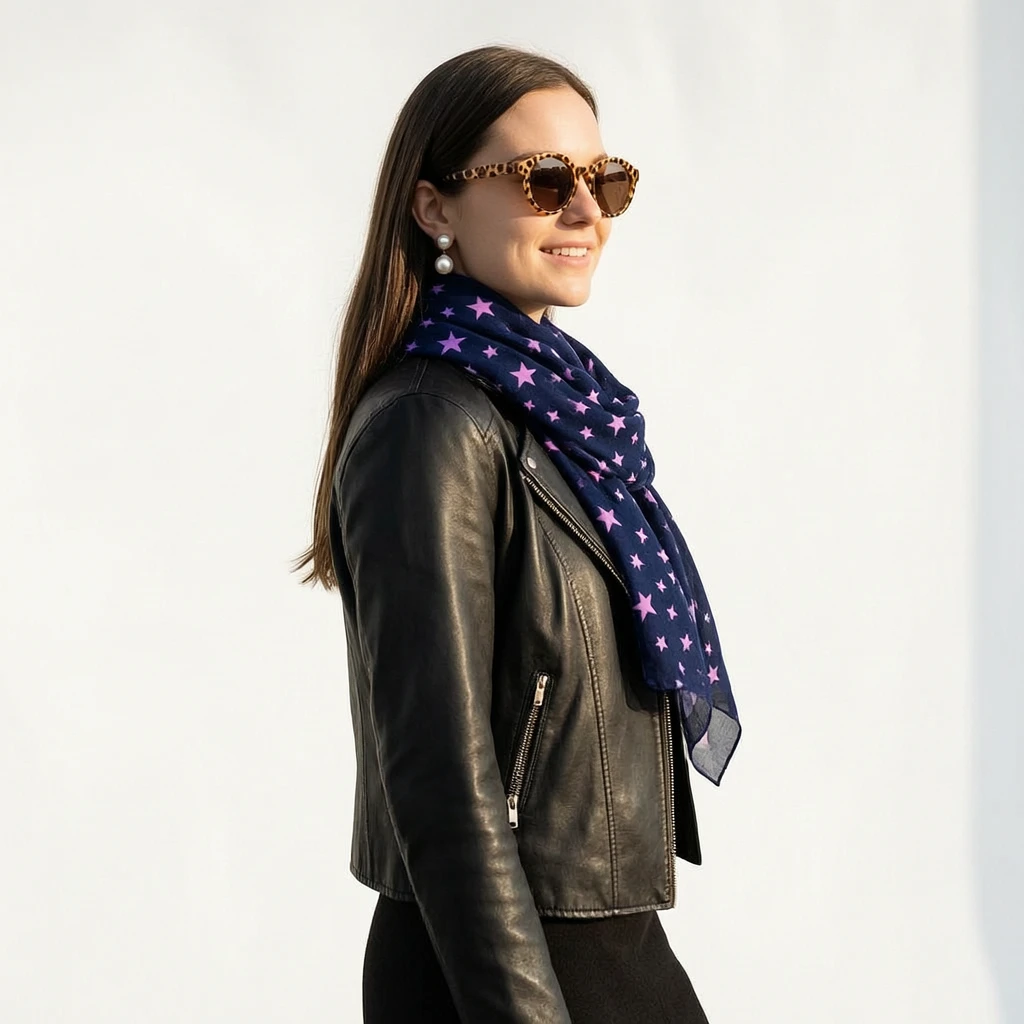

Examples Of Wan 2.7 Image Edit