

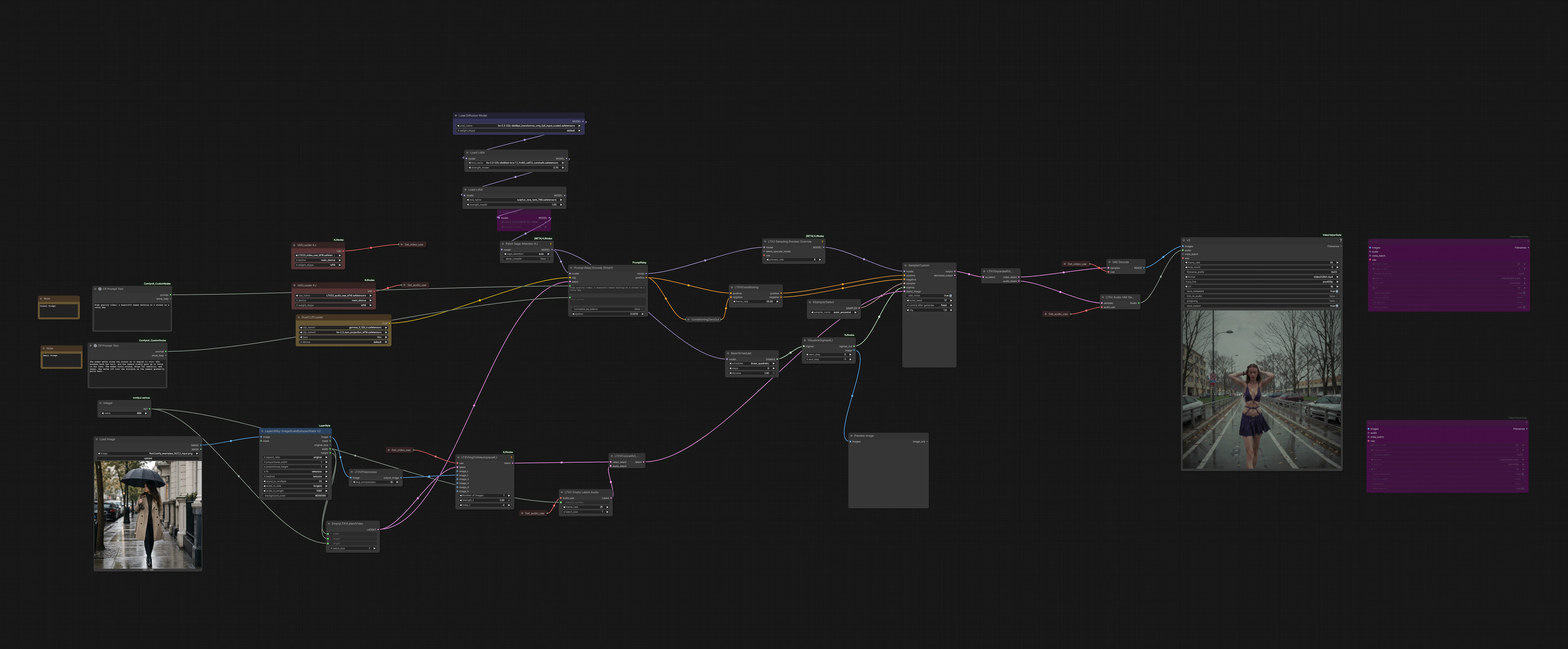
LTX 2.3 Sulphur 2 Prompt Relay workflow: image-to-video micro‑action sequencing in ComfyUI#
This ComfyUI workflow turns a single reference image plus a segmented motion prompt into a short cinematic clip. It combines LTX‑2.3 distilled video generation with a Sulphur 2 motion LoRA and Prompt Relay smart encoding, so you can describe micro‑actions as a sequence instead of relying on one flat prompt. The graph is prewired for synchronized audio latents, a validated rainy‑street image‑to‑video example, and normalized inputs/outputs for direct cloud playback.
Use this LTX 2.3 Sulphur 2 Prompt Relay workflow when you want tight visual anchoring to a reference frame and controlled motion that unfolds beat by beat. Filmmakers, editors, and motion designers can lay out “beats” like “walks under rain | brushes hair | turns and waves | exits” and get coherent motion and framing across the whole shot.
Key models in Comfyui LTX 2.3 Sulphur 2 Prompt Relay workflow#
- LTX‑2.3 audio‑visual foundation model (distilled, transformer‑only). Generates video and synchronized audio tokens in one diffusion pass; this workflow uses the distilled 22B variant packaged for ComfyUI. Weights: Lightricks/LTX‑2.3 and nodes/utilities: Lightricks/ComfyUI‑LTXVideo. See also the research background in LTX‑Video and the paper LTX‑Video: Realtime Video Latent Diffusion.
- LTX‑Video VAE pair (video VAE + audio VAE). Encodes/decodes latent video frames and the audio stream used for timing alignment. Prebuilt VAE files suitable for ComfyUI are available in the LTX‑2.3 packs, for example Kijai/LTX2.3_comfy and the official ComfyUI‑LTXVideo repository.
- Gemma‑based text encoder and LTX text projection. Provides long‑context prompt understanding for LTX‑2.3 via CLIP‑style encoders and a model‑specific projection layer bundled with the LTX integration. See encoder and configs in ComfyUI‑LTXVideo.
- Sulphur 2 motion LoRA (optional). A fine‑tune loaded as a LoRA to bias motion pacing and continuity for image‑to‑video. It pairs well with Prompt Relay when you want explicit beat‑to‑beat control.
How to use Comfyui LTX 2.3 Sulphur 2 Prompt Relay workflow#
The workflow follows a clear path from reference image to latent setup, model and LoRAs, prompt sequencing, sampling, then decode and export. Replace the demo inputs with your own and focus on the few controls called out below.
- Reference image and sizing
LoadImage(#620) lets you choose the anchor image. The next node,ImageScaleByAspectRatio V2(#621), fits it to the working canvas while keeping composition stable.LTXVPreprocess(#586) applies LTX‑friendly pre‑processing so the first frame locks in the subject, lighting, and palette. Use a clean, well‑lit reference that already matches your desired framing.
- Latent setup (video + audio)
EmptyLTXVLatentVideo(#577) defines the canvas size and shot length.Get_video_vae(#583) andLTXVImgToVideoInplaceKJ(#617) inject the reference still directly into the latent video so the look stays consistent from frame one. In parallel,Get_audio_vae(#576) withLTXVEmptyLatentAudio(#547) creates a synchronized audio latent (silent by default) to keep timing aligned.LTXVConcatAVLatent(#548) merges both streams for unified diffusion.
- Model loading and motion control
UNETLoader(#632) loads the distilled LTX‑2.3 transformer. The LoRA stack adds behavior:LoraLoaderModelOnly(#630) applies a distilled LTX helper,LoraLoaderModelOnly(#628) loads the Sulphur 2 motion LoRA, andLoraLoaderModelOnly(#606) can add an I2V stabilizer.PathchSageAttentionKJ(#542) patches attention for performance/consistency. Together these nodes determine how strongly your prompts steer motion versus preserving the reference.
- Prompt sequencing with Prompt Relay
DualCLIPLoader(#416) loads the text encoder.PromptRelaySmartEncode(#610) accepts aglobal_promptfor persistent details and asmart_promptfor the action sequence. Use pipe‑separated segments like “woman walks under rain | brushes hair | turns and waves | walks into distance,” or use block headers such as “Scene 1: … Scene 2: …” to weight screen time. The node auto‑distributes time across segments, so you can write beats instead of counting frames. See syntax reference in ComfyUI‑PromptRelay.
- Conditioning and frame rate
LTXVConditioning(#164) receives the Prompt Relay output for positive guidance and a minimal negative baseline (ConditioningZeroOut, #420). It also sets the target frame rate for the shot, which downstream nodes use to keep timing consistent with your segment weighting.
- Sampler and preview
BasicScheduler(#514) shapes the noise schedule;KSamplerSelect(#154) picks the sampler.VisualizeSigmasKJ(#358) previews the schedule so you can see how the denoising curve will progress.LTX2SamplingPreviewOverride(#588) enables responsive previews while diffusing.SamplerCustom(#561) runs the unified audio‑video diffusion using your AV latent, prompts, LoRAs, and schedule.
- Decode and export
LTXVSeparateAVLatent(#549) splits the final AV latent.VAEDecode(#471) produces frames;LTXVAudioVAEDecode(#550) decodes the audio latent.VHS_VideoCombine(#604) muxes frames and audio into an H.264 MP4 with standard yuv420p formatting, ready for playback and editing.
Key nodes in Comfyui LTX 2.3 Sulphur 2 Prompt Relay workflow#
PromptRelaySmartEncode(#610)- Purpose: Translates your beat‑by‑beat “smart prompt” into properly timed text conditioning for the whole clip. Use
global_promptfor unchanging details (style, subject, lighting) andsmart_promptfor the action sequence. Two authoring styles are supported: inline segments separated by|with optional proportional tags like[0-50], or block headers like “Scene 1:” that weight segments by range. Keep one syntax per prompt to avoid ambiguity. Reference: ComfyUI‑PromptRelay.
- Purpose: Translates your beat‑by‑beat “smart prompt” into properly timed text conditioning for the whole clip. Use
LTXVImgToVideoInplaceKJ(#617)- Purpose: Locks the first frame’s look and gently propagates it through motion. If identity or wardrobe drifts, raise its image adherence; if motion seems constrained, lower it to allow more dynamics. Balance this with your Sulphur 2 LoRA strength so the reference remains stable without over‑freezing motion.
LoraLoaderModelOnly(#628) — Sulphur 2 motion LoRA- Purpose: Injects the Sulphur 2 fine‑tune to bias motion continuity, trajectory smoothness, and action staging. Increase
strength_modelto emphasize guided movement across segments; reduce it if you see over‑constraint or repeated patterns. Adjust in tandem withImgToVideoInplacestrength to keep subject fidelity and motion energy in harmony.
- Purpose: Injects the Sulphur 2 fine‑tune to bias motion continuity, trajectory smoothness, and action staging. Increase
LTXVConditioning(#164)- Purpose: Consolidates positive/negative conditioning for LTX‑2.3 and sets the clip’s frame rate. If you lengthen the shot, revisit your Prompt Relay segment weights so the relative timing still matches the intended beats.
SamplerCustom(#561)- Purpose: Runs the denoising pass using your chosen sampler and schedule. If motion is jittery, try a slightly smoother schedule or a sampler known for temporal stability; if prompts under‑steer, modestly raise guidance while watching for over‑saturation. Use
VisualizeSigmasKJto sanity‑check the schedule’s shape before long runs.
- Purpose: Runs the denoising pass using your chosen sampler and schedule. If motion is jittery, try a slightly smoother schedule or a sampler known for temporal stability; if prompts under‑steer, modestly raise guidance while watching for over‑saturation. Use
Optional extras#
- Writing effective micro‑actions with Prompt Relay
- Inline style: “walks under rain | brushes hair | turns and waves | exits.” To give one action more time, add a weight tag like “[0-200]” vs “[200-260]”; only the span matters.
- Block style: Use headers such as “Scene 1:” and “Scene 2-4:” on their own lines. The range in the header sets relative duration, and headers are stripped before tokenization.
- Quick troubleshooting
- Identity drift: increase image adherence in
LTXVImgToVideoInplaceKJor reduce Sulphur 2strength_model. - Motion too slow/fast: rebalance segment spans in the smart prompt so important beats get more or less time.
- Flicker or artifacts: try a steadier sampler and schedule, or slightly raise guidance; keep an eye on over‑sharpening.
- Identity drift: increase image adherence in
- Useful references
- LTX‑2.3 model weights and docs: Hugging Face: Lightricks/LTX‑2.3
- ComfyUI nodes and example flows: Lightricks/ComfyUI‑LTXVideo
- Prompt Relay syntax and examples: kijai/ComfyUI‑PromptRelay
- LTX‑friendly helpers used in this graph: kijai/ComfyUI‑KJNodes
Acknowledgements#
This workflow implements and builds upon the following works and resources. We gratefully acknowledge Lightricks for LTX-Video, Kijai for the ComfyUI-PromptRelay node and ComfyUI-KJNodes helpers, and RunningHub and RunComfy for workflow references and Cloud Save setup for their contributions and maintenance. For authoritative details, please refer to the original documentation and repositories linked below.
Resources#
- RunningHub/Workflow reference
- Docs / Release Notes: RunningHub workflow reference
- RunComfy/Cloud Save setup
- Docs / Release Notes: RunComfy Cloud Save setup
- Lightricks/LTX-Video
- GitHub: Lightricks/LTX-Video
- Hugging Face: Lightricks/LTX-Video-0.9.7-dev
- arXiv: arXiv:2501.00103
- kijai/ComfyUI-PromptRelay
- GitHub: kijai/ComfyUI-PromptRelay
- kijai/ComfyUI-KJNodes
- GitHub: kijai/ComfyUI-KJNodes
Note: Use of the referenced models, datasets, and code is subject to the respective licenses and terms provided by their authors and maintainers.