

SDXL LoRA Inference: Run AI Toolkit LoRA in ComfyUI for Training‑Matched Results#
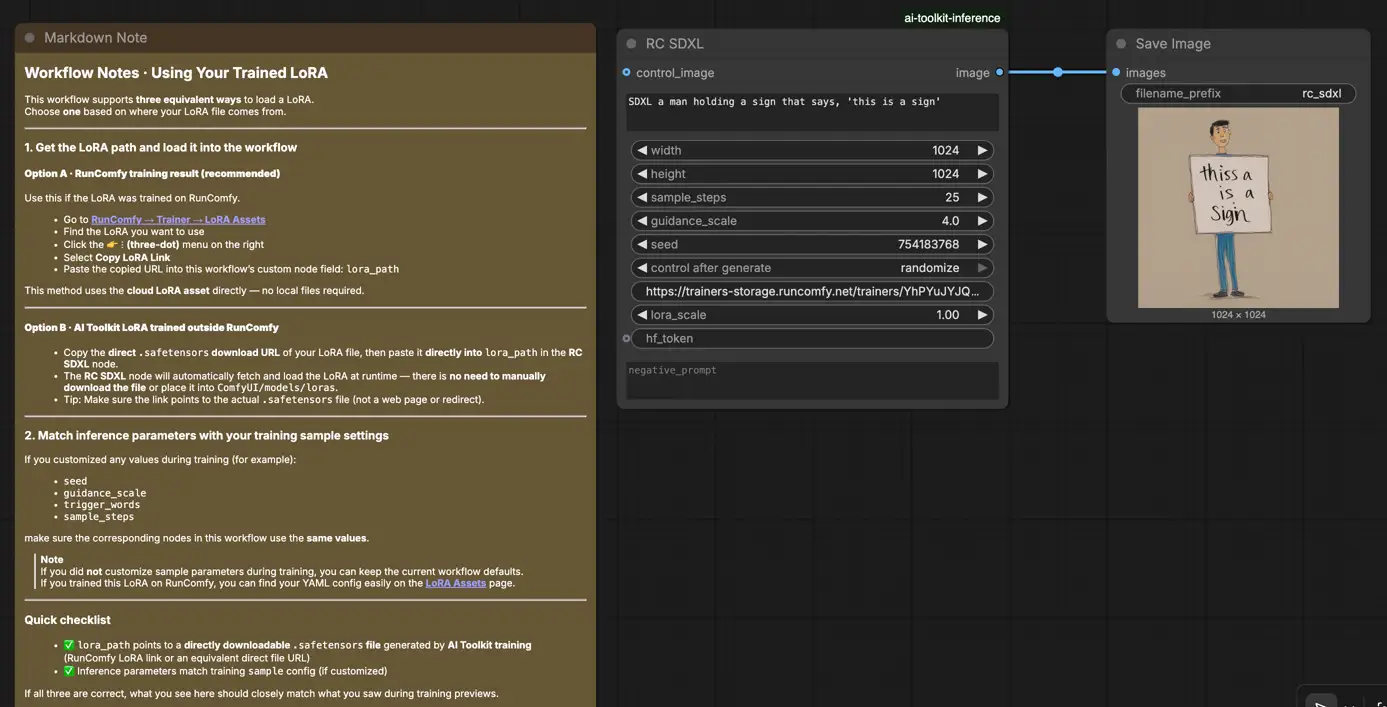
SDXL LoRA Inference: training‑matched results with fewer steps in ComfyUI. This workflow runs Stable Diffusion XL (SDXL) with AI Toolkit–trained LoRAs via RunComfy’s RC SDXL (RCSDXL) custom node (open‑sourced in the runcomfy-com GitHub organization repositories). By wrapping an SDXL‑specific pipeline (instead of a generic sampler graph) and standardizing LoRA loading and scaling (lora_path / lora_scale) with SDXL‑correct defaults, your ComfyUI outputs stay much closer to what you saw in training previews.
If you trained an SDXL LoRA in AI Toolkit (RunComfy Trainer or elsewhere) and your ComfyUI results look “off” compared to training previews, this workflow is the quickest way to return to training‑matched behavior.
How to use the SDXL LoRA Inference workflow#
Step 1: Open the workflow#
Open the RunComfy SDXL LoRA Inference workflow
Step 2: Import your LoRA (2 options)#
- Option A (RunComfy training result): RunComfy → Trainer → LoRA Assets → find your LoRA → ⋮ → Copy LoRA Link
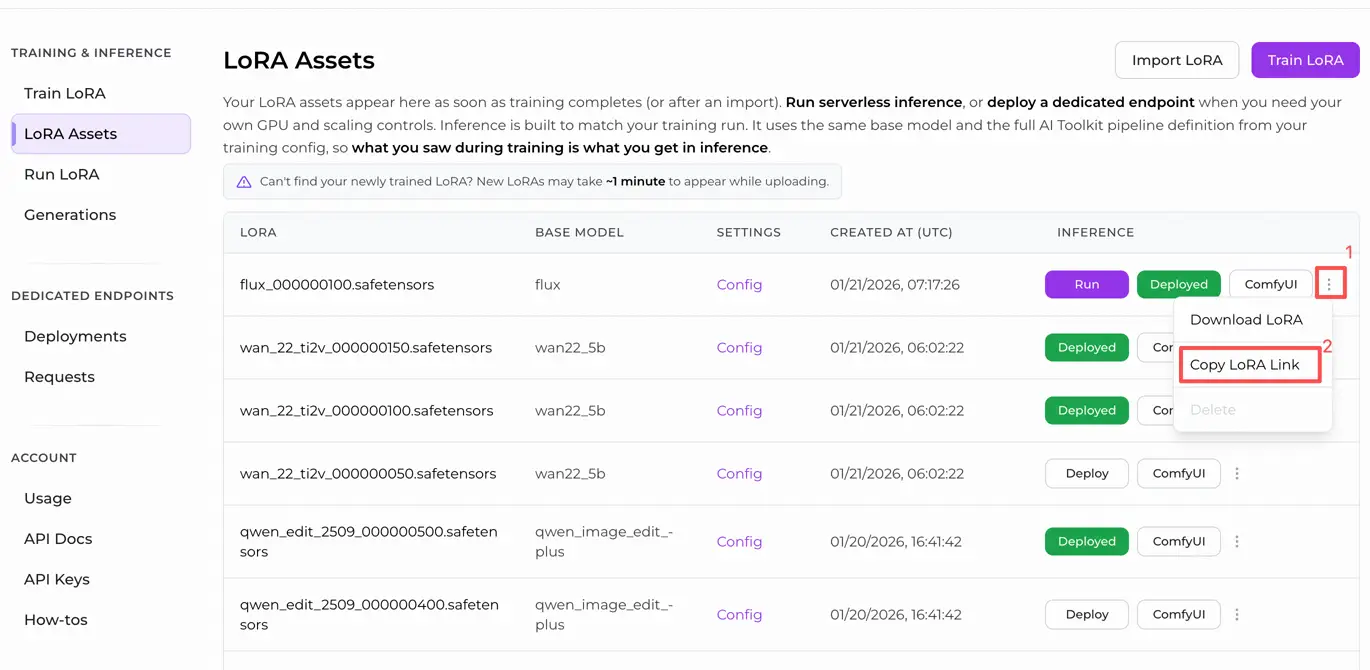
- Option B (AI Toolkit LoRA trained outside RunComfy): Copy a direct
.safetensorsdownload link for your LoRA and paste that URL intolora_path.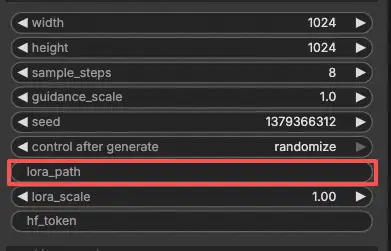
Step 3: Configure RCSDXL for SDXL LoRA Inference#
In the RCSDXL SDXL LoRA Inference node UI, set the remaining parameters:
prompt: your primary text prompt (include any trigger tokens you used during training)negative_prompt: optional; leave blank if you didn’t use one in training previewswidth/height: output resolutionsample_steps: sampling steps (match your training preview settings when comparing results)guidance_scale: CFG / guidance (match training preview CFG)seed: use a fixed seed for reproducibility; change it to explore variationslora_scale: LoRA strength/intensity
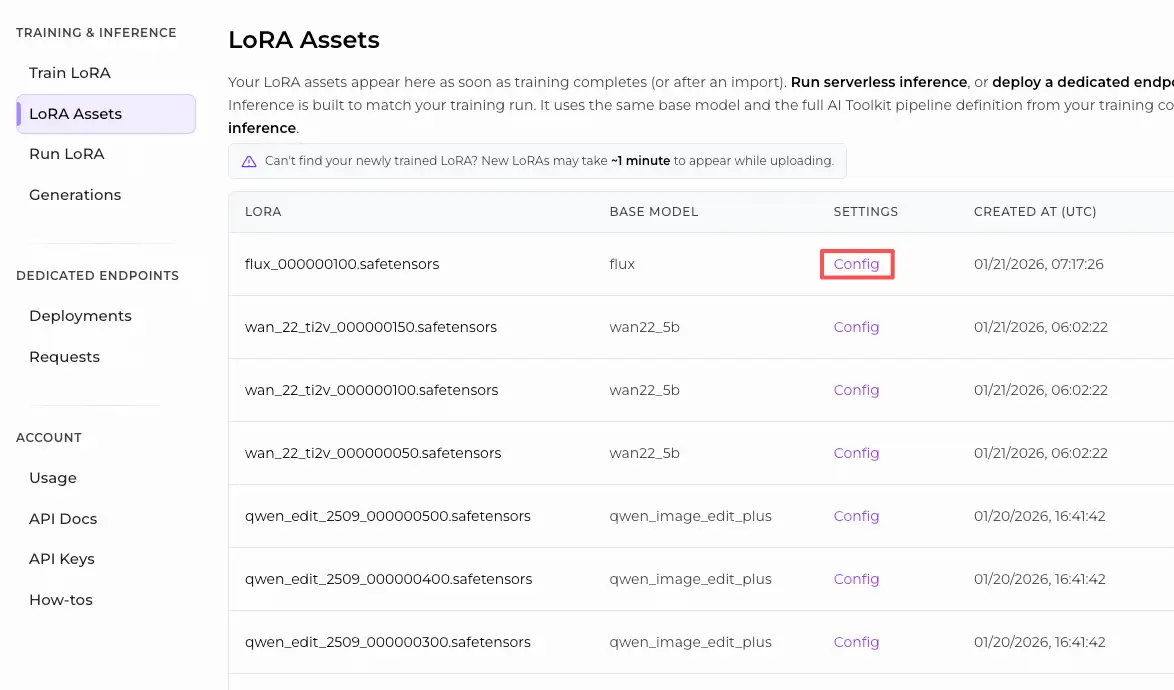
If you tweaked sampling during training, open the AI Toolkit training YAML and copy the same values here—especially width, height, sample_steps, guidance_scale, and seed. If you trained on RunComfy, you can also open the LoRA Config in Trainer → LoRA Assets and copy the preview/sample values.
Step 4: Run SDXL LoRA Inference#
- Click Queue/Run → output is saved automatically via SaveImage
Why SDXL LoRA Inference often looks different in ComfyUI & What the RCSDXL custom node does#
Most SDXL LoRA mismatches aren’t caused by one wrong knob—they happen because the inference pipeline changes. AI Toolkit training previews are generated through a model‑specific SDXL inference implementation, while many ComfyUI graphs are reconstructed from generic components. Even with the same prompt, steps, CFG, and seed, a different pipeline (and LoRA injection path) can produce noticeably different results.
The RC SDXL (RCSDXL) node wraps an SDXL‑specific inference pipeline so SDXL LoRA Inference stays aligned with the AI Toolkit training preview pipeline and uses consistent LoRA injection behavior for SDXL. Reference implementation: `src/pipelines/sdxl.py`
Troubleshooting SDXL LoRA Inference#
Most “training preview vs ComfyUI inference” problems come from pipeline mismatches, not a single wrong parameter. If your LoRA was trained with AI Toolkit (SDXL), the most reliable way to recover training‑matched behavior in ComfyUI is to run inference through RunComfy’s RCSDXL custom node, which aligns SDXL sampling + LoRA injection at the pipeline level.
(1) Inference on lora .safetensor files sdxl model doesn't match samples in training#
Why this happens
Even when the LoRA loads, results can still drift if your ComfyUI graph doesn’t match the training preview pipeline (different SDXL defaults, different LoRA injection path, different refiner handling).
How to fix (recommended)
- Use RCSDXL and paste your direct
.safetensorslink intolora_path. - Copy the sampling values from your AI Toolkit training config (or RunComfy Trainer → LoRA Assets Config):
width,height,sample_steps,guidance_scale,seed. - Keep “extra speed stacks” (LCM/Lightning/Turbo) out of the comparison unless you trained/sampled with them.
(2) SDXL lora key not loaded "lora_te2_text_projection.*"#
Why this happens
Your LoRA contains SDXL Text Encoder 2 projection keys that your current loading path isn’t applying (easy to hit when injection/key mapping doesn’t match SDXL’s dual‑encoder setup).
How to fix (most reliable)
- Use RCSDXL and load the LoRA via
lora_pathinside the node (pipeline‑level injection). - Keep
lora_scaleconsistent, and include the same trigger tokens used during training. - If warnings persist, try the exact base checkpoint used in training (mismatched SDXL variants can produce missing/ignored keys).
(3) Can't use LoRAs with SDXL anymore#
Why this happens
After updating ComfyUI / custom nodes, SDXL LoRA application can change (loader behavior, caching, memory behavior), making previously-working graphs fail or drift.
How to fix (recommended)
- Use RCSDXL to keep the SDXL inference path stable and training‑aligned.
- Clear model/node cache or restart the session after updates (especially if behavior changes only after you tweak LoRA/loader settings).
- For debugging, run a minimal base‑only SDXL workflow first, then add complexity back.
(4) Scheduling Hook LoRA incorrect CLIP cache in subsequent run after value change#
Why this happens
Hook/scheduling workflows can reuse cached CLIP state after parameter changes, which breaks reproducibility and makes LoRA behavior look inconsistent run-to-run.
How to fix (recommended)
- For training‑matched inference, prefer RCSDXL with simple
lora_path/lora_scalefirst (avoid hook/scheduling layers until the baseline matches). - If you must use hook/scheduling nodes, clear cache (or restart) after changing hook parameters, then rerun with the same seed.
(5) Ksampler error while try use LORA in inpaiting SDXL#
Why this happens
Inpainting stacks patch the model during sampling. Some custom nodes / helper wrappers can conflict with LoRA patching when you change settings mid‑session, triggering KSampler/inpaint worker errors.
How to fix (recommended)
- Confirm the LoRA works in RCSDXL in a plain txt2img workflow first (pipeline‑level baseline).
- Add inpainting back one component at a time. If the error appears only after edits, restart/clear cache before rerunning.
- If the issue only happens with a specific helper node, try the vanilla inpaint path or update/disable the conflicting custom node.
(6) Im getting this error clip missing: ['clip_l.logit_scale', 'clip_l.transformer.text_projection.weight']#
Why this happens
This usually means the loaded CLIP/text‑encoder assets don’t match the SDXL checkpoint you’re running (missing expected SDXL CLIP weights), which can also make LoRA behavior look “off”.
How to fix (recommended)
- Make sure you’re using a proper SDXL checkpoint setup with correct SDXL text encoders/CLIP components.
- Then run LoRA inference via RCSDXL so the SDXL conditioning path stays consistent end‑to‑end.
Run SDXL LoRA Inference now#
Open the RunComfy SDXL LoRA Inference workflow, paste your LoRA into lora_path, and run RCSDXL for training‑matched SDXL LoRA inference in ComfyUI.