

LTX-2 ControlNet: structure-guided, audio-synced video generation in ComfyUI#
LTX-2 ControlNet is a control-driven ComfyUI workflow for the ComfyUI-LTXVideo extension that lets you steer LTX-2 video generation with depth, canny edge, and pose guidance while keeping audio and visuals in sync. It runs in a unified audio-visual latent space, so speech, foley, and motion are generated together and stay aligned from the first frame to the last.
Built for text-to-video, image-to-video, and video-to-video, the workflow adds IC LoRA–based ControlNet conditioning for precise layout and motion control, first-frame initialization for scene continuity, and a two-stage pipeline with latent upscaling for sharp results without blowing up VRAM. LTX-2 ControlNet is fully open, fast to iterate, and production-oriented for creators who need repeatable, high-quality outputs.
Key models in Comfyui LTX-2 ControlNet workflow#
- LTX-2 19B (dev FP8 and distilled). Core audio-visual generative model used for sampling video and audio in a single latent space. Model family
- Gemma 3 12B IT text encoder. Provides robust language understanding for prompts and negatives via the packaged encoder used by LTX-2. Encoder file
- LTX-2 Spatial Upscaler x2. Latent upscaling model used in stage two to refine spatial detail. Upscaler
- LTX-2 Audio VAE. Specialized audio decoder-encoder that keeps generated sound aligned with frames. Included with LTX-2 checkpoints. Checkpoints
- IC LoRA control family for LTX-2. Adds ControlNet-style conditioning:
- Depth control LoRA: ltx-2-19b-IC-LoRA-Depth-Control
- Canny control LoRA: ltx-2-19b-IC-LoRA-Canny-Control
- Pose control LoRA: ltx-2-19b-IC-LoRA-Pose-Control
- Distilled LoRA for quality/efficiency trade-offs: ltx-2-19b-distilled-lora-384
- Lotus Depth D v1.1. Depth estimator used in the depth-control path. Model
- SD VAE FT MSE (Stability AI). Image VAE used for depth precompute and tiled decoding. VAE
- ComfyUI-LTXVideo extension. Provides the LTX-2 samplers, AV latents, audio VAE, and guider nodes used throughout. Repository
How to use Comfyui LTX-2 ControlNet workflow#
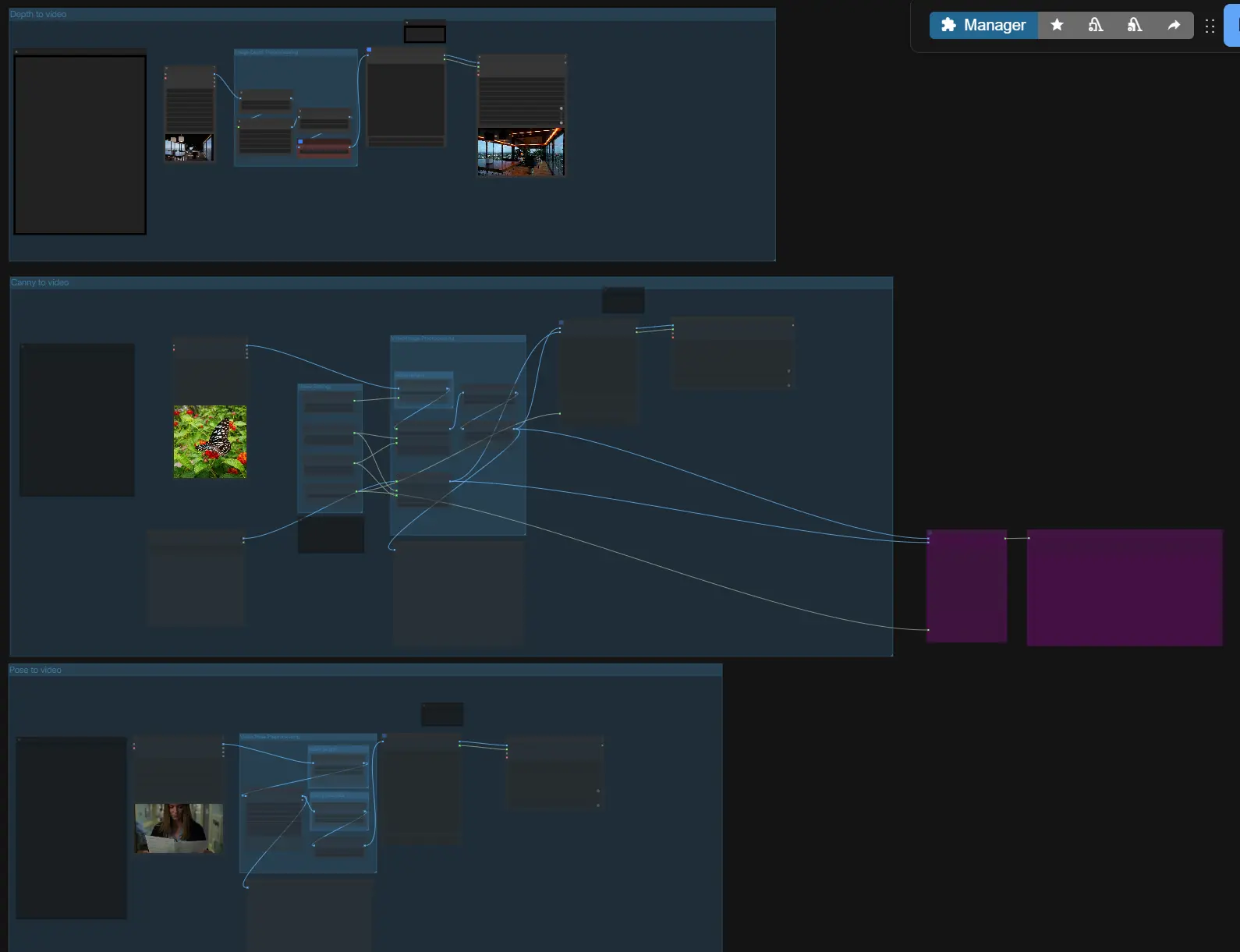
At a high level, LTX-2 ControlNet takes your prompt and optional references, builds an audio-visual latent with ControlNet-style guidance, samples a first pass, then upscales the latent for crisp video and synchronized audio. Choose one of three guided paths (Depth, Canny, Pose) or use them independently, then set length and size before exporting.
- Image/Video Preprocessing
- If you are doing image-to-video or video-to-video, use the loaders to bring in your reference media.
VHS_LoadVideo(#196, #197, #198) splits frames for analysis, whileLoadImage(#189) handles stills. The group provides convenient scaling so the downstream guides see consistent frame sizes. - A “first frame” image can be passed forward for scene initialization; you will enable it later in the generation group.
- If you are doing image-to-video or video-to-video, use the loaders to bring in your reference media.
- Image Depth Preprocessing
- For depth guidance, the “Image to Depth Map (Lotus)” subgraph converts your input into a normalized depth map using Lotus Depth. This prepares a single-frame or multi-frame depth representation that LTX-2 can follow.
- The path includes optional resizing and intensity controls so the guide encodes broad structure without overfitting to small artifacts.
- Video Pose Preprocessing
- For pose guidance,
DWPreprocessor(#158) detects full-body keypoints from the input video and scales them for stable conditioning. This yields a clean pose image sequence that emphasizes skeleton and limb orientation. - Preview nodes help you quickly verify that detections and aspect ratios look correct before generation.
- For pose guidance,
- Canny to video
- This control path extracts edges with
Canny(#169), then builds an AV latent with the control image sequence. Use it when you want to preserve silhouettes, major contours, or typography edges from a reference. - A first-frame image input is available for consistent initialization; enable it only when you want the opening frame to match a specific still.
- This control path extracts edges with
- Depth to video
- This path feeds the Lotus depth maps as the control images. Depth control is ideal for enforcing camera geometry, large-scale layout, and subject distance while letting the generator choose textures and lighting.
- You can supply a first frame to lock the initial composition and then let motion evolve guided by depth cues.
- Pose to video
- The pose path uses the keypoint render from the preprocessor, steering body orientation and motion timing. It is especially effective for character blocking, hand-lift timing, and walk cycles.
- As with other modes, you can combine prompt timing with optional first-frame conditioning for continuity.
- Video settings and length
- Set the working width, height, and frame count in the “Video Settings” and “video length” groups. The workflow auto-adjusts invalid values to the nearest compatible sizes for LTX-2’s latent grid and stride so you can iterate safely.
- Keep your target frame rate consistent across nodes; the conditioning nodes and final mux respect it for smooth audio-visual sync.
- Generation, upscaling, and export
- During sampling,
LTXVAddGuideintegrates your positive/negative conditioning with the chosen control images, thenSamplerCustomAdvancedexecutes the schedule fromLTXVSchedulerfor both video and audio latents. The optional first-frame is injected withLTXVImgToVideoInplacewhere enabled. - The second stage runs
LTXVLatentUpsamplerto refine detail with the x2 latent upscaler. Final decode happens with tiledVAEDecodeTiledfor frames andLTXVAudioVAEDecodefor audio, then the video is written withVHS_VideoCombineorCreateVideodepending on the selected branch.
- During sampling,
Key nodes in Comfyui LTX-2 ControlNet workflow#
LTXVAddGuide(#132)- Merges text conditioning and IC LoRA controls into the AV latent, acting as the heart of LTX-2 ControlNet guidance. Adjust only the few controls that matter: choose the control LoRA that matches your path (depth, canny, or pose) and, when available, the
image_strengththat tunes how tightly the model follows guides. Reference implementation and node behavior are provided by the LTXVideo extension. Docs/Code
- Merges text conditioning and IC LoRA controls into the AV latent, acting as the heart of LTX-2 ControlNet guidance. Adjust only the few controls that matter: choose the control LoRA that matches your path (depth, canny, or pose) and, when available, the
LTXVImgToVideoInplace(#149, #155)- Injects a first-frame image into the AV latent for consistent scene initialization. Use
strengthto balance faithfulness to the first frame versus freedom to evolve; keep it lower for more motion and higher for tighter anchors. Bypass it when you want purely text- or control-driven openings. Docs/Code
- Injects a first-frame image into the AV latent for consistent scene initialization. Use
LTXVScheduler(#95)- Drives the denoising trajectory for the unified latent so both audio and video converge together. Increase steps for complex scenes and fine detail; shorten for drafts and quick iteration. Schedule settings interact with guidance strength, so avoid extreme values when guidance is strong. Docs/Code
LTXVLatentUpsampler(#112)- Performs the second-stage latent upscaling with the LTX-2 x2 spatial upscaler, improving sharpness with minimal VRAM growth. Use it after the first pass rather than increasing base resolution to keep iterations responsive. Upscaler model
DWPreprocessor(#158)- Generates clean human pose keypoints for the pose-control path. Verify detections with the preview; if hands or small limbs are noisy, scale inputs to a moderate max dimension before preprocessing. Provided by the ControlNet auxiliary suite. Repo
VHS_VideoCombine/CreateVideo(#195, #106)- Muxes decoded frames and audio into an MP4 with the selected frame rate and pixel format. Use these only after confirming your audio decode looks aligned in the preview. Provided by Video Helper Suite. Repo
Optional extras#
- Prompting for LTX-2 ControlNet
- Describe actions over time, not just static attributes.
- Include needed sound cues or dialogue so audio is generated on-beat.
- Use a concise negative prompt to suppress artifacts you repeatedly see.
- Sizing and lengths
- Use image sizes of the form 32k + 1 for width/height; the graph auto-corrects if you miss, but exact values speed iteration.
- Frame counts of the form 8k + 1 tend to be most stable for scheduling.
- First-frame consistency
- Enable first-frame only when you need a locked opening composition; pair it with moderate
image_strengthto avoid overconstraint.
- Enable first-frame only when you need a locked opening composition; pair it with moderate
- VRAM and throughput
- The workflow includes sequence-parallel and torch compile options in the LTXVideo patcher for multi-GPU or memory-constrained setups. Keep them on for long clips, off when debugging node behavior. Extension
Acknowledgements#
This workflow implements and builds upon the following works and resources. We gratefully acknowledge Lightricks for ComfyUI-LTXVideo for their contributions and maintenance. For authoritative details, please refer to the original documentation and repositories linked below.
Resources#
- ComfyUI-LTXVideo GitHub Repository: https://github.com/Lightricks/ComfyUI-LTXVideo
- GitHub: Lightricks/ComfyUI-LTXVideo
Note: Use of the referenced models, datasets, and code is subject to the respective licenses and terms provided by their authors and maintainers.