

LTX 2.3 Close-Up Shots: portrait image-to-video with native audio#
LTX 2.3 Close-Up Shots is a RunComfy-ready ComfyUI workflow that turns a single portrait into a cinematic, face-forward clip with jointly generated native audio. “Close-Up Shots” describes the framing goal and prompt style, not a separate LTX model variant or LoRA. The graph runs the distilled LTX 2.3 v1.1 GGUF path with no active detailer LoRA, using a two-stage latent pipeline and an x2 spatial upscaler to deliver stable identity, natural lip sync, and crisp close framing.
Designed for fashion portraits, dialogue beats, interviews, and polished social clips, this ComfyUI build emphasizes tight composition and coherent audio-video motion. With LTX 2.3 Close-Up Shots, you supply a still image and a concise scene description; the workflow handles motion, timing, and voice to produce a share-ready MP4.
Key models in Comfyui LTX 2.3 Close-Up Shots workflow#
- LTX-2.3 22B Distilled 1.1 (Transformer-only). The core video-audio generator distilled for faster inference and lower memory while preserving quality. Source: Lightricks/LTX-2.3.
- LTX-2.3 x2 Spatial Upscaler 1.1. A native latent upscaler that sharpens details and improves motion stability during the second pass. Packaged in the LTX 2.3 release: Lightricks/LTX-2.3.
- LTX-2.3 Video VAE (bf16) and LTX-2.3 Audio VAE (bf16). Decoders that turn video and audio latents into frames and waveform while keeping sync tight. Curated weights: Kijai/LTX2.3_comfy.
- Quantized GGUF weights for LTX 2.3 22B 1.1. Memory-efficient UNet/transformer and text stack, optimized for CPU offload or low-VRAM GPUs. Distribution: QuantStack/LTX-2.3-GGUF.
- Gemma 3 12B Instruct text encoder with LTX text projection. Provides robust prompt understanding and timing tokens for both modalities, wired into ComfyUI’s CLIP interface. Included via the GGUF pack: QuantStack/LTX-2.3-GGUF.
- Optional tiny VAE for fast previews. Useful for sampler previews during iteration: madebyollin/taehv.
How to use Comfyui LTX 2.3 Close-Up Shots workflow#
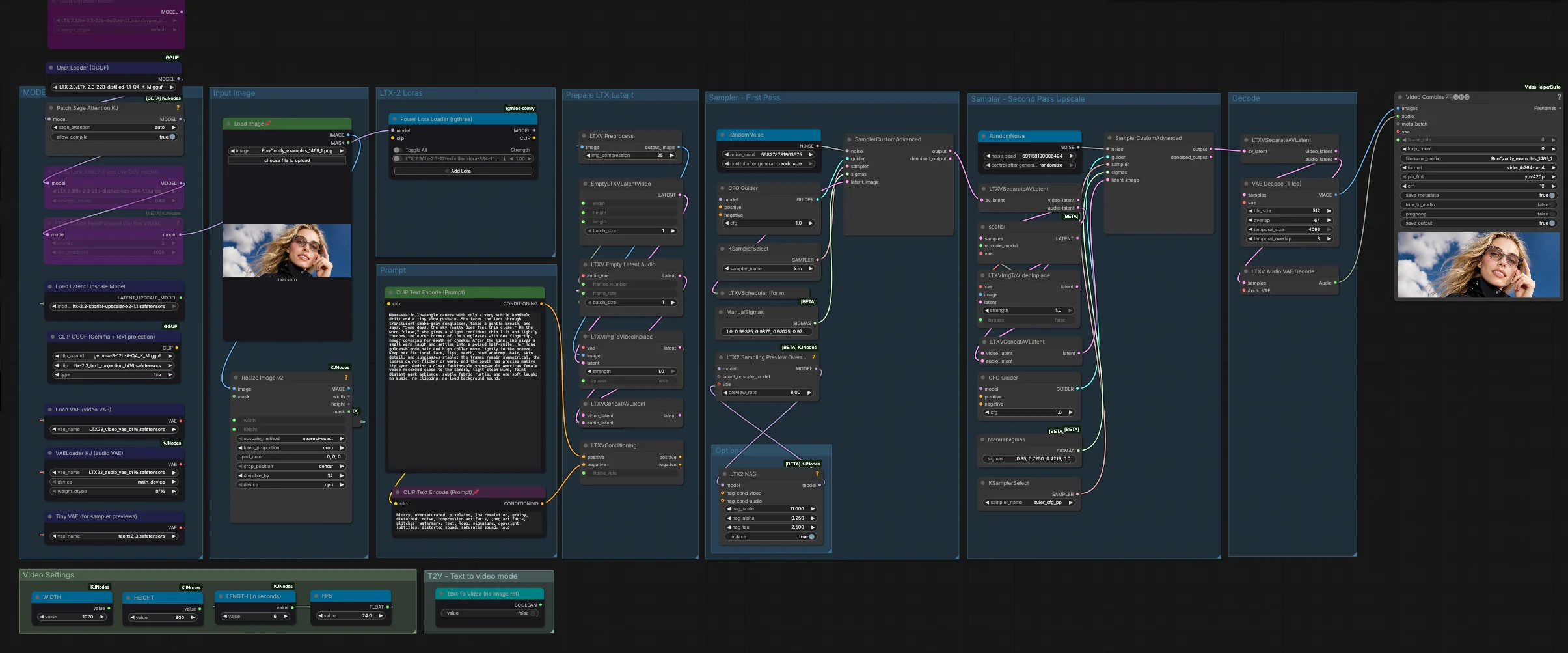
This workflow runs in two coordinated stages. The first pass establishes close-up motion and native audio at a base size. The second pass upsamples spatially and refines identity and lip sync, then decodes and muxes video with audio.
- MODELS Loads the distilled LTX 2.3 22B 1.1 model in GGUF, the Gemma 3-based text stack, and the LTX video and audio VAEs. It also enables sequence-parallel and preview helpers for smoother iteration. No detailer LoRA is active by default, which keeps the LTX 2.3 Close-Up Shots look clean and consistent.
- Video Settings Set your target width, height, frame rate, and clip length here. The graph enforces valid dimensions internally, but choosing production-friendly values yields steadier results and smoother playback. If you plan to iterate quickly, start modestly and scale up in the second pass.
- T2V — Text to video mode When you want to generate from text only, toggle the provided text-to-video switch. For LTX 2.3 Close-Up Shots the default path is image-to-video, which keeps identity and framing anchored to your portrait.
- Input Image Provide a clean portrait still with the face unobstructed. The workflow pre-processes and resizes the image, then uses
LTXVImgToVideoInplace(#161) to anchor identity and lens geometry. Keep background clutter minimal and allow a little headroom so the slow push-in feels natural. - Prompt Use one concise positive prompt to describe the shot over time, including line reads, breaths, micro-gestures, and audible events. Keep the negative prompt focused on removal of artifacts rather than style policing. Do not repeat details already visible in the reference image, since that can reduce fidelity and stability.
- Prepare LTX Latent The graph creates empty video and audio latents that match your settings, merges them into a single AV latent, and attaches your positive and negative conditioning with the chosen frame rate. This keeps timing, motion, and audio in step from the start.
- Sampler — First Pass The first pass uses
CFGGuider(#129) with a speed-optimized sampler to generate a coherent low-res AV latent. This stage locks in close-up camera behavior, speech cadence, and basic lip sync. Think of it as the narrative pass that establishes what happens. - Sampler — Second Pass Upscale The AV latent is split, and the video path is upscaled x2 using
LTXVLatentUpsampler(#118). Identity is re-projected withLTXVImgToVideoInplace(#160) to keep the face stable at the higher size, then audio and video are rejoined and refined with a fidelity-focused sampler. This pass enhances detail, reduces flicker, and polishes the LTX 2.3 Close-Up Shots look. - Decode Video frames are decoded with a tiled VAE for memory efficiency, audio is decoded via the audio VAE, and
VHS_VideoCombinemuxes everything into an H.264 MP4 with standard 4:2:0 pixel format. You can preview audio during iteration and trim the final duration to match the generated speech. - Optional If VRAM is tight, enable the chunked feed-forward option to trade a bit of speed for stability. For faster look-dev, use the tiny preview VAE. Multi-GPU users can benefit from the sequence-parallel patcher to keep long sequences smooth.
Key nodes in Comfyui LTX 2.3 Close-Up Shots workflow#
LTXVImgToVideoInplace(#161 and #160) Anchors the portrait into the latent video so the face remains stable while subtle push-ins and micro-movements play out. Keep it active for image-to-video; switch itsbypassonly when using text-to-video mode. For the best LTX 2.3 Close-Up Shots results, start from a sharp, evenly lit reference and avoid occlusion over the mouth.LTXVLatentUpsampler(#118) Applies the native LTX 2.3 x2 spatial upscaler in latent space before the second-pass refinement. This preserves motion coherence while increasing detail. For close-ups, keeping the upscale at x2 typically offers the best balance of sharpness and stability.CFGGuider(#129 and #103) Combines your positive and negative conditioning into a unified guidance signal for both modalities. Small adjustments to guidance strength can tighten or loosen adherence to your script and framing. If you increase guidance, consider slightly softening the negative list to avoid over-constraining expressions.SamplerCustomAdvanced(#113 and #119) The first pass favors a speed-oriented strategy to establish motion and audio quickly, while the second pass switches to a fidelity-oriented strategy to sharpen details. If you change sampler strategy, keep the first pass fast and the second pass precise so LTX 2.3 Close-Up Shots maintains its cinematic polish.LTX2_NAG(#342) Introduces noise-aware guidance that balances video and audio conditioning. Raising the video emphasis can firm up framing and pose; raising the audio emphasis can harden lip sync. Tune conservatively and in tandem withCFGGuiderto avoid over-constraint.LTXVConditioning(#107 and #22) Binds your prompts and frame rate to the latent timeline. Maintain a single, scene-level positive prompt and a compact negative prompt for the cleanest alignment. The attached frame rate ensures speech pacing and motion cadence stay in lockstep.VHS_VideoCombine(#140) Encodes the final result to MP4 with standard playback settings. For delivery, raise quality by loweringcrf; for editorial, enabletrim_to_audioso the clip length matches the generated speech exactly.
Optional extras#
- Framing tips for LTX 2.3 Close-Up Shots Crop so the eyes sit near the upper third, allow a little headroom, and keep the mouth fully visible to improve lip sync. Avoid strong backlight or heavy filters in the reference.
- Prompting that works Write what happens over time, including audible moments like breaths, laughs, and room tone. Leave out attributes already present in the image. Keep the negative list short and practical.
- Sizing and performance If you are low on VRAM, try moderate base sizes first, then let the second pass upscale. Dimensions that follow LTX’s grid constraints will sample more predictably, and higher frame rates demand more compute.
- Iteration workflow Lock image and prompt, iterate the first pass until the motion and read feel right, then move to the second pass for detail. Use the tiny preview VAE to speed up checks, and only enable full decoding when you are ready to export.
- When to use T2V Switch to text-to-video mode for B‑roll and abstract close-ups driven purely by narration. For identity-driven shots, keep the portrait path on to preserve the LTX 2.3 Close-Up Shots aesthetic.
Acknowledgements#
This workflow implements and builds upon the following works and resources. We gratefully acknowledge Lightricks for the LTX‑2.3 model, LTX Docs for the Image‑to‑Video Workflow Guide, QuantStack for the LTX‑2.3‑GGUF quantizations, and iiTzMYUNG for the LTX 2.3 source showcase for their contributions and maintenance. For authoritative details, please refer to the original documentation and repositories linked below.
Resources#
- Lightricks/LTX-2.3
- GitHub: Lightricks/LTX-2
- Hugging Face: Lightricks/LTX-2.3
- arXiv: arXiv:2601.03233
- LTX Docs/Image-to-Video Workflow Guide
- GitHub: Lightricks/ComfyUI-LTXVideo
- Docs / Release Notes: Image-to-Video Workflow Guide
- QuantStack/LTX-2.3-GGUF
- Hugging Face: QuantStack/LTX-2.3-GGUF
- iiTzMYUNG/LTX 2.3 Close-Up Shots Are Absolutely Insane!
- Docs / Release Notes: LTX 2.3 Close-Up Shots Are Absolutely Insane!
Note: Use of the referenced models, datasets, and code is subject to the respective licenses and terms provided by their authors and maintainers.