

LTX 2.3 Talking and Singing Lip Sync: Portrait-to-Performance ComfyUI Workflow#
LTX 2.3 Talking and Singing Lip Sync turns a clear front-facing portrait and a voice or song into a cinematic digital-human video with expressive, synchronized mouth motion. Built for RunComfy, it uses LTX 2.3 video generation with LTXV ComfyUI nodes and Mel-Band RoFormer audio separation to keep the face readable while matching speech or lyrics.
This ComfyUI workflow is suited to AI music videos, virtual singers, character performance tests, and creator demos where both the on-screen performer and the final audio must remain usable. You provide a portrait image and an audio track, choose a frame rate and duration, and the pipeline renders an mp4 with lip sync aligned to your track.
Note: For especially impressive results, we strongly recommend generating the song with Ace Step Model, then creating a clear cinematic portrait with Seedream 5.0 Pro. Use those two assets as the audio and portrait inputs for this workflow to get a more polished singing digital-human performance.
Key models in Comfyui LTX 2.3 Talking and Singing Lip Sync workflow#
- LTX-2.3 video generation model by Lightricks. A transformer-based audio-video generator that couples audio features with visual motion to produce temporally coherent frames suitable for talking and singing. Model card and official repository.
- LTX-2.3 Video VAE and Audio VAE. Latent encoders/decoders that pack video and audio into the AV latent space used by LTX-2.3, ensuring efficient sampling and clean reconstruction. Implemented in the LTX ComfyUI integration. ComfyUI-LTXVideo.
- MelBandRoFormer. A modern music source-separation model used here to optionally extract vocals for cleaner lip-conditioning while keeping your original mix for the final render. Weights and ComfyUI node.
How to use Comfyui LTX 2.3 Talking and Singing Lip Sync workflow#
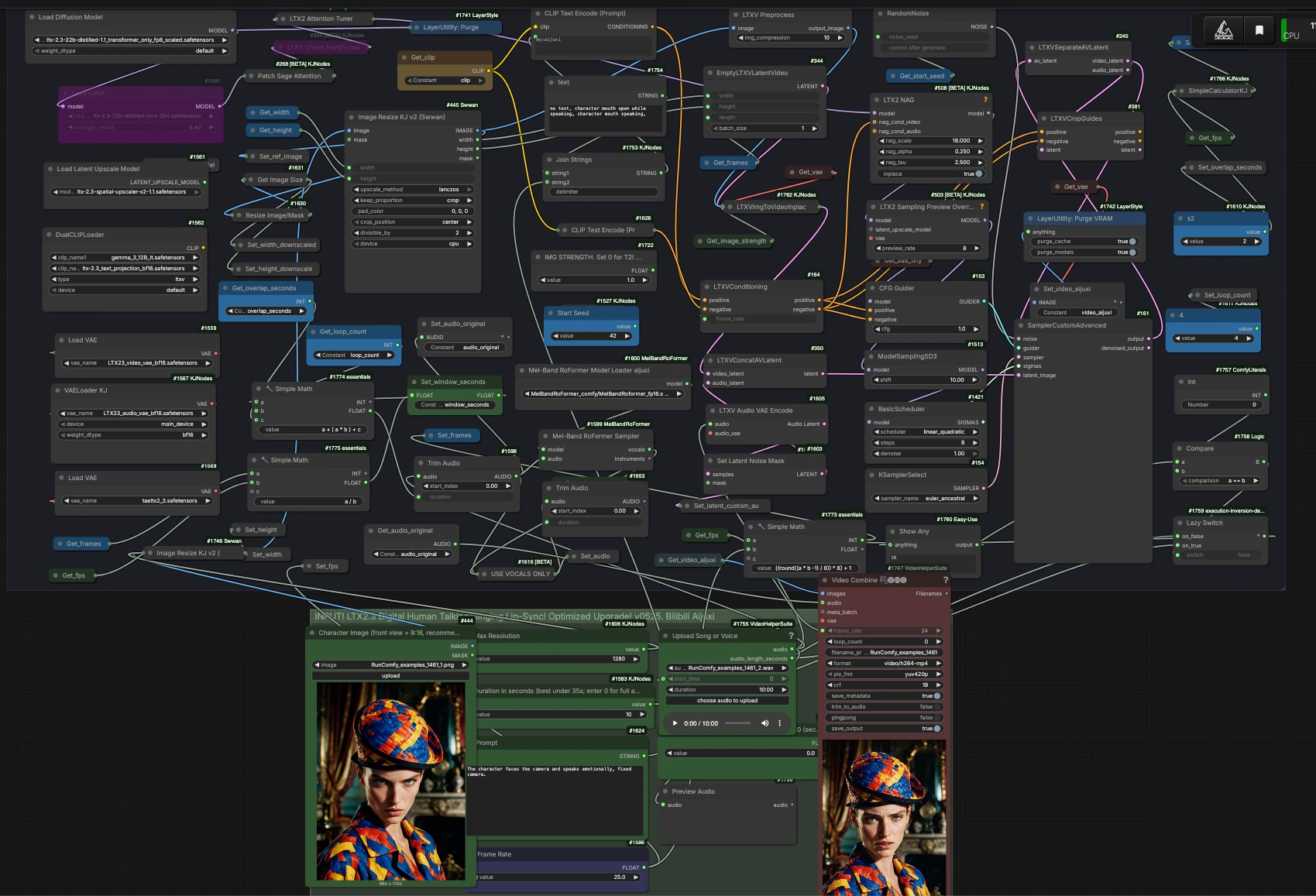
The workflow runs in three stages: Input, LTX 2.3 generation, and Export. Groups work together end to end to turn your portrait and audio into a synced performance.
INPUT#
Load a front-facing portrait using Character Image (front view + 9:16, recommended) (#444). The image is resized for the model and lightly preprocessed to preserve identity and mouth region detail. Upload your song or voice with Upload Song or Voice (#1755), then set Start lip-sync from which second? e.g. 10.0 (seconds) (#1776) if you want to skip intro bars or silence. Choose a duration with Duration in seconds (best under 35s; enter 0 for full audio) (#1583) and set Frame Rate (#1586) for the render. Write an intent prompt in Prompt (#1624) to guide expression and camera behavior; the workflow also injects helpful negative cues to avoid subtitles, watermarks, and static frames.
LTX2.3 Digital Human Talking/Singing Lip-Sync#
Your portrait is turned into a starting latent clip by LTXV Preprocess (#446) and LTXVImgToVideoInplaceKJ (#1762). Control how strongly the portrait is enforced using IMG STRENGTH. Set 0 for T2I mode (#1722): higher values lock to the photo, while lower values allow more generative motion. The audio path trims your upload, optionally separates vocals with Mel-Band RoFormer Sampler (#1599), and encodes the chosen track through LTXV Audio VAE Encode (#1605). Audio and video latents are fused by LTXV Concat AV Latent (#350), and text conditioning from CLIP Text Encode nodes drives overall scene intent and cleanliness via LTXVConditioning (#164). The LTX-2.3 model is patched and guided for lip precision using LTX2 NAG (#508), then sampled with SamplerCustomAdvanced (#161) under the selected scheduler and sampler.
Export and save#
After sampling, the video latent is decoded by VAE Decode (#1318) into frames. Video Combine 🎥🅥🅗🅢 (#1747) muxes those frames with your trimmed original audio to produce an mp4 at your chosen frame rate. If you enabled vocals-only for conditioning, the final export still uses the full mix so your result remains ready to share. The output is saved with a clear prefix for easy versioning.
Key nodes in Comfyui LTX 2.3 Talking and Singing Lip Sync workflow#
LTXVImgToVideoInplaceKJ (#1762)#
Converts the reference portrait into an initial latent video. Adjust IMG STRENGTH. Set 0 for T2I mode (#1722) to balance identity lock versus freedom of motion. For tight likeness and stable head pose, keep the strength higher; for more performative motion, reduce it. If you set it to 0, treat the workflow like text-to-video and rely more on the prompt and audio.
Mel-Band RoFormer Sampler (#1599)#
Separates vocals from a song to feed cleaner speech features into the model. Use USE VOCALS ONLY (#1616) when the instrumental is dominant or when consonants are getting lost; keep it off when you want the full mix to influence expressiveness. The final render uses the original trimmed audio, preserving your intended soundtrack. See the model details in the ComfyUI extension and weights linked above.
LTXV Audio VAE Encode (#1605)#
Encodes the selected audio into the LTX audio latent space that drives mouth shapes and micro-expressions. Trim obvious silences before encoding for snappier alignment. Pair with the start-time offset if your lyric entry does not begin at 0 seconds.
LTX2 NAG (#508)#
Applies noise-augmented guidance tailored for LTX 2.3 to sharpen audio-to-lip coupling. If lips feel under-animated, raise its guidance slightly; if teeth or mouth shapes look overdriven, lower the effect. Small, incremental changes work best because this control interacts with your prompt strength and sampler settings. Reference implementation lives in the LTX repositories.
SamplerCustomAdvanced (#161)#
Runs the denoising process with your chosen KSamplerSelect (#154), CFG Guider (#153), and scheduler. Lower classifier-free guidance generally favors natural motion and identity retention; higher values increase prompt dominance but can stiffen lips. If you switch samplers, keep the rest of the settings intact for a fair A/B comparison.
Video Combine 🎥🅥🅗🅢 (#1747)#
Writes the final mp4 by combining frames and the trimmed audio. Leave defaults for broad compatibility or increase quality if you plan to color-grade later. Ensure the frame_rate matches your creative intent and matches what you set earlier.
Optional extras#
- Use a clean, front-facing portrait with neutral lighting and a 9:16 crop for the most convincing LTX 2.3 Talking and Singing Lip Sync results.
- If instruments mask consonants, enable
USE VOCALS ONLY(#1616) so the model conditions on a cleaner vocal stem while your export keeps the full mix. - Keep clips under roughly 35 seconds for faster iteration; stitch takes externally if you are building a long music video.
- When motion is too static, lower
IMG STRENGTH; when identity drifts, raise it and simplify the prompt. - Align lyrics by trimming lead-in silence and using the start-time offset control so lip shapes begin exactly on your first word.
- Set a fixed
Start Seedto reproduce a take, then vary the seed for alternates. - Respect likeness and music rights when using this LTX 2.3 Talking and Singing Lip Sync workflow in public projects.
Links to official resources
- LTX-2.3 model card: Lightricks/LTX-2.3
- LTX-Video repository: Lightricks/ltx-video
- ComfyUI-LTXVideo: Lightricks/ComfyUI-LTXVideo
- ComfyUI-MelBandRoFormer: kijai/ComfyUI-MelBandRoFormer
- MelBandRoFormer weights: Kijai/MelBandRoFormer_comfy
Acknowledgements#
This workflow implements and builds upon the following works and resources. We gratefully acknowledge Lightricks for LTX-Video (including the LTX 2.3 model and ComfyUI-LTXVideo nodes), Kijai for MelBandRoFormer (ComfyUI nodes and model weights), and RunningHub for the workflow source article for their contributions and maintenance. For authoritative details, please refer to the original documentation and repositories linked below.
Resources#
- RunningHub/RunningHub workflow source
- Docs / Release Notes: RunningHub Post
- Lightricks/LTX 2.3 model
- GitHub: Lightricks/ltx-video
- Hugging Face: Lightricks/LTX-2.3
- Lightricks/LTX-Video official repository
- GitHub: Lightricks/ltx-video
- Hugging Face: Lightricks/LTX-2.3
- Lightricks/ComfyUI-LTXVideo nodes
- GitHub: Lightricks/ComfyUI-LTXVideo
- Kijai/ComfyUI-MelBandRoFormer nodes
- GitHub: kijai/ComfyUI-MelBandRoFormer
- Hugging Face: Kijai/MelBandRoFormer_comfy
- Kijai/MelBandRoFormer ComfyUI model weights
- Hugging Face: Kijai/MelBandRoFormer_comfy
- GitHub: kijai/ComfyUI-MelBandRoFormer
Note: Use of the referenced models, datasets, and code is subject to the respective licenses and terms provided by their authors and maintainers.