

LTX 2.3 VBVR ComfyUI Workflow: reasoning‑aware image‑to‑video with dialog#
This workflow turns a single reference image into a coherent video sequence guided by text and optional speech, powered by LTX‑2.3 and the LTX 2.3 VBVR LoRA. VBVR stands for video‑based visual reasoning: it helps the model keep identities, spatial relations, and cause‑and‑effect consistent across frames so your scenes feel intentional rather than random. The graph includes speech‑aware prompting, two‑stage LTX sampling, motion smoothing, and final upscale/export to MP4.
Creators who need narrative continuity, believable motion, or dialog timing will find the LTX 2.3 VBVR workflow especially useful. Supply a strong reference frame, describe the action and interactions, and optionally insert a spoken line that is auto‑transcribed and woven into the prompt for better lip and timing alignment.
Key models in Comfyui LTX 2.3 VBVR workflow#
- LTX‑2.3 22B video generation model from Lightricks, the main diffusion backbone for image‑to‑video and audio‑conditioned decoding. Hugging Face: Lightricks/LTX-2.3
- LTX‑2.3 Video VAE for encoding/decoding video latents, paired with the base checkpoint for efficient tiled decoding. Hugging Face: Lightricks/LTX-2.3
- LTX‑2.3 Spatial Upscaler x2 latent model to enhance spatial detail after the first pass. Hugging Face: Lightricks/LTX-2.3
- Gemma 3 12B text encoder packaged for LTX‑2, used here to parse complex instructions and dialog tokens. Hugging Face: Comfy-Org/ltx-2
- LTX 2.3 VBVR LoRA for reasoning‑centric scene structure, object interaction, and continuity across time. Hugging Face: LiconStudio/Ltx2.3-VBVR-lora-I2V
- RIFE frame‑interpolation model to smooth motion between generated frames. GitHub: hzwer/Practical-RIFE
- Whisper speech recognition model for optional audio‑to‑text prompt infusion. GitHub: openai/whisper
How to use Comfyui LTX 2.3 VBVR workflow#
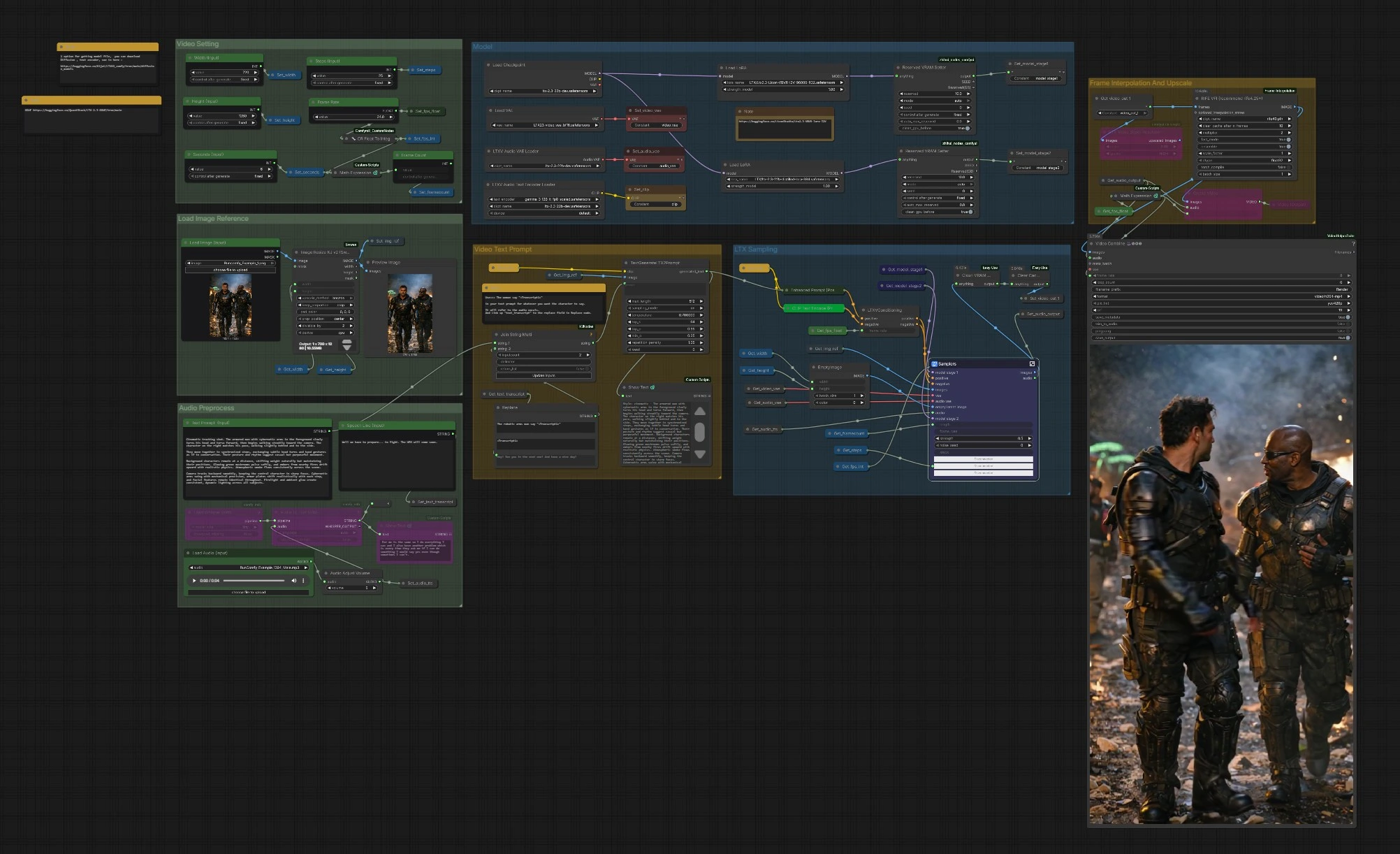
The graph is organized into clear groups. You configure inputs, the model stack, and video settings, then the LTX samplers generate frames that are optionally interpolated and upscaled before export.
Load Image Reference#
Use Load Image (Input) (#5525) to pick a strong, on‑style reference frame. The image is resized by ImageResizeKJv2 (#5280) to your chosen width and height while preserving composition. A preview node confirms what the model will actually see. Good reference images with clear subjects and lighting give the LTX 2.3 VBVR stack a reliable anchor for identity and style.
Video Setting#
Set Width (Input) (#5284), Height (Input) (#5286), Seconds (Input) (#5573), and base Frame Rate (#5289). The graph computes frame count automatically so timing stays consistent when you change duration or fps. If you plan to enable interpolation later, you can choose a modest base fps to save time and let RIFE add smoothness. These settings also inform the conditioning node so motion and pacing remain coherent.
Model#
CheckpointLoaderSimple (#5493) loads LTX‑2.3. The graph attaches the LTX 2.3 VBVR LoRA via LoraLoaderModelOnly (#5616) and can optionally apply a distilled LoRA and a detailer LoRA for extra fidelity. LTXAVTextEncoderLoader (#5494) brings in the Gemma‑based text encoder, while VAELoader (#5629) and LTXVAudioVAELoader (#5492) provide the video and audio VAEs. Two ReservedVRAMSetter nodes balance memory use so long runs remain stable.
Video Text Prompt#
Write your scene in Text Prompt (Input) (#5620). To inject dialog aligned with audio, include a placeholder like: The woman says "<Transcript1>". Feed the actual line into Speech Line (Input) (#5524) or let Whisper produce it from the audio; StringReplace (#5226) and JoinStringMulti (#5602) swap <Transcript1> with the transcript. TextGenerateLTX2Prompt (#5488) then composes a refined instruction, which Enhanced Prompt (Positive) (#5174) encodes before LTXVConditioning (#5173) prepares final guidance. Clear verbs, subject references, and spatial cues give the LTX 2.3 VBVR LoRA the context it needs to reason over time.
Audio Preprocess#
Bring a voice track with Load Audio (Input) (#5590) or connect TTS. AudioAdjustVolume (#5601) normalizes levels. If you want prompt‑aware dialog, use Whisper via Load Whisper (mtb) (#5606) and Audio To Text (mtb) (#5607) to generate the transcript used in the prompt. The same audio is also encoded as a latent and later muxed back into the final video so lip and timing cues can influence generation.
LTX Sampling#
LTXVPreprocess (#5240) and LTXVImgToVideoInplace (#5245) convert your reference frame into an initial latent sequence, preserving core identity while allowing motion. The Samplers subgraph (#5278) runs a two‑stage process with CFG guiders and a scheduler, producing spatio‑temporal latents that respect both your prompt and the LTX 2.3 VBVR reasoning LoRA. Audio latents are concatenated with video latents so speech timing can inform motion. LTXVSpatioTemporalTiledVAEDecode (#5237) decodes frames, and LTXVAudioVAEDecode (#5103) restores the audio track.
Frame Interpolation and Upscale#
RIFE VFI (#5554) interpolates between frames to create smoother motion and to reach your target playback rate when combined with the base fps. RTXVideoSuperResolution (#5631) enhances detail and reduces compression artifacts, improving readability of faces, edges, and small props. Use this stage to balance speed and quality: interpolate for smoothness, then upscale for crispness.
Export#
Choose between CreateVideo (#5599) for a simple mux or VHS_VideoCombine (#5618) for more control over format, metadata, and trimming. The pipeline writes an H.264 MP4 via SaveVideo (#5597). Frame rate is derived from your settings and interpolation stage so playback matches the motion intent you authored at the start.
Key nodes in Comfyui LTX 2.3 VBVR workflow#
LoraLoaderModelOnly (#5616)#
Loads the LTX 2.3 VBVR LoRA that improves logical continuity, object interaction, and camera‑aware motion. Adjust the LoRA weight to balance reasoning influence with style from the base model and other LoRAs. This node is central to the distinct look and coherence that define the LTX 2.3 VBVR workflow. For LTX nodes and LoRA usage, see Lightricks/ComfyUI-LTXVideo and the VBVR LoRA card above.
TextGenerateLTX2Prompt (#5488)#
Assembles the final positive prompt by merging your base description, the image reference, and the dialog token replaced from <Transcript1>. Keep instructions concise, explicit, and consistent about subjects and actions so the model can reason across time. This is where you encode intent that the LTX 2.3 VBVR LoRA will reinforce during sampling.
LTXVConditioning (#5173)#
Packages positive and negative conditioning and forwards timing information so motion and pacing align with your fps choice. If you change frame rate in settings, update it here to keep motion dynamics consistent. Strong negatives help prevent still frames, watermarks, or unwanted overlays from creeping into the sequence.
Samplers (#5278)#
The two‑stage sampler block coordinates noise, guidance, and scheduling to transform the image and audio latents into a coherent video. The most impactful adjustments are the total steps, the image strength of the initial I2V stage, and the noise_seed for reproducibility. Tune these carefully to trade off fidelity to the reference frame against willingness to follow new motion and actions.
RIFE VFI (#5554)#
Interpolates frames for smoother motion or to reach a higher effective fps without regenerating the sequence. Increase interpolation when your base fps is low or when motion feels stuttery; decrease it to preserve the original generative rhythm. The model is widely used for high‑quality VFI; see the RIFE project on GitHub.
Optional extras#
- Dialog trick with LTX 2.3 VBVR: write a natural sentence with the placeholder, for example The woman says "<Transcript1>", then supply the line in Speech Line or let Whisper transcribe the audio so the prompt and lips align.
- Prompting for reasoning: call out who does what, where, and why. Use consistent subject names and temporal cues such as then, while, and as the camera moves to leverage VBVR’s strengths.
- Faster iterations: start with a shorter duration or lower base fps, confirm motion beats, then increase interpolation or seconds to finish.
- Stability tips: if you see identity drift, lower image‑to‑video strength slightly or raise the VBVR LoRA weight; if you see over‑constraint, do the reverse.
Acknowledgements#
This workflow implements and builds upon the following works and resources. We gratefully acknowledge @Benji’s AI Playground for the 2.3 VBVR Workflow Source for their contributions and maintenance. For authoritative details, please refer to the original documentation and repositories linked below.
Resources#
- LTX/2.3 VBVR Workflow Source
- Docs / Release Notes: LTX 2.3 VBVR Workflow Source @Benji’s AI Playground
Note: Use of the referenced models, datasets, and code is subject to the respective licenses and terms provided by their authors and maintainers.