

LTX 2.3 IC-LoRA Camera Control for ComfyUI#
LTX 2.3 IC-LoRA Camera Control is a reference-driven camera motion workflow for LTX-Video 2.3 in ComfyUI. Give it a short reference video and a creative prompt and it will transfer the camera trajectory from the reference to a newly generated scene, preserving subject composition and temporal coherence while you focus on content, lighting, and mood.
Built for filmmakers, VFX artists, and AI creators, this ComfyUI workflow reproduces pans, tilts, dollies, zooms, and orbit moves with adjustable motion strength. It pairs LTX-2.3’s unified audio-video generation with an In-Context LoRA tailored for camera control, so you get smooth movement, consistent framing, and synchronized audio in one pass.
Key models in Comfyui LTX 2.3 IC-LoRA Camera Control workflow#
- Lightricks LTX-2.3. A diffusion transformer that jointly generates video and audio, providing strong temporal coherence and synchronized sound in one forward pass. It is the core generator in this workflow and the target for IC-LoRA guidance. Model card
- LTX-Video VAE. The spatiotemporal video VAE used by LTX compresses frames into a compact latent space for efficient denoising, then decodes high-quality frames at the end of sampling. See the architecture background in the technical reports for LTX-Video and LTX-2.
- Gemma instruction-tuned text encoder. An instruction-tuned Gemma text encoder converts your prompts into conditioning vectors the generator can follow, enabling detailed shot descriptions and style control.
- LTX 2.3 IC-LoRA for Camera Control. A specialized In-Context LoRA adapter that extracts camera motion cues from the reference video and injects them into LTX-2.3, aligning the new scene’s virtual camera with the reference path.
How to use Comfyui LTX 2.3 IC-LoRA Camera Control workflow#
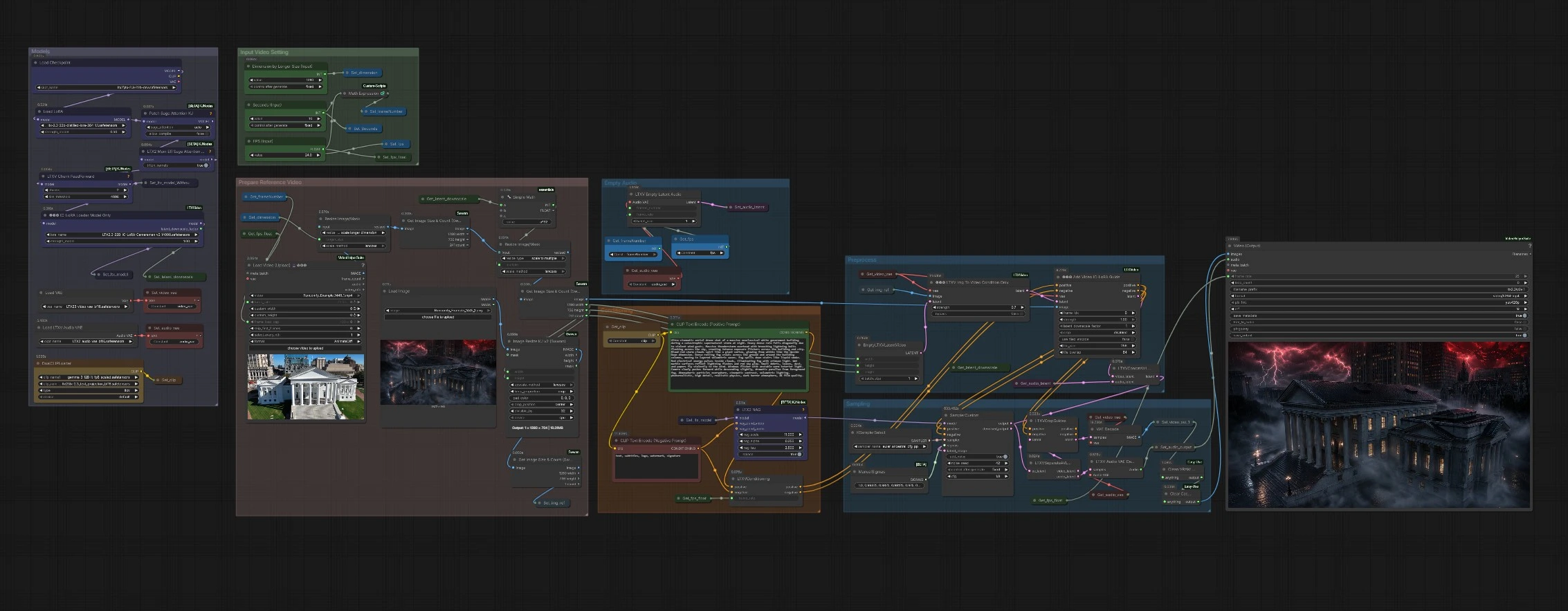
This workflow is organized into groups that prepare your reference, build conditioning, and run sampling before muxing audio and video. The IC-LoRA extracts camera movement from the reference while your prompt defines what appears on screen.
Input Video Setting#
Use the inputs in this group to set frames per second, clip duration, and the target longer-side dimension. These three values determine the frame budget and the working resolution for the entire run. Keeping FPS and duration aligned to your reference helps the IC-LoRA reproduce the timing and speed of the original move. Choose a dimension that fits your delivery aspect ratio and performance budget. If you are experimenting, start modestly and scale up once the motion looks right.
Prepare Reference Video#
Load your camera reference with VHS_LoadVideo (#5983). The pipeline scales and normalizes frames for the model, then analyzes them to compute sizes and counts, ensuring dimensions that work well with LTX-2.3. Smooth, single-take shots without cuts work best for LTX 2.3 IC-LoRA Camera Control, since the adapter is learning the camera path rather than story edits. Pans, tilts, dollies, zooms, and orbits are all supported; avoid shaky clips or rapid scene changes. If your reference is longer than your target, trim it to the most representative segment.
Preprocess#
The workflow creates an empty video latent aligned to your chosen resolution and duration, then optionally anchors appearance from a still image using LTXVImgToVideoConditionOnly (#5904). Supplying an on-style still can improve subject and palette consistency while leaving motion to the IC-LoRA. This stage also computes safe, model-friendly dimensions and ensures the latent timeline matches the reference’s pacing. The result is a clean starting point primed for camera control.
Conditioning#
Write your main shot description in the positive prompt and list undesired artifacts in the negative prompt. The prompts are encoded and time-aware conditioning is assembled in LTXVConditioning (#164). The LTX 2.3 IC-LoRA Camera Control then augments this conditioning with camera-motion tokens extracted from the reference video. Focus your text on subject, setting, lighting, and art direction; leave camera moves to the reference so the guidance does not conflict. You can iterate on tone and style without touching the reference each time.
Models#
The workflow loads the LTX-2.3 base model, applies a performance-friendly attention patch and feed-forward chunking for large resolutions, and injects the IC-LoRA with LTXICLoRALoaderModelOnly (#5924). This keeps VRAM use practical while preserving fidelity and motion coherence. The IC-LoRA also exposes a latent downscale factor that the graph uses to balance speed and detail. Think of this group as the runtime engine room of LTX 2.3 IC-LoRA Camera Control.
Sampling#
SamplerCustom (#561) runs the denoising process using the sampler picked in KSamplerSelect (#154) and a hand-tuned sigma schedule. During sampling, LTXAddVideoICLoRAGuide (#5899) fuses prompt conditioning, the appearance anchor, and the reference-driven camera path into the latent. After denoising completes, video and audio latents are split and decoded, then VHS_VideoCombine (#604) muxes frames and audio at your chosen frame rate. You end up with a ready-to-share MP4 that carries both the content you described and the camera move you referenced. If the camera feels too rigid or too loose, adjust motion strength and re-sample.
Empty Audio#
An aligned audio latent is created so LTX-2.3 can synthesize sound in sync with the generated video. This gives you ambient, foley-like tracks that match motion timing without extra work. If you plan to score the clip in post, you can ignore the generated audio and mute or replace it later. For motion tests, leaving audio on can help you judge timing and intensity.
Key nodes in Comfyui LTX 2.3 IC-LoRA Camera Control workflow#
VHS_LoadVideo (#5983)#
Loads the reference clip that supplies camera motion. Use it to pick the exact segment whose trajectory you want to transfer and to align effective frame rate with your target. Short, stable, single-shot inputs give the most predictable motion transfer. If needed, trim the reference or reduce the frame cap to iterate faster.
LTXICLoRALoaderModelOnly (#5924)#
Injects the LTX 2.3 IC-LoRA Camera Control adapter into the base model and exposes a latent downscale factor the graph uses for efficiency. Increase its strength to adhere more strictly to the reference camera path; lower it when you want the prompt to loosen the motion. Keep model and adapter versions matched for best results. Changing adapters mid-project will change how the camera is interpreted.
LTXAddVideoICLoRAGuide (#5899)#
Attaches the IC-LoRA guidance to both the conditioning and the latent. The key control here is motion strength, which governs how faithfully the generated camera follows the reference. Raise it for exact transfers and technical matches, lower it for creative reinterpretations. Combine with a strong subject prompt to preserve composition while allowing micro-variation.
LTXVImgToVideoConditionOnly (#5904)#
Turns a still image into appearance-only guidance without imposing motion, ideal for locking character, palette, or art direction. Increase adherence if the first frame drifts from your still, decrease it if the look is over-constrained. This node is optional; omit the still when you want the prompt and IC-LoRA to drive the look entirely.
SamplerCustom (#561)#
Runs denoising with your chosen sampler and sigma curve. Pair samplers like euler_ancestral_cfg_pp from KSamplerSelect (#154) with the provided sigma schedule for balanced detail and temporal stability. If you push motion strength high, consider gentler schedules to avoid overcorrection. Re-seed to explore alternates while keeping the same camera path.
VHS_VideoCombine (#604)#
Muxes decoded frames and audio to an MP4 for preview or delivery. Use it to set format and output frame rate to match your pipeline. For dailies, export with higher compression; for finishing, raise quality to preserve highlights and motion cadence. The output includes metadata so you can trace settings later.
Optional extras#
- For clean transfers in LTX 2.3 IC-LoRA Camera Control, pick a reference with a single, continuous move, minimal subject motion, and no cuts.
- Match target FPS and duration to your reference for 1:1 timing; diverge on purpose if you want slow or fast renditions.
- Keep prompts focused on content and style; let the IC-LoRA handle camera language to avoid conflicting signals.
- If you see edge artifacts, try a slightly smaller longer-side dimension or a milder sampler to improve stability.
- Explore LTX resources and examples to deepen your understanding of the model’s behavior and controls: Lightricks/LTX-2.3, Lightricks/ComfyUI-LTXVideo, AVControl.
Acknowledgements#
This workflow implements and builds upon the following works and resources. We gratefully acknowledge Innovate Futures @ Benji for LTX 2.3 IC-LoRA Camera Control Workflow Source for their contributions and maintenance. For authoritative details, please refer to the original documentation and repositories linked below.
Resources#
- Innovate Futures @ Benji/LTX 2.3 IC-LoRA Camera Control Workflow Source
- Docs / Release Notes: LTX 2.3 IC-LoRA Camera Control Workflow Source
Note: Use of the referenced models, datasets, and code is subject to the respective licenses and terms provided by their authors and maintainers.