





Krea 2 Famegrid Spice: fashion‑forward photoreal portraits in ComfyUI#
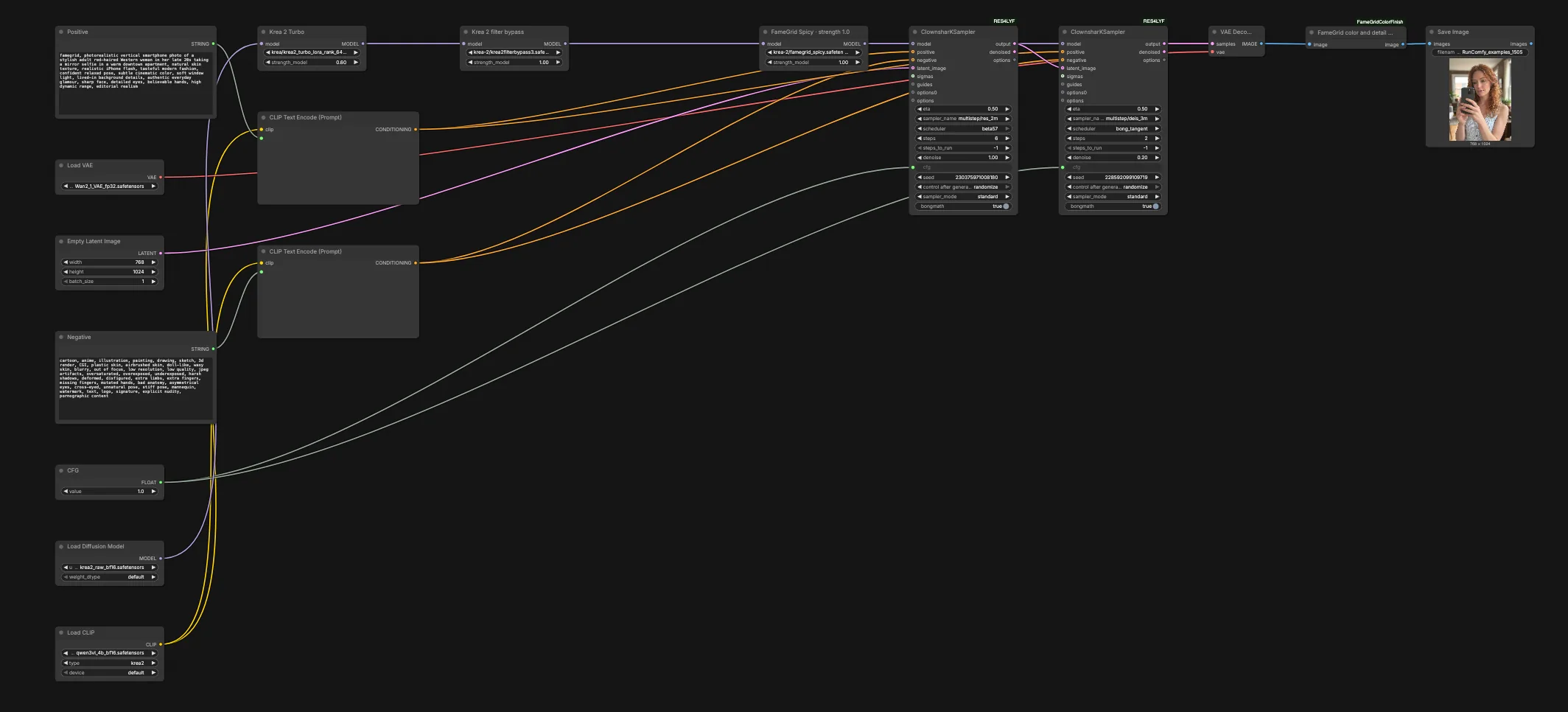
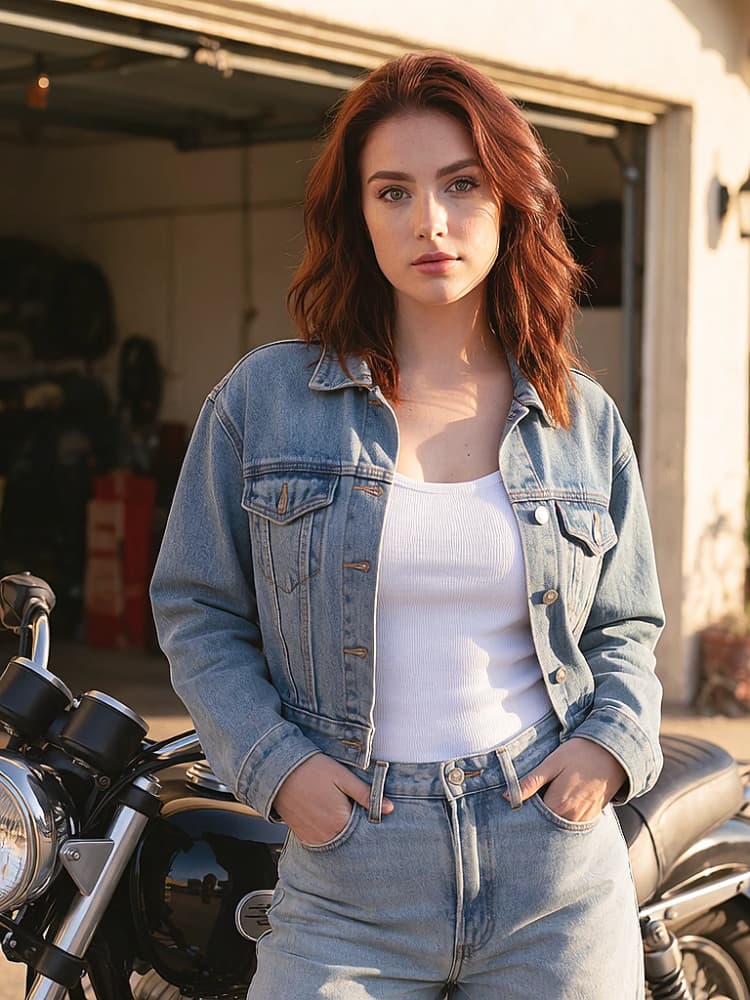
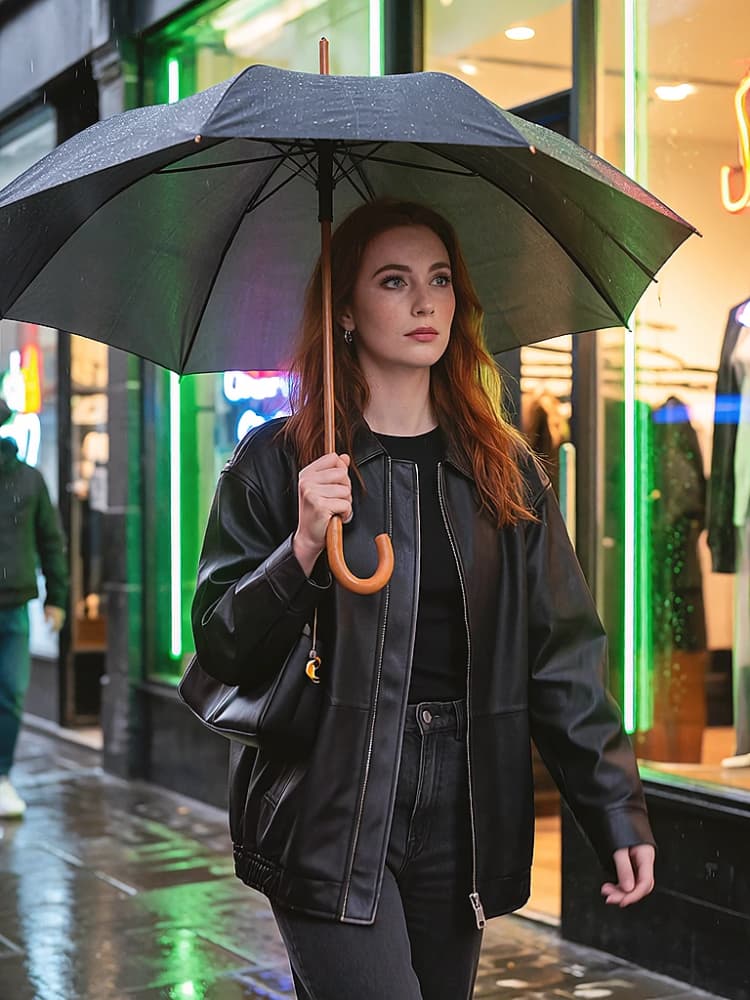
Krea 2 Famegrid Spice is a RunComfy‑ready text‑to‑image workflow for creators who want polished, Western‑editorial, photorealistic portraits without rebuilding a complex graph. It blends Krea 2 raw generation with a Qwen vision‑language text encoder, a Turbo‑aligned adapter, a filter‑tolerance adapter, and the corrected FameGrid Spice LoRA, then locks in a consistent look with a deterministic color finish. The default canvas opens with a pragmatic portrait prompt and medium‑safe vertical settings so you can iterate fast and stay on brief.
If your goal is editorial fashion, lifestyle, or cinematic social imagery, this ComfyUI Krea 2 Famegrid Spice workflow gives you strong prompt following, realistic skin texture, and dependable color balance right out of the box.
Key models in Comfyui Krea 2 Famegrid Spice workflow#
- Krea 2 Raw. The base text‑to‑image diffusion checkpoint used for generation. It is the official open‑weights release and a solid foundation for LoRA‑driven style work. Model card
- Krea 2 Turbo. A distilled release checkpoint known for faster, crisp generations. This workflow applies a Turbo‑aligned adapter so you can capture Turbo behavior while operating from the Raw base. Model card
- Qwen2‑VL family. A multimodal vision‑language model family used here as the text encoder for robust, multilingual prompt conditioning and caption semantics. Qwen/Qwen2‑VL‑2B
- FameGrid Spice LoRA (corrected release). A style LoRA tailored for Krea 2 that biases composition, fashion cues, and micro‑detail toward photoreal editorial outputs.
- Krea 2 filter‑tolerance LoRA. An adapter that reduces over‑filtering and refusals so portrait prompts remain responsive in creative contexts.
- Wan 2.1 VAE. A high‑quality variational autoencoder used for decoding latents into images with clean tonality and detail retention. An equivalent VAE is distributed in the Comfy‑Org Wan packages. Reference VAE file
How to use Comfyui Krea 2 Famegrid Spice workflow#
This workflow follows a clear path from prompts to a finished image: prompts and safety → model assembly with adapters → two‑stage sampling → decode and color finish.
- Prompts and conditioning
- Write or edit the main description in
Positive(#48). The default seed prompt models a vertical smartphone fashion portrait with “famegrid” up front to activate the style LoRA. Keep nouns and wardrobe cues concrete and let the node handle skin realism and lighting language. - Refine undesired traits in
Negative(#271). It ships with a balanced, portrait‑friendly list that steers away from painterly artifacts, aggressive retouching, and common anatomy issues. - Both prompts are encoded through
CLIPTextEncode(#6 and #272) using a Qwen‑family text encoder so the graph captures fine‑grained phrasing, pose hints, and lighting descriptors for Krea 2 to follow.
- Write or edit the main description in
- Model assembly and adapters
- The base UNet loads in
UNETLoader(#316), then the graph applies three adapters in sequence:Krea 2 Turbo(#154) to pull in Turbo’s responsive behavior,Krea 2 filter bypass(#155) to soften refusals on legitimate portrait prompts, andFameGrid Spicy · strength 1.0(#128) to enforce the photoreal editorial look. - This stacking lets you stay on the Krea 2 Raw backbone for capacity while steering style and safety behavior with LoRAs, which is faster to iterate than swapping whole checkpoints.
- The base UNet loads in
- Canvas setup and staged sampling
EmptyLatentImage(#232) seeds a vertical portrait canvas suited to phones and magazines. Keep this orientation when you want mirror‑selfie or waist‑up compositions; widen only when your prompt calls for full‑body framing.- Generation runs in two passes using
ClownsharKSampler_Beta(#265) followed by a lighter secondClownsharKSampler_Beta(#274). The first pass establishes global structure and skin realism; the second consolidates edges, eyes, and small fashion details while preserving the pose and lighting you set in the prompt.
- Decode and finish
VAEDecode(#8) converts latents to an RGB image with the Wan 2.1 VAE for crisp tonality.FameGrid color and detail finish(#340) applies a fixed color‑science recipe that gently brightens, balances palette drift, and adds a subtle detail enhancement. This is deterministic and repeatable, giving Krea 2 Famegrid Spice a consistent signature look. Node repoSaveImage(#213) writes the final output. For multi‑shot explorations, queue several prompts and vary only subject descriptors to keep styling and palette uniform.
Key nodes in Comfyui Krea 2 Famegrid Spice workflow#
FameGrid Spicy · strength 1.0(#128)- This LoRA is the aesthetic driver. Increase its strength for stronger editorial styling, saturated wardrobe cues, and bolder composition bias; reduce it if you need plainer commercial headshots. If faces over‑stylize against minimal prompts, lower this slightly and add concrete scene terms.
Krea 2 Turbo(#154)- A Turbo‑aligned adapter that improves prompt snap and micro‑contrast while keeping you on the Raw base model. Pair modest guidance with this node for the most natural skin; if you push guidance high, results may stiffen and lose the handheld vibe Turbo is known for. Reference Turbo details on the official card if you need parity with the 8‑step workflow. Model card
Krea 2 filter bypass(#155)- Eases refusals and over‑filtering on legitimate portrait prompts. If you see unwanted safety stylization or muted compliance with innocuous fashion descriptors, raise this slightly; lower it if you are working with brand‑sensitive concepts and want stricter filtering behavior.
ClownsharKSampler_Beta(#265) andClownsharKSampler_Beta(#274)- These samplers come from the RES4LYF family and enable high‑quality, efficient staged denoising. Use the first pass to establish composition and subject fidelity, then let the second pass tighten edges and high‑frequency detail. Keep seeds stable across passes for maximum consistency. Learn more about the beta samplers in the standalone package or the full RES4LYF repo. Standalone README • RES4LYF
FameGrid color and detail finish(#340)- Applies a fixed, filmic color balance and subtle sharpening tuned for fashion portraiture. Because it is deterministic, you get uniform finishing across batches and seeds, which is ideal for lookbooks and social sets. If you plan to grade externally, you can bypass this node to export a flatter base. Node repo
CLIPTextEncode(#6)- Encodes prompts with a Qwen‑family text encoder so Krea 2 can interpret nuanced, multi‑clause descriptions. Short, concrete phrasing works best; lead with subject, wardrobe, and setting, then add light and lens cues. For multilingual prompts or mixed‑language styling, keep nouns consistent.
Optional extras#
- Prompting tips
- Keep the “famegrid” token at the start of
Positivewhen you want the signature editorial look. Add specific wardrobe or setting nouns rather than abstract adjectives to steer composition.
- Keep the “famegrid” token at the start of
- Aspect and framing
- Stay vertical for portraits and switch to square or landscape only when the scene demands it. Changing aspect ratio materially affects pose and hand placement.
- Iteration speed
- For quick ideation, keep seeds fixed and vary 1–2 nouns per run. When you like a pose, clone the prompt and adjust only wardrobe and color words for a cohesive series.
- Advanced tweaks
- If outputs look over‑sharp before finishing, ease the style LoRA strength a touch. If color skews warm or cool after decode, leave the finish node enabled; it is designed to neutralize minor palette drift consistently.
This Krea 2 Famegrid Spice workflow is designed to be practical, fast, and repeatable for editorial‑grade portraits. Start with the defaults, nudge strengths and guidance in small steps, and you will get a consistent, stylish look with minimal dial‑spinning.
Acknowledgements#
This workflow implements and builds upon the following works and resources. We gratefully acknowledge the authors on Civitai for the FameGrid 2nd Gen Krea 2 LoRA, the author of the Krea2 filter bypass LoRA, and Elevenheights for the ComfyUI-FameGridColorFinish custom node for their contributions and maintenance. For authoritative details, please refer to the original documentation and repositories linked below.
Resources#
- Reddit/Corrected release discussion
- Docs / Release Notes: Corrected release discussion
- Reddit/First-version discussion
- Docs / Release Notes: First-version discussion
- Civitai/FameGrid 2nd Gen Krea 2 LoRA
- Docs / Release Notes: FameGrid 2nd Gen Krea 2 LoRA on Civitai
- Civitai/Krea2 filter bypass LoRA
- Docs / Release Notes: Krea2 filter bypass LoRA on Civitai
- Pastebin/Corrected Pastebin workflow
- Docs / Release Notes: Corrected Pastebin workflow
- Elevenheights/ComfyUI-FameGridColorFinish
Note: Use of the referenced models, datasets, and code is subject to the respective licenses and terms provided by their authors and maintainers.