LTX-2 ComfyUI: real-time text, image, depth and pose to video with synchronized audio#
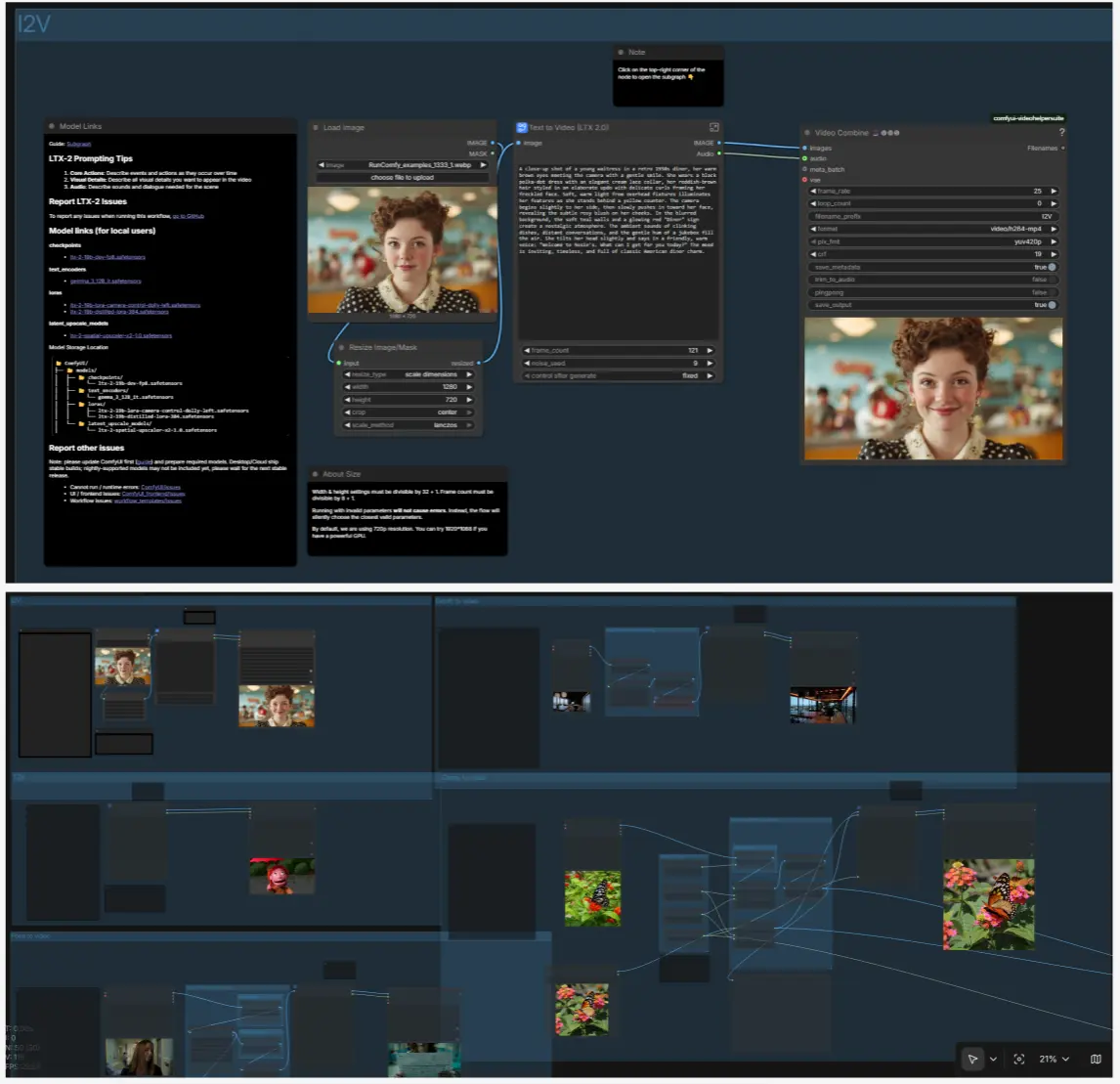
This all-in-one LTX-2 ComfyUI workflow lets you generate and iterate on short videos with audio in seconds. It ships with routes for text to video (T2V), image to video (I2V), depth to video, pose to video, and canny to video, so you can start from a prompt, a still, or structured guidance and keep the same creative loop.
Built around LTX-2’s low-latency AV pipeline and multi-GPU sequence parallelism, the graph emphasizes fast feedback. Describe motion, camera, look, and sound once, then adjust width, height, frame count, or control LoRAs to refine the result without re-wiring anything.
Note: Note on LTX-2 Workflow Compatibility — LTX-2 includes 5 workflows: Text-to-Video and Image-to-Video run on all machine types, while Depth to Video, Canny to Video, and Pose to Video require a 2X-Large machine or larger; running these ControlNet workflows on smaller machines may result in errors.
Key models in the LTX-2 ComfyUI workflow#
- LTX-2 19B (dev FP8) checkpoint. Core audio-visual generative model that produces video frames and synchronized audio from multimodal conditioning. Lightricks/LTX-2
- LTX-2 19B Distilled checkpoint. Lighter, faster variant useful for quick drafts or canny-controlled runs. Lightricks/LTX-2
- Gemma 3 12B IT text encoder. Primary text understanding backbone used by the workflow’s prompt encoders. Comfy-Org/ltx-2 split files
- LTX-2 Spatial Upscaler x2. Latent upsampler that doubles spatial detail mid-graph for cleaner outputs. Lightricks/LTX-2
- LTX-2 Audio VAE. Encodes and decodes audio latents so sound can be generated and muxed alongside video. Included with the LTX-2 release above.
- Lotus Depth D v1‑1. Depth UNet used to derive robust depth maps from images before depth-guided video generation. Comfy‑Org/lotus
- SD VAE (MSE, EMA pruned). VAE used in the depth preprocessor branch. stabilityai/sd-vae-ft-mse-original
- Control LoRAs for LTX‑2. Optional, plug‑and‑play LoRAs to steer motion and structure:
How to use the LTX-2 ComfyUI workflow#
The graph contains five routes that you can run independently. All routes share the same export path and use the same prompt-to-conditioning logic, so once you learn one, the others feel familiar.
T2V: generate video and audio from a prompt#
The T2V path starts with CLIP Text Encode (Prompt) (#3) and an optional negative in CLIP Text Encode (Prompt) (#4). LTXVConditioning (#22) binds your text and the chosen frame rate to the model. EmptyLTXVLatentVideo (#43) and LTX LTXV Empty Latent Audio (#26) create video and audio latents that are fused by LTX LTXV Concat AV Latent (#28). The denoising loop runs through LTXVScheduler (#9) and SamplerCustomAdvanced (#41), after which VAE Decode (#12) and LTX LTXV Audio VAE Decode (#14) produce frames and audio. Video Combine 🎥🅥🅗🅢 (#15) saves an H.264 MP4 with synchronized sound.
I2V: animate a still#
Load a still image with LoadImage (#98) and resize with ResizeImageMaskNode (#99). Inside the T2V subgraph, LTX LTXV Img To Video Inplace injects the first frame into the latent sequence so motion builds from your still rather than pure noise. Keep your textual prompt focused on motion, camera, and ambience; the content comes from the image.
Depth to video: structure‑aware motion from depth maps#
Use the “Image to Depth Map (Lotus)” preprocessor to transform an input into a depth image, decoded by VAEDecode and optionally inverted for correct polarity. The “Depth to Video (LTX 2.0)” route then feeds depth guidance through LTX LTXV Add Guide so the model respects global scene structure as it animates. The path reuses the same scheduler, sampler, and upscaler stages, and ends with tiled decode to images and muxed audio for export.
Pose to video: drive motion from human pose#
Import a clip with VHS_LoadVideo (#198); DWPreprocessor (#158) estimates human pose reliably across frames. The “Pose to Video (LTX 2.0)” subgraph combines your prompt, the pose conditioning, and an optional Pose Control LoRA to keep limbs, orientation, and beats consistent while allowing style and background to flow from the text. Use this for dance, simple stunts, or talk‑to‑camera shots where body timing matters.
Canny to video: edge‑faithful animation and distilled speed mode#
Feed frames to Canny (#169) to get a stable edge map. The “Canny to Video (LTX 2.0)” branch accepts the edges plus an optional Canny Control LoRA for high fidelity to silhouettes, while “Canny to Video (LTX 2.0 Distilled)” offers a faster distilled checkpoint for quick iterations. Both variants let you optionally inject the first frame and choose image strength, then export either via CreateVideo or VHS_VideoCombine.
Video settings and export#
Set width and height via Width (#175) and height (#173), the total frames with Frame Count (#176), and toggle Enable First Frame (#177) if you want to lock in an initial reference. Use VHS_VideoCombine nodes at the end of each route to control crf, frame_rate, pix_fmt, and metadata saving. A dedicated SaveVideo (#180) is provided for the distilled canny route when you prefer direct VIDEO output.
Performance and multi‑GPU#
The graph applies LTXVSequenceParallelMultiGPUPatcher (#44) with torch_compile enabled to split sequences across GPUs for lower latency. KSamplerSelect (#8) lets you pick between samplers including Euler and gradient‑estimation styles; smaller frame counts and lower steps reduce turnaround so you can iterate quickly and scale up when satisfied.
Key nodes in the LTX-2 ComfyUI workflow#
LTX Multimodal Guider(#17). Coordinates how text conditioning steers both video and audio branches. Adjustcfgandmodalityin the linkedLTX Guider Parameters(#18 for VIDEO, #19 for AUDIO) to balance faithfulness vs creativity; raisecfgfor tighter prompt adherence and increasemodality_scaleto emphasize a specific branch.LTXVScheduler(#9). Builds a sigma schedule tailored to LTX‑2’s latent space. Usestepsto trade speed for quality; when prototyping, fewer steps cut latency, then raise steps for final renders.SamplerCustomAdvanced(#41). The denoiser that ties togetherRandomNoise, the chosen sampler fromKSamplerSelect(#8), the scheduler’s sigmas, and the AV latent. Switch samplers for different motion textures and convergence behavior.LTX LTXV Img To Video Inplace(see I2V branches, e.g., #107). Injects an image into a video latent so the first frame anchors content while the model synthesizes motion. Tunestrengthfor how strictly the first frame is preserved.LTX LTXV Add Guide(in guided routes, e.g., depth/pose/canny). Adds a structural guide (image, pose, or edges) directly in latent space. Usestrengthto balance guide fidelity with generative freedom and enable the first frame only when you want temporal anchoring.Video Combine 🎥🅥🅗🅢(#15 and siblings). Packages decoded frames and the generated audio into MP4. For previews, raisecrf(more compression); for finals, lowercrfand confirmframe_ratematches what you set in conditioning.LTXVSequenceParallelMultiGPUPatcher(#44). Enables sequence‑parallel inference with compile optimizations. Leave it on for best throughput; disable only when debugging device placement.
Optional extras#
- Prompting tips for LTX-2 ComfyUI
- Describe core actions over time, not just static appearance.
- Specify important visual details you must see in the video.
- Write the soundtrack: ambience, foley, music, and any dialog.
- Sizing rules and frame rate
- Use width and height that are multiples of 32 (for example 1280×720).
- Use frame counts that are multiples of 8 (121 in this template is a good length).
- Keep frame rate consistent where it appears; the graph includes both float and int boxes and they should match.
- LoRA guidance
- Camera, depth, pose, and canny LoRAs are integrated; start with strength 1 for camera moves, then add a second LoRA only when needed. Browse the official collection at Lightricks/LTX‑2.
- Faster iterations
- Lower the frame count, reduce steps in
LTXVScheduler, and try the distilled checkpoint for the canny route. When the motion works, scale resolution and steps for finals.
- Lower the frame count, reduce steps in
- Reproducibility
- Lock
noise_seedin the Random Noise nodes to get repeatable results while you tune prompts, sizes, and LoRAs.
- Lock
Acknowledgements#
This workflow implements and builds upon the following works and resources. We gratefully acknowledge Lightricks for the LTX-2 multimodal video generation model and the LTX-Video research codebase, and Comfy Org for the ComfyUI LTX-2 partner nodes/integration, for their contributions and maintenance. For authoritative details, please refer to the original documentation and repositories linked below.
Resources#
- Comfy Org/LTX-2 Now Available in ComfyUI!
- GitHub: Lightricks/LTX-Video
- Hugging Face: Lightricks/LTX-Video-ICLoRA-detailer-13b-0.9.8
- arXiv: 2501.00103
- Docs / Release Notes: LTX-2 Now Available in ComfyUI!
Note: Use of the referenced models, datasets, and code is subject to the respective licenses and terms provided by their authors and maintainers.