Flux 3 Klein Distilled Image Editing for fast, faithful reference‑guided edits in ComfyUI#
This workflow delivers Flux 3 Klein Distilled Image Editing: a streamlined, INT8 ComfyUI pipeline that edits a source photo using clear natural‑language instructions. Provide one or more reference images and a concise caption of the desired change, and the graph will regenerate the scene with your edits while preserving identity, composition, and lighting.
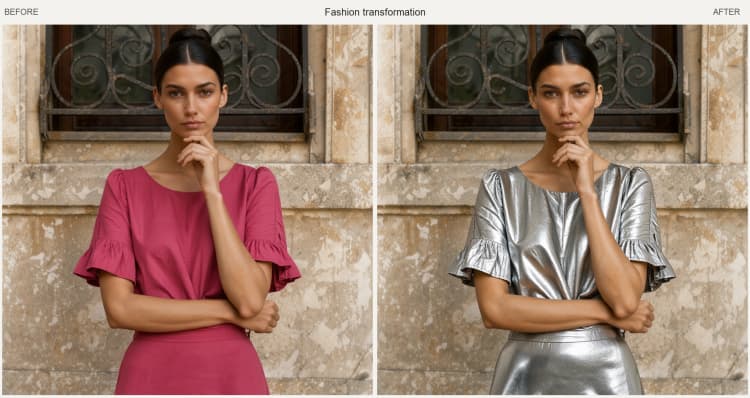
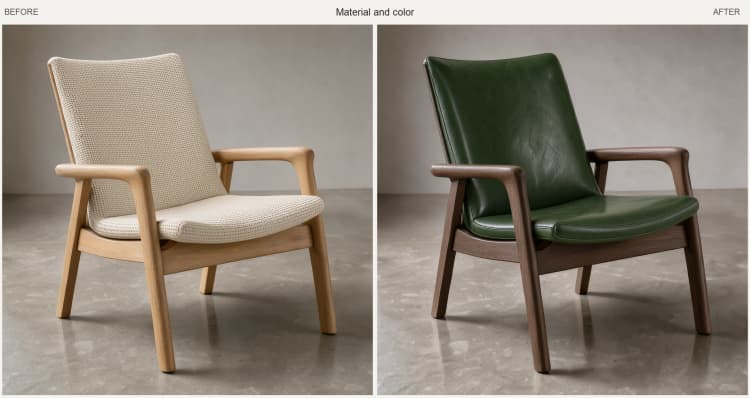
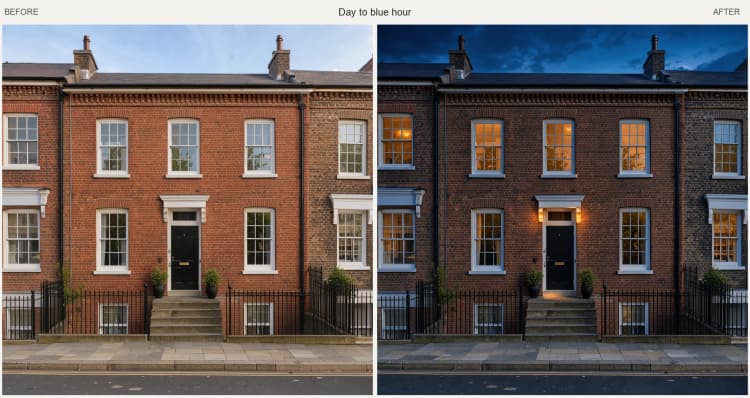
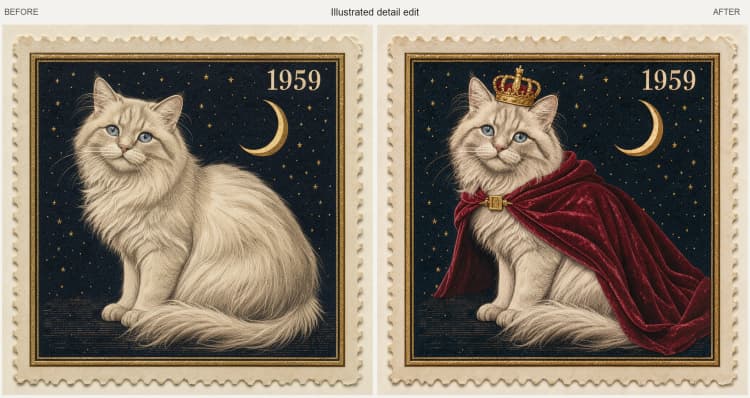
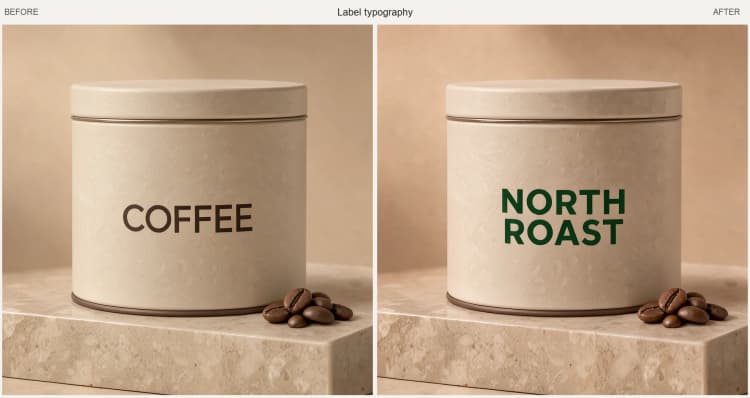
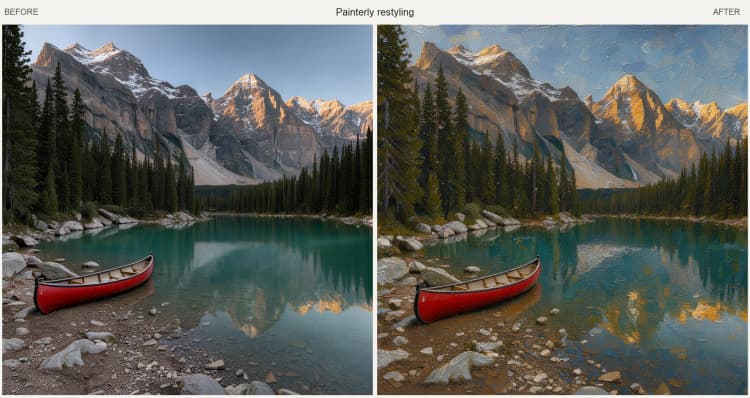
Built on the distilled FLUX.3 Image Klein weights with a 16‑step sampling setup, it excels at quick, high‑quality iterations. Typical uses include changing clothing and materials, replacing label text, shifting lighting, adding illustrated details, and restyling photographs. The workflow saves your result and shows a side‑by‑side comparison against the original so you can judge fidelity and edit strength in one view.
Key models in Comfyui Flux 3 Klein Distilled Image Editing workflow#
- Black Forest Labs FLUX.3 Image Klein (INT8, distilled). The diffusion backbone that synthesizes the edited image while aligning tightly to your prompt and references. These ComfyUI weights are optimized for fewer sampling steps and lower memory use. Model card
- Qwen3‑VL 4B (INT8, convrot) text encoder for FLUX.3. Encodes your caption into conditioning that guides composition, attributes, and style for Flux 3 Klein Distilled Image Editing. Loaded via the ComfyUI text encoder weights provided in the same repository. Text encoder files
- FLUX.2 VAE. Encodes the reference image(s) into the latent space used by the sampler and decodes the final latent back to an image, ensuring consistent color and detail transfer. VAE files
How to use Comfyui Flux 3 Klein Distilled Image Editing workflow#
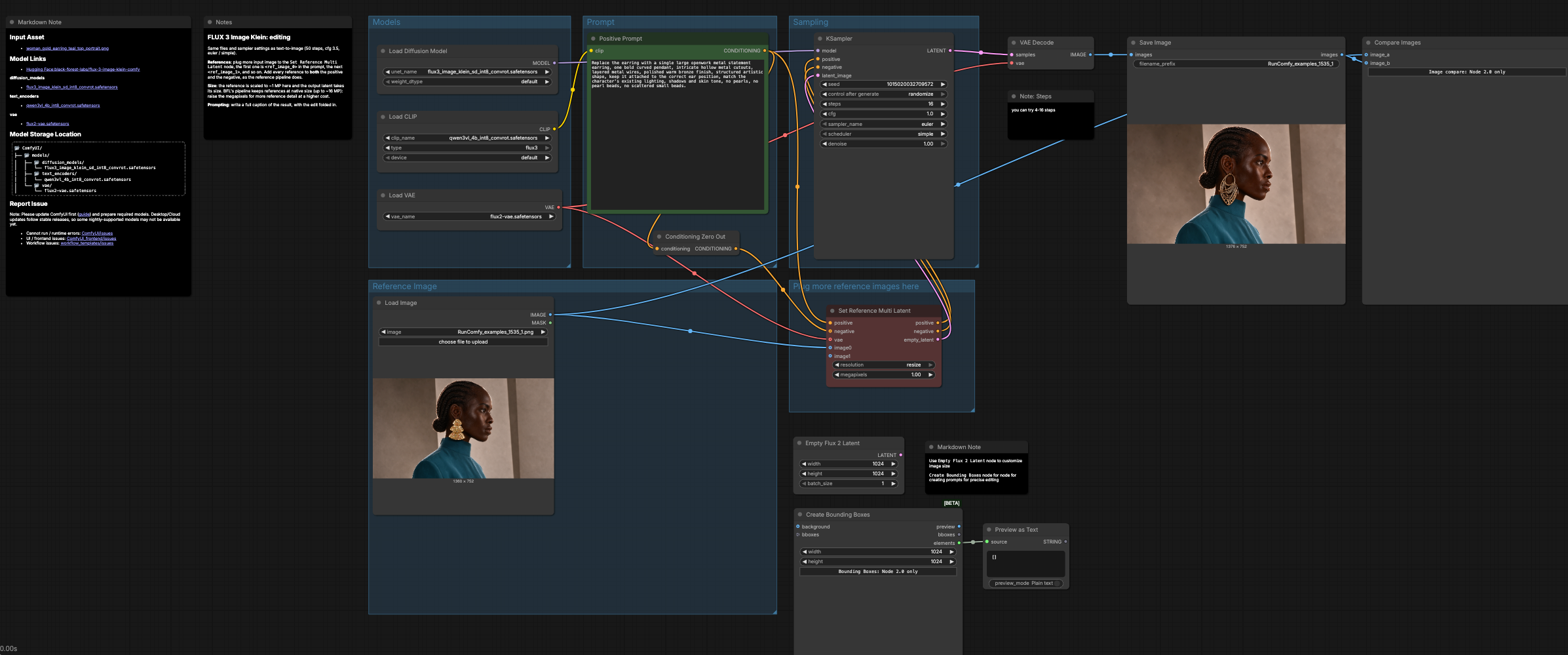
The graph flows from models and prompt setup to reference conditioning, then sampling and decoding, ending with save and side‑by‑side review. Groups run sequentially, and you can add more references at any time for stronger identity or material transfer.
Models#
The Models group preloads the required assets: UNETLoader (#1) brings in the distilled FLUX.3 Image Klein INT8 weights, CLIPLoader (#2) loads the Qwen3‑VL 4B text encoder, and VAELoader (#3) selects the FLUX.2 VAE. These are wired once so you can focus on editing rather than model management. Unless you are swapping assets, there is nothing to configure here, which keeps Flux 3 Klein Distilled Image Editing fast and repeatable.
Reference Image#
Use LoadImage (#11) to select the source photo you want to edit. For best results, start from a clean, well‑lit image and crop to the subject area you want to preserve. The reference is encoded by the VAE and passed to the reference node so the sampler “locks onto” identity, pose, and lighting. If you plan multiple edits to the same subject, keep this image consistent across runs to stabilize results.
Prompt#
Write a short, descriptive sentence that reads like a final caption of the image with the edit included in context using Positive Prompt (#4). Be explicit about what should change and what must stay the same (for example: “replace the earring with a single openwork bronze statement piece; keep lighting and skin tone consistent”). To anchor specific references, mention tokens like <ref_image_0> inside your caption where relevant. The graph builds an unconditional negative via ConditioningZeroOut (#32), so you generally only need to craft the positive text.
Plug more reference images here#
ReferenceMultiLatent (#17) lets you add additional images when identity, logos, or materials must match precisely. Connect more sources to the extra image inputs and refer to them in your prompt with <ref_image_1>, <ref_image_2>, etc., when you want to borrow attributes from multiple references. The node also generates a matching latent canvas from your reference, which keeps composition stable while applying your edit. Raising its internal megapixel target increases fine detail at the cost of time and memory.
Sampling#
The sampler KSampler (#7) runs FLUX.3 Image Klein with an efficient Euler scheduler for quick, high‑quality updates. Because the workflow is distilled and INT8‑quantized, 16 steps is an excellent balance of speed and fidelity for most edits. Guidance is set for faithful, reference‑anchored changes, so your caption steers the alteration without drifting far from the original subject. After sampling, VAEDecode (#8) reconstructs the image, SaveImage (#9) writes it to disk, and ImageCompare (#18) shows original vs. edited for instant visual QA.
Key nodes in Comfyui Flux 3 Klein Distilled Image Editing workflow#
ReferenceMultiLatent (#17)#
Central to Flux 3 Klein Distilled Image Editing, this node merges your caption conditioning with one or more reference images and prepares an edit canvas that matches the reference. Increase its resolution.megapixels when you need more texture fidelity; lower it for rapid drafts. Add extra references to the subsequent image inputs and reference them in your text with <ref_image_1>, <ref_image_2>, etc. See the official model files for reference‑prompt token conventions. Repository
KSampler (#7)#
Controls the edit process: steps governs quality vs. speed, sampler_name and scheduler influence smoothness and stability, cfg balances faithfulness to your text against the reference, and denoise sets how strongly the edit departs from the source. As a rule of thumb, keep steps moderate for previews and push them higher only when you need meticulous texture or typography. If an edit pushes too far from identity, lower cfg or denoise; if it is too timid, raise them slightly.
CLIPTextEncode (#4) “Positive Prompt”#
Encodes your caption into conditioning for the model. Use clear, single‑sentence instructions that describe the final image, including what to change and what to preserve. Mention reference tokens like <ref_image_0> where needed to bind identity or material to a specific image.
EmptyFlux2LatentImage (#44)#
Use this when you want to set a custom output size instead of inheriting it from the reference. Connect its output to the sampler’s latent input to create a blank canvas at your chosen width and height. Larger dimensions improve detail but increase memory and render time, so scale gradually.
Optional extras#
- Keep prompts concise and specific: “replace the label text with ‘KLEIN’, same font weight, same perspective; keep jacket texture and lighting.”
- For drafts, reduce steps to iterate quickly; for finals, restore the default 16‑step setting used by this Flux 3 Klein Distilled Image Editing graph.
- If color or lighting drifts, mention them explicitly in the caption (“match original lighting and skin tone”) to tighten adherence.
Acknowledgements#
This workflow implements and builds upon the following works and resources. We gratefully acknowledge ComfyUI for the Official FLUX.3 Klein ComfyUI tutorial and Black Forest Labs for the Official FLUX.3 Klein ComfyUI model files for their contributions and maintenance. For authoritative details, please refer to the original documentation and repositories linked below.
Resources#
- ComfyUI/Official FLUX.3 Klein ComfyUI tutorial
- GitHub: Comfy-Org/ComfyUI
- Hugging Face: black-forest-labs/flux-3-image-klein-comfy
- Docs / Release Notes: Official FLUX.3 Klein ComfyUI tutorial
- Black Forest Labs/Official FLUX.3 Klein ComfyUI model files
- GitHub: black-forest-labs/flux-3-image-klein
- Hugging Face: black-forest-labs/flux-3-image-klein-comfy
Note: Use of the referenced models, datasets, and code is subject to the respective licenses and terms provided by their authors and maintainers.