

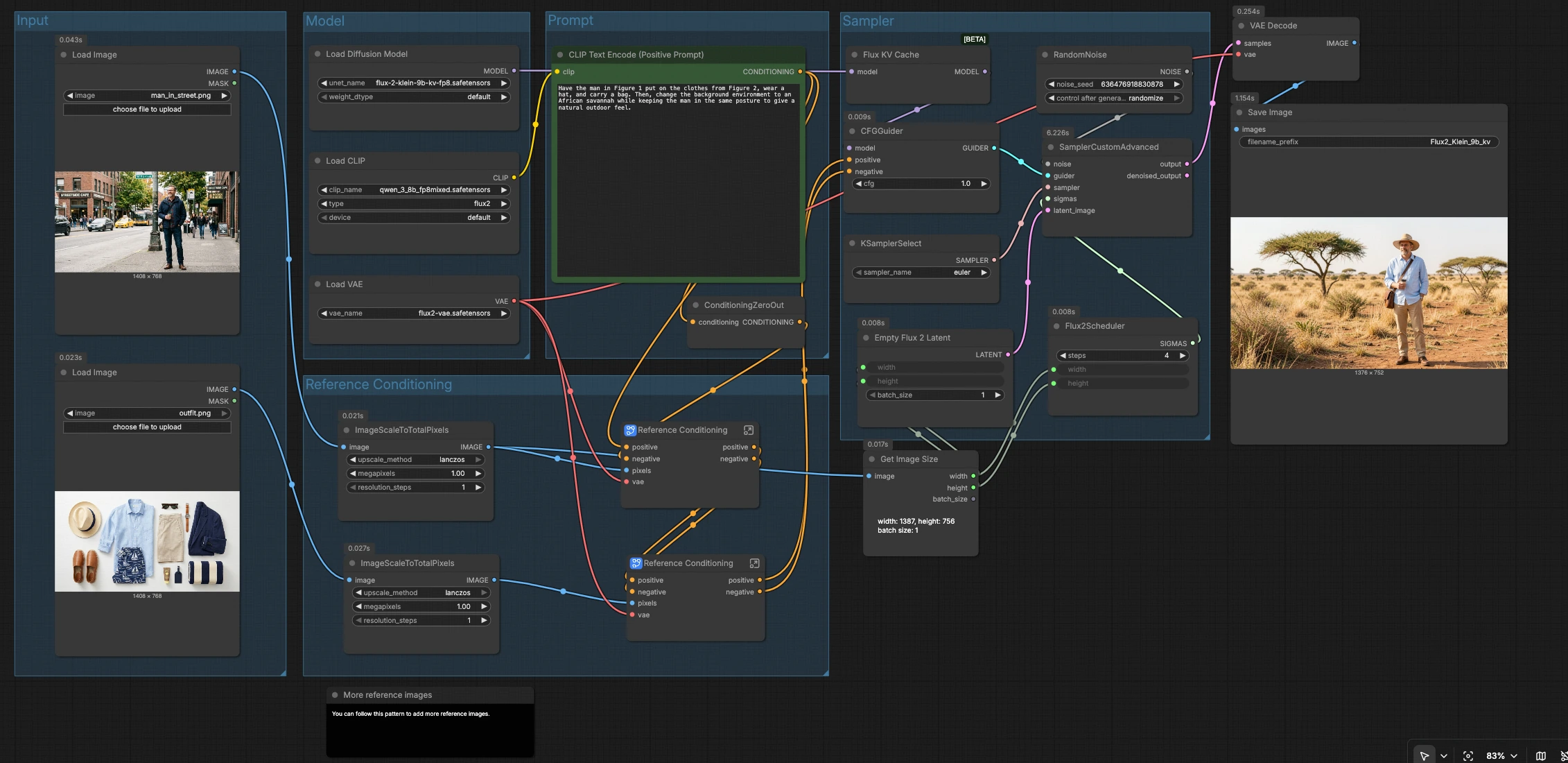






Flux 2 Klein 9B KV Image Edit: instruction-based edits that preserve composition and identity#
Flux 2 Klein 9B KV Image Edit is a ComfyUI workflow for precise, instruction-based image editing with strong identity and layout preservation. Provide one or more reference images plus a natural-language edit prompt, and the workflow applies targeted changes such as scene swaps, style transfer, or detail refinement while keeping your subject intact.
Built on Black Forest Labs’ FLUX.2 Klein 9B KV model with a KV cache for fast iteration, the workflow pairs a modern text encoder and VAE to keep edits faithful to your prompt and your references. It is ideal for creators who want controllable, high-fidelity results directly inside ComfyUI.
Key models in Comfyui Flux 2 Klein 9B KV Image Edit workflow#
- FLUX.2 Klein 9B KV FP8 by Black Forest Labs. Core diffusion backbone used for image generation and image edits; the KV variant enables key-value caching to speed up iterative inference and multi-reference conditioning. Model card
- Qwen 3 8B text encoder for FLUX.2. Encodes your natural-language instructions into embeddings that steer the edit toward the requested attributes, compositions, and styles. Repository
- FLUX.2 VAE. Encodes reference images into latents for conditioning and decodes the final latent back to pixels with high fidelity. Repository
How to use Comfyui Flux 2 Klein 9B KV Image Edit workflow#
Overall flow
- The workflow loads the model stack, encodes your edit instruction, extracts guidance from one or more reference images, then samples and decodes the final image. Groups run in a left-to-right path: Model, Prompt, Input, Reference Conditioning, and Sampler.
Model
- This group loads the diffusion backbone, text encoder, and VAE using
UNETLoader(#126),CLIPLoader(#133), andVAELoader(#127). FluxKVCache(#139) wraps the loaded model to enable key-value caching so repeated runs are faster, which is helpful when refining the same prompt or seed.- No user input is required here; the models are preselected for the Flux 2 Klein 9B KV Image Edit workflow.
Prompt
- Enter your instruction in
CLIP Text Encode (Positive Prompt)(#135). Write what to change and what to keep, for example: “Put the subject in the second outfit and change the background to an African savannah.” - The positive prompt drives the edit; a neutralized negative signal is created by
ConditioningZeroOut(#685) so the reference guidance and your instruction stay in focus. - Keep prompts concise and specific to reduce unintended global changes.
Input
- Load your primary subject image with
LoadImage(#76). Optionally, load a secondary reference such as clothing, style, or texture withLoadImage(#81). - Each reference passes through
ImageScaleToTotalPixels(#130, #131) to normalize resolution and keep memory usage predictable. - Use high-quality, well-lit inputs for the strongest identity and style transfer.
Reference Conditioning
- The subgraph
Reference Conditioning(#134) encodes the primary image with theVAEand blends its latent features into the positive and negative conditionings. This preserves identity, pose, and composition while allowing targeted edits. - A second
Reference Conditioning(#132) layer injects guidance from the optional reference image (for example, an outfit or style) so edits transfer details without breaking the subject. - You can chain additional references by repeating this pattern, following the “More reference images” note in the canvas.
Sampler
Flux2Scheduler(#137) prepares the denoising schedule and resolution, whileGetImageSize(#128) syncs width and height to your normalized input.KSamplerSelect(#122) chooses the sampling algorithm andSamplerCustomAdvanced(#123) performs the denoising usingRandomNoise(#125) for the seed andCFGGuider(#138) for prompt-and-reference guidance.- The final latent is decoded by
VAEDecode(#124) and written bySaveImage(#94).
Key nodes in Comfyui Flux 2 Klein 9B KV Image Edit workflow#
CLIP Text Encode (Positive Prompt) (#135)
- Converts your instruction into embeddings that steer the edit. Favor clear verbs and targets (“replace background with…”, “apply the outfit from the second image…”) and mention what must stay unchanged (“keep pose and expression”). This node is the main lever for semantic control.
Reference Conditioning (#134)
- Encodes the primary reference image and injects its latent features into the conditioning stream. Use this to lock identity, composition, and pose so the Flux 2 Klein 9B KV Image Edit stays faithful while applying your requested changes.
Reference Conditioning (#132)
- Adds guidance from the second reference image, ideal for transferring clothing, materials, or stylistic cues. Place images that define details here to localize the edit without overpowering the subject.
CFGGuider (#138)
- Balances how strongly the model follows the prompt and reference conditionings. If edits are too weak, increase guidance slightly; if the subject drifts or artifacts appear, reduce it to let the references anchor the output.
Flux2Scheduler (#137)
- Sets the denoising schedule and harmonizes resolution with your reference. Paired with
GetImageSize(#128), it keeps the canvas aligned to the input so framing and aspect are preserved.
KSamplerSelect (#122)
- Picks the sampler used by
SamplerCustomAdvanced(#123). If you want a different noise exploration behavior, try an alternative sampler; keep other settings stable when comparing results.
FluxKVCache (#139)
- Enables key-value caching on the model for faster subsequent runs with similar context. Particularly useful when you are iterating on the same prompt or seed and want rapid A/B comparisons.
ConditioningZeroOut (#685)
- Produces a neutral negative conditioning baseline. Replace this with your own negative prompt path only if you have specific content to avoid; otherwise the default keeps edits stable and focused.
Optional extras#
- Start with a literal, step-by-step instruction. Example structure: “Keep the person as-is, apply the outfit from the second image, replace the background with [target scene], maintain pose and lighting.”
- Use high-quality references for both identity and style. Cropped, uncluttered subjects improve transfer.
- For controlled variations, change the seed in
RandomNoise(#125) while keeping the prompt and references fixed. - To add more references, duplicate the
ImageScaleToTotalPixelsandReference Conditioningpattern, wiring each new image into the chain. - Organize outputs by adjusting the base filename in
SaveImage(#94) to keep iterations tidy.
Acknowledgements#
This workflow implements and builds upon the following works and resources. We gratefully acknowledge Black Forest Labs for FLUX.2 Klein 9B KV FP8, Comfy-Org for Qwen 3 8B Text Encoder (flux2-klein-9B) and FLUX.2 VAE, and Comfy.org for the Official Workflow for their contributions and maintenance. For authoritative details, please refer to the original documentation and repositories linked below.
Resources#
- Black Forest Labs/FLUX.2 Klein 9B KV FP8
- GitHub: black-forest-labs/flux2
- Hugging Face: black-forest-labs/FLUX.2-klein-9b-kv-fp8
- Comfy-Org/Qwen 3 8B Text Encoder (flux2-klein-9B)
- Hugging Face: Comfy-Org/flux2-klein-9B
- Comfy-Org/FLUX.2 VAE
- Hugging Face: Comfy-Org/flux2-dev
- Comfy.org/Official Workflow
- Docs / Release Notes: Flux.2 Klein KV: Image Edit - ComfyUI Workflow
Note: Use of the referenced models, datasets, and code is subject to the respective licenses and terms provided by their authors and maintainers.