Wan 2.2 VBVR in ComfyUI: reasoning‑aware image‑to‑video generation#
Wan 2.2 VBVR in ComfyUI is a production‑ready workflow that brings Video‑Based Visual Reasoning to Wan 2.2 image‑to‑video. It augments the standard Wan 2.2 Mixture‑of‑Experts pipeline with a reasoning‑tuned model path and an optional VBVR LoRA path, so your videos track objects, actions, and causal events with stronger temporal logic and scene consistency.
Built for creative direction, simulation, and story beats that need more than pretty frames, this ComfyUI workflow aligns complex prompts with structured motion and multi‑object interactions. You can choose between the pure VBVR model route or layer VBVR and motion LoRAs on Wan 2.2 for speed, then export ready‑to‑edit MP4s.
Key models in Comfyui Wan 2.2 VBVR workflow#
- Wan2.2‑I2V‑A14B (MoE backbone). Two experts specialize in high‑noise and low‑noise phases and switch by SNR during denoising, giving higher capacity without extra per‑step cost. This is the primary generator the workflow extends and blends. Model card • Technical details
- VBVR‑Wan2.2. A fine‑tune of Wan2.2‑I2V‑A14B on a large video‑reasoning suite to improve temporal, causal, and multi‑object reasoning while keeping the architecture unchanged. Use this when you want the strongest reasoning alignment. Model card • Paper
- Wan 2.x VAE. High‑compression video autoencoder that reconstructs frames efficiently for 480p–720p workflows; Wan 2.2 describes a compression design that enables fast 720p generation. Overview
- uMT5‑XXL text encoder. Robust multilingual T5‑family encoder used to derive prompt embeddings for Wan 2.2 text and image‑to‑video pipelines. Model card
- Motion and reasoning LoRAs for Wan 2.2. The workflow can load VBVR LoRA for reasoning bias and LightX2V step‑distilled LoRAs for stronger motion amplitude and camera moves. VBVR LoRA example • LightX2V collection
How to use Comfyui Wan 2.2 VBVR workflow#
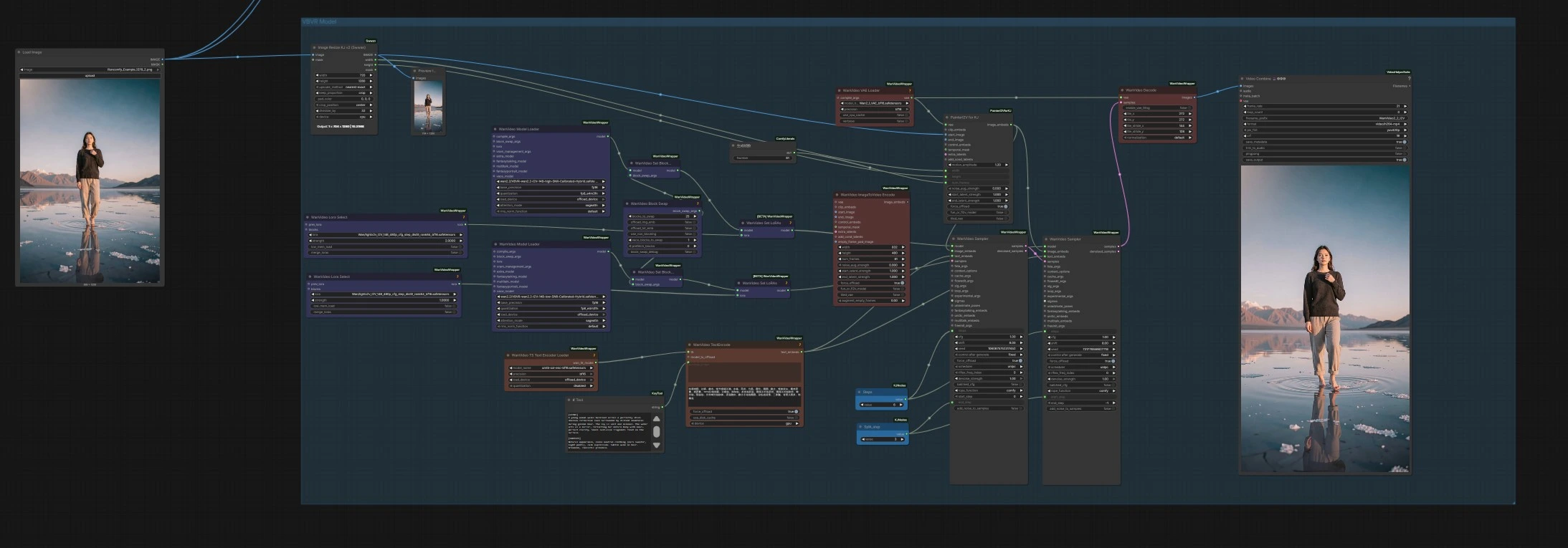
This workflow offers three complementary routes. Each route is self‑contained from prompts and optional start image to video output, so you can test all three and keep the best take.
- VBVR Model route
- Purpose. Use this when you want the strongest video reasoning. It runs a high‑SNR and low‑SNR pair of VBVR‑calibrated Wan 2.2 models, splitting the denoising schedule between a “layout” stage and a “detail” stage.
- How it works. The high‑noise stage runs first in
WanVideoSampler(#173), then its latents flow into the low‑noise stageWanVideoSampler(#172) that refines motion logic and details. Switching is controlled by the samplers’start_stepandend_step, mirroring Wan 2.2’s SNR‑gated expert handoff. - What you set. Provide a start image if desired via
LoadImage(#67), and write your prompt in theTextnode near the encoder feedingWanVideoTextEncode(#170). Tweak frame count with the small integer node next to the samplers (Int(#168)). - Output. Frames are decoded by
WanVideoDecode(#164) and assembled as MP4 withVHS_VideoCombine(#176).
- Wan 2.2 + PainterI2V route
- Purpose. A fast, general path for cinematic motion. It keeps stock Wan 2.2 I2V models but upgrades the image conditioning with
PainterI2VforKJto correct slow‑motion artifacts common in 4‑step LoRAs. - How it works. Your start image is resized for the model, embedded with
PainterI2VforKJ(#181), then sampled byWanVideoSampler(#129, #130). The route uses a high‑noise then low‑noise handoff similar to VBVR but sticks to standard Wan 2.2 weights. - What you set. Supply your prompt in the
Textnode that feedsWanVideoTextEncode(#152). If you chain a LightX2V LoRA, this route’s conditioning helps the motion feel more intentional. See the node’s readme for its design goal. PainterI2VforKJ - Output. Frames are decoded by
WanVideoDecode(#142) and saved withVHS_VideoCombine(#154).
- Purpose. A fast, general path for cinematic motion. It keeps stock Wan 2.2 I2V models but upgrades the image conditioning with
- Wan 2.2 + VBVR LoRA route
- Purpose. A hybrid for quick iterations. It layers a VBVR LoRA on the high‑noise Wan 2.2 model and a motion LoRA on the low‑noise model, giving you a reasoning nudge early and clean motion polish late.
- How it works. The high‑noise stream runs through
WanVideoSampler(#27) and the low‑noise stream throughWanVideoSampler(#90); both receive text embeddings fromWanVideoTextEncode(#16) and optional image conditioning fromPainterI2VforKJ(#179). LoRAs are applied per stage to match the expert’s role. - What you set. Drop your prompt into the
Textnode nearWanVideoTextEncode(#16) and, if needed, adjust the stage split with the nearby integer widgets labeled “Split_step.” VBVR and LightX2V LoRAs are selectable from the LoRA nodes in this group. VBVR LoRA - Output. Frames decode via
WanVideoDecode(#28) and export throughVHS_VideoCombine(#60).
Key nodes in Comfyui Wan 2.2 VBVR workflow#
WanVideoModelLoader(#165, #162)- Loads the VBVR‑calibrated high‑SNR and low‑SNR Wan 2.2 models that map to the early and late denoising experts. Keep the pair consistent so the SNR‑based handoff remains stable. See Wan 2.2’s MoE and SNR switch design for context. Details
WanVideoSampler(#173, #172, #129, #130, #27, #90)- Drives generation and controls the expert split. Adjust
stepsto balance detail vs speed, and tunestart_steporend_stepto shift work between the early layout expert and the late detail expert. Usecfgto trade adherence for motion freedom. Reference implementation is in the wrapper’s sampler nodes. Wrapper repo
- Drives generation and controls the expert split. Adjust
PainterI2VforKJ(#178, #181, #179)- Replaces vanilla image‑to‑video conditioning with a motion‑amplified variant designed to fix slow‑motion when using 4‑step LightX2V LoRAs. It strengthens camera prompts and action beats while keeping subject identity. Node readme
WanVideoTextEncode(#170, #152, #16)- Encodes positive and negative prompts via a uMT5‑XXL encoder so the samplers receive rich, multilingual semantics. Keep prompt structure clear; separating scene, subject, action, and camera intent typically improves alignment. uMT5
VHS_VideoCombine(#176, #154, #60)- Assembles decoded frames into an MP4 with metadata for reproducibility. If you pass audio, the node muxes it with the video. This comes from VideoHelperSuite’s utility nodes. VideoHelperSuite
Optional extras#
- When to pick each route
- VBVR Model: complex interactions, cause‑effect scenes, or multi‑object choreography.
- Wan 2.2 + PainterI2V: dynamic motion or camera‑first storytelling with LightX2V LoRAs.
- Wan 2.2 + VBVR LoRA: quick previews that still benefit from reasoning bias early in the denoising.
- Prompting tips for Wan 2.2 VBVR in ComfyUI
- Use short sections like [SCENE], [SUBJECT], [ACTION], [CAMERA], [LIGHTING]. This helps the text encoder separate intent.
- For object interactions, spell out who does what to whom and in what order.
- LoRA stacking
- Frame size and aspect
- The
ImageResizeKJv2nodes near inputs ensure clean divisibility for the VAE and reduce artifacts. Match your start image aspect to the target video for smoother motion propagation.
- The
Acknowledgements#
This workflow implements and builds upon the following works and resources. We gratefully acknowledge @Ai Verse, the author of Wan 2.2 VBVR in ComfyUI Source for their contributions and maintenance. For authoritative details, please refer to the original documentation and repositories linked below.
Resources#
- YouTube/Wan 2.2 VBVR in ComfyUI Source
- Docs / Release Notes: Wan 2.2 VBVR in ComfyUI Source @Ai Verse
Note: Use of the referenced models, datasets, and code is subject to the respective licenses and terms provided by their authors and maintainers.