






FireRed Image Edit 1.1: fast, instruction‑based image editing in ComfyUI#
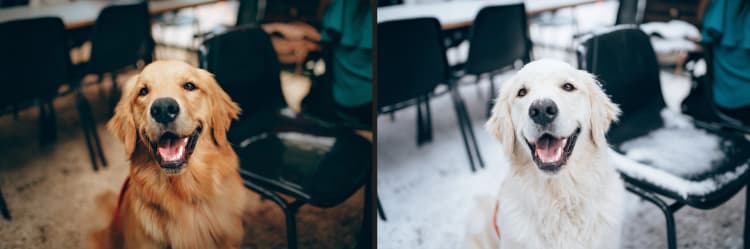
FireRed Image Edit 1.1 is a ComfyUI workflow for targeted, instruction-based image editing. Give it a source image and a natural-language instruction, and it will apply precise changes while preserving composition and identity. It is powered by the FireRed Image Edit 1.1 diffusion transformer and guided by a Qwen2.5-VL 7B vision-language encoder so your edits follow what the image shows and what your prompt intends.
The workflow also includes a Lightning LoRA turbo mode that cuts inference steps dramatically for rapid iteration. Use FireRed Image Edit 1.1 when you need controllable, high-fidelity edits for outfit changes, style transfers, scene adjustments, or subtle detail refinements directly inside ComfyUI.
Key models in Comfyui FireRed Image Edit 1.1 workflow#
- FireRed Image Edit 1.1 diffusion transformer. The core generator specialized for instruction-following image edits; it conditions on both your prompt and the source image to preserve layout and identity. Model card
- FireRed Image Edit 1.0 Lightning LoRA (8-step). A lightweight acceleration adapter that enables turbo mode, reducing sampling steps for quick previews with strong edit adherence. Model card
- Qwen2.5-VL 7B. A multimodal vision-language model used here as the encoder to interpret your instruction alongside the image content, producing robust conditioning for edit control. Model card
- Qwen Image VAE. The image autoencoder used to encode the source image into latents for editing and to decode the final result back to pixels. Included in the FireRed 1.0 assets. Files
How to use Comfyui FireRed Image Edit 1.1 workflow#
At a glance, the workflow starts by loading your source image, encodes it into a latent, builds conditioning from your instruction with Qwen2.5‑VL 7B, and then runs FireRed Image Edit 1.1 through a sampler to produce the edited image. A single turbo toggle controls whether the Lightning LoRA is active, which also switches the step count and guidance strength for speed or quality.
Model#
This group loads the FireRed Image Edit 1.1 diffusion transformer and optionally injects the Lightning LoRA. When turbo is enabled, the LoRA is applied to the base model to accelerate sampling. A model-sampling node configures a schedule tailored for the FireRed transformer so edits remain stable. A guidance normalization step then prepares the model for consistent conditioning across prompts.
Prompt#
This group is where you write the instruction that drives FireRed Image Edit 1.1. The Qwen2.5‑VL 7B encoder reads the source image together with your text to understand both what is present and what should change. You can optionally add up to two more reference images to steer style, clothing, lighting, or other attributes. The workflow also includes a companion encoder path that acts as a negative or counterbalance channel to keep outputs clean and on-target.
Image Encode#
Your source image is automatically resized to a model-friendly resolution and then encoded into the VAE latent space. This latent becomes the starting point for image-to-image editing, allowing FireRed Image Edit 1.1 to preserve composition, camera geometry, and identity. The encoded latent flows directly to the sampler where edits are applied.
Steps Setting#
This group switches the sampler step count based on the turbo toggle. When turbo is on, steps are kept minimal for fast previews; when turbo is off, a higher step count is used for maximum fidelity. Use turbo to explore directions quickly, then disable it for the final, highest-quality render.
CFG Setting#
Classifier-free guidance strength is also switched by the same turbo toggle. A lower guidance value pairs with turbo mode to keep edits stable under fewer steps, while a higher value is used with the full model for stronger prompt adherence. The workflow wires this automatically so you can focus on the instruction rather than micromanaging parameters.
Sampler Setting#
The sampler combines the patched FireRed model, your positive and negative conditioning, and the encoded latent to produce the edited image. You can set a seed to make results repeatable or vary it to explore alternatives. The decoded image is saved to your output folder with a clear prefix so you can batch and compare iterations easily.
Key nodes in Comfyui FireRed Image Edit 1.1 workflow#
TextEncodeQwenImageEditPlus (Positive) (#118)#
This node turns your natural-language edit instruction and one to three images into conditioning for FireRed Image Edit 1.1. Use concise, directive phrasing like “change the jacket to red leather with silver zippers” or “convert to watercolor style with soft edges.” Optional image2 and image3 can lock in style, outfit, or lighting references; keep them visually consistent with your goal. If the edit is too strong, reduce descriptive intensity or add clarifying constraints.
Enable Lightning LoRA? (#153)#
This toggle activates the Lightning LoRA turbo path. When on, the workflow switches the model to the LoRA-augmented version, reduces sampling from about 40 steps to roughly 8 steps, and lowers guidance to keep results stable at high speed. Use it to iterate prompts and references quickly, then turn it off for final, highest-quality output.
LoraLoaderModelOnly (#151)#
This node injects the FireRed Image Edit 1.0 Lightning LoRA into the base FireRed Image Edit 1.1 model. If you adjust LoRA strength, remember that higher values increase edit intensity but can overshoot style or introduce artifacts. For identity-critical edits, keep strength moderate and rely on clearer instructions or extra reference images instead of pushing the LoRA too hard.
KSampler (#130)#
The sampler is where edit strength, guidance, and steps come together. With turbo off, increasing steps improves fine detail and reduces minor artifacts; with turbo on, keep steps low for speed and rely on prompt clarity and references. Adjust cfg sparingly: higher values emphasize the instruction, while lower values prioritize fidelity to the source image. For major scene changes, raise cfg and consider more steps; for subtle tweaks, lower cfg and fewer steps preserve identity.
Optional extras#
- Write edits as clear instructions, not full descriptions of the whole image. “Replace the t-shirt with a navy blazer; keep pose and lighting” outperforms a long narrative.
- Use the optional
image2andimage3inputs to anchor style or clothing details. Match camera angle and framing to the source for best transfer. - Start with turbo on to explore ideas, then disable turbo to finalize. Expect slight differences due to the higher step count and stronger guidance.
- For maximum identity preservation, keep
cfgconservative, use a short, specific instruction, and provide a close-matched reference image when possible. - Save a fixed seed once you like the direction so you can A/B test only the instruction or reference images across runs.
Resources
- FireRed Image Edit 1.1 model: FireRedTeam/FireRed-Image-Edit-1.1-ComfyUI
- Lightning LoRA and VAE assets: FireRedTeam/FireRed-Image-Edit-1.0-ComfyUI
- Qwen2.5‑VL 7B encoder: Qwen/Qwen2.5-VL-7B-Instruct
- ComfyUI project (node references): comfy-org/ComfyUI
Acknowledgements#
This workflow implements and builds upon the following works and resources. We gratefully acknowledge FireRedTeam for FireRed Image Edit 1.1 Diffusion Model, FireRedTeam for FireRed Image Edit 1.0 Lightning LoRA, and Comfy.org for Comfy.org Official Workflow for their contributions and maintenance. For authoritative details, please refer to the original documentation and repositories linked below.
Resources#
- FireRedTeam/FireRed Image Edit 1.1 Diffusion Model
- GitHub: FireRedTeam/FireRed-Image-Edit
- Hugging Face: FireRedTeam/FireRed-Image-Edit-1.1-ComfyUI
- arXiv: 2602.13344
- FireRedTeam/FireRed Image Edit 1.0 Lightning LoRA
- GitHub: FireRedTeam/FireRed-Image-Edit
- Hugging Face: FireRedTeam/FireRed-Image-Edit-1.0-ComfyUI
- arXiv: 2602.13344
- Comfy.org/Comfy.org Official Workflow
- GitHub: Comfy-Org/workflow_templates
- Docs / Release Notes: FireRed Image Edit 1.1: Image Edit
Note: Use of the referenced models, datasets, and code is subject to the respective licenses and terms provided by their authors and maintainers.