



logo
RunComfy
  • ComfyUI
  • TrainerNew
  • Models
  • API
  • Pricing
discord logo
ComfyUI>Workflows>LongCat Image | Text to Image

LongCat Image | Text to Image

Workflow Name: RunComfy/LongCat Image
Workflow ID: 0000...1383
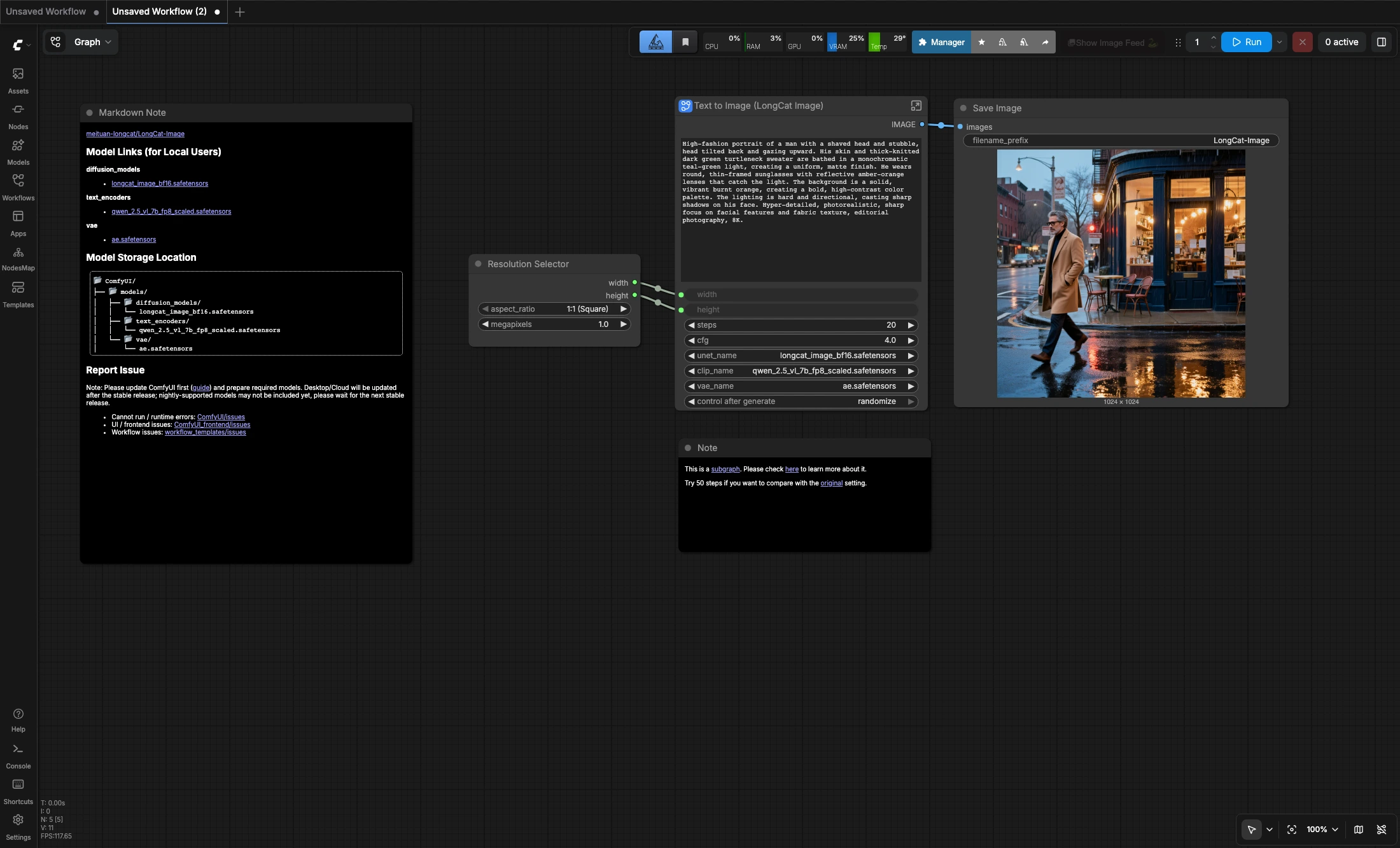
LongCat Image text to image is a straightforward ComfyUI workflow for square prompt-to-image generation. It combines the LongCat-Image model, the Qwen 2.5 VL text encoder, and the AE VAE in a compact graph that is easy to iterate on. The default setup generates 1024x1024 images in 20 steps, and you can increase the step count if you want to compare against the original recommended setting.

What is the LongCat Image text to image ComfyUI workflow?

LongCat Image text to image is a compact ComfyUI workflow for generating square 1024x1024 images from text prompts. It uses the LongCat-Image diffusion model together with the Qwen 2.5 VL text encoder and the AE VAE, giving you a straightforward prompt-to-image setup for portraits, product shots, and polished editorial-style visuals.

The graph is intentionally simple: choose a square resolution, write your prompt, run the workflow, and save the image. It works well for quick iteration in either English or Chinese prompts, and the included note suggests trying 50 steps if you want to compare the result against the original model setting.

Key features of LongCat Image text to image

  • Square-first generation: Default setup is tuned for 1:1 output at 1024x1024.
  • Compact workflow design: The graph stays focused on prompt-to-image generation without extra routing complexity.
  • Flexible prompting: Suitable for both English and Chinese text prompts.
  • Easy quality tuning: Start from the default 20-step setup, then increase steps when you want slower but more deliberate sampling.

How to use LongCat Image in ComfyUI

  1. Choose the output size
    • Use the Resolution Selector node to keep the default square layout or adjust the target megapixels if needed.
  2. Write your prompt
    • Open the Text to Image (LongCat Image) subgraph and replace the default prompt with your own subject, lighting, mood, and composition instructions.
  3. Run the workflow
    • Queue the graph to generate a single image from your prompt.
  4. Save the result
    • The Save Image node writes the final output once the run is complete.

Tips and settings

  • The current default setup runs at 20 steps with CFG 4.
  • If you want to compare against the original recommendation from the source workflow, try 50 steps.
  • Clear, concrete prompts tend to work better than broad or abstract prompt fragments in this compact graph.

Resources

  • Workflow source: Comfy.org workflow page
  • Official model: meituan-longcat/LongCat-Image on Hugging Face

Want More ComfyUI Workflows?

InfiniteTalk | Lip-Synced Avatar Generator

Photo + Voice = Perfectly Synced Talking Avatar in Minutes

Wan 2.1 LoRA

Enhance Wan 2.1 video generation with LoRA models for improved style and customization.

IPAdapter Plus (V2) + AnimateLCM | ipiv's Morph

Use IPAdapter Plus, ControlNet QRCode, and AnimateLCM to create morphing videos quickly.

Segment Anything V2 (SAM2) | Video Segmentation

Object segmentation of videos with unrivaled accuracy.

Mesh Graphormer ControlNet | Fix Hands

Mesh Graphormer ControlNet | Fix Hands

Mesh Graphormer ControlNet corrects malformed hands in images while preserving the rest.

Wan2.1 Stand In | Consistent Character Video Maker

Keeps characters consistent across video from just one reference image.

Controllable Animation in AI Video | Motion Control Tool

Make videos obey your motion rules instantly and precisely.

Hunyuan Video 1.5 | Fast AI Video Generator

Turn text or images into smooth 1080p videos quickly and easily.

Follow us
  • LinkedIn
  • Facebook
  • Instagram
  • Twitter
Support
  • Discord
  • Email
  • System Status
  • Affiliate
Resources
  • Free ComfyUI Online
  • ComfyUI Guides
  • RunComfy API
  • ComfyUI Tutorials
  • ComfyUI Nodes
  • Learn More
Legal
  • Terms of Service
  • Privacy Policy
  • Cookie Policy
RunComfy
Copyright 2026 RunComfy. All Rights Reserved.

RunComfy is the premier ComfyUI platform, offering ComfyUI online environment and services, along with ComfyUI workflows featuring stunning visuals. RunComfy also provides AI Models, enabling artists to harness the latest AI tools to create incredible art.