

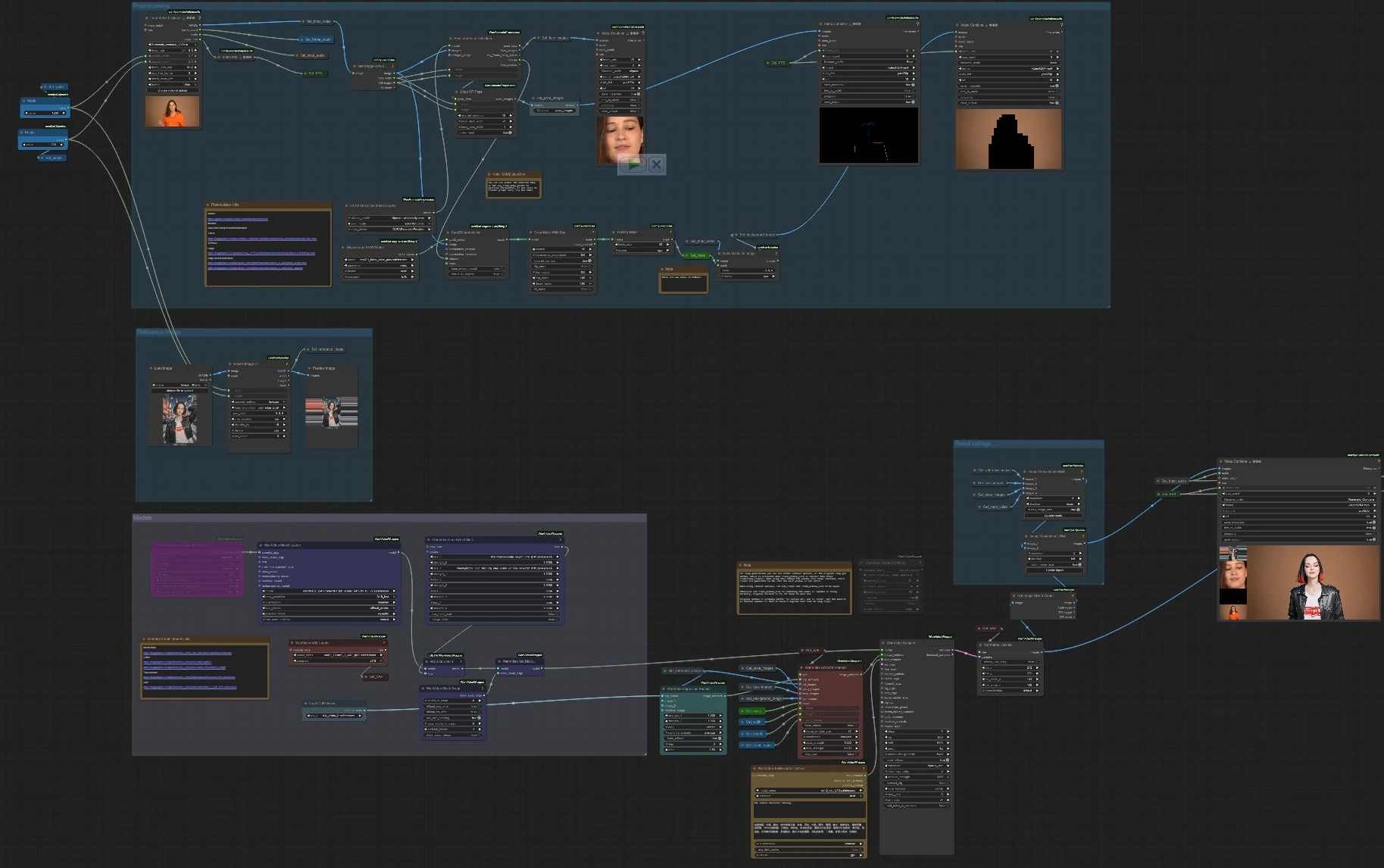
Wan 2.2 Animate V2 pose‑driven video generation workflow for ComfyUI#
Wan 2.2 Animate V2 is a pose‑driven video generation workflow that turns a single reference image plus a driving pose video into a lifelike, identity‑preserving animation. It builds on the first version with higher fidelity, smoother motion, and better temporal consistency, all while closely following full‑body movement and expressions from the source video.
This ComfyUI workflow is designed for creators who want fast, reliable results for character animation, dance clips, and performance‑driven storytelling. It combines robust pre‑processing (pose, face, and subject masking) with the Wan 2.2 model family and optional LoRAs, so you can dial in style, lighting, and background handling with confidence.
Key models in ComfyUI Wan 2.2 Animate V2 workflow#
- Wan 2.2 Animate 14B. Core video diffusion model that synthesizes temporally consistent frames from multimodal embeddings. Weights: Kijai/WanVideo_comfy_fp8_scaled (Wan22Animate).
- Wan 2.1 VAE. Latent video decoder/encoder used by the Wan family to reconstruct RGB frames with minimal loss. Weights: Wan2_1_VAE_bf16.safetensors.
- UMT5‑XXL text encoder. Encodes prompts that guide look, scene, and cinematics. Weights: umt5‑xxl‑enc‑bf16.safetensors.
- CLIP Vision (ViT‑H/14). Extracts identity‑preserving features from the reference image. Paper: CLIP.
- ViTPose Whole‑Body (ONNX). Estimates dense body keypoints that drive motion transfer. Models: ViTPose‑L WholeBody and ViTPose‑H WholeBody. Paper: ViTPose.
- YOLOv10 detector. Supplies person boxes to stabilize pose detection and segmentation. Example: yolov10m.onnx.
- Segment Anything 2. High‑quality subject masks for background preservation, compositing, or relighting previews. Repo: facebookresearch/segment-anything-2.
- Optional LoRAs for style and light transport. Useful for relighting and texture detail in Wan 2.2 Animate V2 outputs. Examples: Lightx2v and Wan22_relight.
How to use ComfyUI Wan 2.2 Animate V2 workflow#
At a high level, the pipeline extracts pose and face cues from the driving video, encodes identity from a single reference image, optionally isolates the subject with a SAM 2 mask, and then synthesizes a video that matches the motion while preserving identity. The workflow is organized into four groups that collaborate to produce the final result and two convenience outputs for quick QA (pose and mask previews).
Reference Image#
This group loads your portrait or full‑body image, resizes it to the target resolution, and makes it available across the graph. The resized image is stored and reused by Get_reference_image and previewed so you can quickly assess framing. Identity features are encoded by WanVideoClipVisionEncode (CLIP Vision) (#70), and the same image feeds WanVideoAnimateEmbeds (#62) as ref_images for stronger identity preservation. Provide a clear, well‑lit reference that matches the subject type in the driver video for best results. Headroom and minimal occlusions help Wan 2.2 Animate V2 lock onto face structure and clothing.
Preprocessing#
The driver video is loaded with VHS_LoadVideo (#191), which exposes frames, audio, frame count, and source fps for later use. Pose and face cues are extracted by OnnxDetectionModelLoader (#178) and PoseAndFaceDetection (#172), then visualized with DrawViTPose (#173) so you can confirm tracking quality. Subject isolation is handled by Sam2Segmentation (#104), followed by GrowMaskWithBlur (#182) and BlockifyMask (#108) to produce a clean, stable mask; a helper DrawMaskOnImage (#99) previews the matte. The group also standardizes width, height, and frame count from the driver video, so Wan 2.2 Animate V2 can match spatial and temporal settings without guesswork. Quick checks export as short videos: a pose overlay and a mask preview for zero‑shot validation.
Models#
WanVideoVAELoader (#38) loads the Wan VAE and WanVideoModelLoader (#22) loads the Wan 2.2 Animate backbone. Optional LoRAs are chosen in WanVideoLoraSelectMulti (#171) and applied via WanVideoSetLoRAs (#48); WanVideoBlockSwap (#51) can be enabled through WanVideoSetBlockSwap (#50) for architectural tweaks that affect style and fidelity. Prompts are encoded by WanVideoTextEncodeCached (#65), while WanVideoClipVisionEncode (#70) turns the reference image into robust identity embeddings. WanVideoAnimateEmbeds (#62) fuses the CLIP features, reference image, pose images, face crops, optional background frames, the SAM 2 mask, and the chosen resolution and frame count into a single animation embedding. That feed drives WanVideoSampler (#27), which synthesizes latent video consistent with your prompt, identity, and motion cues, and WanVideoDecode (#28) converts latents back to RGB frames.
Result collage#
To help compare outputs, the workflow assembles a simple side‑by‑side: the generated video alongside a vertical strip that shows the reference image, face crops, pose overlay, and a frame from the driver video. ImageConcatMulti (#77, #66) builds the visual collage, then VHS_VideoCombine (#30) renders a “Compare” mp4. The final clean output is rendered by VHS_VideoCombine (#189), which also carries over audio from the driver for quick review cuts. These exports make it easy to judge how well Wan 2.2 Animate V2 followed motion, preserved identity, and maintained the intended background.
Key nodes in ComfyUI Wan 2.2 Animate V2 workflow#
VHS_LoadVideo (#191) Loads the driving video and exposes frames, audio, and metadata used across the graph. Keep the subject fully visible with minimal motion blur for stronger keypoint tracking. If you want shorter tests, limit the number of frames loaded; keep the source fps consistent downstream to avoid audio desync in the final combine.
PoseAndFaceDetection (#172) Runs YOLO and ViTPose to produce whole‑body keypoints and face crops that directly guide motion transfer. Feed it the images from the loader and the standardized width and height; the optional retarget_image input allows adapting poses to a different framing when needed. If the pose overlay looks noisy, consider a higher‑quality ViTPose model and ensure the subject is not heavily occluded. Reference: ComfyUI‑WanAnimatePreprocess.
Sam2Segmentation (#104) Generates a subject mask that can preserve background or localize relighting in Wan 2.2 Animate V2. You can use the detected bounding boxes from PoseAndFaceDetection or draw quick positive points if needed to refine the matte. Pair it with GrowMaskWithBlur for cleaner edges on fast motion and review the result with the mask preview export. Reference: Segment Anything 2.
WanVideoClipVisionEncode (#70) Encodes the reference image with CLIP Vision to capture identity cues like facial structure, hair, and clothing. You can average multiple reference images to stabilize identity or use a negative image to suppress unwanted traits. Centered crops with consistent lighting help produce stronger embeddings.
WanVideoAnimateEmbeds (#62) Fuses identity features, pose images, face crops, optional background frames, and the SAM 2 mask into a single animation embedding. Align width, height, and num_frames with your driver video for fewer artifacts. If you see background drift, provide clean background frames and a solid mask; if the face drifts, ensure face crops are present and well lit.
WanVideoSampler (#27) Produces the actual video latents guided by your prompt, LoRAs, and the animation embedding. For long clips, choose between a sliding‑window strategy or the model’s context options; match the windowing to clip length to balance motion sharpness and long‑range consistency. Adjust the scheduler and guidance strength to trade off fidelity, style adherence, and motion smoothness, and consider enabling block swap if your LoRA stack benefits from it.
Optional extras#
- Start with a clean driver clip: steady camera, simple lighting, and minimal occlusion give Wan 2.2 Animate V2 the best chance to track motion cleanly.
- Use a reference that matches the target outfit and framing; avoid extreme angles or heavy filters that conflict with your prompt or LoRAs.
- Preserve or replace backgrounds with the SAM 2 mask; when compositing, keep edges soft enough to avoid haloing on fast motion.
- Keep fps consistent from load to export to maintain lip sync and beat alignment when carrying over audio.
- For quick iteration, test a short segment first, then extend the frame range once pose, identity, and lighting look right.
Helpful resources used in this workflow:
- Preprocess nodes: kijai/ComfyUI‑WanAnimatePreprocess
- ViTPose ONNX models: ViTPose‑L, ViTPose‑H model and data
- YOLOv10 detector: yolov10m.onnx
- Wan 2.2 Animate 14B weights: Wan22Animate
- LoRAs: Lightx2v, Wan22_relight
Acknowledgements#
This workflow implements and builds upon the following works and resources. We gratefully acknowledge Benji’s AI Playground's workflow and the Wan team for the Wan 2.2 Animate V2 model for their contributions and maintenance. For authoritative details, please refer to the original documentation and repositories linked below.
Resources#
- Wan team/Wan 2.2 Animate V2
- Docs / Release Notes: YouTube @Benji’s AI Playground
Note: Use of the referenced models, datasets, and code is subject to the respective licenses and terms provided by their authors and maintainers.