

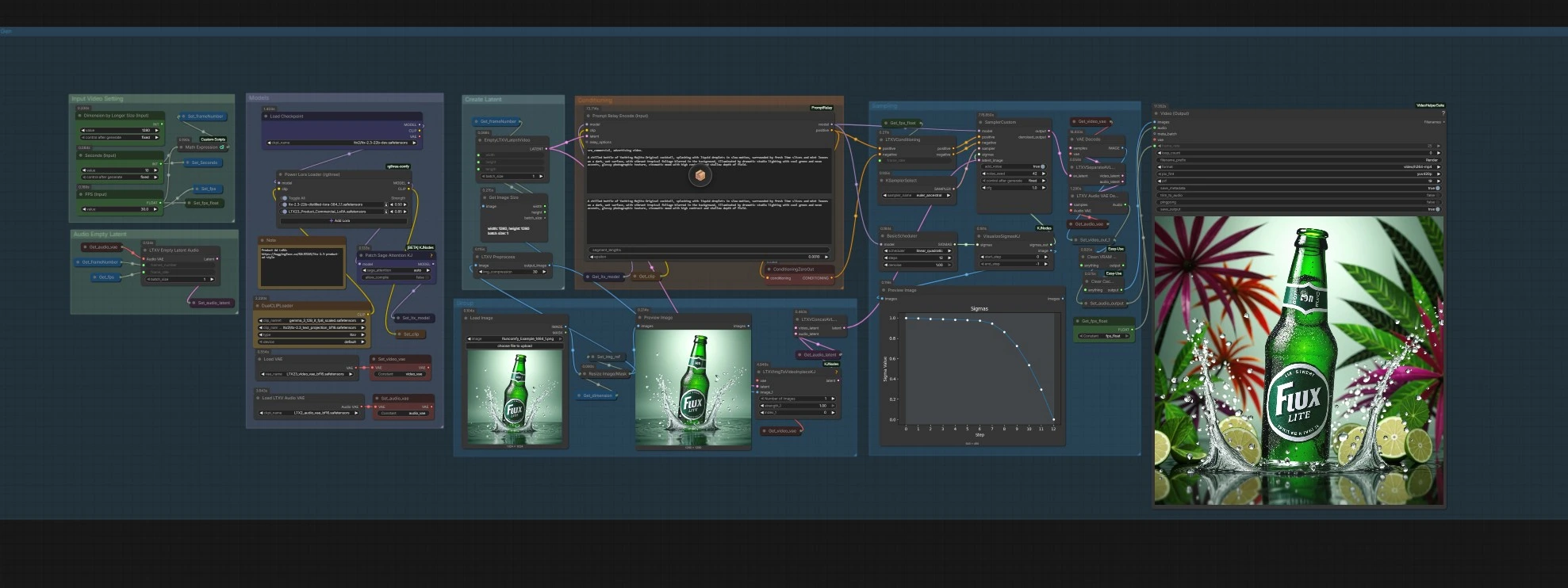
ComfyUI Video Ads With Krea 2 and LTX 2.3#
ComfyUI Video Ads With Krea 2 and LTX 2.3 is a production workflow for turning product concepts, prompts, and brand visuals into polished ad videos. It fuses Krea 2’s fast, high-quality image generation with the LTX-2.3 video model to deliver cinematic motion, consistent branding, and controllable storytelling for product spots, social ads, and promo reels.
Built for creators and marketing teams, this ComfyUI Video Ads With Krea 2 and LTX 2.3 workflow lets you start from either a reference image or text brief, preserve geometry and composition with depth guidance, and then animate the result into a coherent clip with configurable length, frame rate, and export settings.
Key models in Comfyui Video Ads With Krea 2 and LTX 2.3 workflow#
- Krea 2 Turbo. Primary text-to-image checkpoint used to generate the ad’s hero frame with high fidelity and speed. Official weights for ComfyUI are published at Comfy-Org/Krea-2. View model
- Krea-2 Depth ControlNet LoRA. Adds depth-conditioned control so Krea 2 adheres to product layout and camera geometry. View model
- Depth Anything V2. Monocular depth estimator used to extract scene structure from the reference image for reliable ControlNet guidance. GitHub • Paper
- LTX-2.3 (22B). The text/image-to-video model that animates the still into a coherent, cinematic sequence; includes dedicated video and audio VAEs. View model
- LTX-2.3 Product Ad Style LoRA. Optional style adapter that pushes lighting, framing, and finish toward commercial product aesthetics. View model
- Qwen-VL family. Multimodal captioner used to expand an input image into a strong, natural-language marketing prompt when you start from visuals. View model
- Krea 2 pipeline docs. Reference for Krea 2’s design and prompting approach in Diffusers. Docs
How to use Comfyui Video Ads With Krea 2 and LTX 2.3 workflow#
The workflow runs in two phases: 1) generate a high-impact hero image with Krea 2 under depth control, then 2) animate it with LTX-2.3 using your marketing prompt and video settings. You can feed either a product image to steer the look or a written brief to drive generation end to end.
Group: Prompt via Image URL#
Start by loading a brand or product image with LoadImage (#15). The image is captioned by Qwen3Caption (#33) to produce a rich, natural-language prompt tailored for Krea 2. ShowText|pysssss (#32) displays and routes that expanded copy into the shared prompt string so you can edit it before generation. Use this path when you want strong product identity preservation, logo legibility, and composition continuity.
Group: Prompt via Text#
If you prefer to brief directly, write your marketing copy in PrimitiveStringMultiline (#29). Keep sentences specific and visual; this ComfyUI Video Ads With Krea 2 and LTX 2.3 setup favors clear, descriptive language over keyword lists. The string is stored via Set_strPrompt (#28) and read back by Get_strPrompt (#35) for CLIP encoding.
Group: Model (Krea 2)#
UNETLoader (#3) loads the Krea 2 Turbo checkpoint, and CLIPLoader (#11) loads the paired text encoder. Power Lora Loader (rgthree) (#14) adds a Krea detail-enhancer LoRA to sharpen microtextures and packaging edges. VAELoader (#1) supplies the image VAE used later to decode latents.
Group: ControlNet via LoRA — Depth#
DepthAnythingV2Preprocessor (#16) predicts a depth map from your reference image to capture geometry and camera angle. Krea2ControlImageEncode (#17) encodes the control image into latents compatible with Krea 2, while Krea2ControlLoRALoader (#24) loads the depth-control LoRA. Krea2ControlApply (#18) injects the control signal into the model so the hero frame respects structure without sacrificing Krea 2’s visual richness.
Group: Conditions#
CLIPTextEncode (#9) turns the active prompt into positive conditioning. ConditioningZeroOut (#7) intentionally clears negative conditioning to keep direction simple and aligned with Krea 2’s recommended prompting style.
Group: Sampling (image)#
KSampler (#13) renders the hero frame under the depth-guided Krea 2 setup. VAEDecode (#8) produces the final still for preview. This image becomes the visual anchor for the video phase.
Group: Models (LTX-2.3)#
CheckpointLoaderSimple (#66) loads LTX-2.3 (22B), with DualCLIPLoader (#70) supplying the paired text encoders and projection. LTXVAudioVAELoader (#46) and VAELoader (#45) load the audio and video VAEs respectively to handle latent encoding/decoding on the video path.
Group: Input Video Setting#
Use Dimension by Longer Size (Input) (#47) to target the output size by the clip’s longer edge. Seconds (Input) (#64) and FPS (Input) (#77) define duration and playback rate. Internally, MathExpression|pysssss (#76) computes the needed frame count and utility nodes convert types so downstream components remain in sync. This makes the clip length predictable and helps synchronize audio stubs and export.
Group: Create Latent#
LTXVPreprocess (#97) normalizes the hero image for LTX, and GetImageSize (#96) feeds dimensions to EmptyLTXVLatentVideo (#95) to build a blank video latent with the correct length. This latent is your timeline substrate for motion synthesis.
Group: Conditioning (video)#
Prompt Relay Encode (Input) (#98) re-encodes your marketing prompt for LTX-2.3 so the same copy drives motion and framing. ConditioningZeroOut (#90) provides a clean negative stream. LTXVImgToVideoInplaceKJ (#71) inserts the hero frame into the video latent so the first frames inherit the product look before motion evolves.
Group: Sampling (video)#
BasicScheduler (#93) and KSamplerSelect (#79) set the diffusion schedule and algorithm, while VisualizeSigmasKJ (#82) offers an at-a-glance view of the noise curve. SamplerCustom (#81) runs the LTX-2.3 generation over the full latent sequence to synthesize smooth, ad-friendly motion that honors your prompt and the initial frame.
Group: Output and export#
LTXVSeparateAVLatent (#50) splits video and audio latents for decoding via VAEDecode (#37) and LTXVAudioVAEDecode (#51). The frames and audio are muxed by VHS_VideoCombine (#91) into an MP4 at your chosen frame rate, with metadata preserved for reproducibility. Utility nodes handle cleanup and optional image preview before the final render is saved.
Key nodes in Comfyui Video Ads With Krea 2 and LTX 2.3 workflow#
DepthAnythingV2Preprocessor (#16)#
Extracts a high-quality depth map from your reference image to preserve geometry in the Krea stage. If you see warping or off-perspective results, try a higher-capacity model variant or slightly more input image contrast to strengthen edges. Reference: Depth Anything V2. GitHub
Krea2ControlLoRALoader (#24) and Krea2ControlApply (#18)#
Load and apply the depth-control LoRA to anchor composition. Increase the LoRA’s influence when you want rigid layout adherence; reduce it when you prefer more creative reinterpretation. Model card: Krea-2 Depth ControlNet LoRA. Hugging Face
Power Lora Loader (rgthree) (#14)#
Adds a detail-enhancement LoRA in the Krea path to sharpen packaging, labels, and specular highlights. If microtextures look too crunchy, lower the strength; if the image feels plastic or soft, raise it modestly.
KSampler (#13)#
Primary sampler for the hero frame. Use more steps for intricate packaging and glass reflections; adjust denoise downward to better preserve the reference composition when using strong depth guidance; pick a stable sampler_name for reproducible looks across ad variants.
Prompt Relay Encode (Input) (#98)#
Encodes the same marketing prompt for the LTX path so copy, style terms, and shot language carry from image to video. Keep the prompt concrete and cinematic; Relay makes it easy to reuse or A/B prompts across multiple runs. Project repo: ComfyUI-PromptRelay. GitHub
EmptyLTXVLatentVideo (#95)#
Defines the video timeline. Length is derived from your seconds and FPS inputs; bump duration for more narrative beats, or shorten for snappier social placements. Ensure resolution and length remain compatible with your GPU memory.
LTXVImgToVideoInplaceKJ (#71)#
Seeds the video latent with the hero frame so identity, materials, and branding persist as motion emerges. If motion feels too abrupt from frame one, start with gentler schedules or add a few warm-up frames.
SamplerCustom (#81) with BasicScheduler (#93)#
Runs LTX-2.3 over the sequence. Pair a steady schedule with moderate steps for smooth, ad-style movement; explore punchier samplers when you want bolder camera pushes or rack focus effects. LTX Video nodes: ComfyUI-LTXVideo. GitHub
VHS_VideoCombine (#91)#
Exports frames and audio into MP4 with embedded metadata. Tweak format, quality, and frame_rate to match platform specs. Node suite: ComfyUI-VideoHelperSuite. GitHub
Optional extras#
- For maximum brand fidelity, start with a clean product PNG or studio photo, then let the image-caption path generate the Krea 2 prompt you’ll refine.
- If labels or logos drift, increase depth adherence (via the depth LoRA path) and slightly lower denoising in the Krea
KSampler(#13). - The Product Ad Style LoRA for LTX-2.3 adds glossy, premium lighting; keep its influence moderate to avoid overpowering your brand palette. Model
- Use concise, shot-ready language in prompts: camera angle, lens feel, lighting, color palette, mood, and action verb. This suits both Krea 2 and LTX-2.3.
- To batch variants quickly, lock the hero frame seed and iterate on only the LTX schedule or prompt phrasing for motion diversity.
- Custom nodes referenced in this workflow include Krea 2 ControlNet and KJNodes LTXV utilities. Krea2 ControlNet • KJ Nodes
Acknowledgements#
This workflow implements and builds upon the following works and resources. We gratefully acknowledge ComfyUI for the workflow, Krea 2 for the model, and LTX 2.3 for the model for their contributions and maintenance. For authoritative details, please refer to the original documentation and repositories linked below.
Resources#
- ComfyUI Video Ads With Krea 2 and LTX 2.3 Workflow Source
- Docs / Release Notes: YouTube
Note: Use of the referenced models, datasets, and code is subject to the respective licenses and terms provided by their authors and maintainers.