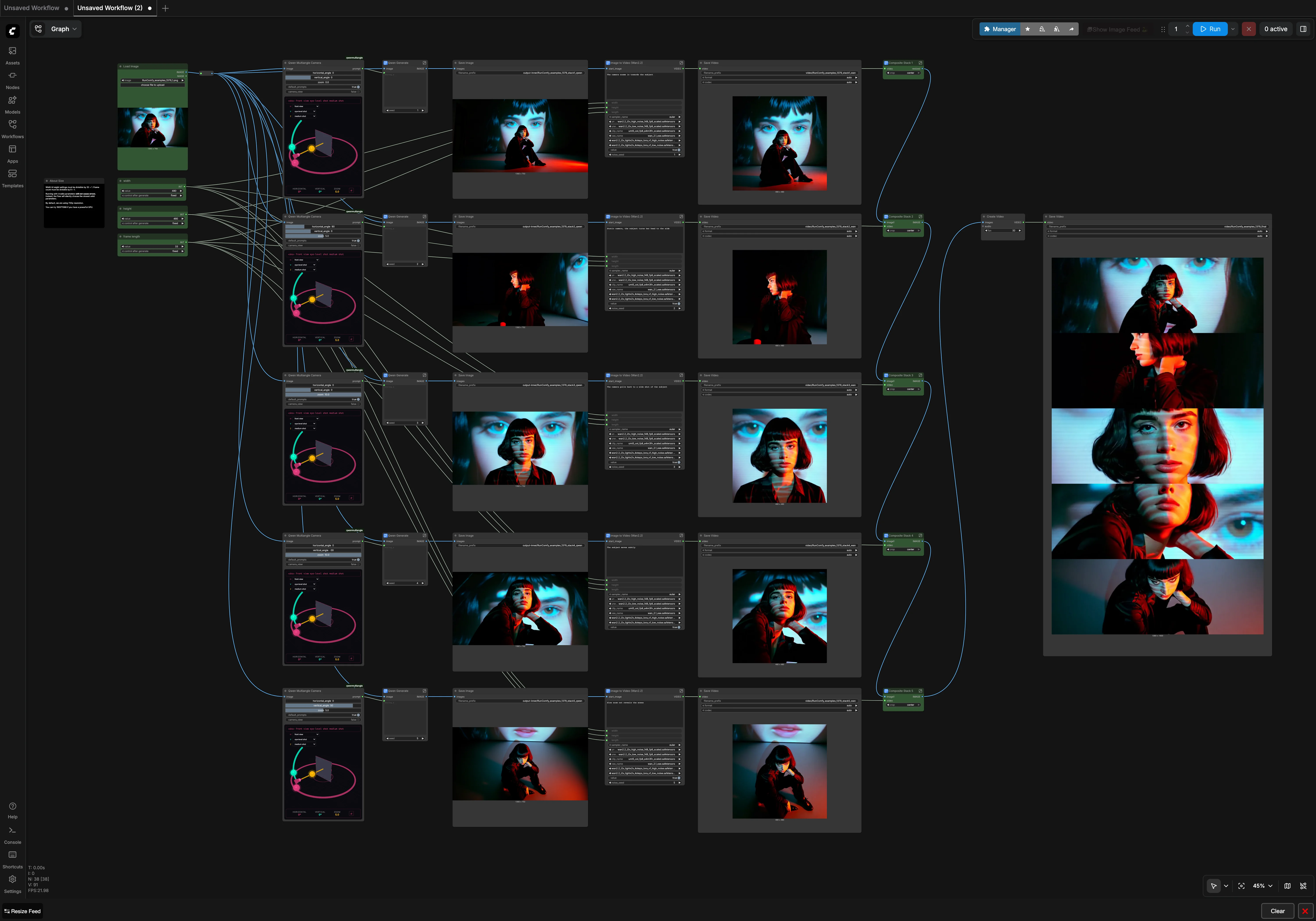
Wan 2.2 Qwen Multiangle Split Stack: turn one photo into a synchronized 5‑angle 9:16 video#
Wan 2.2 Qwen Multiangle Split Stack in ComfyUI converts a single image into five distinct camera angles, animates each one, then assembles them into a clean 9:16 vertical split stack. The result is a synchronized multi‑perspective video that is ideal for product showcases, character turnarounds, and social‑media‑ready posts.
From one input you get six deliverables: five individual Wan 2.2 image‑to‑video (I2V) clips and one final stacked supercut. The workflow is opinionated but flexible, so you can swap prompts, tune duration, and adjust composition without touching any installation details.
Key models in Comfyui Wan 2.2 Qwen Multiangle Split Stack workflow#
- Wan 2.2 Image‑to‑Video diffusion (14B, high‑noise and low‑noise UNet pair) with optional LightX2V 4‑steps LoRA for speed. This model turns a still into motion while preserving subject identity and scene layout. Source: Comfy‑Org Wan 2.2 repack, including LoRA files and VAE assets. Hugging Face
- Qwen‑Image‑Edit 2511 for viewpoint‑aware image editing. It generates five angle variants of the same subject from the single input and is enhanced here by two LoRAs: Multiple‑Angles (for consistent yaw/pitch shifts) and Lightning 4‑steps (for fast, high‑quality edits). Comfy‑Org Qwen‑Image‑Edit • Multiple‑Angles LoRA • Lightning 4‑steps LoRA
- Qwen 2.5‑VL 7B vision‑language encoder. Used to condition and parse edit prompts that steer Qwen‑Image‑Edit toward clean, repeatable angle changes. Hugging Face
- VAEs for decoding and encoding latents: Wan 2.1 VAE for Wan I2V and Qwen Image VAE for the image‑edit path. Wan VAE • Qwen Image VAE
- RIFE frame interpolation to unify smoothness and frame cadence before stacking. It reduces temporal judder across the five clips. GitHub
How to use Comfyui Wan 2.2 Qwen Multiangle Split Stack workflow#
Overall flow: one image goes through Qwen to produce five angle‑consistent stills, each still is animated by Wan 2.2 into a clip, then all clips are resized and stacked top‑to‑bottom into a 9:16 video.
1) Load and set global length/size#
- Drop your source into
LoadImage(#41). This is the only required user asset. - Set
width(#207),height(#208), andframe length(#214). These three integers drive all five Wan 2.2 animations at once. - The stacker later resizes each pane to a uniform tile so you can keep square I2V renders for subject stability and still get a 1080×1920 final stack.
2) Generate five multi‑angle stills with Qwen#
- The five
QwenMultiangleCameraNodeinstances (#964, #984, #1022, #1041, #1060) analyze the input and produce camera‑angle prompts (e.g., slight left, profile, subtle up/down tilt). - Each prompt is passed to a
Qwen Generategroup (#962, #983, #1021, #1040, #1059) that uses Qwen‑Image‑Edit with the Multiple‑Angles and Lightning LoRAs to render a photorealistic viewpoint change while keeping identity, clothing, and background coherent. - Preview images are saved (
SaveImagenodes #369, #460, #534, #607, #680) so you can quickly inspect angles before animation.
3) Animate each angle with Wan 2.2 I2V#
- Five
Image to Video (Wan2.2)subgraphs take each edited still asstart_imageand produce motion clips (WanImageToVideoinside #772, #774, #775, #837, #839). - All five share the same length and resolution from the global ints, which keeps motion and framing synchronized across panes.
- You can provide a short motion prompt in each I2V node if you want different camera behavior per pane, or leave them aligned for a perfectly matched split stack.
4) Build the 9:16 split stack#
- Each clip flows through
GetVideoComponentsandRIFE VFIto normalize frame cadence, then throughResizeImageMaskNodeto a tile size of 1080×384. - The tiles are stitched vertically by
ImageStitchinside the Composite Stack subgraphs (Composite Stack 1–5, e.g., #925 → #927 → #932 → #937 → #942). CreateVideo(#758) assembles the stacked frames andSaveVideo(#759) writes the final 9:16 supercut.
5) Exportables#
- Individual angle clips are saved by
SaveVideo(#203, #464, #537, #610, #683). - The stacked video is saved by
SaveVideo(#759). Filenames are prefilled; you can change them to match your project.
Key nodes in Comfyui Wan 2.2 Qwen Multiangle Split Stack workflow#
QwenMultiangleCameraNode (#964 et al.)#
This node family generates five angle‑aware prompts from the single image, which is the foundation of the Wan 2.2 Qwen Multiangle Split Stack look. Use it as the place to standardize yaw/pitch changes across runs. Small prompt additions like “consistent studio lighting” or “neutral background” here help Qwen‑Image‑Edit keep edges and shadows stable. See the model pages for capabilities and constraints of Qwen‑Image‑Edit and its LoRAs. Qwen‑Image‑Edit • Multiple‑Angles LoRA
Qwen Generate (#962)#
This subgraph wraps Qwen‑Image‑Edit 2511 with the Multiple‑Angles and Lightning 4‑steps LoRAs plus the Qwen 2.5‑VL text encoder. It converts each camera instruction into a clean, identity‑preserving still. If you need stronger adherence to the original, nudge the positive text in the embedded TextEncodeQwenImageEditPlus to emphasize subject traits or product features. Lightning 4‑steps • Qwen 2.5‑VL 7B
WanImageToVideo (#772)#
This is the Wan 2.2 I2V kernel that turns each edited still into motion. The node reads global width, height, and length, and you can add a short motion prompt to define zooms or subtle subject motion. Toggle the 4‑steps LoRA inside the I2V subgraph if you want faster renders at near‑baseline quality; leave it off if you prefer maximum fidelity. Wan 2.2 I2V
RIFE VFI (#926)#
Used to smooth and align clip cadence before stitching. Increase interpolation only if your source motion looks choppy; higher factors raise render time. RIFE is lightweight and pairs well with Wan 2.2’s fixed‑step decoding, which is why it sits just before stacking. Practical‑RIFE
ImageStitch (#912)#
Builds the 5‑row vertical panel. Keep the direction set to “down” to preserve the 9:16 layout. If you decide to use fewer than five angles, adjust the tile height in the upstream resize node so the combined height still totals 1920 px for a perfect 1080×1920 export.
Optional extras#
- Creative control: Use the green “Create Prompt” string nodes to add style notes once, then let Qwen propagate them consistently across all angles.
- Consistency tips: Ask for “uniform studio lighting, neutral background, centered subject” to minimize variation across the stack.
- Performance: If VRAM is tight, lower
widthandheightfirst, thenframe length. The stacker will still output a 9:16 video. - Fewer or more panes: You can run any subset of angles; just restitch with matching tile heights so the final canvas remains 1080×1920.
- Deliverable mix: Share the stacked supercut for social feeds and keep the five individual Wan 2.2 clips for detail shots, thumbnails, or loops.
Acknowledgements#
This workflow implements and builds upon the following works and resources. We gratefully acknowledge hellorob for the Wan 2.2 Qwen Multiangle Split Stack Source ComfyUI workflow for their contributions and maintenance. For authoritative details, please refer to the original documentation and repositories linked below.
Resources#
- hellorob/Wan 2.2 Qwen Multiangle Split Stack Source
- GitHub: Comfy-Org/workflow_templates
- Docs / Release Notes: Wan 2.2 Qwen Multiangle Split Stack Source
Note: Use of the referenced models, datasets, and code is subject to the respective licenses and terms provided by their authors and maintainers.