

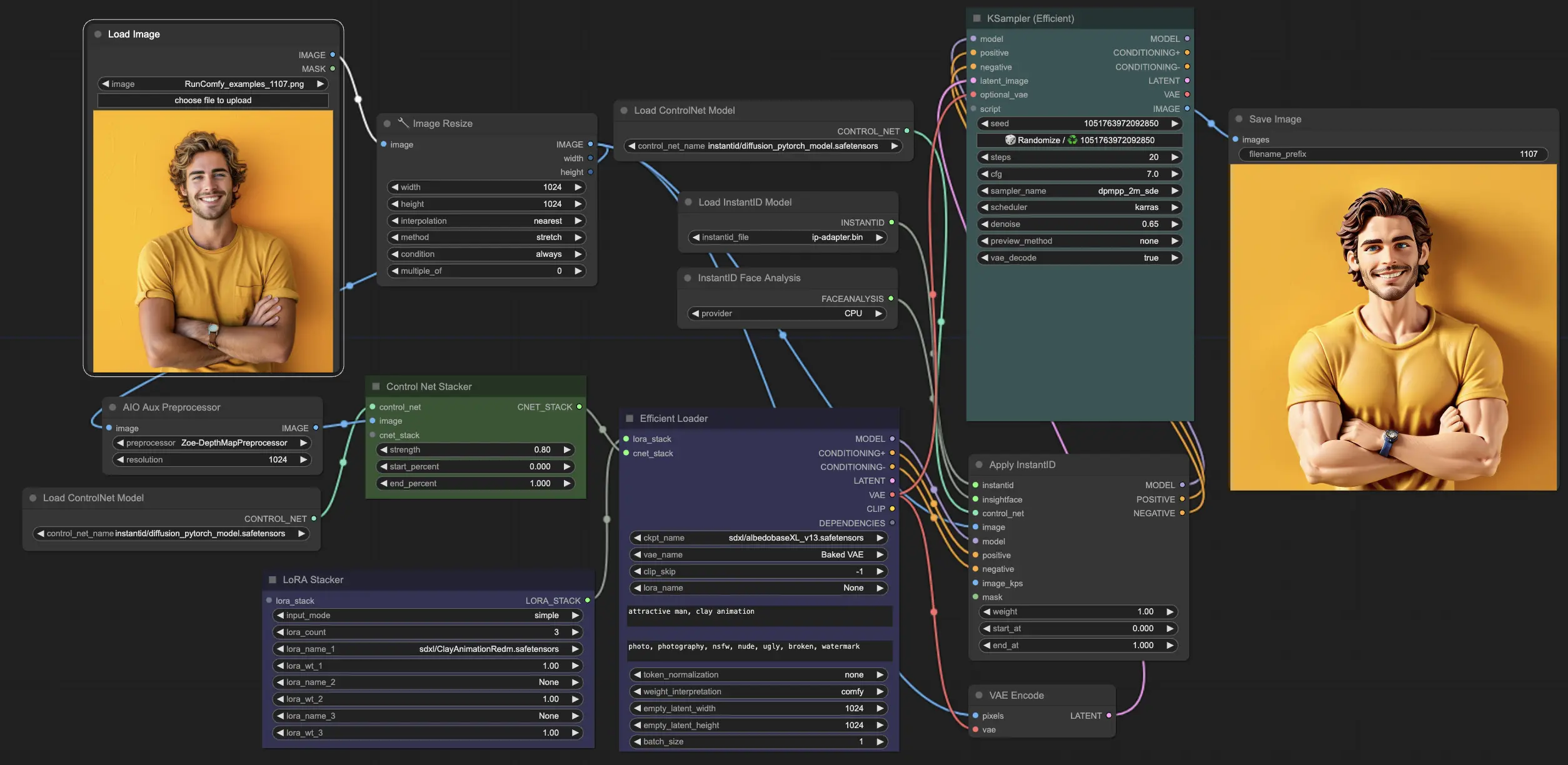
What is Face-to-Many?#
Face-to-many is a powerful workflow in ComfyUI that allows you to transform a single facial image into multiple artistic styles effortlessly. By utilizing the InstantID technology within the ControNet model, you can generate personalized images in various styles such as 3D, emoji, pixel art, video game, clay, or toy aesthetics, all while preserving the key facial features and identity of the original image.
How Does Face-to-Many Work?#
The Face-to-many workflow in ComfyUI leverages several key components to achieve its impressive results:
1. InstantID#
At the core of the Face-to-many workflow is the InstantID model, which specializes in identity-preserving personalized image synthesis. It maps and preserves key facial points and attributes across different artistic transformations, ensuring high fidelity to the original face.
2. ControlNet#
The ControlNet model is used to guide the image generation process by providing additional control and consistency. It helps maintain the structure and key features of the original facial image throughout the transformations into different artistic styles.
3. Lora models#
Different Lora models are used to define the specific artistic styles that can be applied to the facial image. By selecting the appropriate Lora model, you can transform the face into 3D, emoji, pixel art, video game, clay, or toy styles.
Step-by-Step Tutorial: Using Face-to-Many in ComfyUI#
To generate personalized images in various styles using the Face-to-Many workflow, follow these steps:
1. Upload the facial image:#
Use the "LoadImage" node to upload the single facial image you want to transform. Make sure the image is of sufficient quality and resolution for optimal results.
2. Select the desired styles for Face-to-Many#
In the "LoRA Stacker" node, choose the Lora models corresponding to the styles you want to apply. The mapping of styles to Lora models is as follows:
- 3D: sdxl/3DRedmond-3DRenderStyle-3DRenderAF.safetensors
- Emoji: sdxl/fofr/emoji.safetensors
- Video game: sdxl/PS1Redmond-PS1Game-Playstation1Graphics.safetensors
- Pixels: sdxl/PixelArtRedmond-Lite64.safetensors
- Clay: sdxl/ClayAnimationRedm.safetensors
- Toy: sdxl/ToyRedmond-FnkRedmAF.safetensors
3. Adjust settings and prompts for better Face-to-Many results#
Provide style-specific prompts in the "EfficientLoader" node to guide the image generation process.
- 3D: 3D Style
- Emoji: Emiji Style
- Video game: PS1 Style
- Pixels: Pixels Arty
- Clay: Clay Animation
- Toy: Toy Style
4. Generate the Face-to-Many images:#
Once all the settings are configured, run the Face-to-Many workflow to generate the personalized images in the selected styles. Feel free to experiment with different combinations of styles, prompts, and settings to achieve desired results.
By leveraging the power of the Face-to-Many workflow in ComfyUI, you can easily transform a single facial image into a variety of captivating artistic styles. Whether you want to create a 3D render, an emoji version, or a video game character, Face-to-Many provides a seamless and efficient way to generate personalized images while preserving the identity of the original face.
For more information and to view the original work, please visit the GitHub page of the author fofr at fofr. Many of the loras are crafted by artificialguybr. You can support artificialguybr's work through Patreon or Ko-fi or follow artificialguybr on Twitter: artificialguybr.