

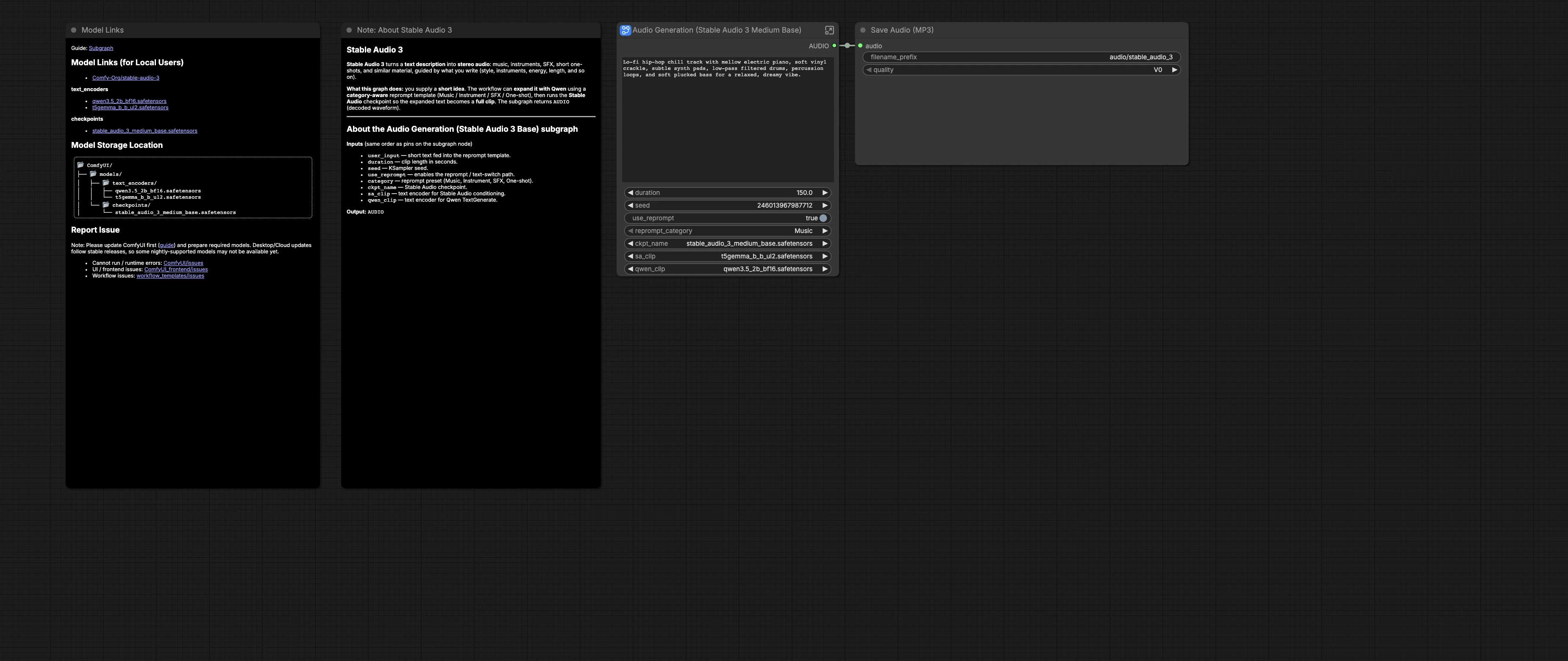
Stable Audio 3.0 Medium Base workflow for long-form text-to-audio in ComfyUI#
This Stable Audio 3.0 Medium Base workflow turns short text ideas into longer, more musical stereo audio. It is built around the stable_audio_3_medium_base checkpoint with T5-Gemma and Qwen3.5 text encoders to deliver prompt-driven music sketches, ambient beds, SFX, and one-shots with reproducible settings in ComfyUI.
The graph includes an optional category-aware reprompt system that can expand your brief idea into a dense, production-ready prompt before synthesis. You choose the category, duration, and seed, then the pipeline conditions Stable Audio 3 and renders audio that is saved as an MP3. The workflow follows the official template and assets provided by Comfy-Org for Stable Audio 3.0 Medium Base. See the reference template and models at Comfy-Org/workflow_templates and Comfy-Org/stable-audio-3.
Key models in Comfyui Stable Audio 3.0 Medium Base workflow#
- Stable Audio 3 Medium Base checkpoint. The core generative model that synthesizes stereo audio from text conditioning and latents. Source: Comfy-Org/stable-audio-3.
- T5-Gemma Base UL2 text encoder. Produces the text embeddings used to condition Stable Audio 3 for positive and negative prompts. Packaged text encoder file is included under the Stable Audio 3 repository’s text_encoders folder: Comfy-Org/stable-audio-3.
- Qwen3.5 2B text model. Powers the optional category-aware reprompt that expands a short idea into a detailed music, instrument, SFX, or one-shot description. Source: Comfy-Org/Qwen3.5.
How to use Comfyui Stable Audio 3.0 Medium Base workflow#
At a high level, you provide a short idea and a target duration. The graph can keep your words as-is or use Qwen3.5 to rewrite them via a category template. The result is encoded to conditioning, sampled by Stable Audio 3, decoded to audio, and saved.
User inputs: prompt and duration#
The subgraph Audio Generation (Stable Audio 3 Medium Base) (#52) exposes user_input, duration, seed, use_reprompt, and category. Write a brief idea in plain language, such as a style, instrument list, mood, and an optional BPM. Choose a clip length in seconds and set a seed for reproducibility or variation. Turn use_reprompt on when you want the template-driven rewrite, then select a category such as Music, Instrument, SFX, or One-shot.
Loaders: checkpoint and text encoders#
CheckpointLoaderSimple (#25) loads stable_audio_3_medium_base.safetensors, providing the MODEL and VAE used later for sampling and decoding. CLIPLoader (#26) loads the T5-Gemma encoder used for conditioning. A second CLIPLoader (#29) loads the Qwen3.5 model that drives the reprompt stage.
Reprompt: JSON templates and category#
A category selector CustomCombo (#43) feeds a large JSON of system prompts into JsonExtractString (#49). The selected template is inserted into a meta-prompt by Text Replace (PROMPT TEMPLATE) (#38). Your user_input is injected by Text Replace (USER INPUT) (#39), and the target length is inserted using Text Replace (AUDIO LENGTH) (#40), keeping the rewrite aligned with your chosen duration.
Reprompt: Qwen TextGenerate#
TextGenerate (#28) uses Qwen3.5 to turn the assembled template plus your idea into a concise, detailed prompt that follows category-specific rules. This stage is especially helpful for longer musical structures and for SFX where concrete technical language matters. The prompt rewrite is previewable, so you can iterate quickly on category choice and phrasing.
Switching between original and rewritten text#
ComfySwitchNode (#34) selects either your original text or the Qwen-generated rewrite based on use_reprompt. Leave it on to get structured, length-aware prompts, or turn it off when you want literal control over wording. This simple switch makes A/B testing straightforward.
CLIP encode: conditioning#
CLIPTextEncode (#6) converts the selected prompt into the positive conditioning that drives the model. A second CLIPTextEncode (#7) provides a neutral negative conditioning by default. This pairing supplies Stable Audio 3 with clear guidance while avoiding unintended artifacts.
Audio generation: Stable Audio#
EmptyLatentAudio (#11) creates an audio latent whose length matches duration. KSampler (#3) performs the denoising process using the Stable Audio 3 Medium Base MODEL from the checkpoint. VAEDecodeAudio (#12) turns the final latent into an audible stereo waveform. Because the same duration also informs the reprompt, the rendered clip length and the rewritten text stay in sync.
Save and export#
Outside the subgraph, SaveAudioMP3 (#19) writes the result to an MP3 file with a helpful prefix for organization. Use this when batch-generating takes with different seed values or categories, then audition and keep your favorites.
Key nodes in Comfyui Stable Audio 3.0 Medium Base workflow#
ComfySwitchNode(#34). Toggles between the originaluser_inputand the Qwen-generated text. Turn it on for structured, length-matched rewrites or off for direct control.TextGenerate(#28). Runs Qwen3.5 with a category-specific system prompt to expand ideas. To customize the rewrite style, edit the category templates inJsonExtractString(#49) and the glue prompts in the adjacentText Replacenodes.EmptyLatentAudio(#11). Sets clip length. Keep this aligned with the insertedAUDIO_LENGTHtoken so the synthesis time matches the textual intent.KSampler(#3). Governs the denoising trajectory for Stable Audio 3. Adjustseedfor variations while keeping other settings stable to compare takes fairly.SaveAudioMP3(#19). Controls the output filename prefix and format for quick library building from multiple runs.
Optional extras#
- Start with a one or two sentence idea that names genre or source, key instruments or textures, and mood. The reprompt can fill in details like BPM and arrangement.
- Pick the category that matches your goal: Music for full tracks, Instrument for loops or stems, SFX for environments and actions, One-shot for isolated hits.
- Keep duration realistic for your target content. Very long clips are heavier to compute and may benefit from a stable
seedwhile you iterate. - When results feel crowded, disable the reprompt and try a simpler phrase, then re-enable it once you like the direction.
- For fast alt takes, keep everything constant and change only the
seed.
Acknowledgements#
This workflow implements and builds upon the following works and resources. We gratefully acknowledge Comfy-Org for the ComfyUI Stable Audio 3 Day-0 Support article, Comfy-Org for the Official Stable Audio 3.0 Medium Base workflow template, Comfy-Org for the Stable Audio 3 model files, and Comfy-Org for the Qwen3.5 encoder model files for their contributions and maintenance. For authoritative details, please refer to the original documentation and repositories linked below.
Resources#
- Comfy-Org/ComfyUI Stable Audio 3 Day-0 Support Article
- Docs / Release Notes: Stable Audio 3 Day-0 Support
- Comfy-Org/Official Stable Audio 3.0 Medium Base Workflow Template
- GitHub: Comfy-Org/workflow_templates
- Comfy-Org/Stable Audio 3 Model Files
- Hugging Face: Comfy-Org/stable-audio-3
- Comfy-Org/Qwen3.5 Encoder Model Files
- Hugging Face: Comfy-Org/Qwen3.5
Note: Use of the referenced models, datasets, and code is subject to the respective licenses and terms provided by their authors and maintainers.