

ACE-Step 1.5XL Base text to music: Prompt‑to‑song workflow for ComfyUI#
This workflow turns natural‑language descriptions into finished audio using the ACE-Step 1.5XL Base diffusion family. It pairs the base model with its ACE Step VAE and dual Qwen text encoders to keep results firmly in the music lane rather than TTS or speech. If you want prompt‑driven AI music with predictable structure, tempos, and instrumentation, this ACE-Step 1.5XL Base text to music pipeline is a focused, minimal setup that gets you from idea to MP3 quickly.
Designed for producers, sound designers, and creators, the graph emphasizes clarity: choose models, set a duration, write a musical prompt, then generate and save. The ACE-Step 1.5XL Base text to music workflow is compact enough for fast iteration while remaining expressive for detailed arrangements, keys, and tempos.
Key models in Comfyui ACE-Step 1.5XL Base text to music workflow#
- ACE-Step 1.5 XL Base (bf16) diffusion model. The generative backbone that denoises audio latents into coherent music phrases and textures. Model file
- ACE Step 1.5 VAE. The paired variational autoencoder that encodes/decodes between latent space and waveform domain, preserving timbre and mix balances. Model file
- Qwen 4B ACE15 text encoder. A large text encoder adapted for ACE that captures rich musical semantics, structure, and arrangement cues from the prompt. Model file
- Qwen 0.6B ACE15 text encoder. A lighter ACE‑adapted encoder that prioritizes speed and resource efficiency while retaining strong prompt understanding. Model file
How to use Comfyui ACE-Step 1.5XL Base text to music workflow#
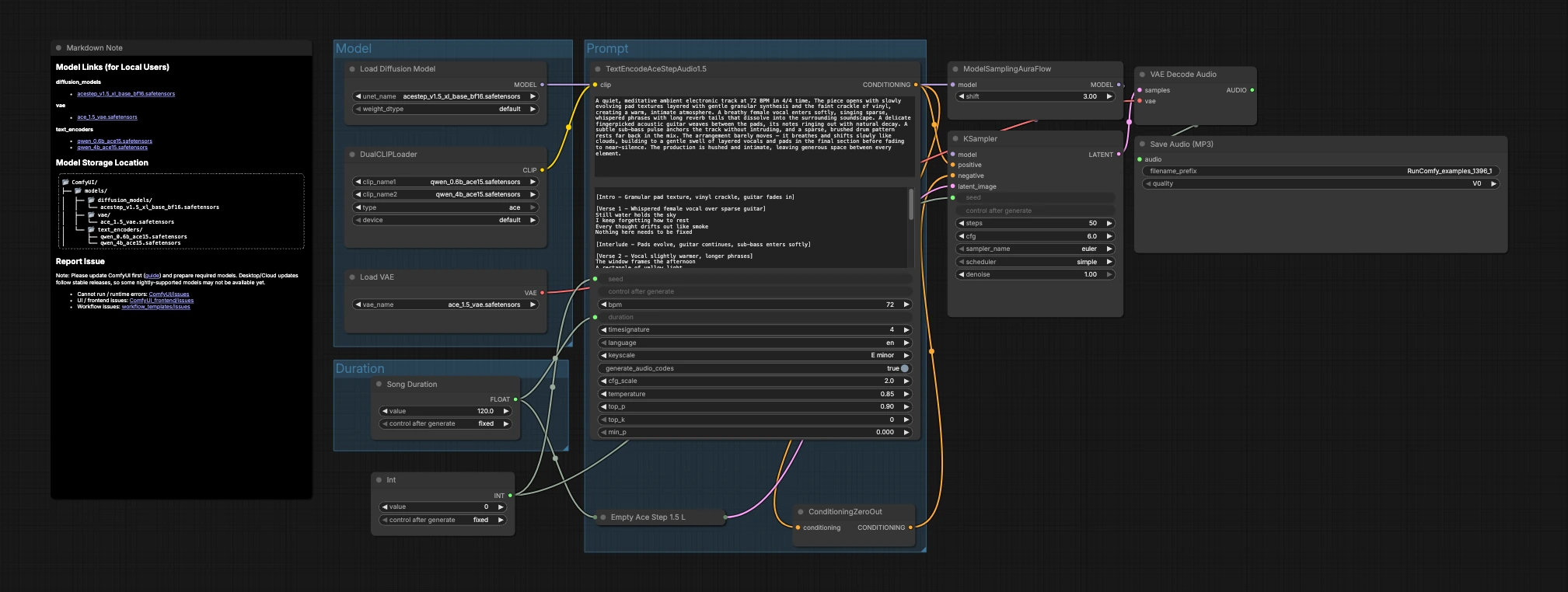
The graph is organized into three groups that flow into generation and export: Model, Duration, and Prompt. You load the models, pick a target length, describe the music, then the sampler creates latents that the VAE decodes to audio.
Model#
This group loads the core assets. UNETLoader (#104) selects the ACE-Step 1.5 XL Base diffusion checkpoint, and VAELoader (#106) loads the matching ACE Step 1.5 VAE so decode quality aligns with training. DualCLIPLoader (#105) brings in both Qwen ACE15 encoders; the workflow uses them jointly so rich text prompts translate into strong musical conditioning.
Duration#
Here you decide how long the piece should be. Song Duration (#99) sets the target length in seconds and feeds it forward so the latent canvas and text conditioning agree. PrimitiveInt (#109) provides a seed, letting you lock exact results for reproducibility or vary it to explore alternate takes.
Prompt#
This is where language becomes music. Write your description in TextEncodeAceStepAudio1.5 (#94), including helpful musical metadata such as tempo (BPM), meter, key, instrumentation, arrangement, vocal presence, and mix notes. The node emits the positive conditioning; ConditioningZeroOut (#47) supplies a neutral negative path so generation stays focused on your description. EmptyAceStep1.5LatentAudio (#98) initializes a latent audio timeline for the chosen duration. ModelSamplingAuraFlow (#78) adapts the base model to a scheduler suited for ACE-Step audio. KSampler (#3) combines model, conditioning, latent, and seed to generate the music latent. VAEDecodeAudio (#18) converts the latent back to waveform, and SaveAudioMP3 (#107) writes the result to an MP3 file ready to share.
Key nodes in Comfyui ACE-Step 1.5XL Base text to music workflow#
TextEncodeAceStepAudio1.5 (#94)#
Turns your prompt into conditioning that the diffusion model can follow. It accepts musical details like tempo, time signature, key, arrangement notes, instrumentation, language, and optional vocal intent. For best results, be concrete about genre, feel, and mix placement, and keep structural cues concise so the model can maintain coherence over the requested duration.
EmptyAceStep1.5LatentAudio (#98)#
Creates the latent audio “canvas” for the piece. Match its seconds to what you set in Song Duration (#99) and referenced in the text encoder to avoid unintended truncation or padding. Longer canvases invite more gradual development, while shorter ones suit loops, cues, and stingers.
ModelSamplingAuraFlow (#78)#
Configures the sampling strategy tailored to ACE-Step audio. Use it as provided for stable results; adjust only if you have a specific scheduler preference, since it interacts with step count and guidance in KSampler (#3).
KSampler (#3)#
Performs the denoising that turns conditioning into audio latents. The key levers here are sampler type, step count, and seed. Increase steps to refine detail at the cost of time, and keep the seed fixed when comparing prompts so you can attribute changes to the text rather than randomness.
DualCLIPLoader (#105)#
Loads both Qwen ACE15 text encoders. If you have access to both, start with the 4B encoder active for richer language understanding; switch to the 0.6B variant when you need faster iterations or lower memory usage. Keep the encoder choice consistent across takes when evaluating subtle prompt edits.
ConditioningZeroOut (#47)#
Provides a neutral negative path. If you want to suppress specific artifacts or steer away from spoken content, you can replace this with an actual negative prompt node; otherwise the zeroed negative keeps the ACE-Step 1.5XL Base text to music generation focused on your positive description.
Optional extras#
- Start prompts with a compact recipe: genre + mood + tempo + meter + key + instrumentation + arrangement + mix notes.
- Use explicit musical verbs and roles (lead, pad, bass, percussion) so the model allocates space in the mix and avoids speech‑like content.
- Fix the seed when A/B testing prompts, then vary the seed to explore alternate performances of a winning idea.
- Keep duration aligned across
Song Duration(#99),TextEncodeAceStepAudio1.5(#94), andEmptyAceStep1.5LatentAudio(#98) for predictable phrasing. - Choose Qwen 4B for richer prompt comprehension or 0.6B for speed; keep your choice constant while you iterate to make comparisons fair.
Acknowledgements#
This workflow implements and builds upon the following works and resources. We gratefully acknowledge Comfy.org for the audio_ace_step1_5_xl_base workflow, Comfy-Org for the ACE Step 1.5 XL Base diffusion model and ACE Step 1.5 VAE, and the Qwen team for the 0.6B and 4B ACE15 text encoders for their contributions and maintenance. For authoritative details, please refer to the original documentation and repositories linked below.
Resources#
- Comfy.org/Workflow source page
- Docs / Release Notes: audio_ace_step1_5_xl_base workflow page
- Comfy-Org/ACE Step 1.5 XL Base diffusion model
- Hugging Face: acestep_v1.5_xl_base_bf16.safetensors
- Comfy-Org/ACE Step 1.5 VAE
- Hugging Face: ace_1.5_vae.safetensors
- Comfy-Org/Qwen 0.6B ACE15 text encoder
- Hugging Face: qwen_0.6b_ace15.safetensors
- Comfy-Org/Qwen 4B ACE15 text encoder
- Hugging Face: qwen_4b_ace15.safetensors
Note: Use of the referenced models, datasets, and code is subject to the respective licenses and terms provided by their authors and maintainers.