

SCAIL 2 Multi-role Reference Action Transfer: multi‑character, identity‑preserving motion transfer for ComfyUI#
This workflow delivers SCAIL 2 Multi-role Reference Action Transfer: it takes a driving video and transfers the actions to one or more reference characters while preserving each subject’s visual identity. It supports motion transfer and full character replacement, handles multi-image identity references, and produces coherent, multi-role scenes suitable for storytelling, dialogue, and group performances.
Built around Wan 2.1 video generation with SCAIL_2 embeddings, CLIP Vision guidance, and segmentation-driven role masks, the pipeline focuses on consistent identity, natural motion, and controllable interactions across an entire clip.
Key models in Comfyui SCAIL 2 Multi-role Reference Action Transfer workflow#
- Wan 2.1 video backbone via ComfyUI-WanVideoWrapper. The generator synthesizes video frames from SCAIL_2 image embeddings, visual conditioning, and prompt text while handling long contexts and efficient memory use. GitHub
- CLIP Vision encoder. Provides robust visual embeddings from the primary reference image or collage to steer identity and appearance during generation. See the CLIP paper for background on image–text representation learning. arXiv
- mT5 family text encoder. Encodes the positive and negative prompts used to bias content toward the desired subjects and actions across frames. arXiv
- Segment Anything–style segmentation for video object tracking. The workflow uses a SAM-family checkpoint to detect and track subjects and produce per-role masks that drive multi-character action transfer. Background on SAM segmentation: GitHub
- LoRA adapters. Optional adapters specialize the generator for identity preservation and action fidelity without retraining the full model. Background on LoRA tuning: arXiv
- FeiHou Toolbox utilities. Collage and mask utilities facilitate multi-image identity references and colored, role-aware masks for SCAIL 2. GitHub
- KJNodes image utilities. High-quality resizing aligns inputs and masks to video dimensions for stable sampling. GitHub
How to use Comfyui SCAIL 2 Multi-role Reference Action Transfer workflow#
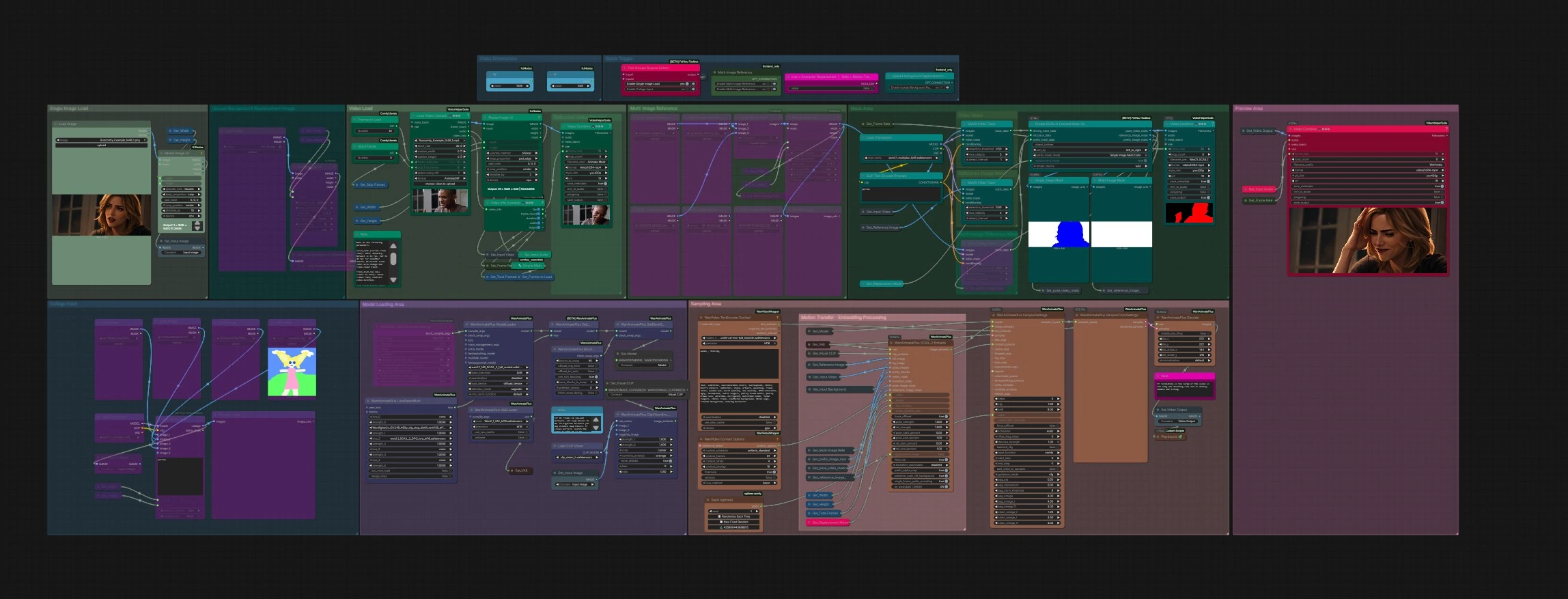
The workflow has four main stages: load assets and the generator, build multi-role references and masks, compile SCAIL_2 embeddings, then sample and export the final video. Groups run top-to-bottom, with helpful previews at each step.
Model Loading Area#
This area prepares the Wan 2.1 backbone and its VAE. Use WanAnimatePlus ModelLoader (#37) to choose the base model and precision, and WanAnimatePlus VAELoader (#71) for the matching VAE. If you plan to bias identity or motion further, add adapters with WanAnimatePlus LoraSelectMulti (#66), then apply them to the model via WanAnimatePlus SetLoRAs (#69). Optional WanVideoTorchCompileSettings (#72) can lower latency by compiling attention blocks.
Single Image Load#
Provide a primary identity image with LoadImage in the Single Image Load group. This picture anchors the look of your main subject. If you prefer to build a collage of multiple identities or roles, switch in the Quick Toggle group to route from the Collage Input instead of the single image.
Collage Input#
Use AutoRefCollage (#370) to assemble up to several reference images into one layout, automatically detecting people and placing crops into a clean canvas. The collage acts as a multi-role identity board: each subject contributes appearance cues for the SCAIL 2 Multi-role Reference Action Transfer stage. A preview node shows the assembled collage so you can check framing before moving on.
Multi-Image Reference#
Here you can also load three or more curated portraits with LoadImage and pack them using ImageBatchMulti (#331). ImageResizeKJv2 aligns their size to match the intended video resolution. This path is helpful when you want tighter control over which identities and angles inform the appearance model.
Video Load#
VHS_LoadVideo (#297) brings in the driving video and audio. You can force a target frame rate for smoother motion, cap the total frames to limit duration, skip an intro segment, or sample every Nth frame for faster iteration. A separate “Reference Video Preview” sub-pipeline combines and plays back the loaded frames so you can confirm the clip looks correct before tracking.
Mask Area#
The workflow detects and tracks subjects to create the role-aware masks that power SCAIL 2 Multi-role Reference Action Transfer. Three SAM3_VideoTrack nodes (#315, #316, #306) track objects in the driving video, reference imagery, and optional prefix frames. SCAIL2ColoredMaskV2 (#354) fuses those tracks into three outputs: a pose video mask, a colored reference image mask, and a prefix mask for warm starts. Previews for single-role and multi-role masks help you verify that each color corresponds to the correct character before sampling.
Motion Transfer - Embedding Processing#
WanAnimatePlus SCAIL_2 Embeds (#342) turns your inputs into SCAIL_2 image embeddings used by the generator. It combines VAE features, CLIP Vision embeddings, your reference image or collage, the background replacement (optional), the tracked pose frames, and the colored masks. You can run in two modes: motion transfer (use the reference appearance with the driving motion) or character replacement (replace the person in the input video with your reference). Options also exist to preserve the main reference background and to crop or tile prefix frames for long or high-resolution runs.
Sampling Area#
WanVideoTextEncodeCached encodes prompts, and WanVideoContextOptions (#290) controls temporal windows across frames. WanAnimatePlus SamplerSettings (#332) collects the model, SCAIL_2 image embeds, and text embeds along with sampling hyperparameters and schedule; WanAnimatePlus SamplerFromSettings (#311) performs generation. WanAnimatePlus Decode (#267) turns latents into frames; you can enable VAE tiling here if you face memory limits. Video is finalized via VHS_VideoCombine and exported from the Preview Area; a companion combine can export a mask-only clip for quick debugging.
Quick Toggle and Video Dimensions#
The “true = Character Replacement | false = Motion Transfer” switch (#341) instantly changes how roles are handled downstream. Width and height constants feed all resize and mask nodes to keep shapes aligned. A FastGroupsBypassSwitch (#351) lets you swap between a single image and a collage input without rewiring.
Key nodes in Comfyui SCAIL 2 Multi-role Reference Action Transfer workflow#
SCAIL2ColoredMaskV2 (#354)#
Generates role-aware masks by merging object tracks from the driving video, reference imagery, and optional prefix frames. Use object_indices to pick which tracked IDs become roles and the prefix_mask_mode to specify a single-image, multi-color layout when you drive several characters at once. Keep replacement_mode consistent with the global toggle so the mask semantics match the embedding stage.
WanAnimatePlus SCAIL_2 Embeds (#342)#
Fuses VAE, CLIP Vision, multi-image references, pose frames, and masks into SCAIL_2 embeddings for the generator. Increase ref_strength when identity drifts; raise pose_strength when motion fidelity is low. For scenes that should keep a reference background, enable background preservation; when starting from a single prefix frame, enable single‑frame prefix encoding.
SAM3_VideoTrack (#315, #316, #306)#
Detects and tracks subjects across frames to feed the mask generator. If you under-detect characters, lower the detection_threshold or allow more max_objects; if tracking is noisy, increase the detect_interval to reduce re-detection jitter. Always review the colored-mask preview to ensure each role remains stable over time.
VHS_LoadVideo (#297)#
Controls the driving clip. force_rate sets the working FPS, frame_load_cap limits duration, skip_first_frames trims intros, and select_every_nth lets you sub-sample frames for faster tests. These controls directly affect context windows and memory, so adjust them before sampling.
WanAnimatePlus SamplerSettings (#332)#
Holds the core generation knobs. steps, scheduler, and cfg steer detail, smoothness, and adherence to prompts; denoise_strength governs how much the SCAIL_2 guidance can reshape frames. Use the seed input for reproducibility when refining multi-character scenes.
WanAnimatePlus BlockSwap (#67)#
Optional memory-saver that swaps compute blocks during sampling. On tight VRAM budgets or long frame ranges, increase swapping to prevent out‑of‑memory errors; on high‑VRAM GPUs, reduce or disable it for speed.
WanAnimatePlus Decode (#267)#
Decodes latents to RGB frames. If your resolution or clip length is high and decode OOMs, enable tiled VAE decoding and set appropriate tile sizes and strides so tiles overlap cleanly.
Optional extras#
- For multi-character clips, give each role at least one clean, front-facing portrait and keep lighting consistent across the collage.
- Start with motion transfer mode to validate masks and motion quality, then switch to character replacement if you need to fully swap the performer.
- Use the mask-only video preview to confirm role assignments and color stability before a long render.
- Keep all inputs aligned to the same width and height; use the provided resize nodes rather than external tools to avoid subtle shape mismatches.
- If results look over-stylized or off-identity, lower prompt strength and raise reference emphasis in the embedding stage; adjust LoRA mix if you enabled adapters.
- Long clips benefit from larger context windows in
WanVideoContextOptions; balance this with memory by enabling VAE tiling and, if needed, modest block swapping.
This SCAIL 2 Multi-role Reference Action Transfer workflow is designed to make multi-role motion transfer repeatable and predictable: prepare clear references, verify masks, then sample with steady settings for identity-faithful, natural motion across characters.
Acknowledgements#
This workflow implements and builds upon the following works and resources. We gratefully acknowledge SCAIL 2 for SCAIL 2 Multi-role Reference Action Transfer Workflow Source for their contributions and maintenance. For authoritative details, please refer to the original documentation and repositories linked below.
Resources#
- SCAIL 2/SCAIL 2 Multi-role Reference Action Transfer Workflow Source
- Docs / Release Notes: SCAIL 2 Multi-role Reference Action Transfer Workflow Source
Note: Use of the referenced models, datasets, and code is subject to the respective licenses and terms provided by their authors and maintainers.