LTX 2.3 MSR multi‑subject identity video workflow for ComfyUI#
This workflow turns several character or object references into a single, consistent, story‑ready video using LTX 2.3 MSR. It preserves identity across multiple subjects while leveraging the LTX‑2.3 audio‑visual model for motion, cinematography, and synchronized sound. Creators can combine up to four subject images plus a background, then guide the scene with prompts for dialogue, group shots, and dynamic lifestyle sequences.
Built for storytellers, advertisers, and social creators, the graph assembles references into an MSR guide, injects identity via an image‑conditioned LoRA pass, and samples an audio‑visual latent that decodes to frames and optional audio. LTX 2.3 MSR is the anchor for identity fidelity; the rest of the pipeline handles composition, motion guidance, and export.
Key models in Comfyui LTX 2.3 MSR workflow#
- LTX‑2.3 22B distilled (1.1) by Lightricks. The base audio‑visual foundation model that generates motion, visuals, and synchronized audio. Weights are published on Hugging Face under LTX‑2.3. Lightricks/LTX-2.3
- Gemma 3 12B Instruct text encoder (fp4 mixed). Used for prompt encoding in the LTX stack to translate text into conditioning signals for generation. Packaged with the LTX assets for ComfyUI. Comfy-Org/ltx-2
- LTX 2.3 MSR LoRA (Licon MSR V1). A Multi‑Subject Reference LoRA specialized for LTX‑2.3 that locks multiple identities at once, stabilizing faces, clothing, and object features across the whole clip. liconstudio/ComfyUI-Licon-MSR
- LTX‑2 Audio VAE. Provides the latent audio space and decoding used when generating or attaching synchronized sound with LTX‑2.x assets. Comfy-Org/ltx-2
How to use Comfyui LTX 2.3 MSR workflow#
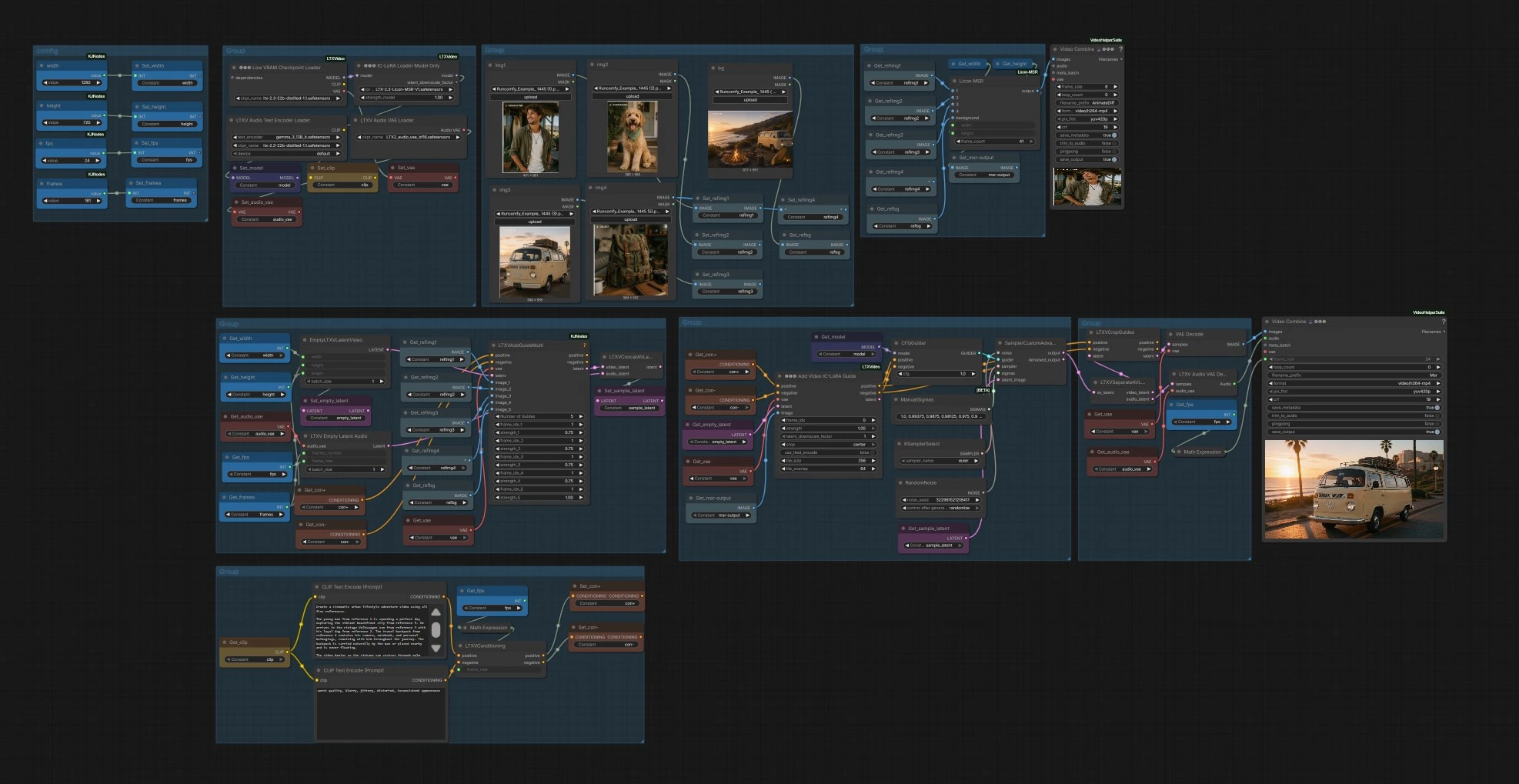
This graph has three phases: build an MSR guide from references, condition the video latent with multi‑image guidance and prompts, then sample and decode to frames and audio.
- Comfig
- Set your canvas
width,height, totalframes, andfpsin the configuration nodes. These feed the empty video and audio latents and the export stage, keeping timing consistent from conditioning through final render. - Choose aspect and duration that fit your story. Higher frame counts increase motion continuity but also VRAM and runtime.
- Set your canvas
- Reference loaders
- Load up to four subject images (
img1,img2,img3,img4) and a background (bg). These map torefimg1..4andrefbggetters so you can quickly swap sources without rewiring. - Use clear, well‑lit images with the subject centered and unobstructed. For clothing or props you want preserved, ensure they are visible in at least one reference.
- Load up to four subject images (
- MSR composer
LiconMSR(#28) assembles the subject references and background into a single MSR image output. This becomes the visual identity blueprint for LTX 2.3 MSR, aligning facial features, attire, and object details before sampling.- A small
VHS_VideoCombine(#66) creates a quick low‑FPS preview from the MSR output so you can sanity‑check composition before running the full render.
- Multi‑guide conditioning
LTXVAddGuideMulti(#108) ingests up to five images (your four subjects plus background) along with the positive and negative prompts to produce an initial video latent with spatial and appearance guidance.- Positive prompt text describes scene, camera, and vibe; negative text avoids artifacts and off‑style looks.
LTXVConditioning(#7) attaches yourfpsso motion timing matches the exporter.
- LoRA identity control
- The LTX 2.3 MSR LoRA is loaded into the model, and
LTXAddVideoICLoRAGuide(#9) applies an image‑conditioned LoRA pass using the MSR image. This reinforces identity across frames without freezing motion. - Use this stage to balance identity strength with freedom for natural movement and expressions.
- The LTX 2.3 MSR LoRA is loaded into the model, and
- Sampling
- The sampler stack uses
CFGGuider(#37),KSamplerSelect(#13),ManualSigmas(#27), andRandomNoise(#15) feedingSamplerCustomAdvanced(#16). The result is a joint audio‑visual latent that reflects your references, prompts, and MSR constraints. - If you need new variations, change the noise seed or sampler while keeping references and MSR settings fixed for consistency.
- The sampler stack uses
- Crop guidance and decode
LTXVCropGuides(#17) adjusts the video latent to your target frame size, avoiding unwanted trims. The video and audio latents are then split byLTXVSeparateAVLatent(#24).VAEDecode(#38) converts video latents to frames;LTXVAudioVAEDecode(#25) reconstructs audio.
- Export
VHS_VideoCombine(#96) assembles frames and optional audio into H.264 MP4 at your chosenfps, using yourfilename_prefix. This is the final video produced by the LTX 2.3 MSR workflow.
Key nodes in Comfyui LTX 2.3 MSR workflow#
LiconMSR (#28)#
Assembles 1–4 subject references plus a background into a single MSR guide. Set width and height to match your target canvas so the composed guide and final frames align. If you see identity drift, revisit the input references or increase how prominently the key subjects appear in their source images.
LTXVAddGuideMulti (#108)#
Combines multiple guidance images with your prompts to form the initial video latent. Use it to prioritize which references dominate the scene by slightly favoring hero subjects. Keep background guidance active for stable environments and fewer scene jumps.
LTXAddVideoICLoRAGuide (#9)#
Injects the image‑conditioned MSR LoRA using the composed MSR image. Increase strength to tighten identity preservation for faces, attire, or props; reduce it if motion feels too constrained. Crop choices should reflect where subjects appear most often in the frame.
CFGGuider (#37)#
Controls how strongly the sampler follows your prompts. Higher cfg improves adherence to textual intent but can reduce variety; moderate values keep a natural look while honoring the MSR guidance.
SamplerCustomAdvanced (#16)#
Runs the denoising process using your chosen sampler, sigmas, and noise seed. Euler or DPM‑style samplers work well with LTX‑2.3; explore seeds for alternates while keeping the same references to retain identity.
VHS_VideoCombine (#96)#
Builds the final MP4 with optional audio. Match frame_rate to the conditioning stage and set a clear filename_prefix for versioning. Use this node’s preview to review pacing and identity consistency before sharing.
Optional extras#
- Prepare references with neutral, front‑facing angles and minimal occlusion; add a second angle for complex hairstyles or accessories.
- Keep wardrobe and prop references large enough that textures and logos are visible; avoid heavy motion blur in source images.
- When identity is perfect but motion is stiff, slightly lower the LoRA guide strength in the LTX 2.3 MSR stage and add prompt cues for movement.
- For longer stories, increase
framesand keepfpsconstant to preserve timing; for snappier edits, raisefpsand shortenframes. - Use a background reference similar in lighting and perspective to your intended scene for fewer inconsistencies.
Acknowledgements#
This workflow implements and builds upon the following works and resources. We gratefully acknowledge the LTX project for the LTX 2.3 MSR (Multi-Subject Reference) workflow for their contributions and maintenance. For authoritative details, please refer to the original documentation and repositories linked below.
Resources#
- LTX/LTX 2.3 MSR Workflow Source
- Docs / Release Notes: RunningHub post
Note: Use of the referenced models, datasets, and code is subject to the respective licenses and terms provided by their authors and maintainers.