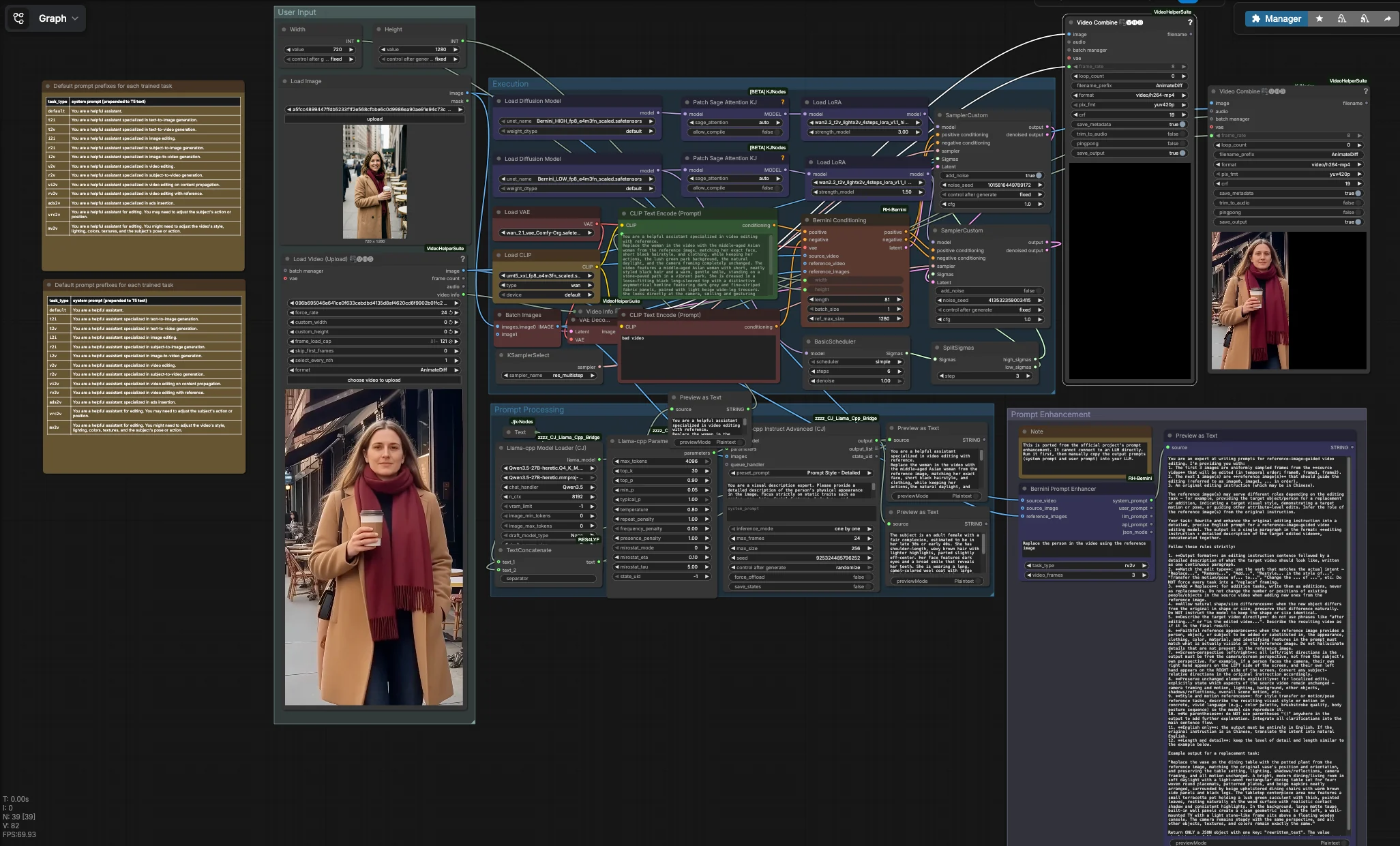
Bernini multimodal video generation and editing workflow#
This Bernini multimodal video generation and editing workflow is a turnkey ComfyUI pipeline for identity‑aware, reference‑guided video editing and video‑to‑video transformation. It combines a source video, one or more reference images, and a focused prompt to preserve motion and camera behavior while replacing or restyling the subject. The workflow pairs Bernini’s high and low diffusion backbones with Wan‑style text encoding, a Bernini‑compatible VAE, LightX2V LoRAs, and Bernini‑specific conditioning so results look consistent frame to frame.
Built for creators and researchers evaluating Bernini inside ComfyUI, the workflow excels at character replacement, motion‑preserving edits, mimicry, and camera‑aware short‑form generation. It exports an edited MP4 plus an optional side‑by‑side comparison, making it easy to review the impact of your prompt and reference set. Throughout this README the term Bernini multimodal video generation and editing workflow refers to this end‑to‑end graph.
Key models in Comfyui Bernini multimodal video generation and editing workflow#
- ByteDance Bernini diffusion model family (HIGH and LOW backbones). Provides the core denoising networks used in a two‑stage schedule: the HIGH model handles structure under stronger noise while the LOW model refines details and temporal consistency. See the model hub for reference weights and notes: ByteDance/Bernini.
- Wan text encoder (umT5‑XXL). A Wan‑style T5 encoder that turns your instruction into conditioning for Bernini; exposed in ComfyUI through a CLIP‑compatible interface. Assets suitable for ComfyUI are available here: Kijai/WanVideo_comfy_fp8_scaled.
- Wan 2.1 VAE. Performs latent decoding to turn denoised latents into video frames with color fidelity that matches Wan/Bernini training. A ComfyUI‑ready VAE is included in the same asset pack: Kijai/WanVideo_comfy_fp8_scaled.
- LightX2V LoRA pair (high_noise and low_noise). Lightweight adapters that steer Bernini toward stable motion while preserving the reference identity across frames. The provided FP8 LoRA weights align with the two‑stage sampling used in this workflow and are packaged with the Bernini assets above: Kijai/WanVideo_comfy_fp8_scaled.
How to use Comfyui Bernini multimodal video generation and editing workflow#
This workflow has four coordinated groups. You provide a source video and one or more reference images, shape the instruction text, then the Execution group runs a two‑phase Bernini pass that decodes to frames and assembles your output video. A parallel utility can generate scaffolded system and user prompts for LLM‑assisted prompt writing.
User Input#
Load your source video with VHS_LoadVideo (#90). The node reads the clip and exposes its metadata so the final render inherits the original frame rate, which helps preserve motion feel. Add one or more identity references with LoadImage (#31); frontal, well‑lit faces with neutral expressions work best. Set target size using Width (#109) and Height (#110), ideally matching the source aspect ratio to avoid stretching. A default negative prompt is encoded by CLIPTextEncode (#4) to suppress common artifacts in low‑quality video; you can refine it if needed.
Prompt Processing#
If you want the instruction to precisely match the reference identity, the graph can summarize static traits from your reference images using a local LLM. llama_cpp_model_loader (#93) and llama_cpp_instruct_adv (#92) analyze images batched by BatchImagesNode (#74) and return a concise description of immutable attributes such as hair, age, and clothing. That description is concatenated with your task directive from JjkText (#104) via TextConcatenate (#102). The result flows into CLIPTextEncode (#3), which becomes the positive conditioning for Bernini. Preview nodes show the composed text so you can iterate quickly before running the heavy stages.
Prompt Enhancement#
BerniniPromptEnhancer (#60) generates structured “system” and “user” prompts tailored to the selected task type and inputs. Run it to obtain stronger instructions that you can paste into your LLM for richer prompt expansion; by design it is not wired into the main graph. This utility comes from the Bernini custom node pack: ComfyUI‑RH‑Bernini. Treat it as a prewriting tool to standardize language that works well with Bernini’s conditioning.
Execution#
The core path starts by loading Bernini’s HIGH and LOW UNets and attaching LightX2V LoRAs for each stage. BerniniConditioning (#34) fuses your positive and negative encodings, VAE, source video frames, and reference images to build Bernini‑specific conditioning and an initial latent aligned to your resolution and frame count. A BasicScheduler (#18) creates the denoising schedule, then SplitSigmas (#17) divides it into HIGH and LOW ranges. The HIGH sampler SamplerCustom (#19) establishes structure and identity under stronger noise, passing its latent to the LOW sampler SamplerCustom (#15) for detail and temporal polish. KSamplerSelect (#27) chooses the sampler algorithm, VAEDecode (#16) turns the final latent into frames, and VHS_VideoCombine (#87) renders an MP4 that inherits the source frame rate. In parallel, ImageConcanate (#97) and a second VHS_VideoCombine (#96) produce a side‑by‑side comparison for quick quality checks. Video I/O and assembly are provided by the Video Helper Suite: ComfyUI‑VideoHelperSuite.
Key nodes in Comfyui Bernini multimodal video generation and editing workflow#
BerniniConditioning (#34) Builds Bernini‑native conditioning by combining your text encodings, VAE, source video, and reference imagery. It also prepares the starting latent volume and handles spatial and temporal sizing. Tune width and height to match your target resolution and use length to control the number of frames generated. If the reference subject is small in the image, increase ref_max_size so the model better perceives identity details. This node is part of the Bernini custom pack: ComfyUI‑RH‑Bernini.
LoraLoaderModelOnly (#11) Applies the LightX2V high_noise LoRA to the HIGH backbone. Raising its strength_model increases adherence to the reference at the structural stage, useful when the subject’s silhouette or coarse features do not match the source video. Lower it if the edit becomes too rigid or suppresses natural motion. Use in tandem with the LOW‑stage LoRA to balance fidelity and fluidity.
LoraLoaderModelOnly (#29) Applies the LightX2V low_noise LoRA to the LOW backbone. This LoRA refines textures like hair, skin, and clothing while keeping the motion set by the HIGH stage. If identity details drift between frames, increase strength slightly; if textures oversharpen or look overfit, reduce it. Together with the HIGH‑stage LoRA it forms a complementary pair.
SplitSigmas (#17) Divides the denoising schedule into HIGH and LOW ranges. Moving the split earlier yields gentler edits that keep more of the original video, while moving it later grants the HIGH stage more influence for stronger replacements. Adjust the split when you change prompts or LoRA strengths so both stages remain balanced. This control is especially helpful for camera‑locked, motion‑preserving edits.
KSamplerSelect (#27) Selects the sampler algorithm used by both denoising stages. Some samplers favor stability and temporal smoothness while others emphasize detail or speed. If you see flicker, try a sampler known for consistency; if you need extra crispness, try an algorithm that injects more variance. Keep the same choice for both stages to maintain predictable behavior.
VHS_VideoCombine (#87) Encodes decoded frames into a final MP4 while inheriting the frame rate reported by VHS_VideoInfo so playback speed matches the source clip. Use filename controls to organize runs and enable metadata saving if you plan to audit settings. A second instance (#96) outputs a side‑by‑side render for rapid visual comparison. Provided by ComfyUI‑VideoHelperSuite.
Optional extras#
- For identity‑critical tasks, supply two or three high‑quality reference images showing consistent hair, lighting, and expression. Use the batch input to feed them together.
- Keep the target aspect ratio close to the source video. Large mismatches can stretch faces and destabilize motion.
- If the background or camera drifts, strengthen language in your instruction that locks camera position and scene, and reinforce with a concise negative prompt.
- Use the side‑by‑side export when tuning LoRA strengths or the sigma split. It shortens iteration time by making differences obvious.
- For faster trials, limit the number of frames you load, then scale up once you are happy with identity match and motion quality.
This Bernini multimodal video generation and editing workflow is designed to be edited safely: start with the defaults, iterate on the instruction and references, then fine‑tune the LoRA strengths and sigma split for your subject and scene.
Acknowledgements#
This workflow implements and builds upon the following works and resources. We gratefully acknowledge ByteDance for Bernini, RH-RunningHub for ComfyUI-RH-Bernini, and Kosinkadink for ComfyUI-VideoHelperSuite for their contributions and maintenance. For authoritative details, please refer to the original documentation and repositories linked below.
Resources#
- RunningHub/Bernini Multimodal Video Generation and Editing (ComfyUI Workflow)
- Docs / Release Notes: RunningHub workflow reference
- RunComfy/Cloud Save workflow
- Docs / Release Notes: RunComfy Cloud Save workflow
- ByteDance/Bernini-R
- GitHub: bytedance/Bernini
- Hugging Face: ByteDance/Bernini-R
- arXiv: arXiv:2605.22344
- Docs / Release Notes: ByteDance Bernini model source
- Kijai/WanVideo_comfy_fp8_scaled (Bernini assets)
- Hugging Face: Kijai/WanVideo_comfy_fp8_scaled
- Docs / Release Notes: Kijai Bernini ComfyUI fp8 model assets
- RH-RunningHub/ComfyUI-RH-Bernini
- GitHub: RH-RunningHub/ComfyUI-RH-Bernini
- Docs / Release Notes: RunComfy Bernini custom nodes
- Kosinkadink/ComfyUI-VideoHelperSuite
- GitHub: Kosinkadink/ComfyUI-VideoHelperSuite
- Docs / Release Notes: ComfyUI Video Helper Suite
Note: Use of the referenced models, datasets, and code is subject to the respective licenses and terms provided by their authors and maintainers.