SteadyDancer image-to-video pose animation workflow#
This ComfyUI workflow turns a single reference image into a coherent video, driven by the motion of a separate pose source. It is built around SteadyDancer’s image-to-video paradigm so the very first frame preserves the identity and appearance of your input image while the rest of the sequence follows the target motion. The graph reconciles pose and appearance through SteadyDancer-specific embeds and a pose pipeline, producing smooth, realistic full‑body movement with strong temporal coherence.
SteadyDancer is ideal for human animation, dance generation, and bringing characters or portraits to life. Provide one still image plus a motion clip, and the ComfyUI pipeline handles pose extraction, embedding, sampling, and decoding to deliver a ready‑to‑share video.
Want to run Steady Dancer without setting up nodes? Try our new Playground to generate videos instantly. 👉 Run Steady Dancer Online
Key models in Comfyui SteadyDancer workflow#
- SteadyDancer. Research model for identity-preserving image-to-video with a Condition‑Reconciliation Mechanism and Synergistic Pose Modulation. Used here as the core I2V method. GitHub
- Wan 2.1 I2V SteadyDancer weights. Checkpoints ported for ComfyUI that implement SteadyDancer on the Wan 2.1 stack. Hugging Face: Kijai/WanVideo_comfy (SteadyDancer) and Kijai/WanVideo_comfy_fp8_scaled (SteadyDancer)
- Wan 2.1 VAE. Video VAE used for latent encode and decode within the pipeline. Included with the WanVideo port on Hugging Face above.
- OpenCLIP CLIP ViT‑H/14. Vision encoder that extracts robust appearance embeddings from the reference image. Hugging Face
- ViTPose‑H WholeBody (ONNX). High‑quality keypoint model for body, hands, and face used to derive the driving pose sequence. GitHub
- YOLOv10 (ONNX). Detector that improves person localization before pose estimation on diverse videos. GitHub
- umT5‑XXL encoder. Optional text encoder for style or scene guidance alongside the reference image. Hugging Face
How to use Comfyui SteadyDancer workflow#
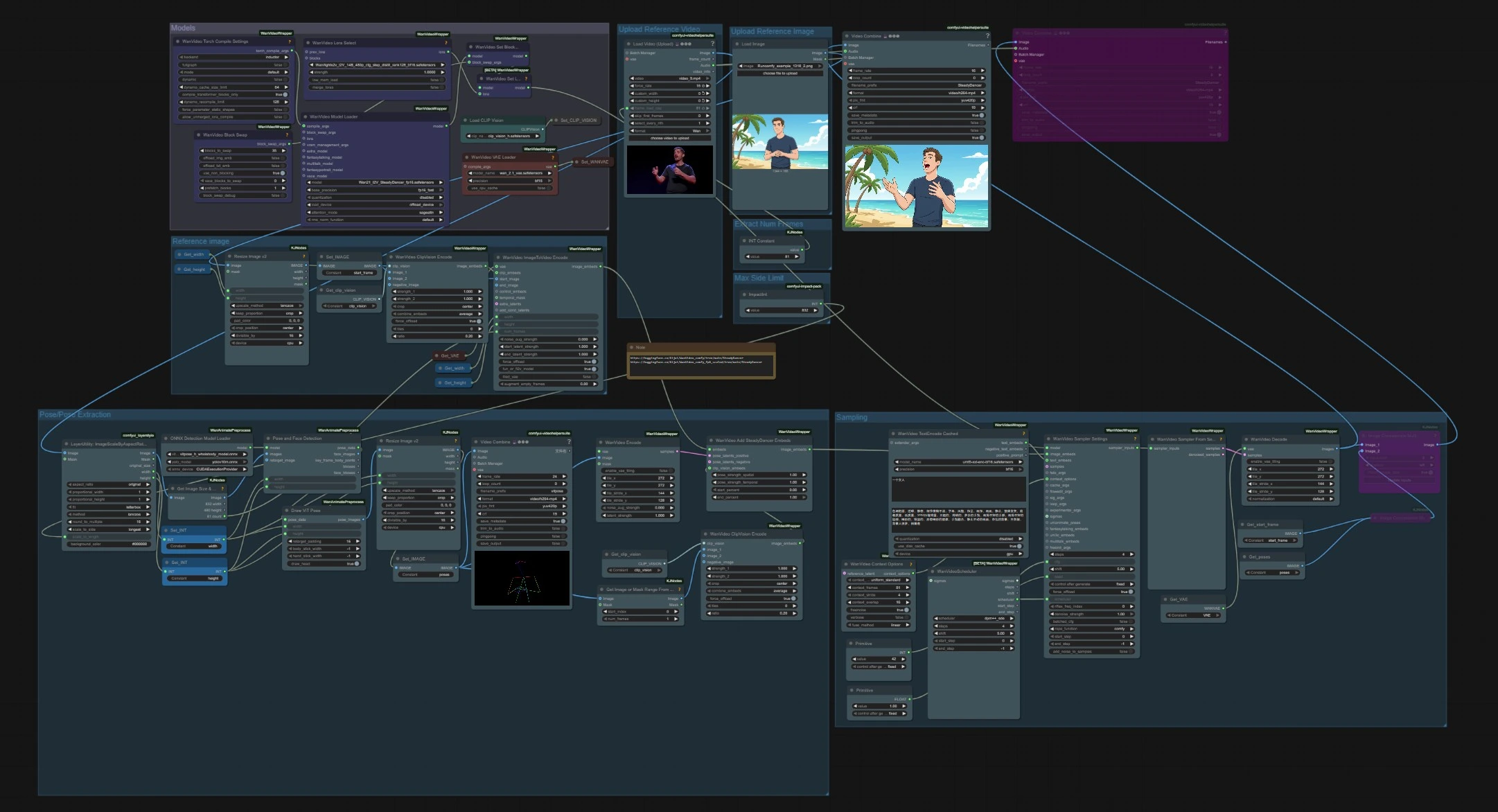
The workflow has two independent inputs that meet at sampling: a reference image for identity and a driving video for motion. Models load once up front, pose is extracted from the driving clip, and SteadyDancer embeds blend pose and appearance before generation and decoding.
Models#
This group loads the core weights used throughout the graph. WanVideoModelLoader (#22) selects the Wan 2.1 I2V SteadyDancer checkpoint and handles attention and precision settings. WanVideoVAELoader (#38) provides the video VAE, and CLIPVisionLoader (#59) prepares the CLIP ViT‑H vision backbone. A LoRA selection node and BlockSwap options are present for advanced users who want to change memory behavior or attach add‑on weights.
Upload Reference Video#
Import the motion source using VHS_LoadVideo (#75). The node reads frames and audio, letting you set a target frame rate or cap the number of frames. The clip can be any human motion such as a dance or sports move. The video stream then flows to aspect‑ratio scaling and pose extraction.
Extract Num Frames#
A simple constant controls how many frames are loaded from the driving video. This limits both pose extraction and the length of the generated SteadyDancer output. Increase it for longer sequences, or reduce it to iterate faster.
Max Side Limit#
LayerUtility: ImageScaleByAspectRatio V2 (#146) scales frames while preserving aspect ratio so they fit the model’s stride and memory budget. Set a long‑side limit appropriate for your GPU and the desired detail level. The scaled frames are used by the downstream detection nodes and as a reference for output size.
Pose/Pose Extraction#
Person detection and pose estimation run on the scaled frames. PoseAndFaceDetection (#89) uses YOLOv10 and ViTPose‑H to find people and keypoints robustly. DrawViTPose (#88) renders a clean stick‑figure representation of the motion, and ImageResizeKJv2 (#77) sizes the resulting pose images to match the generation canvas. WanVideoEncode (#72) converts the pose images into latents so SteadyDancer can modulate motion without fighting the appearance signal.
Upload Reference Image#
Load the identity image that you want SteadyDancer to animate. The image should clearly show the subject you intend to move. Use a pose and camera angle that broadly matches the driving video for the most faithful transfer. The frame is forwarded to the reference image group for embedding.
Reference image#
The still image is resized with ImageResizeKJv2 (#68) and registered as the start frame via Set_IMAGE (#96). WanVideoClipVisionEncode (#65) extracts CLIP ViT‑H embeddings that preserve identity, clothing, and coarse layout. WanVideoImageToVideoEncode (#63) packs width, height, and frame count with the start frame to prepare SteadyDancer’s I2V conditioning.
Sampling#
This is where appearance and motion meet to generate video. WanVideoAddSteadyDancerEmbeds (#71) receives image conditioning from WanVideoImageToVideoEncode and augments it with pose latents plus a CLIP‑vision reference, enabling SteadyDancer’s condition reconciliation. Context windows and overlap are set in WanVideoContextOptions (#87) for temporal consistency. Optionally, WanVideoTextEncodeCached (#92) adds umT5 text guidance for style nudges. WanVideoSamplerSettings (#119) and WanVideoSamplerFromSettings (#129) run the actual denoising steps on the Wan 2.1 model, after which WanVideoDecode (#28) converts latents back to RGB frames. Final videos are saved with VHS_VideoCombine (#141, #83).
Key nodes in Comfyui SteadyDancer workflow#
WanVideoAddSteadyDancerEmbeds (#71)#
This node is the SteadyDancer heart of the graph. It fuses the image conditioning with pose latents and CLIP‑vision cues so the first frame locks identity while motion unfolds naturally. Adjust pose_strength_spatial to control how tightly limbs follow the detected skeleton and pose_strength_temporal to regulate motion smoothness over time. Use start_percent and end_percent to limit where pose control applies within the sequence for more natural intros and outros.
PoseAndFaceDetection (#89)#
Runs YOLOv10 detection and ViTPose‑H keypoint estimation on the driving video. If poses miss small limbs or faces, increase input resolution upstream or choose footage with fewer occlusions and cleaner lighting. When multiple people are present, keep the target subject largest in frame so the detector and pose head remain stable.
VHS_LoadVideo (#75)#
Controls what portion of the motion source you use. Increase the frame cap for longer outputs or lower it to prototype rapidly. The force_rate input aligns pose spacing with the generation rate and can help reduce stutter when the original clip’s FPS is unusual.
LayerUtility: ImageScaleByAspectRatio V2 (#146)#
Keeps frames within a chosen long‑side limit while maintaining aspect ratio and bucketing to a divisible size. Match the scale here to the generation canvas so SteadyDancer does not need to upsample or crop aggressively. If you see soft results or edge artifacts, bring the long side closer to the model’s native training scale for a cleaner decode.
WanVideoSamplerSettings (#119)#
Defines the denoising plan for the Wan 2.1 sampler. The scheduler and steps set overall quality versus speed, while cfg balances adherence to the image plus prompt against diversity. seed locks reproducibility, and denoise_strength can be lowered when you want to hew even closer to the reference image’s appearance.
WanVideoModelLoader (#22)#
Loads the Wan 2.1 I2V SteadyDancer checkpoint and handles precision, attention implementation, and device placement. Leave these as configured for stability. Advanced users can attach an I2V LoRA to alter motion behavior or lighten computational cost when experimenting.
Optional extras#
- Pick a clear, well‑lit reference image. Front‑facing or slightly angled views that resemble the driving video’s camera make SteadyDancer preserve identity more reliably.
- Prefer motion clips with a single prominent subject and minimal occlusion. Busy backgrounds or fast cuts reduce pose stability.
- If hands and feet jitter, slightly increase pose temporal strength in
WanVideoAddSteadyDancerEmbedsor raise the video FPS to densify poses. - For longer scenes, process in segments with overlapping context and stitch the outputs. This keeps memory use reasonable and maintains temporal continuity.
- Use the built‑in preview mosaics to compare the generated frames against the start frame and pose sequence while you tune settings.
This SteadyDancer workflow gives you a practical, end‑to‑end path from one still image to a faithful, pose‑driven video with identity preserved from the very first frame.
Acknowledgements#
This workflow implements and builds upon the following works and resources. We gratefully acknowledge MCG-NJU for SteadyDancer for their contributions and maintenance. For authoritative details, please refer to the original documentation and repositories linked below.
Resources#
- MCG-NJU/SteadyDancer
- GitHub: MCG-NJU/SteadyDancer
- Hugging Face: MCG-NJU/SteadyDancer-14B
- arXiv: arXiv:2511.19320
Note: Use of the referenced models, datasets, and code is subject to the respective licenses and terms provided by their authors and maintainers.