MiniMax H3 Veda Acceleration: reference-to-video with audio sync and two-stage refinement#
MiniMax H3 Veda Acceleration turns a subject image, a scene image, and a natural-language brief into a coherent video with synchronized environmental audio. It blends identity-preserving reference conditioning with scene control, then refines the result through a latent upscaling stage that recovers detail while keeping motion stable.
Designed for creators who need fast turnaround with high realism, the workflow pairs Veda sparse attention with MiniMax H3 to accelerate generation without sacrificing subject fidelity. It works well for coastal portraits, landscape travel films, and casual lifestyle scenes, and it produces ready-to-share H.264 MP4s right from ComfyUI.
Key models in Comfyui MiniMax H3 Veda Acceleration workflow#
- MiniMax H3 Singularity UNet. The diffusion backbone that powers reference-to-video, trained for ref-to-video alignment and efficient convergence. Model card
- Veda R2VA predictor. A sparse-attention predictor that allocates full attention only where needed to bind references and speed up inference. Repository and preview weights
- MiniMax H3 latent upscaler 3D Conv v1. A temporal-aware latent upscaler used in the refinement stage to increase resolution while preserving motion continuity. Model pack
- MiniMax H3 video VAE and audio VAE. Codec models that encode and decode video and sound latents so images and audio stay in sync. Model bundle
- Qwen3VL-based text encoder packaged for MiniMax H3. Encodes your prompt into conditioning that guides both visuals and ambient sound. Model bundle
How to use Comfyui MiniMax H3 Veda Acceleration workflow#
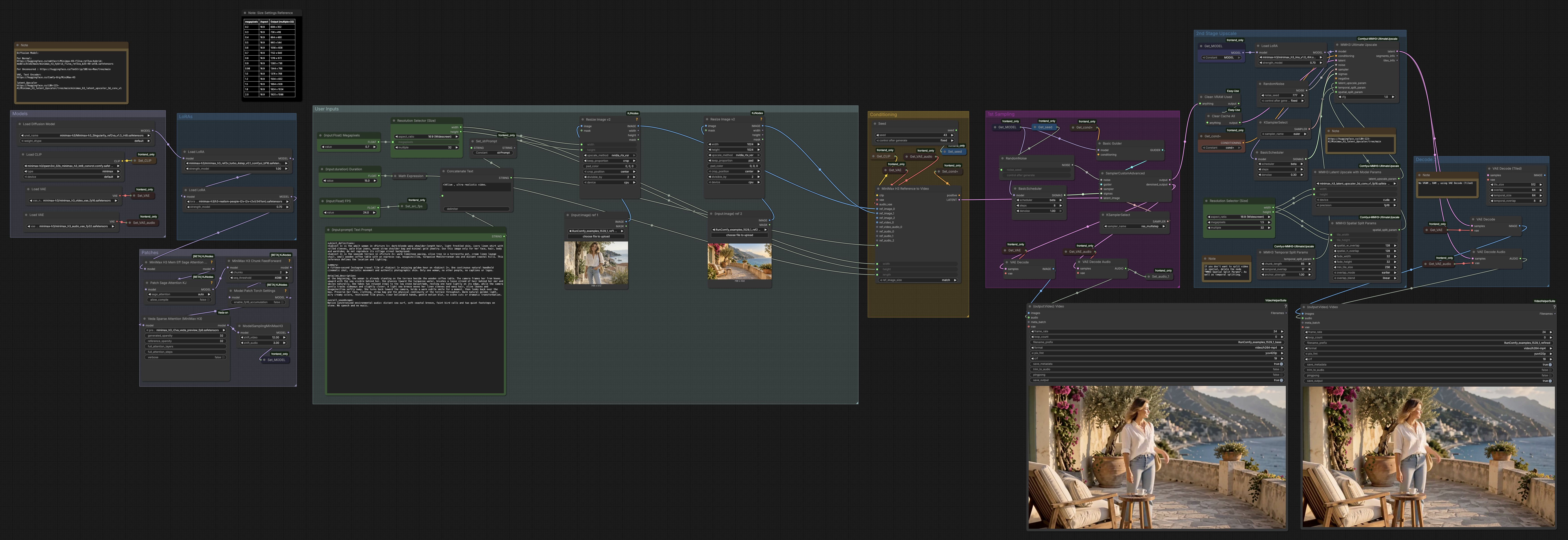
This workflow runs in two passes. The first pass creates a base clip from your references and prompt. The second pass uses latent upscaling with temporal and spatial tiling to sharpen detail and stabilize motion, then muxes decoded frames with generated audio.
User Inputs#
Use the Text Prompt block to describe the scene, motion, and sound. The included template separates subject definitions, a short summary, a detailed shot description, and an overall soundscape so MiniMax H3 can balance identity, setting, and audio. Load two images: one for the subject and one for the scene. Set Megapixels to pick a base size, Duration to target run time, and FPS for playback; the graph aligns frame count to internal segmenting so temporal seams are minimized. Keep a fixed seed for reproducibility or change it for variations.
Models#
The graph loads the MiniMax H3 video and audio VAEs, the Qwen3VL-based text encoder, and the MiniMax H3 Singularity diffusion model. These provide the codec for visuals and sound, the language interface for your prompt, and the ref-to-video backbone. You do not need to manage devices or dtypes; the graph handles them for you. Model handles are also stored so they can be reused across stages.
LoRAs#
Several model-only LoRA adapters can be enabled to speed convergence or bias style. A turbo ref-to-video LoRA shortens the first pass while keeping reference adherence, and an optional realism adapter emphasizes natural skin tones and lens behavior. A motion-style adapter can add subtle camera stability and surface micro-detail. Adjusting LoRA strengths lets you balance speed, identity, and cinematic texture.
Patches#
Veda sparse attention is injected ahead of sampling to allocate compute where references matter most, and a memory-efficient attention patch keeps VRAM steady on longer clips. A chunked feed-forward patch trims peak memory during inference, and a sigma-shift utility balances audio and video schedules so both converge together. These patches collectively deliver the Veda Acceleration behavior: faster sampling with strong subject and scene binding.
Conditioning#
MiniMaxH3ReferenceToVideo (#6359) fuses your subject and scene images with the prompt to build positive conditioning and an initialized latent clip. The subject image carries identity and wardrobe, while the scene image anchors environment, lighting, and palette. Prompt fields refine motion, framing, and the ambient audio bed so the decoded soundtrack matches the visuals. Conditioning is cached for reuse in both stages.
1st Sampling#
A guider and scheduler feed a multi-step sampler that denoises the initialized latent into a base video. This pass prioritizes identity match, scene continuity, and smooth camera motion over micro-detail. The graph decodes a preview of frames and synchronized audio so you can immediately check pacing and feel. A lightweight video combine node saves a base MP4 for quick review.
2nd Stage Upscale#
The refinement stage upsamples in latent space using a MiniMax H3 upscaler that understands temporal consistency. Temporal splitting processes the clip in overlapping chunks to avoid motion seams, and spatial tiling lets you reach higher resolutions on limited VRAM. A brief resampling pass adds crisp textures and fine edges without disrupting the established motion. You can disable temporal or spatial splits if you prefer single-pass refinement and have enough memory.
Decode 2#
The refined latents are decoded through the MiniMax H3 video and audio VAEs to recover frames and sound. A final video combine step muxes images and audio into an H.264 MP4 at your chosen FPS, saving metadata alongside the file. This stage produces your delivery-ready result, with exposure, color, motion, and ambient audio kept consistent from the first pass.
Key nodes in Comfyui MiniMax H3 Veda Acceleration workflow#
MiniMaxH3ReferenceToVideo (#6359)#
This node is the heart of reference conditioning, assembling subject identity, scene layout, and the prompt into a coherent latent clip. Provide a clean subject image with minimal background and a scene image that clearly shows environment and lighting. Keep wording about hands, camera moves, and wind or footsteps in the prompt to guide both visuals and audio. If identity drifts, simplify the subject description and ensure the face is well lit and unobstructed.
VedaSparseAttention (#6616)#
Veda sparse attention accelerates inference by predicting where full attention is needed to bind references and where sparsity is safe. If you observe missed accessories or hair detail, lower sparsity or enable more full-attention windows so critical tokens receive extra focus. For high-motion clips, consider slightly denser settings to protect temporal coherence. Learn more about the method and the packaged predictor weights in the Veda repositories. Docs and weights
MMH3LatentUpscaleWithModelParams (#6596)#
This utility selects the temporal-aware latent upscaler and sets the target latent size for refinement. Choose a modest scale up so motion remains stable and the second sampler can add meaningful detail. If you plan heavy crops later, allocate a bit more headroom here to preserve texture in the final framing. The upscaler family is available on Hugging Face. Model pack
MMH3UltimateUpscale (#6600)#
The refinement sampler consumes your base latent plus upscale parameters to add crisp, film-like detail while preserving identity and scene continuity. Temporal and spatial split parameters control chunk sizes and overlaps; larger tiles reduce seams but demand more VRAM. If you notice stitch lines, increase overlaps or enable temporal anchors; if you see over-sharpening, reduce the refinement strength or downscale the target slightly. The node is part of the MiniMax H3 upscale toolkit. Repository
MiniMaxH3SigmaShift (#6007)#
Sigma shift balances the audio and video schedules so both modalities converge harmoniously. If audio feels slightly out of phase with action, nudge the video and audio shift amounts closer together; if motion looks soft while audio is crisp, bias toward earlier video refinement. Small adjustments go a long way, and the setting carries through to both passes for consistency.
Resolution Selector (Size) (#6345)#
This selector maps a Megapixels value to width and height that are friendly to the VAEs and the upscaler. Pick an aspect first, then raise or lower Megapixels until you hit your desired base size. For longer durations on limited VRAM, start smaller and rely on the upscaler to recover detail in the second pass.
Optional extras#
- Curate references: use a clean, well-lit subject portrait for identity and a scene photo that clearly defines architecture, foliage, water, or sky for lighting and mood.
- Prompt structure: keep the provided template with subject_definitions, summary, detailed_description, and overall_soundscape. It helps MiniMax H3 keep audio and visuals aligned.
- Timing: Duration and FPS set the target frame count; the workflow snaps to internal segment sizes so temporal tiles blend cleanly.
- Splitting choices: if you have ample VRAM, you can bypass spatial or temporal splits for slightly faster refinement; on tight VRAM, prefer smaller tiles with more overlap.
- Repro: lock the seed while iterating on prompts or references; change seed only when you want purposeful variations.
By combining strong reference adherence, Veda sparse attention, and latent upscaling, MiniMax H3 Veda Acceleration delivers realistic, stylistically consistent videos with synchronized ambient audio in a streamlined two-stage process.
Acknowledgements#
This workflow implements and builds upon the following works and resources. We gratefully acknowledge AI Future Tech for the workflow guidance, Veda-Sparse for Veda-on-ComfyUI and the Veda R2VA predictor, and WarmBloodAban and LBH-123-AI for the MiniMax H3 Singularity and MiniMax H3 latent upscaler models for their contributions and maintenance. For authoritative details, please refer to the original documentation and repositories linked below.
Resources#
- AI Future Tech/Workflow by AI Future Tech
- Docs / Release Notes: How to speed up
- Veda-Sparse/Veda-on-ComfyUI
- GitHub: veda-sparse/Veda-on-ComfyUI
- Veda-Sparse/Veda R2VA predictor
- Hugging Face: Veda-Sparse/Minimax-H3-R2VA-Veda-Preview
- WarmBloodAban/MiniMax H3 Singularity
- Hugging Face: WarmBloodAban/Minimax-h3_Singularity
- LBH-123-AI/MiniMax H3 latent upscaler
- Hugging Face: LBH-123-AI/Minimax_h3_latent_Upscaler
Note: Use of the referenced models, datasets, and code is subject to the respective licenses and terms provided by their authors and maintainers.