



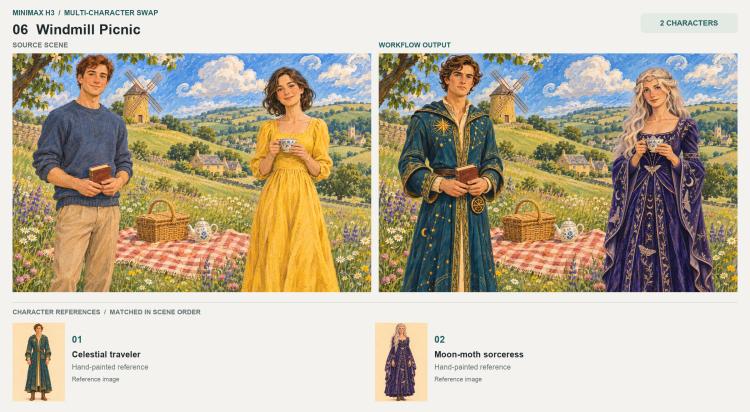
MiniMax H3 Multi-Character Swap: 1–4 character replacement for still images in ComfyUI#
MiniMax H3 Multi-Character Swap is a reference-driven ComfyUI workflow for replacing one to four people in a still image. H3 Replacer v1.3 combines a scene image, separate character references, Qwen3-VL prompt assembly, and Fizgig's still-image latent path to guide the new identities and outfits while retaining the scene's composition and lighting.
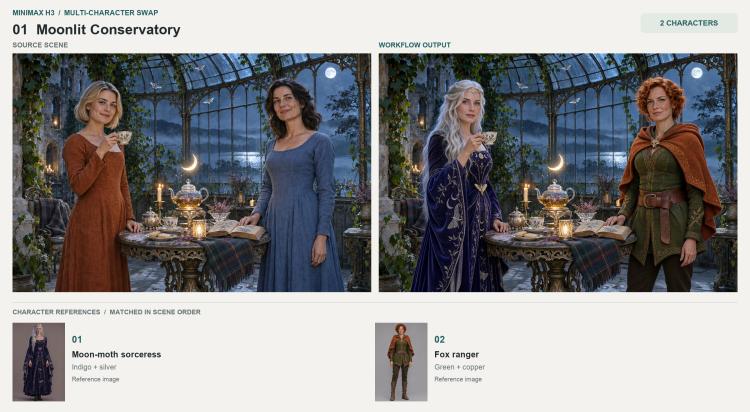
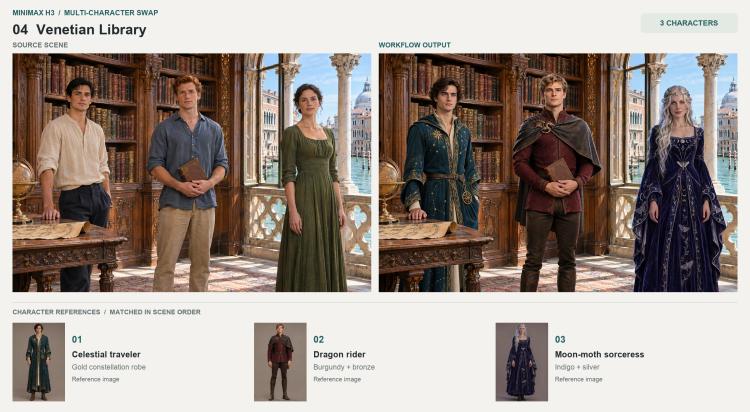
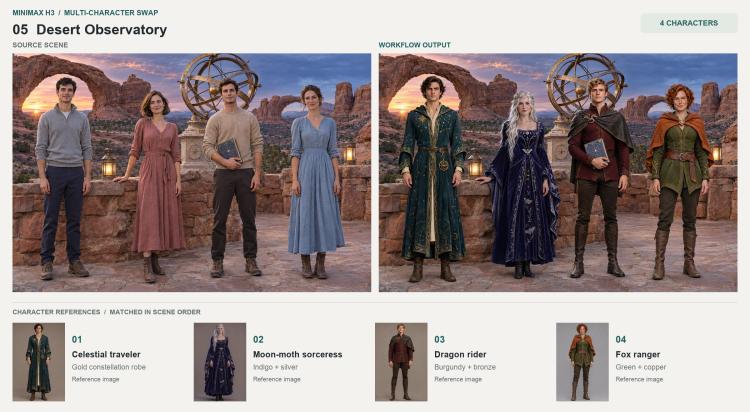
Use a base photo or artwork and assign references in the same order as the people in the scene. Explicitly describe positions, hand actions, and objects that should remain. The examples cover one, two, three, and four people, including an illustrated pair; identity matching, poses, and background details still need inspection after each render.
Key models in the MiniMax H3 Multi-Character Swap workflow#
- MiniMax H3 Singularity. The saved workflow uses
Minimax-h3_Singularity_ref2va_Pruned_v1.3_int8.safetensorsas its diffusion model. Model repository - Qwen3-VL 8B.
qwen3vl_8b_int8_convrot.safetensorssupports the image descriptions and automatic prompt assembly. It is separate from the H3 conditioning encoder. Qwen3-VL model files - H3 conditioning encoder and VAE. The graph uses
qwen3vl_32b_minimax_h3_int8_convrot.safetensorsandminimax_h3_video_vae_fp16.safetensorsfor H3 conditioning and image-latent conversion. This workflow saves a still image despite the video terminology in some node and model names. MiniMax H3 model files
How to use MiniMax H3 Multi-Character Swap in ComfyUI#
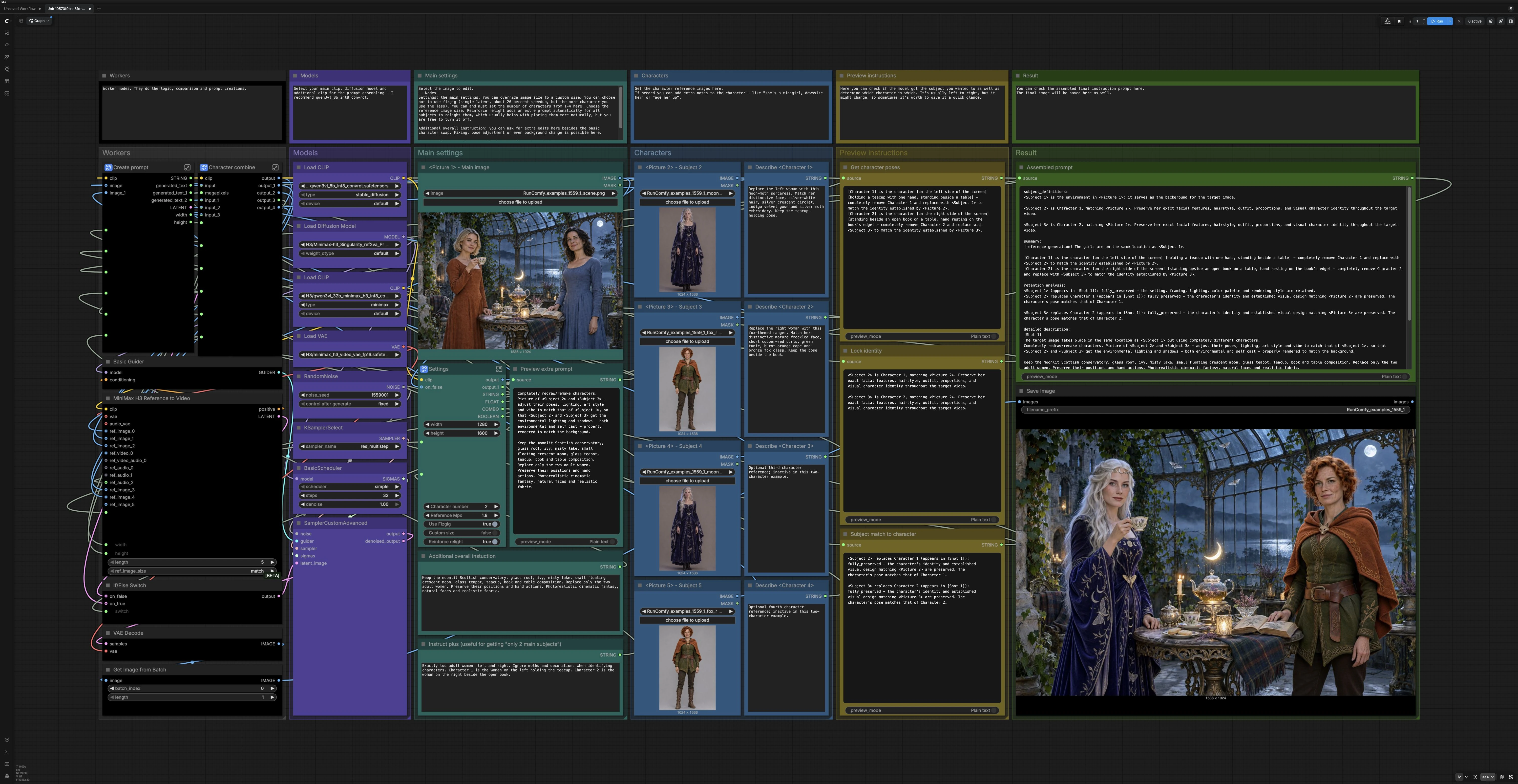
The workflow is organized into six color-coded groups that collaborate to analyze the base image, assemble precise instructions from your text and references, and render the final still with MiniMax H3. Set the number of subjects, load references, preview the auto‑generated instructions, then render and inspect.
Models#
This group loads the diffusion model, both Qwen3-VL encoders, and the VAE. Keep the provided selections to reproduce the tested workflow. H3 Replacer v1.3 is the source workflow version; the diffusion model, helper encoder, and H3 conditioning encoder serve different parts of the graph.
Characters#
Load one to four character references and explicitly match each slot to a person in the scene. The main scene is Picture 1; Character 1 uses Picture 2, Character 2 uses Picture 3, and so on. Add short notes for distinctive facial features, hair, clothing, or accessories. Keep every LoadImage node pointed to a valid file; the saved two-person setup keeps valid references in the unused third and fourth slots. The character-count setting controls which references are active.
Main settings#
Open Settings (#328) to select the character count from 1 to 4, reference image size, and latent path. Custom size overrides the output dimensions; with it disabled, the graph uses the base image dimensions. Reinforce relight adds instructions to match the scene's light and shadows. Leave Use Fizgig enabled to reproduce the tested single-frame path; it is not a draft-versus-final quality switch.
Preview instructions#
Review Get character poses (#4), Lock identity (#22), and Subject match to character (#33) to inspect the generated pose descriptions, identity instructions, and reference mapping. These panes display model-generated text; their names do not guarantee correct matching or prevent identity mixing. If a description is wrong, revise the instruction fields in Main settings or Characters and run again. Check both the assembled prompt and the resulting image.
Workers#
Create prompt (#303) combines your extra instructions, pose descriptions, and identity instructions. It also provides the image dimensions and the Fizgig single-frame latent. Character combine (#302) resizes and routes the active character references to the H3 conditioning node.
Result#
MiniMaxH3ReferenceToVideo (#39) consumes the assembled prompt, the H3 text encoder and VAE, and your ordered references to produce conditioning and an initial latent. A switch then selects between that latent and the Fizgig still‑latent path before sampling. After SamplerCustomAdvanced (#15) denoises with the loaded guider and schedule, VAEDecode produces the final image, and the Assembled prompt (#29) panel shows the exact instructions used for the run. The output is saved automatically for review and iteration.
Key nodes in the MiniMax H3 Multi-Character Swap workflow#
MiniMaxH3ReferenceToVideo(#39) Turns the scene image, ordered character references, and assembled prompt into H3 conditioning and a starting latent. In the tested configuration, the sampler uses the Fizgig single-frame latent instead. The final chain selects and saves an image; the node name does not make this a video-swap workflow.Settings(#328) Controls character count (1–4), reference size,Use Fizgig,Custom size, andReinforce relight. Start with the saved defaults and change one setting at a time when comparing results.FizgigH3StillLatent(#205) Creates a single-frame latent inside the Create prompt subgraph. The saved workflow uses this latent and retains its original standardVAEDecodenode, followed byImageFromBatchandSaveImage. The examples were rendered with that graph. The plugin also provides a separate Still Decode node, which is not used here. Fizgig H3 Still projectCreate prompt(#303) Assembles the instruction string from pose descriptions, identity instructions, and your extra notes. It also supplies the image dimensions and the Fizgig latent. If mapping is off, refine the input descriptions and regenerate; the Preview group shows the resulting text rather than serving as the source of those instructions.SamplerCustomAdvanced(#15) Drives the denoising process using the loaded guider and scheduler. For consistency across iterations, keep your seed fixed during comparisons; switch it only when exploring variations after you are happy with identity and placement.
Optional extras#
- Describe positions explicitly. In your short instructions, write “Character 1 on the left holding a cup” and “Character 2 on the right by the book” so the MiniMax H3 Multi-Character Swap keeps mapping stable.
- Describe important props and hand actions accurately. Specify a closed book, a hand resting on a wall, or a backpack that must remain. These details needed explicit instructions in the examples.
- Use references with a compatible rendering style. The illustrated example uses newly painted character references; photographic references initially produced characters that looked too realistic for the source artwork.
- Review relighting and anatomy. Check faces, hands, held objects, reference order, and background continuity. Adjust the descriptions and rerun when an object disappears or a pose changes.
The output is a still image. Scene retention and identity matching depend on the references, instructions, and settings; the workflow does not promise pixel-identical backgrounds or flawless matching for every input.
Acknowledgements#
This setup uses the author's H3 Replacer v1.3 workflow, WarmBloodAban's MiniMax H3 Singularity model, Comfy-Org's model files, and shootthesound's Fizgig H3 Still nodes. The source page's “1–4” refers to the number of characters, not workflow version 1.4.
Resources#
- Original H3 MiniMax Multi-Character Swap workflow
- WarmBloodAban/Minimax-h3_Singularity
- Hugging Face: WarmBloodAban/Minimax-h3_Singularity
- Comfy-Org/MiniMax-H3
- Hugging Face: Comfy-Org/MiniMax-H3
- shootthesound/ComfyUI-Fizgig-H3-Still
Note: Use of the referenced models, datasets, and code is subject to the respective licenses and terms provided by their authors and maintainers.