

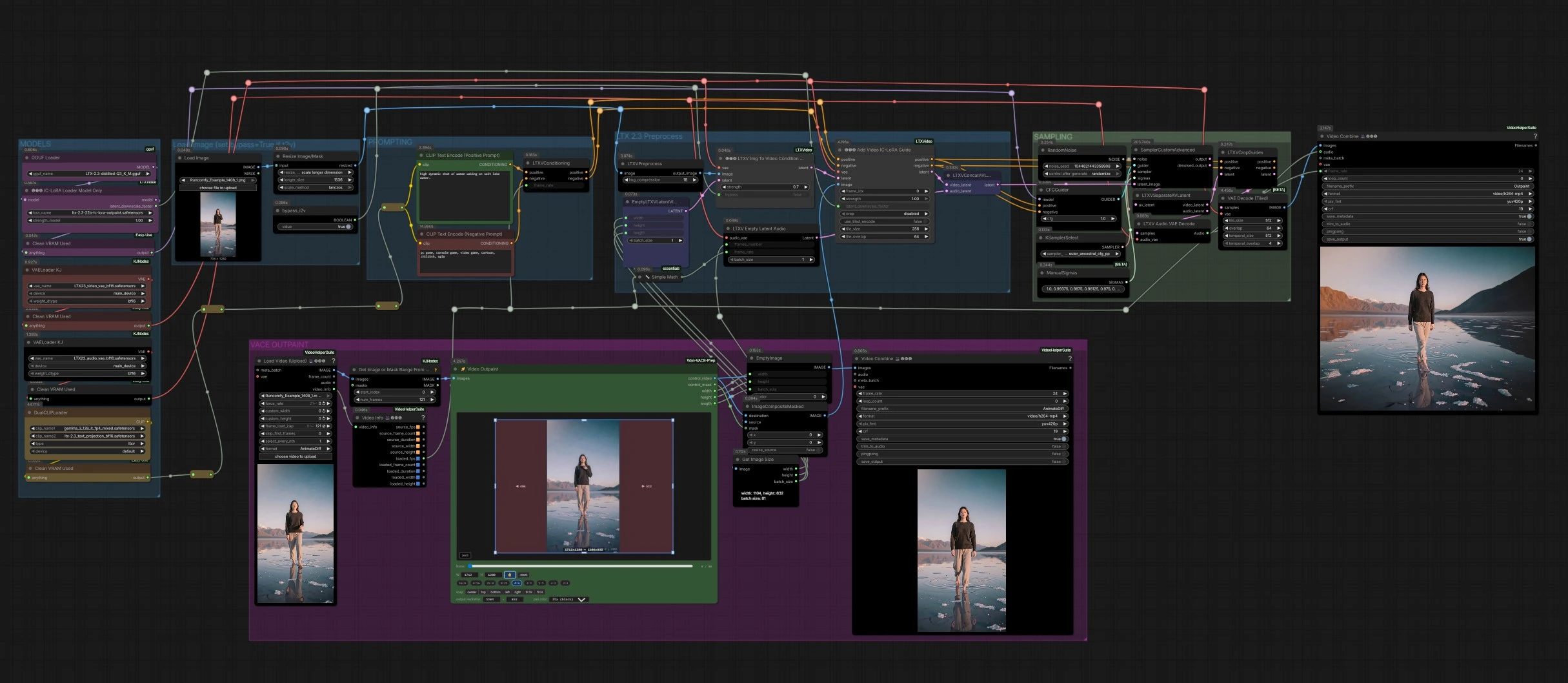
LTX 2.3 Outpainting for ComfyUI: Seamless video frame expansion with temporal consistency#
This workflow implements LTX 2.3 Outpainting to extend video frames beyond their original boundaries while preserving motion, lighting, and perspective. It is designed for editors and creators who need aspect ratio changes, side or vertical extensions, and cinematic reframing without breaking continuity. Using IC‑LoRA guidance, LTX 2.3 Outpainting fills masked canvas regions consistently across time and can also generate synchronized audio.
Built around Lightricks’ LTX‑2.3 model and its ComfyUI integration, the graph couples a smart outpaint preprocessor with IC‑LoRA conditioning to steer generation into the newly added areas. You can run pure text‑to‑video or image‑to‑video variants, preview the control frames, and export a final MP4 with audio.
Key models in Comfyui LTX 2.3 Outpainting workflow#
- LTX‑2.3 22B checkpoint. Core audio‑video diffusion model that drives generation quality and temporal stability. Use the official LTX‑2.3 weights such as ltx‑2.3‑22b‑dev or ltx‑2.3‑22b‑distilled‑1.1 for faster runs Hugging Face page and the upstream model details in the LTX‑Video repository GitHub and paper arXiv.
- Gemma 3 12B Instruct text encoder with LTX 2.3 text projection. Encodes prompts with strong adherence, feeding LTX‑2.3 through ComfyUI’s dual‑encoder setup. See the encoder card Hugging Face and ComfyUI support GitHub.
- LTX‑2.3 video VAE and audio VAE. Map between pixel or waveform space and the model’s latent space for decoding final frames and audio. Distributed in the ComfyUI‑LTXVideo package GitHub.
- LTX 2.3 Outpainting IC‑LoRA. A spatial expansion LoRA that conditions LTX‑2.3 to treat masked or black regions as generation areas, preserving scene continuity across time. It leverages IC‑LoRA conditioning provided by the LTXVideo nodes GitHub.
- Video Outpaint preprocessor. The VACE‑style outpaint node computes the new canvas, mask, and control frames used by LTX 2.3 Outpainting to guide synthesis in the expanded regions GitHub.
How to use Comfyui LTX 2.3 Outpainting workflow#
The workflow has five coordinated groups. VACE OUTPAINT proposes the new canvas and mask, LTX 2.3 Preprocess prepares inputs, SAMPLING synthesizes video and audio, and the output stage encodes the final MP4. PROMPTING and MODELS run in parallel to provide text conditioning and weights.
MODELS#
This group loads the LTX‑2.3 base checkpoint and applies the LTX 2.3 Outpainting IC‑LoRA so the model learns where to add new content. The video and audio VAEs are initialized to decode frames and waveforms. Model state is passed downstream to the guider and sampler so the same weights drive both conditioning and denoising. You do not need to change anything here unless you want to swap the base checkpoint or a different IC‑LoRA.
PROMPTING#
Positive and negative prompts are encoded by a dual‑encoder setup, pairing Gemma 3 12B with the LTX 2.3 text projection. Write what you want to see in the added margins along with motion cues and lighting direction to align outpainted content. Style or content you do not want goes into the negative prompt. The encoders produce conditioning streams that are later merged with the LTX 2.3 Outpainting guide.
VACE OUTPAINT#
Drop a source video into the loader to generate per‑frame images. The VACEOutpaint (#5109) node computes an expanded canvas and a precise mask that marks the new generation area. The graph composites the original frames into this larger canvas with ImageCompositeMasked (#5110), resulting in control frames that show “keep” versus “synthesize” regions clearly. A preview branch assembles these control frames into a lightweight MP4 so you can confirm the outpaint geometry before generating. Width, height, and sequence length from this stage drive the downstream latent setup, so the model works at the exact expanded size.
LTX 2.3 Preprocess#
The composite frames are normalized for LTX‑2.3 with LTXVPreprocess (#3336). If you want image‑to‑video anchoring, set bypass_i2v to false so LTXVImgToVideoConditionOnly (#3159) conditions motion on the control frames; for pure text‑to‑video outpainting set it to true. LTXVConditioning (#1241) attaches prompt conditioning and inherits frame rate from the video loader, keeping audio and video in sync. These signals flow into LTXAddVideoICLoRAGuide to inform where and how LTX 2.3 Outpainting should fill the masked areas.
SAMPLING#
LTXAddVideoICLoRAGuide (#5012) fuses prompt, optional image conditioning, the outpainted control image, and the IC‑LoRA into a single guidance package. An empty audio latent with the correct frame count is concatenated so audio is generated in lockstep with the video. The sampler uses CFGGuider (#4828) with a denoiser selected by KSamplerSelect and a short ManualSigmas schedule to balance prompt adherence and temporal smoothness. SamplerCustomAdvanced (#4829) produces a joint audio‑video latent that is then split for decoding.
Decode and export#
VAEDecodeTiled (#4851) decodes video frames efficiently at the expanded resolution, and LTXVAudioVAEDecode (#4848) reconstructs the waveform. VHS_VideoCombine (#5137) muxes frames and audio into an MP4 and writes it to your output folder at the inherited frame rate. A separate preview branch assembles the VACE control video for quick iteration before final runs.
Key nodes in Comfyui LTX 2.3 Outpainting workflow#
VACEOutpaint (#5109)#
Computes the target canvas and a binary or feathered mask that marks outpaint regions. Expand left or right for widescreen reframes or top and bottom for vertical conversions, then confirm in the preview video. Keep growth moderate for the first pass, iterate if you need more headroom. Black or clearly masked regions work best because LTX 2.3 Outpainting is trained to treat them as generation zones.
LTXAddVideoICLoRAGuide (#5012)#
Central to LTX 2.3 Outpainting, this node injects the IC‑LoRA and uses the composite control frames to bias generation into masked areas only. Increase the LoRA strength to enforce stronger spatial expansion behavior, reduce it if the model starts overwriting original content. The latent downscale factor comes from the loader and should be left as configured unless you are balancing speed against detail.
CFGGuider (#4828)#
Controls how tightly the model follows your prompts versus input conditioning. Raise guidance to sharpen adherence in newly added margins, lower it if motion becomes unstable. Consider minor changes together with the sigma schedule rather than large jumps.
SamplerCustomAdvanced (#4829) with KSamplerSelect and ManualSigmas (#5025)#
Defines the denoising path. The chosen Euler Ancestral CFG++ variant provides crisp detail with smooth motion for LTX‑2.3. A short manual sigma ladder helps preserve structure from the original frame while letting the outpainted zones evolve coherently.
VAEDecodeTiled (#4851)#
Decodes high‑resolution frames in tiles to manage VRAM. If you see seam artifacts, adjust tile size or overlap slightly and re‑run. This node is purely for efficiency and does not change the creative outcome.
VHS_VideoCombine (#5137)#
Muxes video frames and the generated audio track at the inherited frame rate. If you prefer the source audio instead, route that audio into the combiner and disable the generated track.
Optional extras#
- Prompting tips for LTX 2.3 Outpainting: describe the content that should appear specifically in the new margins, add motion verbs, camera direction, and lighting cues. Keep negative prompts short and focused on visual artifacts you want to suppress.
- Outpaint geometry: start with small side pads for a natural look, then iterate toward the final aspect ratio. Feathered masks blend better than hard edges when extending skies, water, or foliage.
- Text‑to‑video vs image‑to‑video: set
bypass_i2vtotruefor text‑driven LTX 2.3 Outpainting,falsewhen you want the original frame to anchor style and layout. - References and sources: LTX‑2.3 weights and ComfyUI integration GitHub and Hugging Face; VACE‑style outpaint preprocessor GitHub.
Acknowledgements#
This workflow implements and builds upon the following works and resources. We gratefully acknowledge @CG Pixel the creator of LTX 2.3 for the Outpainting Workflow for their contributions and maintenance. For authoritative details, please refer to the original documentation and repositories linked below.
Resources#
- LTX 2.3/Outpainting Workflow Source
- Docs / Release Notes: YouTube @CG Pixel
Note: Use of the referenced models, datasets, and code is subject to the respective licenses and terms provided by their authors and maintainers.