

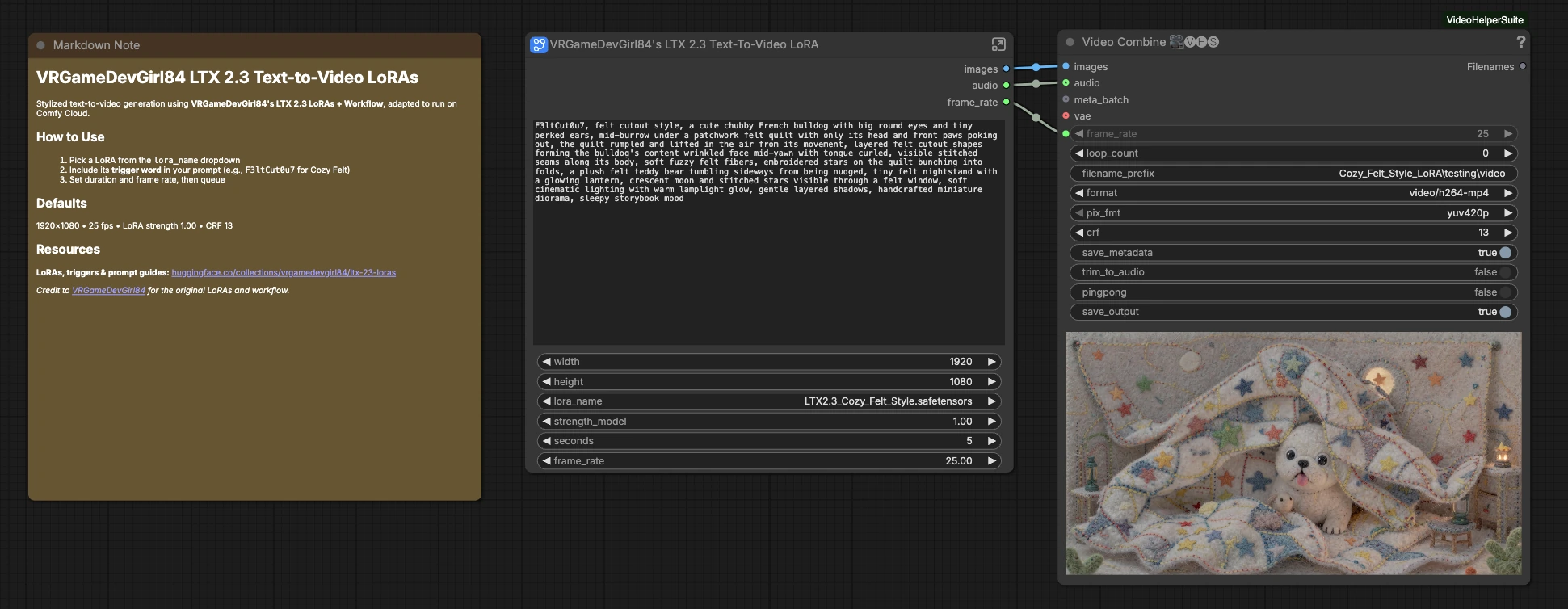
LTX 2.3 Cozy Felt Text-to-Video Workflow for ComfyUI#
This workflow turns short prompts into stylized motion clips in a handmade felt cutout aesthetic. Built around VRGameDevGirl84’s Cozy Felt style LoRA for LTX 2.3, it pushes compositions toward soft edges, stitched seams, and plush textures while keeping temporal coherence for video. LTX 2.3 Cozy Felt is ideal for creators who want a ready, reliable text-to-video pipeline that exports MP4 with synced, model-generated audio.
Unlike a generic template, LTX 2.3 Cozy Felt is wired for fast prompting, one-click LoRA selection, robust LTX video and audio VAE handling, and a clean export path. Add the Cozy Felt trigger word to your prompt, choose the LoRA, set clip length and frame rate, and render. The graph uses a two-stage sampler with an upsampling step to balance style strength with detail and stability.
Key models in Comfyui LTX 2.3 Cozy Felt workflow#
- LTX-2.3 22B Distilled 1.1: the diffusion backbone that generates the video and audio latents from text conditioning. Source: Lightricks/LTX-2.
- LTX 2.3 Cozy Felt Style LoRA: VRGameDevGirl84’s style adapter that steers the base model toward a cozy felt, stitched-paper look. Source: vrgamedevgirl84/LTX2.3_Cozy_Felt_Style_LoRa.
- LTX Video VAE: the spatio-temporal decoder that reconstructs frames from video latents. Curated weights: Kijai/LTXV2_comfy.
- LTX Audio VAE: the decoder that reconstructs the synchronized audio track from audio latents. Curated weights: Kijai/LTXV2_comfy.
- LTX AV Text Encoder (Gemma 3 12B IT) and LTX embeddings connector: maps prompts into conditioning compatible with the LTX 2.3 architecture. Reference: Lightricks/LTX-2.
- LTX Spatial Upscaler x2: a latent upscaler for cleaner detail before final decoding. Source: Lightricks/LTX-2.
How to use Comfyui LTX 2.3 Cozy Felt workflow#
At a glance: you load the LTX 2.3 models, pick the LTX 2.3 Cozy Felt LoRA, write a prompt that includes the trigger, set the clip duration and frame rate, then render and export. The graph runs a two-stage sampler with a mid-pass upsample, decodes video and audio, then muxes everything into MP4.
Load Models#
This group initializes all core LTX assets so the rest of the graph can focus on prompting and sampling. The UNETLoader (#5288) loads the LTX-2.3 22B Distilled backbone, while LTXAVTextEncoderLoader (#5289) brings in the AV text encoder and its embeddings connector. VAELoaderKJ (#5287) and LTXVAudioVAELoader (#5291) prepare the video and audio VAEs, and LatentUpscaleModelLoader (#5286) readies the x2 upscaler for mid-pass refinement. No edits are required here once weights are in place.
LoRA#
The LoraLoaderModelOnly (#5230) applies the VRGameDevGirl84 LTX 2.3 Cozy Felt adapter to the base model. Use the lora_name dropdown to select the Cozy Felt file and adjust strength_model if you want either a subtle hint or a full felt cutout look. Because this is a model-only loader, it keeps the rest of the LTX stack intact while injecting the style. If you later try other LTX 2.3 LoRAs, switch the selection and keep the rest of the graph unchanged. Source LoRA: vrgamedevgirl84/LTX2.3_Cozy_Felt_Style_LoRa.
Prompts#
Two encoders shape the text conditioning. The primary CLIPTextEncode (#5223) is where you write your scene prompt and add the Cozy Felt trigger word F3ltCut0u7 to push the LTX 2.3 Cozy Felt style. A secondary CLIPTextEncode (#5259) carries negatives that reduce photoreal artifacts and slick, plastic surfaces so the felt texture remains dominant. Use compact, object-first phrasing with material cues like stitched seams, fuzzy fibers, and layered cutouts. Avoid conflicting style words if you want stronger LTX 2.3 Cozy Felt output.
Video Size#
EmptyImage (#5217) sets the working width and height for the video latent. The dimensions here decide the aspect ratio for the entire clip and pass shape information deeper into the sampler. Choose a size that matches your target delivery to avoid letterboxing in post. Upscaling is handled later in latent space, so you can start lean and refine mid-pass.
Frame Rate + Length Calculation#
This group computes the total frame count from your timing choices. Set the clip duration with seconds in PrimitiveInt (#5295) and the desired frame_rate with Float (#5296). ComfyMathExpression (#5293) multiplies these values to produce length, and JWFloatToInteger (#5298) ensures that timing-dependent nodes get integers. Keep seconds × frame_rate aligned with your export settings for smooth motion without dropped or duplicated frames.
Render#
The Samplers subgraph (Samplers (#5232)) runs a two-stage diffusion process tailored for LTX 2.3 Cozy Felt. LTXVConditioning (#5224) feeds positive and negative conditioning along with frame_rate so temporal signals stay consistent across the run. The graph creates video and audio latents of the same length, combines them, and routes through two samplers separated by a latent upsample. The result is a stylized, coherent sequence that already carries an audio bed derived from the same prompt.
Preprocess#
Inside the sampler subgraph, ImageScaleBy and GetImageSize prepare reference shape data, while RandomNoise seeds the run for reproducibility. EmptyLTXVLatentVideo (#5163) and LTXVEmptyLatentAudio (#5170) create synchronized AV latents based on length and frame_rate. These are concatenated via LTXVConcatAVLatent so video and audio stay aligned during denoising. Changing the seed is the fastest way to explore multiple LTX 2.3 Cozy Felt variations from the same prompt.
Sampler Stage 1#
SamplerCustomAdvanced (#5159) performs the initial denoising pass using a schedule from ManualSigmas (#5182) and guidance from CFGGuider (#5151). This stage establishes global composition, motion cues, and the core felt texture suggested by your trigger and material words. The output is split into video and audio with LTXVSeparateAVLatent (#5167), then the video latent is refined by LTXVLatentUpsampler (#5187) using the x2 upscaler. The upsampled video is rejoined with the audio latent to maintain sync before the next sampler.
Sampler Stage 2#
SamplerCustomAdvanced (#5155) applies a shorter refinement schedule from ManualSigmas (#5183) guided by CFGGuider (#5171). This stage sharpens edges, stitches, and layered cutout boundaries that define the LTX 2.3 Cozy Felt look without drifting off-style. After denoising, LTXVSeparateAVLatent (#5156) splits the result for decoding. Keep the same frame_rate across conditioning and export to preserve timing.
Decode and Export#
LTXVSpatioTemporalTiledVAEDecode (#5185) reconstructs the video frames from the final video latent, and LTXVAudioVAEDecode (#5169) reconstructs the audio. At the top level, VHS_VideoCombine (#5265) muxes images and audio into an MP4, respecting your chosen frame_rate and saving a preview-friendly file. Filenames are auto-managed so you can iterate rapidly and compare results. This makes it simple to produce multiple takes of a single LTX 2.3 Cozy Felt prompt.
Key nodes in Comfyui LTX 2.3 Cozy Felt workflow#
LoraLoaderModelOnly (#5230)#
Applies the VRGameDevGirl84 LTX 2.3 Cozy Felt adapter to the UNet without touching encoders or VAEs. Adjust strength_model to balance between pure Cozy Felt and a lighter hint when mixing with other aesthetic cues. If you switch to a different LTX 2.3 LoRA, use this same node to swap files.
LTXVConditioning (#5224)#
Bridges positive and negative conditioning into the LTX AV format while passing frame_rate so temporal embeddings match your export. Keep the same frame_rate setting across the graph for consistent motion cadence.
ManualSigmas (#5182) and ManualSigmas (#5183)#
Define the noise schedules for the two sampler stages. The first schedule is broader for structure and motion, the second is tighter for detail and texture. If you introduce a new schedule, test small changes to avoid destabilizing felt edges or causing flicker.
LTXVLatentUpsampler (#5187)#
Upscales video latents between sampler stages using the x2 model from LTX. This improves edge definition and layered paper contours typical of LTX 2.3 Cozy Felt while keeping compute efficient compared to image-space upscaling. Reference weights: Lightricks/LTX-2.
LTXVSpatioTemporalTiledVAEDecode (#5185)#
Decodes video with a tiled strategy to fit memory while preserving temporal context. If you run into memory limits, adjust its tiling options rather than shrinking your working resolution. Implementation provided by KJNodes: Kijai/ComfyUI-KJNodes.
VHS_VideoCombine (#5265)#
Assembles decoded frames and audio into a single MP4. Tune its format and quality controls to match your delivery needs. Keeping frame_rate aligned with earlier groups avoids timing mismatches.
Optional extras#
- Prompting for LTX 2.3 Cozy Felt: include the trigger F3ltCut0u7 plus material cues like stitched seams, fuzzy felt fibers, layered cutouts, and soft lantern lighting.
- Keep negatives concise to avoid glossy plastic, photoreal, and CGI cues that can overpower the felt texture.
- For quick variations, change the seed while holding the same prompt and timing; for larger shifts, slightly adjust subject phrasing or material adjectives.
- Longer clips benefit from stable camera language in the prompt and fewer competing actions.
- If you try other LTX 2.3 LoRAs, remove the Cozy Felt trigger and use the new adapter’s trigger for best results. For more LTX 2.3 LoRAs, see the collection: vrgamedevgirl84/ltx-23-loras.
Acknowledgements#
This workflow implements and builds upon the following works and resources. We gratefully acknowledge Purz for LTX 2.3 - Cozy Felt (ComfyUI workflow), VRGameDevGirl84 for the LTX 2.3 LoRA collection, and VRGameDevGirl84 for LTX2.3_Cozy_Felt_Style_LoRa for their contributions and maintenance. For authoritative details, please refer to the original documentation and repositories linked below.
Resources#
- Purz/LTX 2.3 - Cozy Felt (ComfyUI Workflow)
- Docs / Release Notes: LTX 2.3 - Cozy Felt — ComfyUI Workflow
- VRGameDevGirl84/LTX 2.3 LoRA collection
- Hugging Face: LTX 2.3 LoRAs
- VRGameDevGirl84/LTX2.3_Cozy_Felt_Style_LoRa
- GitHub: vrgamegirl19/comfyui-vrgamedevgirl
- Hugging Face: vrgamedevgirl84/LTX2.3_Cozy_Felt_Style_LoRa
- VRGameDevGirl84/Hugging Face profile
- Hugging Face: vrgamedevgirl84
Note: Use of the referenced models, datasets, and code is subject to the respective licenses and terms provided by their authors and maintainers.