logo
RunComfy
  • ComfyUI
  • TrainerNew
  • Models
  • API
  • Pricing
discord logo
ComfyUI>Workflows>SVD + FreeU | Image to Video

SVD + FreeU | Image to Video

Workflow Name: RunComfy/SVD-FreeU
Workflow ID: 0000...1015
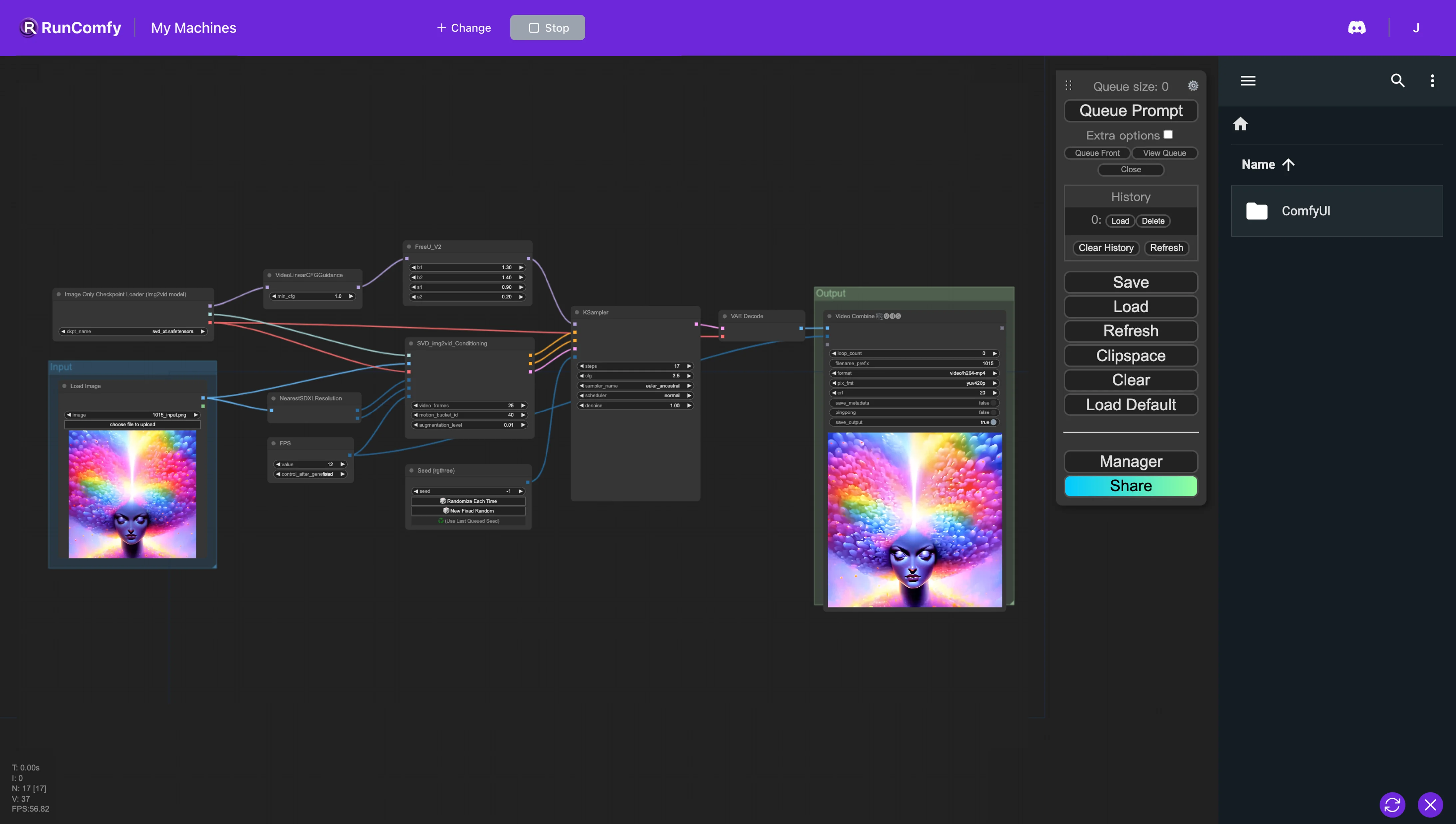
We employ the stable video diffusion process for image-to-video conversion and utilize FreeU, a method that substantially enhances the sample quality of diffusion models at no additional cost, to transform images into videos with improved quality.

1. ComfyUI Stable Video Diffusion (SVD) and FreeU Workflow

This ComfyUI workflow facilitates an optimized image-to-video conversion pipeline by leveraging Stable Video Diffusion (SVD) alongside FreeU for enhanced quality output. FreeU elevates diffusion model results without accruing additional overhead—there's no need for retraining, parameter augmentation, or increased memory or compute time. This integration ensures that you can achieve higher fidelity in video outputs.

2. Overview of Stable Video Diffusion (SVD)

Please check out the details on Introduction to SVD

3. Overview of FreeU

Please check out the details on this Introduction to FreeU
Want More ComfyUI Workflows?

SVD (Stable Video Diffusion) + SD | Text to Video

Integrate Stable Diffusion and Stable Video Diffusion to convert text directly into video.

SVD + IPAdapter V1 | Image to Video

Utilize IPAdapters for static image generation and Stable Video Diffusion for dynamic video generation.

Wan 2.2 Animate V2 | Realistic Pose Video Generator

Transforms photos into smooth-motion animated character videos using Wan 2.2.

DiffuEraser | Video Inpainting

Erase objects from videos with auto-masking and realistic reconstruction.

LayerDiffuse | Text to Transparent Image

LayerDiffuse | Text to Transparent Image

Use LayerDiffuse to generate transparent images or blend backgrounds and foregrounds with one another.

LatentSync| Lip Sync Model

Advanced audio-driven lip sync technology.

Hunyuan Image 2.1 | High-Res AI Image Generator

Next-gen 2.1 model for crisp, sharp, ultra-clear AI visuals fast.

Flux Consistent Characters | Input Image

Flux Consistent Characters | Input Image

Create consistent characters and ensure they look uniform using your images.

Follow us
  • LinkedIn
  • Facebook
  • Instagram
  • Twitter
Support
  • Discord
  • Email
  • System Status
  • Affiliate
Resources
  • Free ComfyUI Online
  • ComfyUI Guides
  • RunComfy API
  • ComfyUI Tutorials
  • ComfyUI Nodes
  • Learn More
Legal
  • Terms of Service
  • Privacy Policy
  • Cookie Policy
RunComfy
Copyright 2026 RunComfy. All Rights Reserved.

RunComfy is the premier ComfyUI platform, offering ComfyUI online environment and services, along with ComfyUI workflows featuring stunning visuals. RunComfy also provides AI Models, enabling artists to harness the latest AI tools to create incredible art.