
logo
RunComfy
  • Models
  • ComfyUI
  • TrainerNew
  • API
  • Pricing
discord logo
ComfyUI>Workflows>LayerDiffuse + TripoSR | Image to 3D

LayerDiffuse + TripoSR | Image to 3D

Workflow Name: RunComfy/TripoSR
Workflow ID: 0000...1078
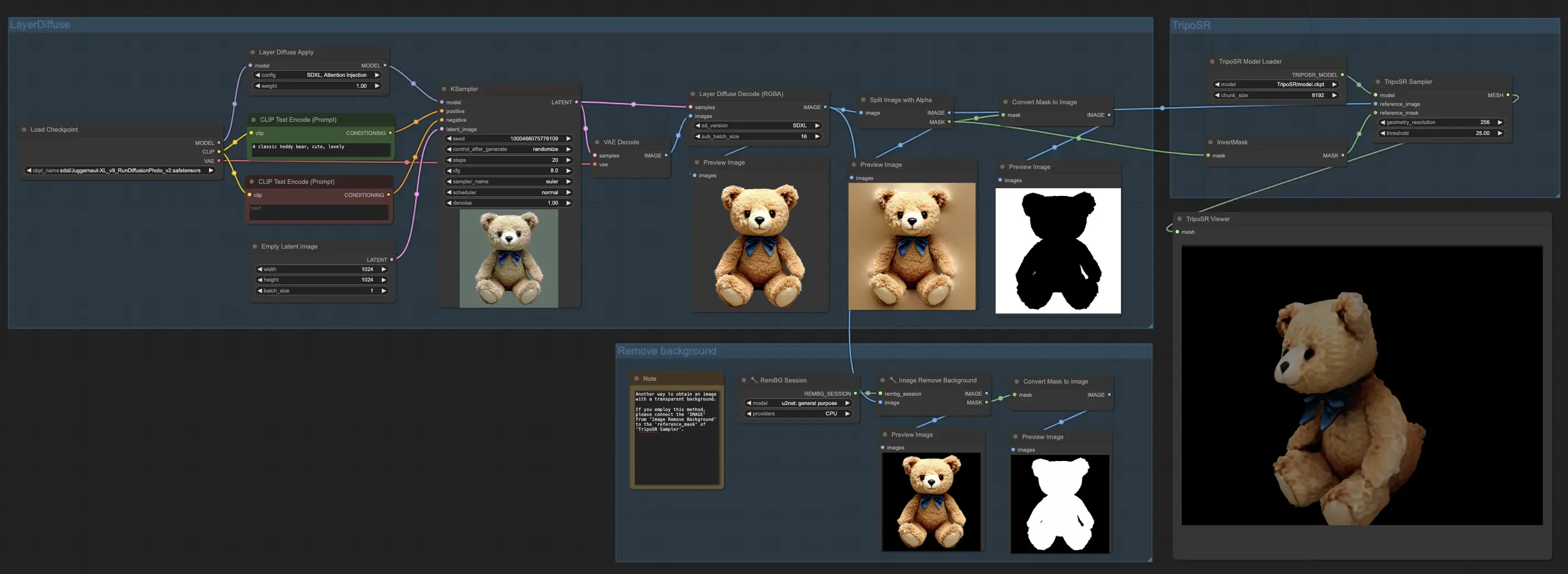
In the innovative ComfyUI workflow, the power of LayerDiffuse is used to create images with clear backgrounds, which are then transformed into rough 3D models by TripoSR. This quick process promises potential for refinement, providing a simple route from image to 3D.

1. ComfyUI Workflow: LayerDiffuse + TripoSR | Image to 3D

In the ComfyUI workflow, we harness the capabilities of LayerDiffuse to produce images with transparent backgrounds. Following this, both the image and its mask are passed on to TripoSR for the creation of 3D objects. The outcome is a rough yet quickly produced 3D model, showing promising potential for further refinement.

For those interested in obtaining the mesh file (.obj), you can find it in your file system's output section. This streamlined process offers a straightforward path from image to 3D model, combining the strengths of LayerDiffuse and TripoSR to enhance your 3D creation experience.

2. Overview of LayerDiffuse

Please check out the details on How to use LayerDiffuse in ComfyUI

3. Overview of TripoSR

3.1. Introduction to TripoSR

TripoSR is a cutting-edge 3D reconstruction model that quickly turns single images into 3D objects with astonishing speed and precision. This innovation is a joint effort by Tripo AI and Stability AI. Utilizing a transformer architecture, TripoSR stands out for its ability to quickly process images into 3D forms. It builds on the Large Reconstruction Model (LRM) network architecture but brings in significant improvements in handling data, designing the model, and refining the training process. These advancements make TripoSR more accurate and efficient than other models available today.

3.2. Technical Architecture of TripoSR

The core of TripoSR includes three main parts: an image encoder, an image-to-triplane decoder, and a triplane-based neural radiance field (NeRF). The image encoder uses a pre-trained vision transformer model to capture both the broad and specific details of an input image. These details are then turned into a detailed 3D model using the innovative triplane-NeRF setup. Uniquely, TripoSR can guess the camera's settings, making it versatile and efficient in different image conditions without needing exact camera information.

3.3. TripoSR Performance Benchmarking

The performance of TripoSR stands out when compared with other leading models. It consistently exceeds in capturing the fine textures and complex shapes of objects swiftly. This exceptional performance, achieved quickly on standard computer hardware, showcases TripoSR's potential to change the 3D reconstruction landscape.

Want More ComfyUI Workflows?

IPAdapter V1 FaceID Plus | Consistent Characters

IPAdapter V1 FaceID Plus | Consistent Characters

Leverage IPAdapter FaceID Plus V2 model to create consistent characters.

EchoMimic | Audio-driven Portrait Animations

Generate realistic talking heads and body gestures synced with the provided audio.

Vid2Vid Part 1 | Composition and Masking

The ComfyUI Vid2Vid offers two distinct workflows to creating high-quality, professional animations: Vid2Vid Part 1, which enhances your creativity by focusing on the composition and masking of your original video, and Vid2Vid Part 2, which utilizes SDXL Style Transfer to transform the style of your video to match your desired aesthetic. This page specifically covers Vid2Vid Part 1

FLUX ControlNet Depth-V3 & Canny-V3

Achieve better control with FLUX-ControlNet-Depth & FLUX-ControlNet-Canny for FLUX.1 [dev].

FLUX Inpainting | Seamless Image Editing

FLUX Inpainting | Seamless Image Editing

Effortlessly fill, remove, and refine images, seamlessly integrating new content.

Wan 2.2 Animate | Character Swap & Lip-Sync

Transforms any face to speak and move like the original with ease.

IPAdapter Plus (V2) + AnimateLCM | ipiv's Morph

Use IPAdapter Plus, ControlNet QRCode, and AnimateLCM to create morphing videos quickly.

Nvidia Cosmos | Text & Image to Video Creation

Generate videos from text prompts or create frame interpolation between two images with Nvidia's Cosmos.

Follow us
  • LinkedIn
  • Facebook
  • Instagram
  • Twitter
Support
  • Discord
  • Email
  • System Status
  • Affiliate
Resources
  • Free ComfyUI Online
  • ComfyUI Guides
  • RunComfy API
  • ComfyUI Tutorials
  • ComfyUI Nodes
  • Learn More
Legal
  • Terms of Service
  • Privacy Policy
  • Cookie Policy
RunComfy
Copyright 2026 RunComfy. All Rights Reserved.

RunComfy is the premier ComfyUI platform, offering ComfyUI online environment and services, along with ComfyUI workflows featuring stunning visuals. RunComfy also provides AI Models, enabling artists to harness the latest AI tools to create incredible art.