Hunyuan3D-2: Transform 2D Images into 3D Models#
Introduction to Hunyuan3D-2 Workflow#
🎉 7/11/25 Update: Hunyuan3D 2.1 is here! Major upgrade from v2.0 featuring enhanced textures, richer details, and improved lighting effects. Try the new workflow now!
Welcome to Hunyuan3D-2, a cutting-edge ComfyUI workflow designed to effortlessly convert 2D images into stunning 3D models. Leveraging the latest advancements in AI segmentation, neural rendering, and computer vision, Hunyuan3D-2 simplifies the traditionally intricate process of 3D modeling. Whether you're a game developer, 3D artist, or content creator, this workflow allows you to generate high-quality 3D assets complete with textures in just a few clicks.
How Hunyuan3D-2 Works#
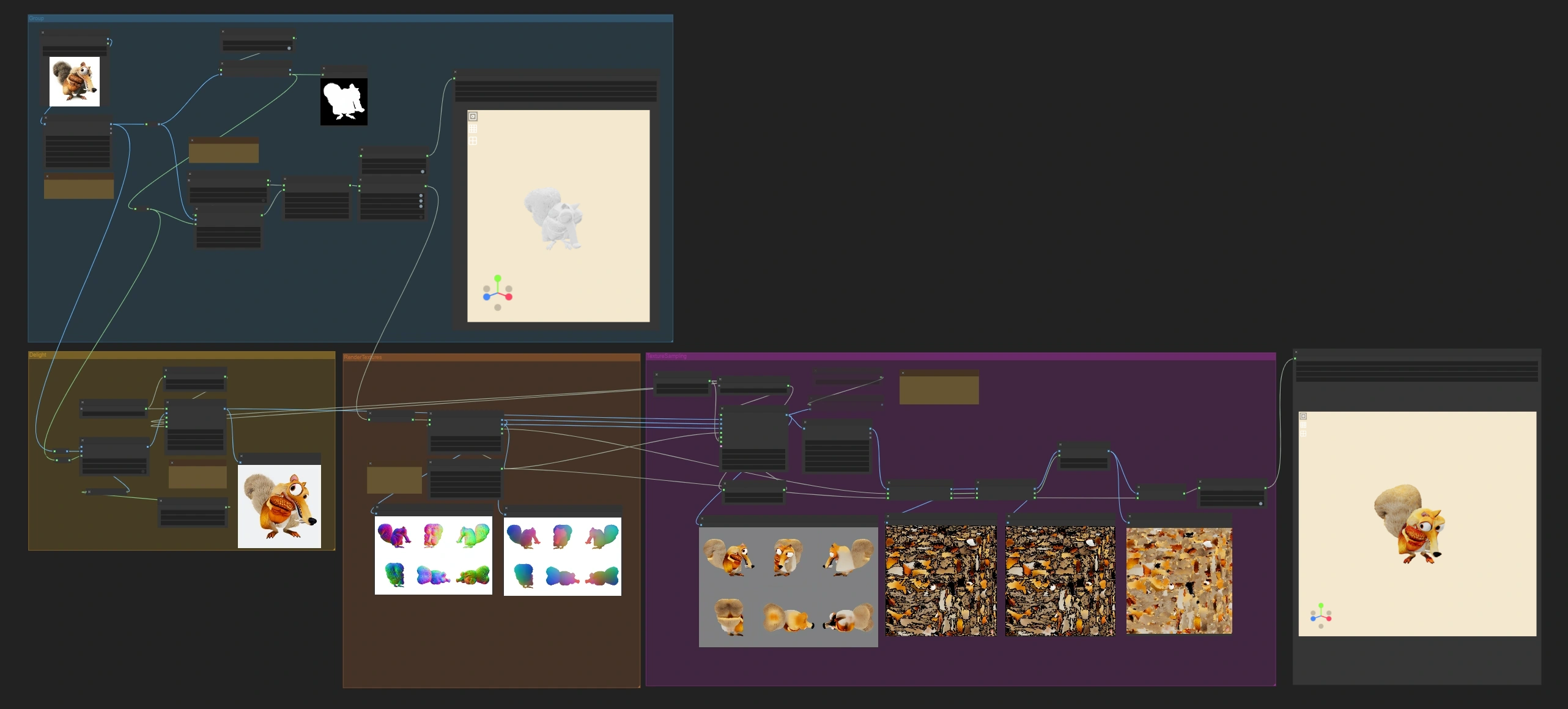
Hunyuan3D-2 ComfyUI Workflow operates through four main stages:
- Image Preparation: Resizes and removes the background from your input image.
- 3D Mesh Generation: Creates a 3D mesh from the isolated subject.
- Mesh Optimization: Cleans up geometry and reduces polygon count for better performance.
- Texture Application: Renders the model from multiple angles and applies realistic textures using AI-powered texture synthesis.
The final output is a production-ready 3D model in GLB format, suitable for games, AR/VR applications, or further refinement in 3D software.
Using Hunyuan3D-2: A Step-by-Step Guide#
Step 1: Load Your Image#
Upload your image to the "Load Image" node. For optimal results, use a clear photo of a single subject against a simple background.
Step 2: Execute the Workflow#
Click "Queue Execution" to process the entire workflow.
Step 3: Download Your 3D Model#
Once processing is complete, find your glb format 3D model in the output folder with the filename "xxx.glb".
Key Features of Hunyuan3D-2#
- One-Click 3D Generation: Convert any 2D image into a 3D model with a single execution.
- Automatic Background Removal: Utilizes IoSPyReNet segmentation for clean subject isolation.
- High-Quality Mesh Generation: Advanced VAE decoding for detailed geometry reconstruction.
- Optimized Output: Automatic mesh cleanup and polygon reduction for real-time applications.
- PBR Material Support: Compatible with physically-based rendering pipelines.
- GLB Export Format: Universal format compatible with most 3D applications.
- JIT Acceleration: Just-In-Time compilation for faster processing.
- Reproducible Results: Seed control ensures consistent outputs for production workflows.
Key Nodes and Parameters in Hunyuan3D-2 Workflow#
Mesh Generation Nodes#
- Hy3D VAE Decode:
octree_resolution: 384 (higher resolution yields more details)num_chunks: 32000 (controls mesh detail level)
- Hy3D Postprocess Mesh:
remove_floaters: true (eliminates disconnected geometry)smooth_normals: false (softens edges when true) <img src="https://cdn.runcomfy.net/workflow_assets/1193/readme01.webp" alt="Hunyuan3D-2" width="450"/>
Texturing Nodes#
- Hy3D Sample MultiView:
seed: 1024 (controls randomization)denoise_strength: 1.0 (0.7-1.0 recommended for texture clarity)
- CV2 Inpaint Texture:
expand_radius: 3 (fills texture gaps; 2-5px recommended) <img src="https://cdn.runcomfy.net/workflow_assets/1193/readme02.webp" alt="Hunyuan3D-2" width="350"/> <img src="https://cdn.runcomfy.net/workflow_assets/1193/readme03.webp" alt="Hunyuan3D-2" width="350"/>
Export Nodes#
- Hy3DExportMesh:
format: GLB (for universal compatibility) <img src="https://cdn.runcomfy.net/workflow_assets/1193/readme04.webp" alt="Hunyuan3D-2" width="350"/>
Tips for Optimal Results with Hunyuan3D-2#
- Use images with clear subjects against simple backgrounds.
- For higher-quality textures, increase the reference image size (requires more VRAM).
- Change the
seedvalue in "Hy3D Sample MultiView" for different texture variations.