

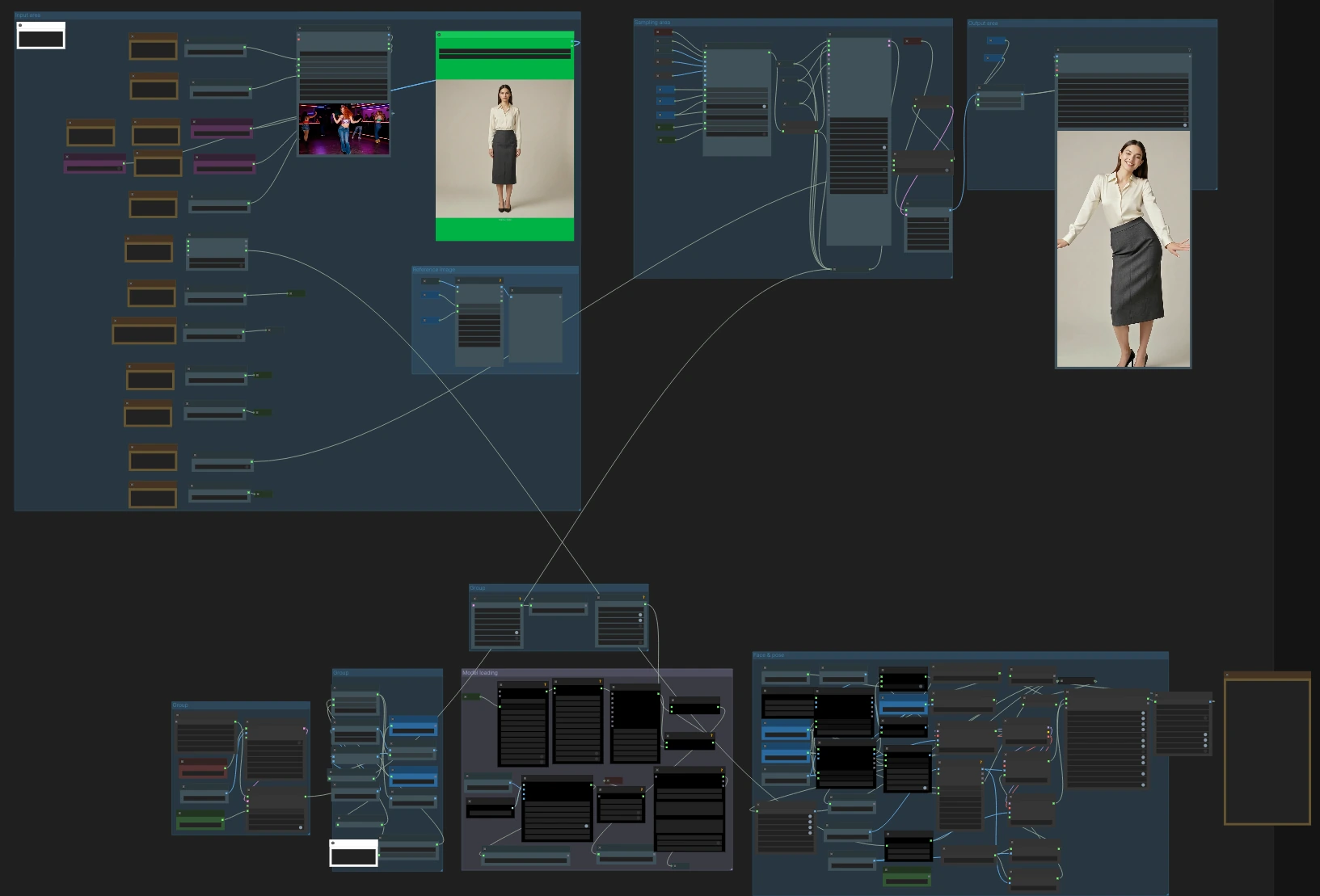
Wan2.2 Animate Action Transfer V7: Motion‑to‑Character Video Workflow for ComfyUI#
Wan2.2 Animate Action Transfer V7 is a ComfyUI video workflow for transferring motion from a driving video onto a target character or image while preserving identity, framing, and style. Built around Wan2.2 Animate with pose, face, CLIP vision, Uni3C ControlNet, and stacked Wan LoRA guidance, it produces an MP4 ready for editing or publishing.
This Wan2.2 Animate Action Transfer workflow is ideal for creators who want a RunComfy‑ready action‑transfer setup with example inputs and consistent, repeatable results. It handles pose and face conditioning, optional camera guidance, frame and aspect utilities, and audio passthrough so you can focus on directing performance and look.
Key models in ComfyUI Wan2.2 Animate Action Transfer workflow#
- Wan2.2 Animate 14B. The core video diffusion model that generates motion‑consistent frames conditioned by identity, pose, and text embeddings. Model card
- Wan Video VAE (Wan 2.1). High‑quality latent encode/decode for video frames that balances detail and speed in ComfyUI. Assets
- CLIP Vision encoder (ViT‑H/14 via OpenCLIP). Extracts identity and composition cues from the target image to keep the subject stable across frames. Repo
- ViTPose Whole‑Body. Robust body, hands, and face keypoint estimation to drive accurate action transfer. Paper
- YOLOv10 detectors. Person and region detection used to localize bodies before keypoint extraction and proportion mapping. Repo
- SDPose Whole‑Body extractor. Alternative whole‑body keypoint backend integrated for multi‑strategy pose analysis. Repo
- Uni3C ControlNet for video (via WanVideoWrapper). Optional structural guidance that stabilizes camera and scene constraints during rendering. Repo
How to use ComfyUI Wan2.2 Animate Action Transfer workflow#
At a high level, you load a target character image and a driving video, the workflow extracts pose and face signals, encodes identity with CLIP vision, optionally applies Uni3C camera guidance and Wan LoRAs, then renders with Wan2.2 Animate into frames and exports an MP4 with or without the source audio.
Input area#
Load your driving video in VHS_LoadVideo (#275) and your target character image in LoadImage (#299). The video loader manages frame rate caps, optional audio extraction, and basic selection controls; the image loader is used as identity and framing reference. The aspect utilities automatically compute width and height from your chosen orientation so the output matches 16:9 or 9:16 without distortions. If you plan to keep the source audio, leave it connected; the exporter will trim or pad as configured.
Reference image#
This group prepares the target image for identity guidance. ImageResizeKJv2 (#225) aligns the image to the render resolution, CLIPVisionLoader (#178) loads the vision backbone, and WanVideoClipVisionEncode (#189) produces CLIP vision embeddings. Use a clean, well‑lit image with the desired framing; CLIP vision preserves subject identity, clothing cues, and composition so the generated video follows your look.
Face and pose computation#
The workflow supports multiple pose pipelines for robustness. OnnxDetectionModelLoader (#204) with PoseAndFaceDetection (#235, #249) extracts whole‑body pose plus face crops from the driving video. In parallel, YOLO‑based region detection (YOLOModelLoader (#327, #387) with BBoxYOLO (#324, #379, #395)) feeds SDPoseKeypointExtractor (#326, #383, #384) for alternate keypoints. A proportion‑retarget route using BodyRatioMapperProportionTransfer (#388) adapts motion between different body ratios and renders a clean pose map via BodyRatioMapperSDPoseRender (#391). A boolean switch lets you bypass face guidance for fully masked or helmeted actors so you avoid expression conflicts.
Model loading#
WanVideoVAELoader (#277) and WanVideoModelLoader (#287) bring in the Wan2.2 Animate backbone and VAE. Two WanVideoLoraSelectMulti nodes (#248, #276) let you stack LoRAs for style, speed, relighting, or inpainting guidance, and WanVideoSetBlockSwap (#290) configures memory‑friendly block swapping for long clips. WanVideoContextOptions (#270) sets temporal context windows and stride so the model sees enough neighboring frames to stay stable without over‑smoothing action.
Uni3C camera and structure guidance#
When you need steadier camera behavior or scene constraints, enable the Uni3C path. WanVideoUni3C_ControlnetLoader (#345) loads the control model, WanVideoEncode (#346) converts frames to latents for conditioning, and WanVideoUni3C_embeds (#344) generates Uni3C embeddings whose strength you can tune. This guidance is merged into the main render chain to stabilize pans, zooms, or large‑motion scenes.
Sampling and rendering#
WanVideoAnimateEmbeds (#295) fuses CLIP vision identity, pose maps, and face crops into image embeddings while you control pose_strength and face_strength. The main renderer runs in two stages with WanVideoSampler (#222, #367); a switch chooses the Uni3C‑guided branch when enabled, otherwise the standard branch. After sampling, WanVideoDecode (#246) turns latents into images and frame selection utilities route them to export. The workflow balances context length, stride, and memory so you can render long sequences reliably.
Export#
Two exporters are included. VideoCombineNode (#330) provides a compact MP4 export with optional trim to audio. VHS_VideoCombine (#285) offers a richer interface for frame rate, CRF, pix_fmt, and output naming; it also supports direct audio passthrough. A compression utility can zip all frames if you prefer image sequences for post work.
Batch utilities and helpers#
A small cluster manages frame math, repeats, and counts so reference batches match the target sequence length. Utilities like ImageFromBatch (#181), ImageBatch (#304), BatchCount+ (#308, #314), and easy mathInt (#309) keep lengths synchronized for smooth conditioning across the clip. VRAM hygiene nodes clear memory between heavy steps to reduce out‑of‑memory errors during long renders.
Key nodes in ComfyUI Wan2.2 Animate Action Transfer workflow#
VHS_LoadVideo(#275). Loads the driving video and extracts audio. Use the frame cap when testing or iterating; once you lock look and motion, remove the cap for full‑length renders. Keep the original FPS if you want motion to feel identical to the source, or force a new FPS if you need a specific deliverable cadence.WanVideoAnimateEmbeds(#295). Combines identity (CLIP vision), pose, and face signals into embeddings that drive the model. Adjustpose_strengthto decide how tightly the motion follows the source andface_strengthto prioritize facial similarity; lower face strength can help stylized, anime, or animal characters.WanVideoContextOptions(#270). Configures temporal context window, stride, and overlap that control how many neighboring frames the model considers. Larger context yields smoother continuity; shorter context can preserve crisp changes in fast action. Keep context settings consistent when you change FPS or resolution.WanVideoUni3C_embeds(#344). Generates optional camera/structure guidance. Increasestrengthwhen you see camera wobble or unintended zooms; decrease it if the guidance begins to fight your creative framing.WanVideoLoraSelectMulti(#276). Stacks Wan LoRAs for style, speed, relighting, or inpainting. Start with one LoRA at a moderate strength, then layer additional ones only as needed; merging too many strong LoRAs can destabilize identity.WanVideoSampler(#367). The main diffusion sampler for Wan2.2 Animate. Scheduler, denoise strength, and step count interact; raising steps improves detail but costs time, while higher denoise increases motion rewrite. If you use Uni3C, tune its strength before pushing steps higher.PoseAndFaceDetection(#235). Extracts whole‑body pose and face crops from the driving video. Leave the “mask/helmet actor” switch off unless the performer’s face is fully occluded; enabling it on visible faces can mute expressions.VHS_VideoCombine(#285). High‑quality MP4 exporter with audio support. Usetrim_to_audioto hard‑sync the video to music or dialog and adjustcrffor the size/quality tradeoff. Keeppix_fmtat a broadcast‑friendly value if you are delivering to editors or social platforms.
Optional extras#
- Prepare inputs: use a clean, evenly lit target image and a driving clip with minimal motion blur for best keypoints.
- Match aspect ratio: pick 16:9 or 9:16 early; the workflow auto‑scales images so the final video does not letterbox unexpectedly.
- Stability tips: if you see arm or leg drift, increase
pose_strength; if identity drifts, raise CLIP vision influence or simplify LoRA stacking. - Camera control: enable Uni3C only when you need camera stabilization; keeping it off often yields the most cinematic movement when the source is hand‑held.
- Iteration: render short frame ranges first, then export the full sequence once motion and look are dialed in.
This Wan2.2 Animate Action Transfer workflow brings reliable action transfer to ComfyUI with practical defaults and room to grow. Load your image and driving video, set pose and face strength, pick Uni3C if needed, and export a polished MP4.
Acknowledgements#
This workflow implements and builds upon the following works and resources. We gratefully acknowledge Wan-AI for the Wan2.2 Animate official model, Kijai for the ComfyUI Wan nodes (ComfyUI-WanVideoWrapper and ComfyUI-WanAnimatePreprocess), and the RunningHub and RunComfy teams for shared ComfyUI workflows for their contributions and maintenance. For authoritative details, please refer to the original documentation and repositories linked below.
Resources#
- RunningHub/Workflow source
- Docs / Release Notes: RunningHub post
- RunComfy/Cloud Save workflow
- Docs / Release Notes: RunComfy shared workflow
- Wan-AI/Wan2.2 Animate official model
- Hugging Face: Wan-AI/Wan2.2-Animate-14B
- kijai/ComfyUI-WanVideoWrapper nodes
- GitHub: kijai/ComfyUI-WanVideoWrapper
- Kijai/Wan2.2 Animate FP8 ComfyUI model assets
- Hugging Face: Kijai/WanVideo_comfy_fp8_scaled
- kijai/ComfyUI-WanAnimatePreprocess nodes
Note: Use of the referenced models, datasets, and code is subject to the respective licenses and terms provided by their authors and maintainers.